
 Stefan HallerandClaude Opus 5
c5fadcd07e
Stefan HallerandClaude Opus 5
c5fadcd07e
Reading a change in lazygit and saying something about it on GitHub
means finding the line again in the browser: open the pull request, find
the commit, find the file, scroll to the line. The line is already under
the cursor here.

Bind G in the focused main view, the key the commits panel opens the
pull request with, to open it at the line the selection is on. The URL
names the commits whose diff is on screen, so that the line numbers of
the diff are the ones the page shows, the file by the SHA-256 of its
repo-relative path, and the line by the side of the diff it is on: R for
the new version of the file, L for the old one, where a deleted line is.
GitHub documents none of that; the form was read off the URLs its own
pages carry.

One commit is named by its hash. A range of them is named by the commit
the range starts after and the commit it ends at, the form the chooser
above a pull request's files uses. The commit a range starts after is
the parent of its oldest commit; where the range starts where the pull
request itself does, that parent is none of the pull request's own
commits, and the keyword BASE stands for it.

Which branch's pull request that is depends on the panel beneath. The
commits panel lists the commits of the checked-out branch, the
sub-commits panel those of the branch drilled into, and the commit files
panel shows the files of a commit from either. In a stack of branches,
each with a pull request of its own, those lists include the commits of
the branches below, and each of those commits is in the pull request of
its own branch. So the command looks upwards from the commit for the
nearest head of a branch with a pull request, and takes the listed
branch if it finds none. Panels showing a diff that no pull request has
a view of don't answer, and the command isn't offered over their diffs
at all.

Neither is it offered over a diff that is not the commit's own, where
the line numbers on screen are not the ones the page shows: a diff
against another ref in diffing mode, and the custom patch, whose lines
sit at the numbers the patch gives them.

A pull request holds only the commits of its branch that are pushed, and
its pages say they can't find any other commit. So the command refuses
where a commit of the diff is not one of the pull request's. Amend a
commit in the middle of the branch, and the diffs of the commits below
it still open; the ones above it sit on hashes the remote doesn't have.
A commit from before the branch, in a main branch already, is refused
too, and so is a range of commits that reaches across the head of a
branch in a stack, since its commits are in two pull requests. Whether a
commit is pushed is known only for the upstream of the listed branch.
For a branch lower in a stack, that is right as long as the branches of
the stack are pushed together.

Only GitHub pull requests are known, since that is where the pull
request data comes from. The whole path can't be exercised headlessly:
no pull request reaches the model without a GitHub token, so the test
covers where the command is offered and the three reasons it refuses.
The URL is unit-tested instead, both the anchor of a line and the way
the commits are named, and so is the choice of a branch in a stack.

Co-Authored-By: Claude Opus 5 (1M context) <noreply@anthropic.com>
Co-Authored-By: Claude Opus 5.5 (1M context) <noreply@anthropic.com>
Integration Tests
The pkg/integration package is for integration testing: that is, actually running a real lazygit session and having a robot pretend to be a human user and then making assertions that everything works as expected.
TL;DR: integration tests live in pkg/integration/tests, and we run them through the just recipes in the repo's justfile. Run the whole suite headlessly with:
just e2e
or open a terminal UI to browse and run individual tests with:
just e2e-tui
Writing tests
The tests live in pkg/integration/tests. Each test is registered in pkg/integration/tests/test_list.go which is an auto-generated file. You can re-generate that file by running just generate at the root of the Lazygit repo.
Each test has two important steps: the setup step and the run step.
Setup step
In the setup step, we prepare a repo with shell commands, for example, creating a merge conflict that will need to be resolved upon opening lazygit. This is all done via the shell argument.
When the test runs, lazygit will open in the same working directory that the shell ends up in (so if you want to start lazygit somewhere other than the default location, you can use shell.Chdir() at the end of the setup step to set that working directory.
Run step
The run step has two arguments passed in:
t(the test driver)keys
t is for driving the gui by pressing certain keys, selecting list items, etc.
keys is for use when getting the test to press a particular key e.g. t.Views().Commits().Focus().PressKey(keys.Universal.Confirm)
Running tests
We drive the integration tests through the just recipes in the repo's justfile, so you'll want just installed to run them as described here. (The recipes are thin wrappers, so if you can't install just, the underlying commands are right there in the justfile.)
just e2e— run the whole suite headlessly, with no visible UI. This is what CI does, and the fastest way to run everything.just e2e <name>— run a single test headlessly, e.g.just e2e commit/new_branch; the fastest way to run one test. You can pass several names at once, or a full file path likepkg/integration/tests/commit/new_branch.go.just e2e-cli [--slow|--sandbox|--debug] <name>— run a single test in a visible lazygit UI, so you can watch it (see slow mode below, and sandbox mode and debugging in the following sections).just e2e-tui— open a terminal UI for browsing and running tests; the easiest way to find and run a test without having to type its name.
The name of a test is based on its path, so the name of the test at pkg/integration/tests/commit/new_branch.go is commit/new_branch.
zsh users can get tab-completion of these test names — just e2e sub<Tab> expands to submodule/… — by sourcing scripts/just_e2e_completion.zsh from their .zshrc; see the comment at the top of that file for details.
To watch a test run at a realistic speed, pass --slow to just e2e-cli; it sets a pre-set delay between keypresses and mouse clicks. For finer control, set the INPUT_DELAY env var to a number of milliseconds instead, e.g. INPUT_DELAY=200 just e2e-cli commit/new_branch. In the TUI you can press 't' to run a test in slow mode.
The resultant repo will be stored in test/_results, so if you're not sure what went wrong you can go there and inspect the repo.
Running tests in VSCode
If you've opened an integration test file in your editor you can run that file by bringing up the command panel with cmd+shift+p and typing 'run task', then selecting the test task you want to run

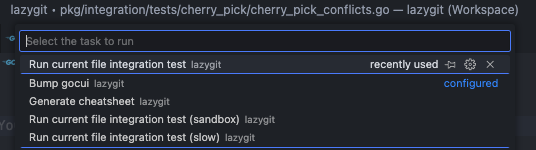 The test will run in a VSCode terminal:

Debugging tests
Debugging an integration test is possible in two ways:
- Pass
--debugtojust e2e-cli, e.g.just e2e-cli --debug tag/reset. - Select a test in
just e2e-tuiand hit "d" to debug it.
In both cases the test runner will print to the console that it is waiting for a debugger to attach, so now you need to tell your debugger to attach to a running process with the name "test_lazygit". If you are using Visual Studio Code, an easy way to do that is to use the "Attach to integration test runner" debug configuration. The test runner will resume automatically when it detects that a debugger was attached. Don't forget to set a breakpoint in the code that you want to step through, otherwise the test will just finish (i.e. it doesn't stop in the debugger automatically).
Sandbox mode
Say you want to do a manual test of how lazygit handles merge-conflicts, but you can't be bothered actually finding a way to create merge conflicts in a repo. To make your life easier, you can simply run a merge-conflicts test in sandbox mode, meaning the setup step is run for you, and then instead of the test driving the lazygit session, you're allowed to drive it yourself.
To run a test in sandbox mode, press 's' on a test in just e2e-tui, or pass --sandbox to just e2e-cli, e.g. just e2e-cli --sandbox conflicts/resolve_multiple_files.
Tips for writing tests
Handle most setup in the shell part of the test
Try to do as much setup work as possible in your setup step. For example, if all you're testing is that the user is able to resolve merge conflicts, create the merge conflicts in the setup step. On the other hand, if you're testing to see that lazygit can warn the user about merge conflicts after an attempted merge, it's fine to wait until the run step to actually create the conflicts. If the run step is focused on the thing you're trying to test, the test will run faster and its intent will be clearer.
Create helper functions for (very) frequently used test logic
If within a test directory you find several tests need to share some logic, you can create a file called shared.go in that directory to hold shared helper functions (see pkg/integration/tests/filter_by_path/shared.go for an example).
If you need to share test logic across test directories you can put helper functions in the tests/shared package. If you find yourself frequently doing the same thing from within a test across test directories, for example, responding a particular popup, consider adding a helper method to pkg/integration/components/common.go. If you look around the code in the components directory you may find another place that's sensible to put your helper function.
Don't do too much in one test
If you're testing different pieces of functionality, it's better to test them in isolation using multiple short tests, compared to one larger longer test. Sometimes it's appropriate to have a longer test which tests how various different pieces interact, but err on the side of keeping things short.
Testing against old git versions
Our CI tests against multiple git versions. If your test fails on an old version, then to troubleshoot you'll need to install the failing git version. One option is to use rtx (see installation steps in the readme) with the git plugin like so:
rtx plugin add git
rtx install git 2.20.0
rtx local git 2.20.0