Coolify
An open-source & self-hostable Heroku / Netlify / Vercel alternative.

About the Project
Coolify is an open-source & self-hostable alternative to Heroku / Netlify / Vercel / etc.
It helps you manage your servers, applications, and databases on your own hardware; you only need an SSH connection. You can manage VPS, Bare Metal, Raspberry PIs, and anything else.
Imagine having the ease of a cloud but with your own servers. That is Coolify.
No vendor lock-in, which means that all the configurations for your applications/databases/etc are saved to your server. So, if you decide to stop using Coolify (oh nooo), you could still manage your running resources. You lose the automations and all the magic. 🪄️
For more information, take a look at our landing page at coolify.io.
Installation
curl -fsSL https://cdn.coollabs.io/coolify/install.sh | bash
You can find the installation script source here.
Note
Please refer to the docs for more information about the installation.
Local dev with coold VM
For v5 development that needs a packaged coold endpoint VM with Corrosion, use:
scripts/dev.sh up
This starts two Lima endpoint VMs by default, configures a WireGuard mesh between them, starts the Docker stack in the background, mints dev host JWTs with php artisan flux:dev --caps=coold,builder, installs them into the VMs, starts each VM coold agent service with builder capacity, and follows Coolify + VM agent logs by default. Flux runs with the Coolify container, not inside the VM. Set COOLIFY_COOLD_VM_COUNT=1 for a single endpoint, COOLIFY_COOLD_VM_ENABLED=false to skip the VMs, COOLIFY_COOLD_VM_BUILDER_CAPACITY=0 to disable builder capability, or COOLIFY_DEV_FOLLOW_LOGS=false to leave up detached. Use scripts/dev.sh down to stop the stack and VM agent; set COOLIFY_COOLD_VM_STOP_ON_DOWN=true if you also want the VM stopped. The dev entrypoints are intentionally kept to scripts/dev.sh for the full stack and scripts/coold-vm.sh for VM-only operations.
Useful Corrosion checks:
scripts/dev.sh corrosion check
scripts/dev.sh corrosion containers
scripts/dev.sh corrosion config
scripts/dev.sh corrosion sql 'select count(*) from service_endpoints;'
Container roles and Flux
The Coolify image can run different process roles with COOLIFY_CONTAINER_ROLE. The value can be a single role or a comma-separated list. If all is present anywhere in the list, every role starts.
all(default): self-hosted mode; runs the web process, worker services, and Flux when configured.web: web/API process only; s6 worker services and Flux sleep unless they are also listed.worker: Horizon, Laravel scheduler worker, and optional Nightwatch agent.horizon: Horizon only.schedulerorscheduler-worker: Laravel scheduler worker only.nightwatchornightwatch-agent: optional Nightwatch agent only.flux: Flux only; used by Cloud/HA deployments that scale coold connection routers separately.
For example, COOLIFY_CONTAINER_ROLE=web,flux starts the web container plus Flux, while COOLIFY_CONTAINER_ROLE=web,all still starts all services.
Flux is installed from the coold nightly release into /usr/local/bin/flux. Containers running the all or flux role expose Flux on port 6443 and use these runtime variables:
COOLIFY_FLUX_GRPC_BIND=0.0.0.0:6443
COOLIFY_FLUX_UNIX_SOCKET_PATH=/run/coolify/flux.sock
COOLIFY_FLUX_JWT_PRIVATE_KEY_PATH=/var/www/html/storage/app/flux/jwt.priv
COOLIFY_FLUX_JWT_PUBLIC_KEY_PATH=/var/www/html/storage/app/flux/jwt.pub
COOLIFY_FLUX_ALLOW_PUBLIC_BIND=1
COOLIFY_FLUX_ID=flux-eu-1
COOLIFY_FLUX_PUBLIC_URL=grpcs://flux-eu-1.example.com:6443
COOLIFY_FLUX_INTERNAL_URL=http://coolify-flux-eu-1.internal:6443
If COOLIFY_FLUX_ENABLED=false is set, the Flux s6 service sleeps even for all and flux roles. The Flux s6 service creates a persistent JWT keypair on first boot when the key files are missing. The current Coolify image only installs the nightly Flux artifact during the Docker build; the s6 service verifies the binary at runtime and sleeps with a clear error if the published artifact is not compatible with the Alpine base image.
Support
Contact us at coolify.io/docs/contact.
Cloud
If you do not want to self-host Coolify, there is a paid cloud version available: app.coolify.io
For more information & pricing, take a look at our landing page coolify.io.
Why should I use the Cloud version?
The recommended way to use Coolify is to have one server for Coolify and one (or more) for the resources you are deploying. A server is around 4-5$/month.
By subscribing to the cloud version, you get the Coolify server for the same price, but with:
- High-availability
- Free email notifications
- Better support
- Less maintenance for you
Donations
To stay completely free and open-source, with no feature behind the paywall and evolve the project, we need your help. If you like Coolify, please consider donating to help us fund the project's future development.
Thank you so much!
Huge Sponsors
- MVPS - Cheap VPS servers at the highest possible quality
- SerpAPI - Google Search API — Scrape Google and other search engines from our fast, easy, and complete API
- Seibert Group - Boost productivity company-wide with AI agents like Claude Code
- ScreenshotOne - Screenshot API for devs
- PrivateAlps - Cloud Services Provider, VPS, servers infrastructure for people who care about privacy and control
Big Sponsors
- 23M - Your experts for high-availability hosting solutions!
- American Cloud - US-based cloud infrastructure services
- Arcjet - Advanced web security and performance solutions
- BC Direct - Your trusted technology consulting partner
- Blacksmith - Infrastructure automation platform
- Capture.page - Fast & Reliable Screenshot API for Developers
- ByteBase - Database CI/CD and Security at Scale
- CodeRabbit - Cut Code Review Time & Bugs in Half
- COMIT - New York Times award–winning contractor
- CompAI - Open source compliance automation platform
- Convex - Open-source reactive database for web app developers
- Darweb - 3D CPQ solutions for ecommerce design
- Dataforest Cloud - Deploy cloud servers as seeds independently in seconds. Enterprise hardware, premium network, 100% made in Germany.
- Formbricks - The open source feedback platform
- GoldenVM - Premium virtual machine hosting solutions
- Greptile - The AI Code Reviewer
- Hetzner - Server, cloud, hosting, and data center solutions
- Hostinger - Web hosting and VPS solutions
- JobsCollider - 30,000+ remote jobs for developers
- Juxtdigital - Digital PR & AI Authority Building Agency
- LiquidWeb - Premium managed hosting solutions
- Logto - The better identity infrastructure for developers
- LumaDock - Fast and reliable virtual server hosting
- Macarne - Best IP Transit & Carrier Ethernet Solutions for Simplified Network Connectivity
- Mobb - Secure Your AI-Generated Code to Unlock Dev Productivity
- PetroSky Cloud - Open source cloud deployment solutions
- PFGLabs - Build Real Projects with Golang
- Ramnode - High Performance Cloud VPS Hosting
- SaasyKit - Complete SaaS starter kit for developers
- SupaGuide - Your comprehensive guide to Supabase
- Supadata AI - Scrape YouTube, web, and files. Get AI-ready, clean data
- Syntax.fm - Podcast for web developers
- Tigris - Modern developer data platform
- Tolgee - The open source localization platform
- Ubicloud - Open source cloud infrastructure platform
- VPSDime - Affordable high-performance VPS hosting solutions
Small Sponsors










































...and many more at GitHub Sponsors
Recognitions

Core Maintainers
| Andras Bacsai | 🏔️ Peak |
|---|---|
 |
 |
   |
|
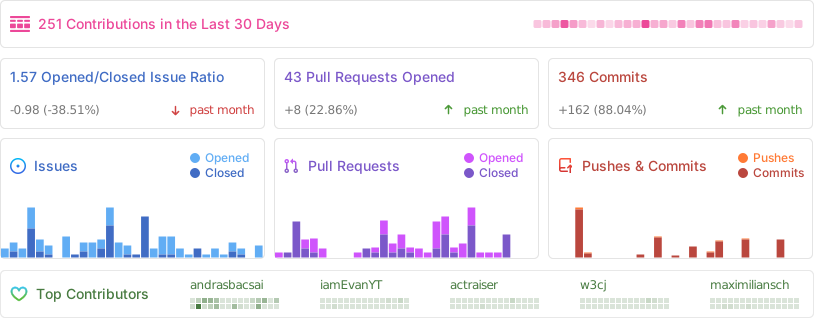
Repo Activity