Compare commits
| Author | SHA1 | Date | |
|---|---|---|---|
 Jesse Duffield Jesse Duffield
|
96f0df9538 | ||
|
Jesse Duffield
|
47358ed9be | ||
|
Jesse Duffield
|
1f156c0da2 | ||
 Chris McDonnell Chris McDonnell
|
ee559035ad | ||
|
Jesse Duffield
|
daffd293d1 | ||
|
Jesse Duffield
|
9aa36d889b | ||
|
Jesse Duffield
|
f2e1afea16 | ||
|
Jesse Duffield
|
c855d2521a | ||
|
Jesse Duffield
|
299b53c708 | ||
|
Jesse Duffield
|
3882d55f69 | ||
|
Jesse Duffield
|
f92379c8fa | ||
|
Jesse Duffield
|
846c0edd7d | ||
|
Jesse Duffield
|
cdd2883fe9 | ||
|
Jesse Duffield
|
9a26e675ee | ||
|
Jesse Duffield
|
f20b09ff16 | ||
|
Jesse Duffield
|
7308b10312 | ||
|
Jesse Duffield
|
f199e412ab | ||
|
Jesse Duffield
|
9beec6e30f | ||
|
Jesse Duffield
|
bfc3ed1c16 | ||
|
Jesse Duffield
|
613c9b23b4 | ||
|
Jesse Duffield
|
c8d56beaa7 | ||
|
Jesse Duffield
|
3857644bb8 | ||
|
Jesse Duffield
|
bb0601ae1f | ||
|
Jesse Duffield
|
5099288efd | ||
|
Jesse Duffield
|
4c299c5563 | ||
|
Jesse Duffield
|
e5965af368 | ||
|
Jesse Duffield
|
c1d48b1df5 | ||
|
Jesse Duffield
|
e127b8c555 | ||
|
Jesse Duffield
|
f642546ccb |
@@ -1,13 +0,0 @@
|
||||
# adapted from https://github.com/devcontainers/images/blob/main/src/go/.devcontainer/Dockerfile
|
||||
|
||||
# [Choice] Go version (use -bullseye variants on local arm64/Apple Silicon): 1, 1.19, 1.18, 1-bullseye, 1.19-bullseye, 1.18-bullseye, 1-buster, 1.19-buster, 1.18-buster
|
||||
ARG VARIANT=1-bullseye
|
||||
FROM golang:${VARIANT}
|
||||
|
||||
RUN go install mvdan.cc/gofumpt@latest
|
||||
RUN curl -sSfL https://raw.githubusercontent.com/golangci/golangci-lint/master/install.sh | sh -s -- -b $(go env GOPATH)/bin v1.50.0
|
||||
RUN golangci-lint --version
|
||||
|
||||
# [Optional] Uncomment this section to install additional OS packages.
|
||||
# RUN apt-get update && export DEBIAN_FRONTEND=noninteractive \
|
||||
# && apt-get -y install --no-install-recommends <your-package-list-here>
|
||||
@@ -1,69 +0,0 @@
|
||||
// adapted from https://github.com/devcontainers/images/blob/main/src/go/.devcontainer/devcontainer.json
|
||||
{
|
||||
"build": {
|
||||
"dockerfile": "./Dockerfile",
|
||||
"context": "."
|
||||
},
|
||||
"features": {
|
||||
"ghcr.io/devcontainers/features/common-utils:1": {
|
||||
"installZsh": "true",
|
||||
"username": "vscode",
|
||||
"uid": "1000",
|
||||
"gid": "1000",
|
||||
"upgradePackages": "true"
|
||||
},
|
||||
"ghcr.io/devcontainers/features/go:1": {
|
||||
"version": "none"
|
||||
},
|
||||
"ghcr.io/devcontainers/features/git:1": {
|
||||
"version": "latest",
|
||||
"ppa": "false"
|
||||
}
|
||||
},
|
||||
"overrideFeatureInstallOrder": [
|
||||
"ghcr.io/devcontainers/features/common-utils"
|
||||
],
|
||||
// not sure if we actually need these
|
||||
"runArgs": [
|
||||
"--cap-add=SYS_PTRACE",
|
||||
"--security-opt",
|
||||
"seccomp=unconfined"
|
||||
],
|
||||
// Configure tool-specific properties.
|
||||
"customizations": {
|
||||
// Configure properties specific to VS Code.
|
||||
"vscode": {
|
||||
// Set *default* container specific settings.json values on container create.
|
||||
"settings": {
|
||||
"go.toolsManagement.checkForUpdates": "local",
|
||||
"go.useLanguageServer": true,
|
||||
"go.gopath": "/go",
|
||||
"[go]": {
|
||||
"editor.formatOnSave": true,
|
||||
"editor.codeActionsOnSave": {
|
||||
"source.organizeImports": true
|
||||
}
|
||||
},
|
||||
"go.lintTool": "golangci-lint",
|
||||
"gopls": {
|
||||
"formatting.gofumpt": true,
|
||||
"usePlaceholders": false // add parameter placeholders when completing a function
|
||||
},
|
||||
"files.eol": "\n"
|
||||
},
|
||||
// Add the IDs of extensions you want installed when the container is created.
|
||||
"extensions": [
|
||||
"golang.Go"
|
||||
]
|
||||
}
|
||||
},
|
||||
// Use 'postCreateCommand' to run commands after the container is created.
|
||||
// "postCreateCommand": "go version",
|
||||
|
||||
// See https://www.kenmuse.com/blog/avoiding-dubious-ownership-in-dev-containers/ for the safe.directory part
|
||||
// The defaultBranch part is required for our deprecated integration tests.
|
||||
"postStartCommand": "git config --global --add safe.directory ${containerWorkspaceFolder} && git config --global init.defaultBranch master",
|
||||
|
||||
// Set `remoteUser` to `root` to connect as root instead. More info: https://aka.ms/vscode-remote/containers/non-root.
|
||||
"remoteUser": "vscode"
|
||||
}
|
||||
@@ -1,4 +0,0 @@
|
||||
root = true
|
||||
|
||||
[*.go]
|
||||
indent_style = tab
|
||||
@@ -1,4 +0,0 @@
|
||||
# These are supported funding model platforms
|
||||
|
||||
github: [jesseduffield]
|
||||
custom: ['https://donorbox.org/lazygit']
|
||||
@@ -1,37 +0,0 @@
|
||||
---
|
||||
name: Bug report
|
||||
about: Create a report to help us improve
|
||||
title: ''
|
||||
labels: bug
|
||||
assignees: ''
|
||||
---
|
||||
|
||||
**Describe the bug**
|
||||
A clear and concise description of what the bug is.
|
||||
|
||||
**To Reproduce**
|
||||
Steps to reproduce the behavior:
|
||||
|
||||
1. Go to '...'
|
||||
2. Click on '....'
|
||||
3. Scroll down to '....'
|
||||
4. See error
|
||||
|
||||
**Expected behavior**
|
||||
A clear and concise description of what you expected to happen.
|
||||
|
||||
**Screenshots**
|
||||
If applicable, add screenshots to help explain your problem.
|
||||
|
||||
**Version info:**
|
||||
_Run `lazygit --version` and paste the result here_
|
||||
_Run `git --version` and paste the result here_
|
||||
|
||||
**Additional context**
|
||||
Add any other context about the problem here.
|
||||
|
||||
**Note:** please try updating to the latest version or [manually building](https://github.com/jesseduffield/lazygit/#manual) the latest `master` to see if the issue still occurs.
|
||||
|
||||
<!--
|
||||
If you want to try and debug this issue yourself, you can run `lazygit --debug` in one terminal panel and `lazygit --logs` in another to view the logs.
|
||||
-->
|
||||
@@ -1,14 +0,0 @@
|
||||
---
|
||||
name: Discussion
|
||||
about: Begin a discussion
|
||||
title: ''
|
||||
labels: discussion
|
||||
assignees: ''
|
||||
|
||||
---
|
||||
|
||||
**Topic**
|
||||
A clear and concise description of what you want to discuss
|
||||
|
||||
**Your thoughts**
|
||||
What you have to say about the topic
|
||||
@@ -1,29 +0,0 @@
|
||||
---
|
||||
name: Feature request
|
||||
about: Suggest an idea for this project
|
||||
title: ''
|
||||
labels: enhancement
|
||||
assignees: ''
|
||||
---
|
||||
|
||||
**Is your feature request related to a problem? Please describe.**
|
||||
A clear and concise description of what the problem is. Ex. I'm always frustrated when [...]
|
||||
|
||||
**Describe the solution you'd like**
|
||||
A clear and concise description of what you want to happen.
|
||||
|
||||
**Describe alternatives you've considered**
|
||||
A clear and concise description of any alternative solutions or features you've considered.
|
||||
|
||||
**Additional context**
|
||||
Add any other context or screenshots about the feature request here.
|
||||
|
||||
<!--
|
||||
You may be able to add your desired feature with a custom command. Check out the examples here: https://github.com/jesseduffield/lazygit/wiki/Custom-Commands-Compendium
|
||||
|
||||
If a custom command does what you want but you still want to see the feature built-in to lazygit, feel free to paste the custom command into the issue to help us better understand the functionality you want.
|
||||
|
||||
We also encourage you to put up a PR yourself! Who cares if you've never written Go before, neither did any of the existing contributors before their first lazygit PR! Check out the PR tutorial here: https://www.youtube.com/watch?v=kNavnhzZHtk&ab_channel=JesseDuffield
|
||||
|
||||
Also check out the contributing guide here: https://github.com/jesseduffield/lazygit/blob/master/CONTRIBUTING.md
|
||||
-->
|
||||
@@ -1,9 +0,0 @@
|
||||
version: 2
|
||||
updates:
|
||||
- package-ecosystem: "gomod"
|
||||
directory: "/"
|
||||
schedule:
|
||||
interval: "weekly"
|
||||
allowed_updates:
|
||||
- match:
|
||||
update_type: "security"
|
||||
@@ -1,15 +0,0 @@
|
||||
- **PR Description**
|
||||
|
||||
- **Please check if the PR fulfills these requirements**
|
||||
|
||||
* [ ] Cheatsheets are up-to-date (run `go generate ./...`)
|
||||
* [ ] Code has been formatted (see [here](https://github.com/jesseduffield/lazygit/blob/master/CONTRIBUTING.md#code-formatting))
|
||||
* [ ] Tests have been added/updated (see [here](https://github.com/jesseduffield/lazygit/blob/master/pkg/integration/README.md) for the integration test guide)
|
||||
* [ ] Text is internationalised (see [here](https://github.com/jesseduffield/lazygit/blob/master/CONTRIBUTING.md#internationalisation))
|
||||
* [ ] Docs (specifically `docs/Config.md`) have been updated if necessary
|
||||
* [ ] You've read through your own file changes for silly mistakes etc
|
||||
|
||||
<!--
|
||||
Be sure to name your PR with an imperative e.g. 'Add worktrees view'
|
||||
see https://github.com/jesseduffield/lazygit/releases/tag/v0.40.0 for examples
|
||||
-->
|
||||
@@ -1,26 +0,0 @@
|
||||
changelog:
|
||||
exclude:
|
||||
labels:
|
||||
- ignore-for-release
|
||||
categories:
|
||||
- title: Features ✨
|
||||
labels:
|
||||
- feature
|
||||
- title: Enhancements 🔥
|
||||
labels:
|
||||
- enhancement
|
||||
- title: Fixes 🔧
|
||||
labels:
|
||||
- bug
|
||||
- title: Maintenance ⚙️
|
||||
labels:
|
||||
- maintenance
|
||||
- title: Docs 📖
|
||||
labels:
|
||||
- docs
|
||||
- title: I18n 🌎
|
||||
labels:
|
||||
- i18n
|
||||
- title: Other Changes
|
||||
labels:
|
||||
- "*"
|
||||
@@ -1,35 +0,0 @@
|
||||
name: Continuous Delivery
|
||||
|
||||
on:
|
||||
push:
|
||||
tags:
|
||||
- 'v*'
|
||||
|
||||
jobs:
|
||||
goreleaser:
|
||||
runs-on: ubuntu-latest
|
||||
steps:
|
||||
- name: Checkout code
|
||||
uses: actions/checkout@v3
|
||||
- name: Unshallow repo
|
||||
run: git fetch --prune --unshallow
|
||||
- name: Setup Go
|
||||
uses: actions/setup-go@v4
|
||||
with:
|
||||
go-version: 1.21.x
|
||||
- name: Run goreleaser
|
||||
uses: goreleaser/goreleaser-action@v4
|
||||
with:
|
||||
distribution: goreleaser
|
||||
version: v1.17.2
|
||||
args: release --clean
|
||||
env:
|
||||
GITHUB_TOKEN: ${{secrets.GITHUB_API_TOKEN}}
|
||||
homebrew:
|
||||
runs-on: ubuntu-latest
|
||||
steps:
|
||||
- name: Bump Homebrew formula
|
||||
uses: dawidd6/action-homebrew-bump-formula@v3
|
||||
with:
|
||||
token: ${{secrets.GITHUB_API_TOKEN}}
|
||||
formula: lazygit
|
||||
@@ -1,215 +0,0 @@
|
||||
name: Continuous Integration
|
||||
|
||||
env:
|
||||
GO_VERSION: 1.21
|
||||
|
||||
on:
|
||||
push:
|
||||
branches:
|
||||
- master
|
||||
pull_request:
|
||||
|
||||
jobs:
|
||||
unit-tests:
|
||||
strategy:
|
||||
fail-fast: false
|
||||
matrix:
|
||||
os:
|
||||
- ubuntu-latest
|
||||
- windows-latest
|
||||
include:
|
||||
- os: ubuntu-latest
|
||||
cache_path: ~/.cache/go-build
|
||||
- os: windows-latest
|
||||
cache_path: ~\AppData\Local\go-build
|
||||
name: ci - ${{matrix.os}}
|
||||
runs-on: ${{matrix.os}}
|
||||
env:
|
||||
GOFLAGS: -mod=vendor
|
||||
steps:
|
||||
- name: Checkout code
|
||||
uses: actions/checkout@v3
|
||||
- name: Setup Go
|
||||
uses: actions/setup-go@v4
|
||||
with:
|
||||
go-version: 1.21.x
|
||||
- name: Test code
|
||||
# we're passing -short so that we skip the integration tests, which will be run in parallel below
|
||||
run: |
|
||||
mkdir -p /tmp/code_coverage
|
||||
go test ./... -short -cover -args "-test.gocoverdir=/tmp/code_coverage"
|
||||
- name: Upload code coverage artifacts
|
||||
uses: actions/upload-artifact@v3
|
||||
with:
|
||||
name: coverage-unit-${{ matrix.os }}-${{ github.run_id }}
|
||||
path: /tmp/code_coverage
|
||||
|
||||
integration-tests:
|
||||
strategy:
|
||||
fail-fast: false
|
||||
matrix:
|
||||
git-version:
|
||||
- 2.20.0 # oldest supported version
|
||||
- 2.22.5
|
||||
- 2.23.0
|
||||
- 2.25.1
|
||||
- 2.30.8
|
||||
- latest # We rely on github to have the latest version installed on their VMs
|
||||
runs-on: ubuntu-latest
|
||||
name: "Integration Tests - git ${{matrix.git-version}}"
|
||||
env:
|
||||
GOFLAGS: -mod=vendor
|
||||
steps:
|
||||
- name: Checkout code
|
||||
uses: actions/checkout@v3
|
||||
- name: Restore Git cache
|
||||
if: matrix.git-version != 'latest'
|
||||
id: cache-git-restore
|
||||
uses: actions/cache/restore@v3
|
||||
with:
|
||||
path: ~/git-${{matrix.git-version}}
|
||||
key: ${{runner.os}}-git-${{matrix.git-version}}
|
||||
- name: Build Git ${{matrix.git-version}}
|
||||
if: steps.cache-git-restore.outputs.cache-hit != 'true' && matrix.git-version != 'latest'
|
||||
run: >
|
||||
sudo apt-get update && sudo apt-get install --no-install-recommends -y build-essential ca-certificates curl gettext libexpat1-dev libssl-dev libz-dev openssl
|
||||
&& curl -sL "https://mirrors.edge.kernel.org/pub/software/scm/git/git-${{matrix.git-version}}.tar.xz" -o - | tar xJ -C "$HOME"
|
||||
&& cd "$HOME/git-${{matrix.git-version}}"
|
||||
&& ./configure
|
||||
&& make -j
|
||||
- name: Install Git ${{matrix.git-version}}
|
||||
if: matrix.git-version != 'latest'
|
||||
run: sudo make -C "$HOME/git-${{matrix.git-version}}" -j install
|
||||
- name: Save Git cache
|
||||
if: steps.cache-git-restore.outputs.cache-hit != 'true' && matrix.git-version != 'latest'
|
||||
uses: actions/cache/save@v3
|
||||
with:
|
||||
path: ~/git-${{matrix.git-version}}
|
||||
key: ${{runner.os}}-git-${{matrix.git-version}}
|
||||
- name: Setup Go
|
||||
uses: actions/setup-go@v4
|
||||
with:
|
||||
go-version: 1.21.x
|
||||
- name: Print git version
|
||||
run: git --version
|
||||
- name: Test code
|
||||
env:
|
||||
# See https://go.dev/blog/integration-test-coverage
|
||||
LAZYGIT_GOCOVERDIR: /tmp/code_coverage
|
||||
run: |
|
||||
mkdir -p /tmp/code_coverage
|
||||
./scripts/run_integration_tests.sh
|
||||
- name: Upload code coverage artifacts
|
||||
uses: actions/upload-artifact@v3
|
||||
with:
|
||||
name: coverage-integration-${{ matrix.git-version }}-${{ github.run_id }}
|
||||
path: /tmp/code_coverage
|
||||
build:
|
||||
runs-on: ubuntu-latest
|
||||
env:
|
||||
GOFLAGS: -mod=vendor
|
||||
GOARCH: amd64
|
||||
steps:
|
||||
- name: Checkout code
|
||||
uses: actions/checkout@v3
|
||||
- name: Setup Go
|
||||
uses: actions/setup-go@v4
|
||||
with:
|
||||
go-version: 1.21.x
|
||||
- name: Build linux binary
|
||||
run: |
|
||||
GOOS=linux go build
|
||||
- name: Build windows binary
|
||||
run: |
|
||||
GOOS=windows go build
|
||||
- name: Build darwin binary
|
||||
run: |
|
||||
GOOS=darwin go build
|
||||
- name: Build integration test binary
|
||||
run: |
|
||||
GOOS=linux go build cmd/integration_test/main.go
|
||||
- name: Build integration test injector
|
||||
run: |
|
||||
GOOS=linux go build pkg/integration/clients/injector/main.go
|
||||
check-codebase:
|
||||
runs-on: ubuntu-latest
|
||||
env:
|
||||
GOFLAGS: -mod=vendor
|
||||
GOARCH: amd64
|
||||
steps:
|
||||
- name: Checkout code
|
||||
uses: actions/checkout@v3
|
||||
- name: Setup Go
|
||||
uses: actions/setup-go@v4
|
||||
with:
|
||||
go-version: 1.21.x
|
||||
- name: Check Vendor Directory
|
||||
# ensure our vendor directory matches up with our go modules
|
||||
run: |
|
||||
go mod vendor && git diff --exit-code || (echo "Unexpected change to vendor directory. Run 'go mod vendor' locally and commit the changes" && exit 1)
|
||||
- name: Check go.mod file
|
||||
# ensure our go.mod file is clean
|
||||
run: |
|
||||
go mod tidy && git diff --exit-code || (echo "go.mod file is not clean. Run 'go mod tidy' locally and commit the changes" && exit 1)
|
||||
- name: Check All Auto-Generated Files
|
||||
# ensure all our auto-generated files are up to date
|
||||
run: |
|
||||
go generate ./... && git diff --quiet || (git status -s; echo "Auto-generated files not up to date. Run 'go generate ./...' locally and commit the changes" && exit 1)
|
||||
shell: bash # needed so that we get "-o pipefail"
|
||||
- name: Check Filenames
|
||||
run: scripts/check_filenames.sh
|
||||
lint:
|
||||
runs-on: ubuntu-latest
|
||||
env:
|
||||
GOFLAGS: -mod=vendor
|
||||
steps:
|
||||
- name: Checkout code
|
||||
uses: actions/checkout@v3
|
||||
- name: Setup Go
|
||||
uses: actions/setup-go@v4
|
||||
with:
|
||||
go-version: 1.21.x
|
||||
- name: Lint
|
||||
uses: golangci/golangci-lint-action@v3.7.0
|
||||
with:
|
||||
version: latest
|
||||
- name: errors
|
||||
run: golangci-lint run
|
||||
if: ${{ failure() }}
|
||||
check-required-label:
|
||||
runs-on: ubuntu-latest
|
||||
if: github.ref != 'refs/heads/master'
|
||||
steps:
|
||||
- uses: mheap/github-action-required-labels@v5
|
||||
with:
|
||||
mode: exactly
|
||||
count: 1
|
||||
labels: "ignore-for-release, feature, enhancement, bug, maintenance, docs, i18n"
|
||||
upload-coverage:
|
||||
# List all jobs that produce coverage files
|
||||
needs: [unit-tests, integration-tests]
|
||||
runs-on: ubuntu-latest
|
||||
steps:
|
||||
- name: Checkout code
|
||||
uses: actions/checkout@v3
|
||||
|
||||
- name: Download all coverage artifacts
|
||||
uses: actions/download-artifact@v3
|
||||
with:
|
||||
path: /tmp/code_coverage
|
||||
|
||||
- name: Combine coverage files
|
||||
run: |
|
||||
# Find all directories in /tmp/code_coverage and create a comma-separated list
|
||||
COVERAGE_DIRS=$(find /tmp/code_coverage -mindepth 1 -maxdepth 1 -type d -printf '/tmp/code_coverage/%f,' | sed 's/,$//')
|
||||
echo "Coverage directories: $COVERAGE_DIRS"
|
||||
# Run the combine command with the generated list
|
||||
go tool covdata textfmt -i=$COVERAGE_DIRS -o coverage.out
|
||||
echo "Combined coverage:"
|
||||
go tool cover -func coverage.out | tail -1 | awk '{print $3}'
|
||||
|
||||
- name: Upload to Codacy
|
||||
run: |
|
||||
CODACY_PROJECT_TOKEN=${{ secrets.CODACY_PROJECT_TOKEN }} \
|
||||
bash <(curl -Ls https://coverage.codacy.com/get.sh) report \
|
||||
--force-coverage-parser go -r coverage.out
|
||||
@@ -1,28 +0,0 @@
|
||||
# see https://github.com/JamesIves/github-sponsors-readme-action
|
||||
name: Generate Sponsors README
|
||||
on:
|
||||
push:
|
||||
branches:
|
||||
- master
|
||||
jobs:
|
||||
deploy:
|
||||
runs-on: ubuntu-latest
|
||||
steps:
|
||||
- name: Checkout 🛎️
|
||||
uses: actions/checkout@v3
|
||||
|
||||
- name: Generate Sponsors 💖
|
||||
uses: JamesIves/github-sponsors-readme-action@v1.2.2
|
||||
with:
|
||||
token: ${{ secrets.SPONSORS_TOKEN }}
|
||||
file: "README.md"
|
||||
if: ${{ github.repository == 'jesseduffield/lazygit' }}
|
||||
|
||||
- name: Create Pull Request 🚀
|
||||
uses: peter-evans/create-pull-request@v6
|
||||
with:
|
||||
commit-message: "README.md: Update Sponsors"
|
||||
title: "README.md: Update Sponsors"
|
||||
author: "github-actions[bot] <41898282+github-actions[bot]@users.noreply.github.com>"
|
||||
labels: "ignore-for-release"
|
||||
delete-branch: true
|
||||
@@ -1,43 +0,0 @@
|
||||
# Please do not add personal files
|
||||
|
||||
# Logs
|
||||
*.log
|
||||
|
||||
# Hidden
|
||||
.*
|
||||
|
||||
# Notes
|
||||
*.notes
|
||||
|
||||
# Tests
|
||||
test/repos/repo
|
||||
coverage.txt
|
||||
|
||||
# Binaries
|
||||
lazygit
|
||||
lazygit.exe
|
||||
|
||||
# Exceptions
|
||||
!.gitignore
|
||||
!.goreleaser.yml
|
||||
!.golangci.yml
|
||||
!.circleci/
|
||||
!.github/
|
||||
!.vscode/
|
||||
!.devcontainer/
|
||||
|
||||
# these are for our integration tests
|
||||
!.git_keep
|
||||
!.gitmodules_keep
|
||||
|
||||
test/git_server/data
|
||||
|
||||
test/_results/**
|
||||
|
||||
oryxBuildBinary
|
||||
__debug_bin
|
||||
|
||||
.worktrees
|
||||
demo/output/*
|
||||
|
||||
coverage.out
|
||||
@@ -1,34 +0,0 @@
|
||||
linters:
|
||||
disable:
|
||||
- structcheck # gives false positives
|
||||
enable:
|
||||
- gofumpt
|
||||
- thelper
|
||||
- goimports
|
||||
- tparallel
|
||||
- wastedassign
|
||||
- exportloopref
|
||||
- unparam
|
||||
- prealloc
|
||||
- unconvert
|
||||
- exhaustive
|
||||
- makezero
|
||||
- nakedret
|
||||
# - goconst # TODO: enable and fix issues
|
||||
fast: false
|
||||
|
||||
linters-settings:
|
||||
exhaustive:
|
||||
default-signifies-exhaustive: true
|
||||
staticcheck:
|
||||
# SA1019 is for checking that we're not using fields marked as deprecated
|
||||
# in a comment. It decides this in a loose way so I'm silencing it. Also because
|
||||
# it's tripping on our own structs.
|
||||
checks: ["all", "-SA1019"]
|
||||
nakedret:
|
||||
# the gods will judge me but I just don't like naked returns at all
|
||||
max-func-lines: 0
|
||||
|
||||
run:
|
||||
go: '1.21'
|
||||
timeout: 10m
|
||||
@@ -1,59 +0,0 @@
|
||||
# This is an example goreleaser.yaml file with some sane defaults.
|
||||
# Make sure to check the documentation at http://goreleaser.com
|
||||
builds:
|
||||
- env:
|
||||
- CGO_ENABLED=0
|
||||
goos:
|
||||
- freebsd
|
||||
- windows
|
||||
- darwin
|
||||
- linux
|
||||
goarch:
|
||||
- amd64
|
||||
- arm
|
||||
- arm64
|
||||
- '386'
|
||||
# Default is `-s -w -X main.version={{.Version}} -X main.commit={{.Commit}} -X main.date={{.Date}}`.
|
||||
ldflags:
|
||||
- -s -w -X main.version={{.Version}} -X main.commit={{.Commit}} -X main.date={{.Date}} -X main.buildSource=binaryRelease
|
||||
|
||||
archives:
|
||||
- replacements:
|
||||
darwin: Darwin
|
||||
linux: Linux
|
||||
windows: Windows
|
||||
386: 32-bit
|
||||
amd64: x86_64
|
||||
format_overrides:
|
||||
- goos: windows
|
||||
format: zip
|
||||
checksum:
|
||||
name_template: 'checksums.txt'
|
||||
snapshot:
|
||||
name_template: '{{ .Tag }}-next'
|
||||
changelog:
|
||||
use: github-native
|
||||
sort: asc
|
||||
brews:
|
||||
-
|
||||
# Repository to push the tap to.
|
||||
tap:
|
||||
owner: jesseduffield
|
||||
name: homebrew-lazygit
|
||||
|
||||
# Your app's homepage.
|
||||
# Default is empty.
|
||||
homepage: 'https://github.com/jesseduffield/lazygit/'
|
||||
|
||||
# Your app's description.
|
||||
# Default is empty.
|
||||
description: 'A simple terminal UI for git commands, written in Go'
|
||||
|
||||
# # Packages your package depends on.
|
||||
# dependencies:
|
||||
# - git
|
||||
# - zsh
|
||||
# # Packages that conflict with your package.
|
||||
# conflicts:
|
||||
# - svn
|
||||
# - bash
|
||||
@@ -1 +0,0 @@
|
||||
disableStartupPopups: true
|
||||
@@ -1,61 +0,0 @@
|
||||
{
|
||||
"version": "0.2.0",
|
||||
"configurations": [
|
||||
{
|
||||
"name": "Debug Lazygit",
|
||||
"type": "go",
|
||||
"request": "launch",
|
||||
"mode": "auto",
|
||||
"program": "main.go",
|
||||
"args": [
|
||||
"--debug",
|
||||
"--use-config-file=${workspaceFolder}/.vscode/debugger_config.yml"
|
||||
],
|
||||
"hideSystemGoroutines": true,
|
||||
"console": "integratedTerminal",
|
||||
},
|
||||
{
|
||||
"name": "Tail Lazygit logs",
|
||||
"type": "go",
|
||||
"request": "launch",
|
||||
"mode": "auto",
|
||||
"program": "main.go",
|
||||
"args": [
|
||||
"--logs",
|
||||
"--use-config-file=${workspaceFolder}/.vscode/debugger_config.yml"
|
||||
],
|
||||
"console": "integratedTerminal",
|
||||
},
|
||||
{
|
||||
"name": "Attach to a running Lazygit",
|
||||
"type": "go",
|
||||
"request": "attach",
|
||||
"mode": "local",
|
||||
"processId": "lazygit",
|
||||
"hideSystemGoroutines": true,
|
||||
"console": "integratedTerminal",
|
||||
},
|
||||
{
|
||||
// To use this, first start an integration test with the "cli" runner and
|
||||
// use the -debug option; e.g.
|
||||
// $ make integration-test-cli -- -debug tag/reset.go
|
||||
"name": "Attach to integration test runner",
|
||||
"type": "go",
|
||||
"request": "attach",
|
||||
"mode": "local",
|
||||
"processId": "test_lazygit",
|
||||
"hideSystemGoroutines": true,
|
||||
"console": "integratedTerminal",
|
||||
},
|
||||
],
|
||||
"compounds": [
|
||||
{
|
||||
"name": "Run with logs",
|
||||
"configurations": [
|
||||
"Tail Lazygit logs",
|
||||
"Debug Lazygit"
|
||||
],
|
||||
"stopAll": true
|
||||
}
|
||||
]
|
||||
}
|
||||
@@ -1,5 +0,0 @@
|
||||
{
|
||||
"gopls": {
|
||||
"formatting.gofumpt": true,
|
||||
},
|
||||
}
|
||||
@@ -1,86 +0,0 @@
|
||||
{
|
||||
// See https://go.microsoft.com/fwlink/?LinkId=733558
|
||||
// for the documentation about the tasks.json format
|
||||
"version": "2.0.0",
|
||||
"tasks": [
|
||||
{
|
||||
"label": "Generate cheatsheet",
|
||||
"type": "shell",
|
||||
"command": "go run scripts/cheatsheet/main.go generate",
|
||||
"problemMatcher": [],
|
||||
},
|
||||
{
|
||||
"label": "Bump gocui",
|
||||
"type": "shell",
|
||||
"command": "./scripts/bump_gocui.sh",
|
||||
"problemMatcher": [],
|
||||
},
|
||||
{
|
||||
"label": "Bump lazycore",
|
||||
"type": "shell",
|
||||
"command": "./scripts/bump_lazycore.sh",
|
||||
"problemMatcher": [],
|
||||
},
|
||||
{
|
||||
"label": "Run current file integration test",
|
||||
"type": "shell",
|
||||
"command": "go generate pkg/integration/tests/tests.go && go run cmd/integration_test/main.go cli ${relativeFile}",
|
||||
"problemMatcher": [],
|
||||
"group": {
|
||||
"kind": "test",
|
||||
"isDefault": true
|
||||
},
|
||||
"presentation": {
|
||||
"focus": true
|
||||
}
|
||||
},
|
||||
{
|
||||
"label": "Run current file integration test (slow)",
|
||||
"type": "shell",
|
||||
"command": "go generate pkg/integration/tests/tests.go && go run cmd/integration_test/main.go cli --slow ${relativeFile}",
|
||||
"problemMatcher": [],
|
||||
"group": {
|
||||
"kind": "test",
|
||||
},
|
||||
"presentation": {
|
||||
"focus": true
|
||||
}
|
||||
},
|
||||
{
|
||||
"label": "Run current file integration test (sandbox)",
|
||||
"type": "shell",
|
||||
"command": "go generate pkg/integration/tests/tests.go && go run cmd/integration_test/main.go cli --sandbox ${relativeFile}",
|
||||
"problemMatcher": [],
|
||||
"group": {
|
||||
"kind": "test",
|
||||
},
|
||||
"presentation": {
|
||||
"focus": true
|
||||
}
|
||||
},
|
||||
{
|
||||
"label": "Open deprecated test TUI",
|
||||
"type": "shell",
|
||||
"command": "go run pkg/integration/deprecated/cmd/tui/main.go",
|
||||
"problemMatcher": [],
|
||||
"group": {
|
||||
"kind": "test",
|
||||
},
|
||||
"presentation": {
|
||||
"focus": true
|
||||
}
|
||||
},
|
||||
{
|
||||
"label": "Sync tests list",
|
||||
"type": "shell",
|
||||
"command": "go generate pkg/integration/tests/tests.go",
|
||||
"problemMatcher": [],
|
||||
"group": {
|
||||
"kind": "test",
|
||||
},
|
||||
"presentation": {
|
||||
"focus": true
|
||||
}
|
||||
},
|
||||
],
|
||||
}
|
||||
@@ -1,3 +0,0 @@
|
||||
# Lazygit Code of Conduct
|
||||
|
||||
Be nice, or face the wrath of the maintainer.
|
||||
@@ -1,221 +0,0 @@
|
||||
# Contributing
|
||||
|
||||
♥ We love pull requests from everyone !
|
||||
|
||||
When contributing to this repository, please first discuss the change you wish
|
||||
to make via issue, email, or any other method with the owners of this repository
|
||||
before making a change.
|
||||
|
||||
## PR walkthrough
|
||||
|
||||
[This video](https://www.youtube.com/watch?v=kNavnhzZHtk) walks through the process of adding a small feature to lazygit. If you have no idea where to start, watching that video is a good first step.
|
||||
|
||||
## Codebase guide
|
||||
|
||||
[This doc](./docs/dev/Codebase_Guide.md) explains:
|
||||
* what the different packages in the codebase are for
|
||||
* where important files live
|
||||
* important concepts in the code
|
||||
* how the event loop works
|
||||
* other useful information
|
||||
|
||||
## All code changes happen through Pull Requests
|
||||
|
||||
Pull requests are the best way to propose changes to the codebase. We actively
|
||||
welcome your pull requests:
|
||||
|
||||
1. Fork the repo and create your branch from `master`.
|
||||
2. If you've added code that should be tested, add tests.
|
||||
3. If you've added code that need documentation, update the documentation.
|
||||
4. Write a [good commit message](http://tbaggery.com/2008/04/19/a-note-about-git-commit-messages.html).
|
||||
5. Issue that pull request!
|
||||
|
||||
Please do not raise pull request from your fork's master branch: make a feature branch instead. Lazygit maintainers will sometimes push changes to your branch when reviewing a PR and we often can't do this if you use your master branch.
|
||||
|
||||
If you've never written Go in your life, then join the club! Lazygit was the maintainer's first Go program, and most contributors have never used Go before. Go is widely considered an easy-to-learn language, so if you're looking for an open source project to gain dev experience, you've come to the right place.
|
||||
|
||||
## Running in a VSCode dev container
|
||||
|
||||
If you want to spare yourself the hassle of setting up your dev environment yourself (i.e. installing Go, extensions, and extra tools), you can run the Lazygit code in a VSCode dev container like so:
|
||||
|
||||
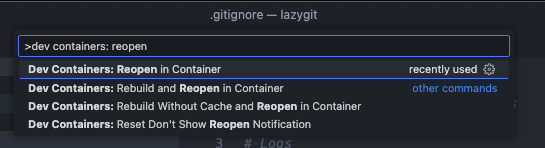
|
||||
|
||||
This requires that:
|
||||
* you have docker installed
|
||||
* you have the dev containers extension installed in VSCode
|
||||
|
||||
See [here](https://code.visualstudio.com/docs/devcontainers/containers) for more info about dev containers.
|
||||
|
||||
## Running in a Github Codespace
|
||||
|
||||
If you want to start contributing to Lazygit with the click of a button, you can open the lazygit codebase in a Codespace. First fork the repo, then click to create a codespace:
|
||||
|
||||

|
||||
|
||||
To run lazygit from within the integrated terminal just go `go run main.go`
|
||||
|
||||
This allows you to contribute to Lazygit without needing to install anything on your local machine. The Codespace has all the necessary tools and extensions pre-installed.
|
||||
|
||||
## Code of conduct
|
||||
|
||||
Please note by participating in this project, you agree to abide by the [code of conduct].
|
||||
|
||||
[code of conduct]: https://github.com/jesseduffield/lazygit/blob/master/CODE-OF-CONDUCT.md
|
||||
|
||||
## Any contributions you make will be under the MIT Software License
|
||||
|
||||
In short, when you submit code changes, your submissions are understood to be
|
||||
under the same [MIT License](http://choosealicense.com/licenses/mit/) that
|
||||
covers the project. Feel free to contact the maintainers if that's a concern.
|
||||
|
||||
## Report bugs using Github's [issues](https://github.com/jesseduffield/lazygit/issues)
|
||||
|
||||
We use GitHub issues to track public bugs. Report a bug by [opening a new
|
||||
issue](https://github.com/jesseduffield/lazygit/issues/new); it's that easy!
|
||||
|
||||
## Go
|
||||
|
||||
This project is written in Go. Go is an opinionated language with strict idioms, but some of those idioms are a little extreme. Some things we do differently:
|
||||
|
||||
1. There is no shame in using `self` as a receiver name in a struct method. In fact we encourage it
|
||||
2. There is no shame in prefixing an interface with 'I' instead of suffixing with 'er' when there are several methods on the interface.
|
||||
3. If a struct implements an interface, we make it explicit with something like:
|
||||
|
||||
```go
|
||||
var _ MyInterface = &MyStruct{}
|
||||
```
|
||||
|
||||
This makes the intent clearer and means that if we fail to satisfy the interface we'll get an error in the file that needs fixing.
|
||||
|
||||
### Code Formatting
|
||||
|
||||
To check code formatting [gofumpt](https://pkg.go.dev/mvdan.cc/gofumpt#section-readme) (which is a bit stricter than [gofmt](https://pkg.go.dev/cmd/gofmt)) is used.
|
||||
VSCode will format the code correctly if you tell the Go extension to use `gofumpt` via your [`settings.json`](https://code.visualstudio.com/docs/getstarted/settings#_settingsjson)
|
||||
by setting [`formatting.gofumpt`](https://github.com/golang/tools/blob/master/gopls/doc/settings.md#gofumpt-bool) to `true`:
|
||||
|
||||
```jsonc
|
||||
// .vscode/settings.json
|
||||
{
|
||||
"gopls": {
|
||||
"formatting.gofumpt": true
|
||||
}
|
||||
}
|
||||
```
|
||||
|
||||
To run gofumpt from your terminal go:
|
||||
|
||||
```
|
||||
go install mvdan.cc/gofumpt@latest && gofumpt -l -w .
|
||||
```
|
||||
|
||||
## Programming Font
|
||||
|
||||
Lazygit supports [Nerd Fonts](https://www.nerdfonts.com) to render certain icons. Sometimes we use some of these icons verbatim in string literals in the code (mainly in tests), so you need to set your development environment to use a nerd font to see these.
|
||||
|
||||
## Internationalisation
|
||||
|
||||
Boy that's a hard word to spell. Anyway, lazygit is translated into several languages within the pkg/i18n package. If you need to render text to the user, you should add a new field to the TranslationSet struct in `pkg/i18n/english.go` and add the actual content within the `EnglishTranslationSet()` method in the same file. Then you can access via `gui.Tr.YourNewText` (or `self.c.Tr.YourNewText`, etc). Although it is appreciated if you translate the text into other languages, it's not expected of you (google translate will likely do a bad job anyway!).
|
||||
|
||||
Note, we use 'Sentence case' for everything (so no 'Title Case' or 'whatever-it's-called-when-there's-no-capital-letters-case')
|
||||
|
||||
## Debugging
|
||||
|
||||
The easiest way to debug lazygit is to have two terminal tabs open at once: one for running lazygit (via `go run main.go -debug` in the project root) and one for viewing lazygit's logs (which can be done via `go run main.go --logs` or just `lazygit --logs`).
|
||||
|
||||
From most places in the codebase you have access to a logger e.g. `gui.Log.Warn("blah")` or `self.c.Log.Warn("blah")`.
|
||||
|
||||
If you find that the existing logs are too noisy, you can set the log level with e.g. `LOG_LEVEL=warn go run main.go -debug` and then only use `Warn` logs yourself.
|
||||
|
||||
If you need to log from code in the vendor directory (e.g. the `gocui` package), you won't have access to the logger, but you can easily add logging support by setting the `LAZYGIT_LOG_PATH` environment variable and using `logs.Global.Warn("blah")`. This is a global logger that's only intended for development purposes.
|
||||
|
||||
If you keep having to do some setup steps to reproduce an issue, read the Testing section below to see how to create an integration test by recording a lazygit session. It's pretty easy!
|
||||
|
||||
### VSCode debugger
|
||||
|
||||
If you want to trigger a debug session from VSCode, you can use the following snippet. Note that the `console` key is, at the time of writing, still an experimental feature.
|
||||
|
||||
```jsonc
|
||||
// .vscode/launch.json
|
||||
{
|
||||
"version": "0.2.0",
|
||||
"configurations": [
|
||||
{
|
||||
"name": "debug lazygit",
|
||||
"type": "go",
|
||||
"request": "launch",
|
||||
"mode": "auto",
|
||||
"program": "main.go",
|
||||
"args": ["--debug"],
|
||||
"console": "externalTerminal" // <-- you need this to actually see the lazygit UI in a window while debugging
|
||||
}
|
||||
]
|
||||
}
|
||||
```
|
||||
|
||||
## Profiling
|
||||
|
||||
If you want to investigate what's contributing to CPU usage you can add the following to the top of the `main()` function in `main.go`
|
||||
|
||||
```go
|
||||
import "runtime/pprof"
|
||||
|
||||
func main() {
|
||||
f, err := os.Create("cpu.prof")
|
||||
if err != nil {
|
||||
log.Fatal("could not create CPU profile: ", err)
|
||||
}
|
||||
defer f.Close()
|
||||
if err := pprof.StartCPUProfile(f); err != nil {
|
||||
log.Fatal("could not start CPU profile: ", err)
|
||||
}
|
||||
defer pprof.StopCPUProfile()
|
||||
...
|
||||
```
|
||||
|
||||
Then run lazygit, and afterwards, from your terminal, run:
|
||||
|
||||
```sh
|
||||
go tool pprof --web cpu.prof
|
||||
```
|
||||
|
||||
That should open an application which allows you to view the breakdown of CPU usage.
|
||||
|
||||
## Testing
|
||||
|
||||
Lazygit has two kinds of tests: unit tests and integration tests. Unit tests go in files that end in `_test.go`, and are written in Go. For integration tests, see [here](https://github.com/jesseduffield/lazygit/blob/master/pkg/integration/README.md)
|
||||
|
||||
## Updating Gocui
|
||||
|
||||
Sometimes you will need to make a change in the gocui fork (https://github.com/jesseduffield/gocui). Gocui is the package responsible for rendering windows and handling user input. Here's the typical process to follow:
|
||||
|
||||
1. Make the changes in gocui inside lazygit's vendor directory so it's easy to test against lazygit
|
||||
2. Copy the changes over to the actual gocui repo (clone it if you haven't already, and use the `awesome` branch, not `master`)
|
||||
3. Raise a PR on the gocui repo with your changes
|
||||
4. After that PR is merged, make a PR in lazygit bumping the gocui version. You can bump the version by running the following at the lazygit repo root:
|
||||
|
||||
```sh
|
||||
./scripts/bump_gocui.sh
|
||||
```
|
||||
|
||||
5. Raise a PR in lazygit with those changes
|
||||
|
||||
## Updating Lazycore
|
||||
|
||||
[Lazycore](https://github.com/jesseduffield/lazycore) is a repo containing shared functionality between lazygit and lazydocker. Sometimes you will need to make a change to that repo and import the changes into lazygit. Similar to updating Gocui, here's what you do:
|
||||
|
||||
1. Make the changes in lazycore inside lazygit's vendor directory so it's easy to test against lazygit
|
||||
2. Copy the changes over to the actual lazycore repo (clone it if you haven't already, and use the `master` branch)
|
||||
3. Raise a PR on the lazycore repo with your changes
|
||||
4. After that PR is merged, make a PR in lazygit bumping the lazycore version. You can bump the version by running the following at the lazygit repo root:
|
||||
|
||||
```sh
|
||||
./scripts/bump_lazycore.sh
|
||||
```
|
||||
|
||||
Or if you're using VSCode, there is a bump lazycore task you can find by going `cmd+shift+p` and typing 'Run task'
|
||||
|
||||
5. Raise a PR in lazygit with those changes
|
||||
|
||||
## Improvements
|
||||
|
||||
If you can think of any way to improve these docs let us know.
|
||||
@@ -1,19 +0,0 @@
|
||||
# run with:
|
||||
# docker build -t lazygit .
|
||||
# docker run -it lazygit:latest /bin/sh
|
||||
|
||||
FROM golang:1.21 as build
|
||||
WORKDIR /go/src/github.com/jesseduffield/lazygit/
|
||||
COPY go.mod go.sum ./
|
||||
RUN go mod download
|
||||
COPY . .
|
||||
RUN CGO_ENABLED=0 GOOS=linux go build
|
||||
|
||||
FROM alpine:3.15
|
||||
RUN apk add --no-cache -U git xdg-utils
|
||||
WORKDIR /go/src/github.com/jesseduffield/lazygit/
|
||||
COPY --from=build /go/src/github.com/jesseduffield/lazygit ./
|
||||
COPY --from=build /go/src/github.com/jesseduffield/lazygit/lazygit /bin/
|
||||
RUN echo "alias gg=lazygit" >> ~/.profile
|
||||
|
||||
ENTRYPOINT [ "lazygit" ]
|
||||
@@ -1,21 +0,0 @@
|
||||
MIT License
|
||||
|
||||
Copyright (c) 2018 Jesse Duffield
|
||||
|
||||
Permission is hereby granted, free of charge, to any person obtaining a copy
|
||||
of this software and associated documentation files (the "Software"), to deal
|
||||
in the Software without restriction, including without limitation the rights
|
||||
to use, copy, modify, merge, publish, distribute, sublicense, and/or sell
|
||||
copies of the Software, and to permit persons to whom the Software is
|
||||
furnished to do so, subject to the following conditions:
|
||||
|
||||
The above copyright notice and this permission notice shall be included in all
|
||||
copies or substantial portions of the Software.
|
||||
|
||||
THE SOFTWARE IS PROVIDED "AS IS", WITHOUT WARRANTY OF ANY KIND, EXPRESS OR
|
||||
IMPLIED, INCLUDING BUT NOT LIMITED TO THE WARRANTIES OF MERCHANTABILITY,
|
||||
FITNESS FOR A PARTICULAR PURPOSE AND NONINFRINGEMENT. IN NO EVENT SHALL THE
|
||||
AUTHORS OR COPYRIGHT HOLDERS BE LIABLE FOR ANY CLAIM, DAMAGES OR OTHER
|
||||
LIABILITY, WHETHER IN AN ACTION OF CONTRACT, TORT OR OTHERWISE, ARISING FROM,
|
||||
OUT OF OR IN CONNECTION WITH THE SOFTWARE OR THE USE OR OTHER DEALINGS IN THE
|
||||
SOFTWARE.
|
||||
@@ -1,68 +0,0 @@
|
||||
.PHONY: all
|
||||
all: build
|
||||
|
||||
.PHONY: build
|
||||
build:
|
||||
go build -gcflags='all=-N -l'
|
||||
|
||||
.PHONY: install
|
||||
install:
|
||||
go install
|
||||
|
||||
.PHONY: run
|
||||
run: build
|
||||
./lazygit
|
||||
|
||||
# Run `make run-debug` in one terminal tab and `make print-log` in another to view the program and its log output side by side
|
||||
.PHONY: run-debug
|
||||
run-debug:
|
||||
go run main.go -debug
|
||||
|
||||
.PHONY: print-log
|
||||
print-log:
|
||||
go run main.go --logs
|
||||
|
||||
.PHONY: unit-test
|
||||
unit-test:
|
||||
go test ./... -short
|
||||
|
||||
.PHONY: test
|
||||
test: unit-test integration-test-all
|
||||
|
||||
# Generate all our auto-generated files (test list, cheatsheets, maybe other things in the future)
|
||||
.PHONY: generate
|
||||
generate:
|
||||
go generate ./...
|
||||
|
||||
.PHONY: format
|
||||
format:
|
||||
gofumpt -l -w .
|
||||
|
||||
# For more details about integration test, see https://github.com/jesseduffield/lazygit/blob/master/pkg/integration/README.md.
|
||||
.PHONY: integration-test-tui
|
||||
integration-test-tui:
|
||||
go run cmd/integration_test/main.go tui $(filter-out $@,$(MAKECMDGOALS))
|
||||
|
||||
.PHONY: integration-test-cli
|
||||
integration-test-cli:
|
||||
go run cmd/integration_test/main.go cli $(filter-out $@,$(MAKECMDGOALS))
|
||||
|
||||
.PHONY: integration-test-all
|
||||
integration-test-all:
|
||||
go test pkg/integration/clients/*.go
|
||||
|
||||
.PHONY: bump-gocui
|
||||
bump-gocui:
|
||||
scripts/bump_gocui.sh
|
||||
|
||||
.PHONY: bump-lazycore
|
||||
bump-lazycore:
|
||||
scripts/bump_lazycore.sh
|
||||
|
||||
.PHONY: record-demo
|
||||
record-demo:
|
||||
demo/record_demo.sh $(filter-out $@,$(MAKECMDGOALS))
|
||||
|
||||
.PHONY: vendor
|
||||
vendor:
|
||||
go mod vendor && go mod tidy
|
||||
@@ -1,84 +0,0 @@
|
||||
package main
|
||||
|
||||
import (
|
||||
"fmt"
|
||||
"log"
|
||||
"os"
|
||||
|
||||
"github.com/jesseduffield/lazygit/pkg/integration/clients"
|
||||
)
|
||||
|
||||
var usage = `
|
||||
Usage:
|
||||
See https://github.com/jesseduffield/lazygit/tree/master/pkg/integration/README.md
|
||||
|
||||
CLI mode:
|
||||
> go run cmd/integration_test/main.go cli [--slow] [--sandbox] <test1> <test2> ...
|
||||
If you pass no test names, it runs all tests
|
||||
Accepted environment variables:
|
||||
INPUT_DELAY (e.g. 200): the number of milliseconds to wait between keypresses or mouse clicks
|
||||
|
||||
TUI mode:
|
||||
> go run cmd/integration_test/main.go tui
|
||||
This will open up a terminal UI where you can run tests
|
||||
|
||||
Help:
|
||||
> go run cmd/integration_test/main.go help
|
||||
`
|
||||
|
||||
type flagInfo struct {
|
||||
name string // name of the flag; can be used with "-" or "--"
|
||||
flag *bool // a pointer to the variable that should be set to true when this flag is passed
|
||||
}
|
||||
|
||||
// Takes the args that you want to parse (excluding the program name and any
|
||||
// subcommands), and returns the remaining args with the flags removed
|
||||
func parseFlags(args []string, flags []flagInfo) []string {
|
||||
outer:
|
||||
for len(args) > 0 {
|
||||
for _, f := range flags {
|
||||
if args[0] == "-"+f.name || args[0] == "--"+f.name {
|
||||
*f.flag = true
|
||||
args = args[1:]
|
||||
continue outer
|
||||
}
|
||||
}
|
||||
break
|
||||
}
|
||||
|
||||
return args
|
||||
}
|
||||
|
||||
func main() {
|
||||
if len(os.Args) < 2 {
|
||||
log.Fatal(usage)
|
||||
}
|
||||
|
||||
switch os.Args[1] {
|
||||
case "help":
|
||||
fmt.Println(usage)
|
||||
case "cli":
|
||||
slow := false
|
||||
sandbox := false
|
||||
waitForDebugger := false
|
||||
raceDetector := false
|
||||
testNames := parseFlags(os.Args[2:], []flagInfo{
|
||||
{"slow", &slow},
|
||||
{"sandbox", &sandbox},
|
||||
{"debug", &waitForDebugger},
|
||||
{"race", &raceDetector},
|
||||
})
|
||||
clients.RunCLI(testNames, slow, sandbox, waitForDebugger, raceDetector)
|
||||
case "tui":
|
||||
raceDetector := false
|
||||
remainingArgs := parseFlags(os.Args[2:], []flagInfo{
|
||||
{"race", &raceDetector},
|
||||
})
|
||||
if len(remainingArgs) > 0 {
|
||||
log.Fatal("tui only supports the -race argument.")
|
||||
}
|
||||
clients.RunTUI(raceDetector)
|
||||
default:
|
||||
log.Fatal(usage)
|
||||
}
|
||||
}
|
||||

|
After Width: | Height: | Size: 88 KiB |

|
After Width: | Height: | Size: 1.3 MiB |
@@ -1,2 +0,0 @@
|
||||
This directory contains stuff for recording lazygit demos.
|
||||
|
||||

|
After Width: | Height: | Size: 473 KiB |

|
After Width: | Height: | Size: 3.1 MiB |

|
After Width: | Height: | Size: 820 KiB |

|
After Width: | Height: | Size: 6.9 MiB |

|
After Width: | Height: | Size: 301 KiB |

|
After Width: | Height: | Size: 1.9 MiB |

|
After Width: | Height: | Size: 462 KiB |

|
After Width: | Height: | Size: 3.8 MiB |

|
After Width: | Height: | Size: 650 KiB |

|
After Width: | Height: | Size: 11 MiB |
@@ -1,112 +0,0 @@
|
||||
# Specify a command to be executed
|
||||
# like `/bin/bash -l`, `ls`, or any other commands
|
||||
# the default is bash for Linux
|
||||
# or powershell.exe for Windows
|
||||
command: echo "YOU NEED TO SPECIFY YOUR OWN COMMAND WITH THE -d ARG"
|
||||
|
||||
# Specify the current working directory path
|
||||
# the default is the current working directory path
|
||||
cwd: null
|
||||
|
||||
# Export additional ENV variables
|
||||
env:
|
||||
recording: true
|
||||
|
||||
# Explicitly set the number of columns
|
||||
# or use `auto` to take the current
|
||||
# number of columns of your shell
|
||||
cols: 120 # 100
|
||||
|
||||
# Explicitly set the number of rows
|
||||
# or use `auto` to take the current
|
||||
# number of rows of your shell
|
||||
rows: 35 # 30
|
||||
|
||||
# Amount of times to repeat GIF
|
||||
# If value is -1, play once
|
||||
# If value is 0, loop indefinitely
|
||||
# If value is a positive number, loop n times
|
||||
repeat: 0
|
||||
|
||||
# Quality
|
||||
# 1 - 100
|
||||
# Higher quality seems to make no difference, but running it through
|
||||
# gifsicle ends up with a much better compressed version.
|
||||
quality: 100
|
||||
|
||||
# Delay between frames in ms
|
||||
# If the value is `auto` use the actual recording delays
|
||||
frameDelay: auto
|
||||
|
||||
# Maximum delay between frames in ms
|
||||
# Ignored if the `frameDelay` isn't set to `auto`
|
||||
# Set to `auto` to prevent limiting the max idle time
|
||||
maxIdleTime: 2000
|
||||
|
||||
# The surrounding frame box
|
||||
# The `type` can be null, window, floating, or solid`
|
||||
# To hide the title use the value null
|
||||
# Don't forget to add a backgroundColor style with a null as type
|
||||
frameBox:
|
||||
type: floating
|
||||
title: Lazygit
|
||||
style:
|
||||
border: 0px black solid
|
||||
backgroundColor: "#1d1d1d"
|
||||
margin: -5px
|
||||
|
||||
# Add a watermark image to the rendered gif
|
||||
# You need to specify an absolute path for
|
||||
# the image on your machine or a URL, and you can also
|
||||
# add your own CSS styles
|
||||
watermark:
|
||||
imagePath: null
|
||||
style:
|
||||
position: absolute
|
||||
right: 15px
|
||||
bottom: 15px
|
||||
width: 100px
|
||||
opacity: 0.9
|
||||
|
||||
# Cursor style can be one of
|
||||
# `block`, `underline`, or `bar`
|
||||
cursorStyle: block
|
||||
|
||||
# Font family
|
||||
# You can use any font that is installed on your machine
|
||||
# in CSS-like syntax
|
||||
# Download from:
|
||||
# https://github.com/ryanoasis/nerd-fonts/releases/download/v3.0.2/DejaVuSansMono.zip
|
||||
# Not using the mono font because it makes icons too small.
|
||||
fontFamily: "DejaVuSansM Nerd Font"
|
||||
|
||||
# The size of the font
|
||||
fontSize: 8
|
||||
|
||||
# The height of lines
|
||||
lineHeight: 1
|
||||
|
||||
# The spacing between letters
|
||||
letterSpacing: 0
|
||||
|
||||
# Theme
|
||||
theme:
|
||||
background: "transparent"
|
||||
foreground: "#dddad6"
|
||||
cursor: "#c7c7c7"
|
||||
black: "#7a7a7a"
|
||||
red: "#fc4384"
|
||||
green: "#b3e33b"
|
||||
yellow: "#ffa727"
|
||||
blue: "#102895"
|
||||
magenta: "#c930c7"
|
||||
cyan: "#00c5c7"
|
||||
white: "#c7c7c7"
|
||||
brightBlack: "#676767"
|
||||
brightRed: "#ff7fac"
|
||||
brightGreen: "#c8ed71"
|
||||
brightYellow: "#ebdf86"
|
||||
brightBlue: "#6871ff"
|
||||
brightMagenta: "#ff76ff"
|
||||
brightCyan: "#5ffdff"
|
||||
brightWhite: "#fffefe"
|
||||

|
After Width: | Height: | Size: 314 KiB |

|
After Width: | Height: | Size: 1.5 MiB |

|
After Width: | Height: | Size: 338 KiB |

|
After Width: | Height: | Size: 1.9 MiB |

|
After Width: | Height: | Size: 431 KiB |

|
After Width: | Height: | Size: 2.1 MiB |

|
After Width: | Height: | Size: 321 KiB |

|
After Width: | Height: | Size: 2.1 MiB |

|
After Width: | Height: | Size: 962 KiB |

|
After Width: | Height: | Size: 7.0 MiB |

|
After Width: | Height: | Size: 626 KiB |

|
After Width: | Height: | Size: 3.0 MiB |

|
After Width: | Height: | Size: 611 KiB |

|
After Width: | Height: | Size: 4.2 MiB |
@@ -1,81 +0,0 @@
|
||||
#!/bin/sh
|
||||
|
||||
set -e
|
||||
|
||||
TYPE=$1
|
||||
TEST=$2
|
||||
|
||||
usage() {
|
||||
echo "Usage: $0 [gif|mp4] <test path>"
|
||||
echo "e.g. using full path: $0 gif pkg/integration/tests/demo/nuke_working_tree.go"
|
||||
exit 1
|
||||
}
|
||||
|
||||
if [ "$#" -ne 2 ]
|
||||
then
|
||||
usage
|
||||
fi
|
||||
|
||||
if [ "$TYPE" != "gif" ] && [ "$TYPE" != "mp4" ]
|
||||
then
|
||||
usage
|
||||
exit 1
|
||||
fi
|
||||
|
||||
if [ -z "$TEST" ]
|
||||
then
|
||||
usage
|
||||
fi
|
||||
|
||||
WORKTREE_PATH=$(git worktree list | grep assets | awk '{print $1}')
|
||||
|
||||
if [ -z "$WORKTREE_PATH" ]
|
||||
then
|
||||
echo "Could not find assets worktree. You'll need to create a worktree for the assets branch using the following command:"
|
||||
echo "git worktree add .worktrees/assets assets"
|
||||
echo "The assets branch has no shared history with the main branch: it exists to store assets which are too large to store in the main branch."
|
||||
exit 1
|
||||
fi
|
||||
|
||||
OUTPUT_DIR="$WORKTREE_PATH/demo"
|
||||
|
||||
if ! command -v terminalizer &> /dev/null
|
||||
then
|
||||
echo "terminalizer could not be found"
|
||||
echo "Install it with: npm install -g terminalizer"
|
||||
exit 1
|
||||
fi
|
||||
|
||||
if ! command -v "gifsicle" &> /dev/null
|
||||
then
|
||||
echo "gifsicle could not be found"
|
||||
echo "Install it with: npm install -g gifsicle"
|
||||
exit 1
|
||||
fi
|
||||
|
||||
# Get last part of the test path and set that as the output name
|
||||
# example test path: pkg/integration/tests/01_basic_test.go
|
||||
# For that we want: NAME=01_basic_test
|
||||
NAME=$(echo "$TEST" | sed -e 's/.*\///' | sed -e 's/\..*//')
|
||||
|
||||
# Add the demo to the tests list (if missing) so that it can be run
|
||||
go generate pkg/integration/tests/tests.go
|
||||
|
||||
mkdir -p "$OUTPUT_DIR"
|
||||
|
||||
# First we record the demo into a yaml representation
|
||||
terminalizer -c demo/config.yml record --skip-sharing -d "go run cmd/integration_test/main.go cli --slow $TEST" "$OUTPUT_DIR/$NAME"
|
||||
# Then we render it into a gif
|
||||
terminalizer render "$OUTPUT_DIR/$NAME" -o "$OUTPUT_DIR/$NAME.gif"
|
||||
|
||||
# Then we convert it to either an mp4 or gif based on the command line argument
|
||||
if [ "$TYPE" = "mp4" ]
|
||||
then
|
||||
COMPRESSED_PATH="$OUTPUT_DIR/$NAME.mp4"
|
||||
ffmpeg -y -i "$OUTPUT_DIR/$NAME.gif" -movflags faststart -pix_fmt yuv420p -vf "scale=trunc(iw/2)*2:trunc(ih/2)*2" "$COMPRESSED_PATH"
|
||||
else
|
||||
COMPRESSED_PATH="$OUTPUT_DIR/$NAME-compressed.gif"
|
||||
gifsicle --colors 256 --use-col=web -O3 < "$OUTPUT_DIR/$NAME.gif" > "$COMPRESSED_PATH"
|
||||
fi
|
||||
|
||||
echo "Demo recorded to $COMPRESSED_PATH"
|
||||

|
After Width: | Height: | Size: 362 KiB |

|
After Width: | Height: | Size: 2.2 MiB |

|
After Width: | Height: | Size: 343 KiB |

|
After Width: | Height: | Size: 2.3 MiB |

|
After Width: | Height: | Size: 443 KiB |

|
After Width: | Height: | Size: 3.0 MiB |

|
After Width: | Height: | Size: 14 KiB |
@@ -1,594 +0,0 @@
|
||||
# User Config
|
||||
|
||||
Default path for the config file:
|
||||
|
||||
- Linux: `~/.config/lazygit/config.yml`
|
||||
- MacOS: `~/Library/Application\ Support/lazygit/config.yml`
|
||||
- Windows: `%LOCALAPPDATA%\lazygit\config.yml` (default location, but it will also be found in `%APPDATA%\lazygit\config.yml`
|
||||
|
||||
For old installations (slightly embarrassing: I didn't realise at the time that you didn't need to supply a vendor name to the path so I just used my name):
|
||||
|
||||
- Linux: `~/.config/jesseduffield/lazygit/config.yml`
|
||||
- MacOS: `~/Library/Application\ Support/jesseduffield/lazygit/config.yml`
|
||||
- Windows: `%APPDATA%\jesseduffield\lazygit\config.yml`
|
||||
|
||||
If you want to change the config directory:
|
||||
|
||||
- MacOS: `export XDG_CONFIG_HOME="$HOME/.config"`
|
||||
|
||||
JSON schema is available for `config.yml` so that IntelliSense in Visual Studio Code (completion and error checking) is automatically enabled when the [YAML Red Hat][yaml] extension is installed. However, note that automatic schema detection only works if your config file is in one of the standard paths mentioned above. If you override the path to the file, you can still make IntelliSense work by adding
|
||||
|
||||
```yaml
|
||||
# yaml-language-server: $schema=https://raw.githubusercontent.com/jesseduffield/lazygit/master/schema/config.json
|
||||
```
|
||||
|
||||
to the top of your config file or via [Visual Studio Code settings.json config][settings].
|
||||
|
||||
[yaml]: https://marketplace.visualstudio.com/items?itemName=redhat.vscode-yaml
|
||||
[settings]: https://github.com/redhat-developer/vscode-yaml#associating-a-schema-to-a-glob-pattern-via-yamlschemas
|
||||
|
||||
## Default
|
||||
|
||||
```yaml
|
||||
gui:
|
||||
# stuff relating to the UI
|
||||
windowSize: 'normal' # one of 'normal' | 'half' | 'full' default is 'normal'
|
||||
scrollHeight: 2 # how many lines you scroll by
|
||||
scrollPastBottom: true # enable scrolling past the bottom
|
||||
scrollOffMargin: 2 # how many lines to keep before/after the cursor when it reaches the top/bottom of the view; see 'Scroll-off Margin' section below
|
||||
scrollOffBehavior: 'margin' # one of 'margin' | 'jump'; see 'Scroll-off Margin' section below
|
||||
sidePanelWidth: 0.3333 # number from 0 to 1
|
||||
expandFocusedSidePanel: false
|
||||
mainPanelSplitMode: 'flexible' # one of 'horizontal' | 'flexible' | 'vertical'
|
||||
enlargedSideViewLocation: 'left' # one of 'left' | 'top'
|
||||
language: 'auto' # one of 'auto' | 'en' | 'zh-CN' | 'zh-TW' | 'pl' | 'nl' | 'ja' | 'ko' | 'ru'
|
||||
timeFormat: '02 Jan 06' # https://pkg.go.dev/time#Time.Format
|
||||
shortTimeFormat: '3:04PM'
|
||||
theme:
|
||||
activeBorderColor:
|
||||
- green
|
||||
- bold
|
||||
inactiveBorderColor:
|
||||
- white
|
||||
searchingActiveBorderColor:
|
||||
- cyan
|
||||
- bold
|
||||
optionsTextColor:
|
||||
- blue
|
||||
selectedLineBgColor:
|
||||
- blue # set to `default` to have no background colour
|
||||
cherryPickedCommitBgColor:
|
||||
- cyan
|
||||
cherryPickedCommitFgColor:
|
||||
- blue
|
||||
unstagedChangesColor:
|
||||
- red
|
||||
defaultFgColor:
|
||||
- default
|
||||
commitLength:
|
||||
show: true
|
||||
mouseEvents: true
|
||||
skipDiscardChangeWarning: false
|
||||
skipStashWarning: false
|
||||
showFileTree: true # for rendering changes files in a tree format
|
||||
showListFooter: true # for seeing the '5 of 20' message in list panels
|
||||
showRandomTip: true
|
||||
showBranchCommitHash: false # show commit hashes alongside branch names
|
||||
showBottomLine: true # for hiding the bottom information line (unless it has important information to tell you)
|
||||
showPanelJumps: true # for showing the jump-to-panel keybindings as panel subtitles
|
||||
showCommandLog: true
|
||||
showIcons: false # deprecated: use nerdFontsVersion instead
|
||||
nerdFontsVersion: "" # nerd fonts version to use ("2" or "3"); empty means don't show nerd font icons
|
||||
showFileIcons: true # for hiding file icons in the file views
|
||||
commandLogSize: 8
|
||||
splitDiff: 'auto' # one of 'auto' | 'always'
|
||||
skipRewordInEditorWarning: false # for skipping the confirmation before launching the reword editor
|
||||
border: 'rounded' # one of 'single' | 'double' | 'rounded' | 'hidden'
|
||||
animateExplosion: true # shows an explosion animation when nuking the working tree
|
||||
portraitMode: 'auto' # one of 'auto' | 'never' | 'always'
|
||||
filterMode: 'substring' # one of 'substring' | 'fuzzy'; see 'Filtering' section below
|
||||
spinner:
|
||||
frames: ['|', '/', '-', '\\']
|
||||
rate: 50 # spinner rate in milliseconds
|
||||
statusPanelView: 'dashboard' # one of 'dashboard' | 'allBranchesLog'
|
||||
git:
|
||||
paging:
|
||||
colorArg: always
|
||||
useConfig: false
|
||||
commit:
|
||||
signOff: false
|
||||
autoWrapCommitMessage: true # automatic WYSIWYG wrapping of the commit message as you type
|
||||
autoWrapWidth: 72 # if autoWrapCommitMessage is true, the width to wrap to
|
||||
merging:
|
||||
# only applicable to unix users
|
||||
manualCommit: false
|
||||
# extra args passed to `git merge`, e.g. --no-ff
|
||||
args: ''
|
||||
log:
|
||||
# one of date-order, author-date-order, topo-order or default.
|
||||
# topo-order makes it easier to read the git log graph, but commits may not
|
||||
# appear chronologically. See https://git-scm.com/docs/git-log#_commit_ordering
|
||||
#
|
||||
# Deprecated: Configure this with `Log menu -> Commit sort order` (<c-l> in the commits window by default).
|
||||
order: 'topo-order'
|
||||
# one of always, never, when-maximised
|
||||
# this determines whether the git graph is rendered in the commits panel
|
||||
#
|
||||
# Deprecated: Configure this with `Log menu -> Show git graph` (<c-l> in the commits window by default).
|
||||
showGraph: 'always'
|
||||
# displays the whole git graph by default in the commits panel (equivalent to passing the `--all` argument to `git log`)
|
||||
showWholeGraph: false
|
||||
skipHookPrefix: WIP
|
||||
# The main branches. We colour commits green if they belong to one of these branches,
|
||||
# so that you can easily see which commits are unique to your branch (coloured in yellow)
|
||||
mainBranches: [master, main]
|
||||
autoFetch: true
|
||||
autoRefresh: true
|
||||
fetchAll: true # Pass --all flag when running git fetch. Set to false to fetch only origin (or the current branch's upstream remote if there is one)
|
||||
branchLogCmd: 'git log --graph --color=always --abbrev-commit --decorate --date=relative --pretty=medium {{branchName}} --'
|
||||
allBranchesLogCmd: 'git log --graph --all --color=always --abbrev-commit --decorate --date=relative --pretty=medium'
|
||||
overrideGpg: false # prevents lazygit from spawning a separate process when using GPG
|
||||
disableForcePushing: false
|
||||
parseEmoji: false
|
||||
truncateCopiedCommitHashesTo: 12 # When copying commit hashes to the clipboard, truncate them to this length. Set to 40 to disable truncation.
|
||||
os:
|
||||
copyToClipboardCmd: '' # See 'Custom Command for Copying to Clipboard' section
|
||||
editPreset: '' # see 'Configuring File Editing' section
|
||||
edit: ''
|
||||
editAtLine: ''
|
||||
editAtLineAndWait: ''
|
||||
open: ''
|
||||
openLink: ''
|
||||
refresher:
|
||||
refreshInterval: 10 # File/submodule refresh interval in seconds. Auto-refresh can be disabled via option 'git.autoRefresh'.
|
||||
fetchInterval: 60 # Re-fetch interval in seconds. Auto-fetch can be disabled via option 'git.autoFetch'.
|
||||
update:
|
||||
method: prompt # can be: prompt | background | never
|
||||
days: 14 # how often an update is checked for
|
||||
confirmOnQuit: false
|
||||
# determines whether hitting 'esc' will quit the application when there is nothing to cancel/close
|
||||
quitOnTopLevelReturn: false
|
||||
disableStartupPopups: false
|
||||
notARepository: 'prompt' # one of: 'prompt' | 'create' | 'skip' | 'quit'
|
||||
promptToReturnFromSubprocess: true # display confirmation when subprocess terminates
|
||||
keybinding:
|
||||
universal:
|
||||
quit: 'q'
|
||||
quit-alt1: '<c-c>' # alternative/alias of quit
|
||||
return: '<esc>' # return to previous menu, will quit if there's nowhere to return
|
||||
quitWithoutChangingDirectory: 'Q'
|
||||
togglePanel: '<tab>' # goto the next panel
|
||||
prevItem: '<up>' # go one line up
|
||||
nextItem: '<down>' # go one line down
|
||||
prevItem-alt: 'k' # go one line up
|
||||
nextItem-alt: 'j' # go one line down
|
||||
prevPage: ',' # go to next page in list
|
||||
nextPage: '.' # go to previous page in list
|
||||
gotoTop: '<' # go to top of list
|
||||
gotoBottom: '>' # go to bottom of list
|
||||
scrollLeft: 'H' # scroll left within list view
|
||||
scrollRight: 'L' # scroll right within list view
|
||||
prevBlock: '<left>' # goto the previous block / panel
|
||||
nextBlock: '<right>' # goto the next block / panel
|
||||
prevBlock-alt: 'h' # goto the previous block / panel
|
||||
nextBlock-alt: 'l' # goto the next block / panel
|
||||
jumpToBlock: ['1', '2', '3', '4', '5'] # goto the Nth block / panel
|
||||
nextMatch: 'n'
|
||||
prevMatch: 'N'
|
||||
optionMenu: <disabled> # show help menu
|
||||
optionMenu-alt1: '?' # show help menu
|
||||
select: '<space>'
|
||||
goInto: '<enter>'
|
||||
openRecentRepos: '<c-r>'
|
||||
confirm: '<enter>'
|
||||
remove: 'd'
|
||||
new: 'n'
|
||||
edit: 'e'
|
||||
openFile: 'o'
|
||||
scrollUpMain: '<pgup>' # main panel scroll up
|
||||
scrollDownMain: '<pgdown>' # main panel scroll down
|
||||
scrollUpMain-alt1: 'K' # main panel scroll up
|
||||
scrollDownMain-alt1: 'J' # main panel scroll down
|
||||
scrollUpMain-alt2: '<c-u>' # main panel scroll up
|
||||
scrollDownMain-alt2: '<c-d>' # main panel scroll down
|
||||
executeCustomCommand: ':'
|
||||
createRebaseOptionsMenu: 'm'
|
||||
pushFiles: 'P'
|
||||
pullFiles: 'p'
|
||||
refresh: 'R'
|
||||
createPatchOptionsMenu: '<c-p>'
|
||||
nextTab: ']'
|
||||
prevTab: '['
|
||||
nextScreenMode: '+'
|
||||
prevScreenMode: '_'
|
||||
undo: 'z'
|
||||
redo: '<c-z>'
|
||||
filteringMenu: '<c-s>'
|
||||
diffingMenu: 'W'
|
||||
diffingMenu-alt: '<c-e>' # deprecated
|
||||
copyToClipboard: '<c-o>'
|
||||
submitEditorText: '<enter>'
|
||||
extrasMenu: '@'
|
||||
toggleWhitespaceInDiffView: '<c-w>'
|
||||
increaseContextInDiffView: '}'
|
||||
decreaseContextInDiffView: '{'
|
||||
toggleRangeSelect: 'v'
|
||||
rangeSelectUp: '<s-up>'
|
||||
rangeSelectDown: '<s-down>'
|
||||
status:
|
||||
checkForUpdate: 'u'
|
||||
recentRepos: '<enter>'
|
||||
files:
|
||||
commitChanges: 'c'
|
||||
commitChangesWithoutHook: 'w' # commit changes without pre-commit hook
|
||||
amendLastCommit: 'A'
|
||||
commitChangesWithEditor: 'C'
|
||||
findBaseCommitForFixup: '<c-f>'
|
||||
confirmDiscard: 'x'
|
||||
ignoreFile: 'i'
|
||||
refreshFiles: 'r'
|
||||
stashAllChanges: 's'
|
||||
viewStashOptions: 'S'
|
||||
toggleStagedAll: 'a' # stage/unstage all
|
||||
viewResetOptions: 'D'
|
||||
fetch: 'f'
|
||||
toggleTreeView: '`'
|
||||
openMergeTool: 'M'
|
||||
openStatusFilter: '<c-b>'
|
||||
branches:
|
||||
createPullRequest: 'o'
|
||||
viewPullRequestOptions: 'O'
|
||||
checkoutBranchByName: 'c'
|
||||
forceCheckoutBranch: 'F'
|
||||
rebaseBranch: 'r'
|
||||
renameBranch: 'R'
|
||||
mergeIntoCurrentBranch: 'M'
|
||||
viewGitFlowOptions: 'i'
|
||||
fastForward: 'f' # fast-forward this branch from its upstream
|
||||
createTag: 'T'
|
||||
pushTag: 'P'
|
||||
setUpstream: 'u' # set as upstream of checked-out branch
|
||||
fetchRemote: 'f'
|
||||
commits:
|
||||
squashDown: 's'
|
||||
renameCommit: 'r'
|
||||
renameCommitWithEditor: 'R'
|
||||
viewResetOptions: 'g'
|
||||
markCommitAsFixup: 'f'
|
||||
createFixupCommit: 'F' # create fixup commit for this commit
|
||||
squashAboveCommits: 'S'
|
||||
moveDownCommit: '<c-j>' # move commit down one
|
||||
moveUpCommit: '<c-k>' # move commit up one
|
||||
amendToCommit: 'A'
|
||||
amendAttributeMenu: 'a'
|
||||
pickCommit: 'p' # pick commit (when mid-rebase)
|
||||
revertCommit: 't'
|
||||
cherryPickCopy: 'C'
|
||||
pasteCommits: 'V'
|
||||
tagCommit: 'T'
|
||||
checkoutCommit: '<space>'
|
||||
resetCherryPick: '<c-R>'
|
||||
copyCommitMessageToClipboard: '<c-y>'
|
||||
openLogMenu: '<c-l>'
|
||||
viewBisectOptions: 'b'
|
||||
stash:
|
||||
popStash: 'g'
|
||||
renameStash: 'r'
|
||||
commitFiles:
|
||||
checkoutCommitFile: 'c'
|
||||
main:
|
||||
toggleSelectHunk: 'a'
|
||||
pickBothHunks: 'b'
|
||||
submodules:
|
||||
init: 'i'
|
||||
update: 'u'
|
||||
bulkMenu: 'b'
|
||||
commitMessage:
|
||||
commitMenu: '<c-o>'
|
||||
amendAttribute:
|
||||
addCoAuthor: 'c'
|
||||
resetAuthor: 'a'
|
||||
setAuthor: 'A'
|
||||
```
|
||||
|
||||
## Platform Defaults
|
||||
|
||||
### Windows
|
||||
|
||||
```yaml
|
||||
os:
|
||||
open: 'start "" {{filename}}'
|
||||
```
|
||||
|
||||
### Linux
|
||||
|
||||
```yaml
|
||||
os:
|
||||
open: 'xdg-open {{filename}} >/dev/null'
|
||||
```
|
||||
|
||||
### OSX
|
||||
|
||||
```yaml
|
||||
os:
|
||||
open: 'open {{filename}}'
|
||||
```
|
||||
|
||||
## Custom Command for Copying to Clipboard
|
||||
```yaml
|
||||
os:
|
||||
copyToClipboardCmd: ''
|
||||
```
|
||||
Specify an external command to invoke when copying to clipboard is requested. `{{text}` will be replaced by text to be copied. Default is to copy to system clipboard.
|
||||
|
||||
If you are working on a terminal that supports OSC52, the following command will let you take advantage of it:
|
||||
```
|
||||
os:
|
||||
copyToClipboardCmd: printf "\033]52;c;$(printf {{text}} | base64)\a" > /dev/tty
|
||||
```
|
||||
|
||||
|
||||
## Configuring File Editing
|
||||
|
||||
There are two commands for opening files, `o` for "open" and `e` for "edit". `o` acts as if the file was double-clicked in the Finder/Explorer, so it also works for non-text files, whereas `e` opens the file in an editor. `e` can also jump to the right line in the file if you invoke it from the staging panel, for example.
|
||||
|
||||
To tell lazygit which editor to use for the `e` command, the easiest way to do that is to provide an editPreset config, e.g.
|
||||
|
||||
```yaml
|
||||
os:
|
||||
editPreset: 'vscode'
|
||||
```
|
||||
|
||||
Supported presets are `vim`, `nvim`, `nvim-remote`, `lvim`, `emacs`, `nano`, `micro`, `vscode`, `sublime`, `bbedit`, `kakoune`, `helix`, and `xcode`. In many cases lazygit will be able to guess the right preset from your $(git config core.editor), or an environment variable such as $VISUAL or $EDITOR.
|
||||
|
||||
`nvim-remote` is an experimental preset for when you have invoked lazygit from within a neovim process, allowing lazygit to open the file from within the parent process rather than spawning a new one.
|
||||
|
||||
If for some reason you are not happy with the default commands from a preset, or there simply is no preset for your editor, you can customize the commands by setting the `edit`, `editAtLine`, and `editAtLineAndWait` options, e.g.:
|
||||
|
||||
```yaml
|
||||
os:
|
||||
edit: 'myeditor {{filename}}'
|
||||
editAtLine: 'myeditor --line={{line}} {{filename}}'
|
||||
editAtLineAndWait: 'myeditor --block --line={{line}} {{filename}}'
|
||||
editInTerminal: true
|
||||
openDirInEditor: 'myeditor {{dir}}'
|
||||
```
|
||||
|
||||
The `editInTerminal` option is used to decide whether lazygit needs to suspend itself to the background before calling the editor. It should really be named `suspend` because for some cases like when lazygit is opened from within a neovim session and you're using the `nvim-remote` preset, you're technically still in a terminal. Nonetheless we're sticking with the name `editInTerminal` for backwards compatibility.
|
||||
|
||||
Contributions of new editor presets are welcome; see the `getPreset` function in [`editor_presets.go`](https://github.com/jesseduffield/lazygit/blob/master/pkg/config/editor_presets.go).
|
||||
|
||||
## Overriding default config file location
|
||||
|
||||
To override the default config directory, use `CONFIG_DIR="$HOME/.config/lazygit"`. This directory contains the config file in addition to some other files lazygit uses to keep track of state across sessions.
|
||||
|
||||
To override the individual config file used, use the `--use-config-file` arg or the `LG_CONFIG_FILE` env var.
|
||||
|
||||
If you want to merge a specific config file into a more general config file, perhaps for the sake of setting some theme-specific options, you can supply a list of comma-separated config file paths, like so:
|
||||
|
||||
```sh
|
||||
lazygit --use-config-file="$HOME/.base_lg_conf,$HOME/.light_theme_lg_conf"
|
||||
or
|
||||
LG_CONFIG_FILE="$HOME/.base_lg_conf,$HOME/.light_theme_lg_conf" lazygit
|
||||
```
|
||||
|
||||
## Scroll-off Margin
|
||||
|
||||
When the selected line gets close to the bottom of the window and you hit down-arrow, there's a feature called "scroll-off margin" that lets the view scroll a little earlier so that you can see a bit of what's coming in the direction that you are moving. This is controlled by the `gui.scrollOffMargin` setting (default: 2), so it keeps 2 lines below the selection visible as you scroll down. It can be set to 0 to scroll only when the selection reaches the bottom of the window.
|
||||
|
||||
That's the behavior when `gui.scrollOffBehavior` is set to "margin" (the default). If you set `gui.scrollOffBehavior` to "jump", then upon reaching the last line of a view and hitting down-arrow the view will scroll by half a page so that the selection ends up in the middle of the view. This may feel a little jarring because the cursor jumps around when continuously moving down, but it has the advantage that the view doesn't scroll as often.
|
||||
|
||||
This setting applies both to all list views (e.g. commits and branches etc), and to the staging view.
|
||||
|
||||
## Filtering
|
||||
|
||||
We have two ways to filter things, substring matching (the default) and fuzzy searching. With substring matching, the text you enter gets searched for verbatim (usually case-insensitive, except when your filter string contains uppercase letters, in which case we search case-sensitively). You can search for multiple non-contiguous substrings by separating them with spaces; for example, "int test" will match "integration-testing". All substrings have to match, but not necessarily in the given order.
|
||||
|
||||
Fuzzy searching is smarter in that it allows every letter of the filter string to match anywhere in the text (only in order though), assigning a weight to the quality of the match and sorting by that order. This has the advantage that it allows typing "clt" to match "commit_loader_test" (letters at the beginning of subwords get more weight); but it has the disadvantage that it tends to return lots of irrelevant results, especially with short filter strings.
|
||||
|
||||
## Color Attributes
|
||||
|
||||
For color attributes you can choose an array of attributes (with max one color attribute)
|
||||
The available attributes are:
|
||||
|
||||
**Colors**
|
||||
|
||||
- black
|
||||
- red
|
||||
- green
|
||||
- yellow
|
||||
- blue
|
||||
- magenta
|
||||
- cyan
|
||||
- white
|
||||
- '#ff00ff'
|
||||
|
||||
**Modifiers**
|
||||
|
||||
- bold
|
||||
- default
|
||||
- reverse # useful for high-contrast
|
||||
- underline
|
||||
- strikethrough
|
||||
|
||||
## Highlighting the selected line
|
||||
|
||||
If you don't like the default behaviour of highlighting the selected line with a blue background, you can use the `selectedLineBgColor` key to customise the behaviour. If you just want to embolden the selected line (this was the original default), you can do the following:
|
||||
|
||||
```yaml
|
||||
gui:
|
||||
theme:
|
||||
selectedLineBgColor:
|
||||
- default
|
||||
```
|
||||
|
||||
You can also use the reverse attribute like so:
|
||||
|
||||
```yaml
|
||||
gui:
|
||||
theme:
|
||||
selectedLineBgColor:
|
||||
- reverse
|
||||
```
|
||||
|
||||
## Custom Author Color
|
||||
|
||||
Lazygit will assign a random color for every commit author in the commits pane by default.
|
||||
|
||||
You can customize the color in case you're not happy with the randomly assigned one:
|
||||
|
||||
```yaml
|
||||
gui:
|
||||
authorColors:
|
||||
'John Smith': 'red' # use red for John Smith
|
||||
'Alan Smithee': '#00ff00' # use green for Alan Smithee
|
||||
```
|
||||
|
||||
You can use wildcard to set a unified color in case your are lazy to customize the color for every author or you just want a single color for all/other authors:
|
||||
|
||||
```yaml
|
||||
gui:
|
||||
authorColors:
|
||||
# use red for John Smith
|
||||
'John Smith': 'red'
|
||||
# use blue for other authors
|
||||
'*': '#0000ff'
|
||||
```
|
||||
|
||||
## Custom Branch Color
|
||||
|
||||
You can customize the color of branches based on the branch prefix:
|
||||
|
||||
```yaml
|
||||
gui:
|
||||
branchColors:
|
||||
'docs': '#11aaff' # use a light blue for branches beginning with 'docs/'
|
||||
```
|
||||
|
||||
## Example Coloring
|
||||
|
||||

|
||||
|
||||
## Display Nerd Fonts Icons
|
||||
|
||||
If you are using [Nerd Fonts](https://www.nerdfonts.com), you can display icons.
|
||||
|
||||
```yaml
|
||||
gui:
|
||||
nerdFontsVersion: "3"
|
||||
```
|
||||
|
||||
Supported versions are "2" and "3". The deprecated config `showIcons` sets the version to "2" for backwards compatibility.
|
||||
|
||||
## Keybindings
|
||||
|
||||
For all possible keybinding options, check [Custom_Keybindings.md](https://github.com/jesseduffield/lazygit/blob/master/docs/keybindings/Custom_Keybindings.md)
|
||||
|
||||
You can disable certain key bindings by specifying `<disabled>`.
|
||||
|
||||
```yaml
|
||||
keybinding:
|
||||
universal:
|
||||
edit: <disabled> # disable 'edit file'
|
||||
```
|
||||
|
||||
### Example Keybindings For Colemak Users
|
||||
|
||||
```yaml
|
||||
keybinding:
|
||||
universal:
|
||||
prevItem-alt: 'u'
|
||||
nextItem-alt: 'e'
|
||||
prevBlock-alt: 'n'
|
||||
nextBlock-alt: 'i'
|
||||
nextMatch: '='
|
||||
prevMatch: '-'
|
||||
new: 'k'
|
||||
edit: 'o'
|
||||
openFile: 'O'
|
||||
scrollUpMain-alt1: 'U'
|
||||
scrollDownMain-alt1: 'E'
|
||||
scrollUpMain-alt2: '<c-u>'
|
||||
scrollDownMain-alt2: '<c-e>'
|
||||
undo: 'l'
|
||||
redo: '<c-r>'
|
||||
diffingMenu: 'M'
|
||||
filteringMenu: '<c-f>'
|
||||
files:
|
||||
ignoreFile: 'I'
|
||||
commits:
|
||||
moveDownCommit: '<c-e>'
|
||||
moveUpCommit: '<c-u>'
|
||||
branches:
|
||||
viewGitFlowOptions: 'I'
|
||||
setUpstream: 'U'
|
||||
```
|
||||
|
||||
## Custom pull request URLs
|
||||
|
||||
Some git provider setups (e.g. on-premises GitLab) can have distinct URLs for git-related calls and the web interface/API itself. To work with those, Lazygit needs to know where it needs to create the pull request. You can do so on your `config.yml` file using the following syntax:
|
||||
|
||||
```yaml
|
||||
services:
|
||||
'<gitDomain>': '<provider>:<webDomain>'
|
||||
```
|
||||
|
||||
Where:
|
||||
|
||||
- `gitDomain` stands for the domain used by git itself (i.e. the one present on clone URLs), e.g. `git.work.com`
|
||||
- `provider` is one of `github`, `bitbucket`, `bitbucketServer`, `azuredevops`, `gitlab` or `gitea`
|
||||
- `webDomain` is the URL where your git service exposes a web interface and APIs, e.g. `gitservice.work.com`
|
||||
|
||||
## Predefined commit message prefix
|
||||
|
||||
In situations where certain naming pattern is used for branches and commits, pattern can be used to populate commit message with prefix that is parsed from the branch name.
|
||||
|
||||
Example:
|
||||
|
||||
- Branch name: feature/AB-123
|
||||
- Commit message: [AB-123] Adding feature
|
||||
|
||||
```yaml
|
||||
git:
|
||||
commitPrefixes:
|
||||
my_project: # This is repository folder name
|
||||
pattern: "^\\w+\\/(\\w+-\\w+).*"
|
||||
replace: '[$1] '
|
||||
```
|
||||
|
||||
## Custom git log command
|
||||
|
||||
You can override the `git log` command that's used to render the log of the selected branch like so:
|
||||
|
||||
```
|
||||
git:
|
||||
branchLogCmd: "git log --graph --color=always --abbrev-commit --decorate --date=relative --pretty=medium --oneline {{branchName}} --"
|
||||
```
|
||||
|
||||
Result:
|
||||
|
||||

|
||||
|
||||
## Launching not in a repository behaviour
|
||||
|
||||
By default, when launching lazygit from a directory that is not a repository, you will be prompted to choose if you would like to initialize a repo. You can override this behaviour in the config with one of the following:
|
||||
|
||||
```yaml
|
||||
# for default prompting behaviour
|
||||
notARepository: 'prompt'
|
||||
```
|
||||
|
||||
```yaml
|
||||
# to skip and initialize a new repo
|
||||
notARepository: 'create'
|
||||
```
|
||||
|
||||
```yaml
|
||||
# to skip without creating a new repo
|
||||
notARepository: 'skip'
|
||||
```
|
||||
|
||||
```yaml
|
||||
# to exit immediately if run outside of the Git repository
|
||||
notARepository: 'quit'
|
||||
```
|
||||
@@ -1,320 +0,0 @@
|
||||
# Custom Command Keybindings
|
||||
|
||||
You can add custom command keybindings in your config.yml (accessible by pressing 'o' on the status panel from within lazygit) like so:
|
||||
|
||||
```yml
|
||||
customCommands:
|
||||
- key: '<c-r>'
|
||||
context: 'commits'
|
||||
command: 'hub browse -- "commit/{{.SelectedLocalCommit.Hash}}"'
|
||||
- key: 'a'
|
||||
context: 'files'
|
||||
command: "git {{if .SelectedFile.HasUnstagedChanges}} add {{else}} reset {{end}} {{.SelectedFile.Name | quote}}"
|
||||
description: 'Toggle file staged'
|
||||
- key: 'C'
|
||||
context: 'global'
|
||||
command: "git commit"
|
||||
subprocess: true
|
||||
- key: 'n'
|
||||
context: 'localBranches'
|
||||
prompts:
|
||||
- type: 'menu'
|
||||
title: 'What kind of branch is it?'
|
||||
key: 'BranchType'
|
||||
options:
|
||||
- name: 'feature'
|
||||
description: 'a feature branch'
|
||||
value: 'feature'
|
||||
- name: 'hotfix'
|
||||
description: 'a hotfix branch'
|
||||
value: 'hotfix'
|
||||
- name: 'release'
|
||||
description: 'a release branch'
|
||||
value: 'release'
|
||||
- type: 'input'
|
||||
title: 'What is the new branch name?'
|
||||
key: 'BranchName'
|
||||
initialValue: ''
|
||||
command: "git flow {{.Form.BranchType}} start {{.Form.BranchName}}"
|
||||
loadingText: 'Creating branch'
|
||||
```
|
||||
|
||||
Looking at the command assigned to the 'n' key, here's what the result looks like:
|
||||
|
||||

|
||||
|
||||
Custom command keybindings will appear alongside inbuilt keybindings when you view the keybindings menu by pressing '?':
|
||||
|
||||

|
||||
|
||||
For a given custom command, here are the allowed fields:
|
||||
| _field_ | _description_ | required |
|
||||
|-----------------|----------------------|-|
|
||||
| key | The key to trigger the command. Use a single letter or one of the values from [here](https://github.com/jesseduffield/lazygit/blob/master/docs/keybindings/Custom_Keybindings.md) | yes |
|
||||
| command | The command to run (using Go template syntax for placeholder values) | yes |
|
||||
| context | The context in which to listen for the key (see [below](#contexts)) | yes |
|
||||
| subprocess | Whether you want the command to run in a subprocess (e.g. if the command requires user input) | no |
|
||||
| prompts | A list of prompts that will request user input before running the final command | no |
|
||||
| loadingText | Text to display while waiting for command to finish | no |
|
||||
| description | Label for the custom command when displayed in the keybindings menu | no |
|
||||
| stream | Whether you want to stream the command's output to the Command Log panel | no |
|
||||
| showOutput | Whether you want to show the command's output in a popup within Lazygit | no |
|
||||
| after | Actions to take after the command has completed | no |
|
||||
|
||||
Here are the options for the `after` key:
|
||||
| _field_ | _description_ | required |
|
||||
|-----------------|----------------------|-|
|
||||
| checkForConflicts | true/false. If true, check for merge conflicts | no |
|
||||
|
||||
## Contexts
|
||||
|
||||
The permitted contexts are:
|
||||
|
||||
| _context_ | _description_ |
|
||||
| -------------- | -------------------------------------------------------------------------------------------------------- |
|
||||
| status | The 'Status' tab |
|
||||
| files | The 'Files' tab |
|
||||
| worktrees | The 'Worktrees' tab |
|
||||
| localBranches | The 'Local Branches' tab |
|
||||
| remotes | The 'Remotes' tab |
|
||||
| remoteBranches | The context you get when pressing enter on a remote in the remotes tab |
|
||||
| tags | The 'Tags' tab |
|
||||
| commits | The 'Commits' tab |
|
||||
| reflogCommits | The 'Reflog' tab |
|
||||
| subCommits | The context you see when pressing enter on a branch |
|
||||
| commitFiles | The context you see when pressing enter on a commit or stash entry (warning, might be renamed in future) |
|
||||
| stash | The 'Stash' tab |
|
||||
| global | This keybinding will take affect everywhere |
|
||||
|
||||
## Prompts
|
||||
|
||||
### Common fields
|
||||
|
||||
These fields are applicable to all prompts.
|
||||
|
||||
| _field_ | _description_ | _required_ |
|
||||
| ------------ | -----------------------------------------------------------------------------------------------| ---------- |
|
||||
| type | One of 'input', 'confirm', 'menu', 'menuFromCommand' | yes |
|
||||
| title | The title to display in the popup panel | no |
|
||||
| key | Used to reference the entered value from within the custom command. E.g. a prompt with `key: 'Branch'` can be referred to as `{{.Form.Branch}}` in the command | yes |
|
||||
|
||||
### Input
|
||||
|
||||
| _field_ | _description_ | _required_ |
|
||||
| ------------ | -----------------------------------------------------------------------------------------------| ---------- |
|
||||
| initialValue | The initial value to appear in the text box | no |
|
||||
| suggestions | Shows suggestions as the input is entered. See below for details | no |
|
||||
|
||||
The permitted suggestions fields are:
|
||||
| _field_ | _description_ | _required_ |
|
||||
|-----------------|----------------------|-|
|
||||
| preset | Uses built-in logic to obtain the suggestions. One of 'authors', 'branches', 'files', 'refs', 'remotes', 'remoteBranches', 'tags' | no |
|
||||
| command | Command to run such that each line in the output becomes a suggestion. Mutually exclusive with 'preset' field. | no |
|
||||
|
||||
Here's an example of passing a preset:
|
||||
|
||||
```yml
|
||||
customCommands:
|
||||
- key: 'a'
|
||||
command: 'echo {{.Form.Branch | quote}}'
|
||||
context: 'commits'
|
||||
prompts:
|
||||
- type: 'input'
|
||||
title: 'Which branch?'
|
||||
key: 'Branch'
|
||||
suggestions:
|
||||
preset: 'branches' # use built-in logic for obtaining branches
|
||||
```
|
||||
|
||||
Here's an example of passing a command directly:
|
||||
|
||||
```yml
|
||||
customCommands:
|
||||
- key: 'a'
|
||||
command: 'echo {{.Form.Branch | quote}}'
|
||||
context: 'commits'
|
||||
prompts:
|
||||
- type: 'input'
|
||||
title: 'Which branch?'
|
||||
key: 'Branch'
|
||||
suggestions:
|
||||
command: "git branch --format='%(refname:short)'"
|
||||
```
|
||||
|
||||
|
||||
Here's an example of passing an initial value for the input:
|
||||
|
||||
```yml
|
||||
customCommands:
|
||||
- key: 'a'
|
||||
command: 'echo {{.Form.Remote | quote}}'
|
||||
context: 'commits'
|
||||
prompts:
|
||||
- type: 'input'
|
||||
title: 'Remote:'
|
||||
key: 'Remote'
|
||||
initialValue: "{{.SelectedRemote.Name}}"
|
||||
```
|
||||
|
||||
### Confirm
|
||||
|
||||
| _field_ | _description_ | _required_ |
|
||||
| ------------ | -----------------------------------------------------------------------------------------------| ---------- |
|
||||
| body | The immutable body text to appear in the text box | no |
|
||||
|
||||
Example:
|
||||
|
||||
```yml
|
||||
customCommands:
|
||||
- key: 'a'
|
||||
command: 'echo "pushing to remote"'
|
||||
context: 'commits'
|
||||
prompts:
|
||||
- type: 'confirm'
|
||||
title: 'Push to remote'
|
||||
body: 'Are you sure you want to push to the remote?'
|
||||
```
|
||||
|
||||
### Menu
|
||||
|
||||
| _field_ | _description_ | _required_ |
|
||||
| ------------ | -----------------------------------------------------------------------------------------------| ---------- |
|
||||
| options | The options to display in the menu | yes |
|
||||
|
||||
The permitted option fields are:
|
||||
| _field_ | _description_ | _required_ |
|
||||
|-----------------|----------------------|-|
|
||||
| name | The first part of the label | no |
|
||||
| description | The second part of the label | no |
|
||||
| value | the value that will be used in the command | yes |
|
||||
|
||||
If an option has no name the value will be displayed to the user in place of the name, so you're allowed to only include the value like so:
|
||||
|
||||
```yml
|
||||
customCommands:
|
||||
- key: 'a'
|
||||
command: 'echo {{.Form.BranchType | quote}}'
|
||||
context: 'commits'
|
||||
prompts:
|
||||
- type: 'menu'
|
||||
title: 'What kind of branch is it?'
|
||||
key: 'BranchType'
|
||||
options:
|
||||
- value: 'feature'
|
||||
- value: 'hotfix'
|
||||
- value: 'release'
|
||||
```
|
||||
|
||||
Here's an example of supplying more detail for each option:
|
||||
|
||||
```yml
|
||||
customCommands:
|
||||
- key: 'a'
|
||||
command: 'echo {{.Form.BranchType | quote}}'
|
||||
context: 'commits'
|
||||
prompts:
|
||||
- type: 'menu'
|
||||
title: 'What kind of branch is it?'
|
||||
key: 'BranchType'
|
||||
options:
|
||||
- value: 'feature'
|
||||
name: 'feature branch'
|
||||
description: 'branch based off develop'
|
||||
- value: 'hotfix'
|
||||
name: 'hotfix branch'
|
||||
description: 'branch based off main for fast bug fixes'
|
||||
- value: 'release'
|
||||
name: 'release branch'
|
||||
description: 'branch for a release'
|
||||
```
|
||||
|
||||
### Menu-from-command
|
||||
|
||||
| _field_ | _description_ | _required_ |
|
||||
| ------------ | -----------------------------------------------------------------------------------------------| ---------- |
|
||||
| command | The command to run to generate menu options | yes |
|
||||
| filter | The regexp to run specifying groups which are going to be kept from the command's output | no |
|
||||
| valueFormat | How to format matched groups from the filter to construct a menu item's value | no |
|
||||
| labelFormat | Like valueFormat but for the labels. If `labelFormat` is not specified, `valueFormat` is shown instead. | no |
|
||||
|
||||
Here's an example using named groups in the regex. Notice how we can pipe the label to a colour function for coloured output (available colours [here](https://github.com/jesseduffield/lazygit/blob/master/docs/Config.md))
|
||||
|
||||
```yml
|
||||
- key : 'a'
|
||||
description: 'Checkout a remote branch as FETCH_HEAD'
|
||||
command: "git fetch {{.Form.Remote}} {{.Form.Branch}} && git checkout FETCH_HEAD"
|
||||
context: 'remotes'
|
||||
prompts:
|
||||
- type: 'menuFromCommand'
|
||||
title: 'Remote branch:'
|
||||
key: 'Branch'
|
||||
command: 'git branch -r --list {{.SelectedRemote.Name }}/*'
|
||||
filter: '.*{{.SelectedRemote.Name }}/(?P<branch>.*)'
|
||||
valueFormat: '{{ .branch }}'
|
||||
labelFormat: '{{ .branch | green }}'
|
||||
```
|
||||
|
||||
Here's an example using unnamed groups:
|
||||
|
||||
```yml
|
||||
- key : 'a'
|
||||
description: 'Checkout a remote branch as FETCH_HEAD'
|
||||
command: "git fetch {{.Form.Remote}} {{.Form.Branch}} && git checkout FETCH_HEAD"
|
||||
context: 'remotes'
|
||||
prompts:
|
||||
- type: 'menuFromCommand'
|
||||
title: 'Remote branch:'
|
||||
key: 'Branch'
|
||||
command: 'git branch -r --list {{.SelectedRemote.Name }}/*'
|
||||
filter: '.*{{.SelectedRemote.Name }}/(.*)'
|
||||
valueFormat: '{{ .group_1 }}'
|
||||
labelFormat: '{{ .group_1 | green }}'
|
||||
```
|
||||
|
||||
Here's an example using a command but not specifying anything else: so each line from the command becomes the value and label of the menu items
|
||||
|
||||
```yml
|
||||
- key : 'a'
|
||||
description: 'Checkout a remote branch as FETCH_HEAD'
|
||||
command: "open {{.Form.File | quote}}"
|
||||
context: 'global'
|
||||
prompts:
|
||||
- type: 'menuFromCommand'
|
||||
title: 'File:'
|
||||
key: 'File'
|
||||
command: 'ls'
|
||||
```
|
||||
|
||||
## Placeholder values
|
||||
|
||||
Your commands can contain placeholder strings using Go's [template syntax](https://jan.newmarch.name/golang/template/chapter-template.html). The template syntax is pretty powerful, letting you do things like conditionals if you want, but for the most part you'll simply want to be accessing the fields on the following objects:
|
||||
|
||||
```
|
||||
SelectedLocalCommit
|
||||
SelectedReflogCommit
|
||||
SelectedSubCommit
|
||||
SelectedFile
|
||||
SelectedPath
|
||||
SelectedLocalBranch
|
||||
SelectedRemoteBranch
|
||||
SelectedRemote
|
||||
SelectedTag
|
||||
SelectedStashEntry
|
||||
SelectedCommitFile
|
||||
SelectedWorktree
|
||||
CheckedOutBranch
|
||||
```
|
||||
|
||||
To see what fields are available on e.g. the `SelectedFile`, see [here](https://github.com/jesseduffield/lazygit/blob/master/pkg/commands/models/file.go) (all the modelling lives in the same directory). Note that the custom commands feature does not guarantee backwards compatibility (until we hit Lazygit version 1.0 of course) which means a field you're accessing on an object may no longer be available from one release to the next. Typically however, all you'll need is `{{.SelectedFile.Name}}`, `{{.SelectedLocalCommit.Hash}}` and `{{.SelectedLocalBranch.Name}}`. In the future we will likely introduce a tighter interface that exposes a limited set of fields for each model.
|
||||
|
||||
## Keybinding collisions
|
||||
|
||||
If your custom keybinding collides with an inbuilt keybinding that is defined for the same context, only the custom keybinding will be executed. This also applies to the global context. However, one caveat is that if you have a custom keybinding defined on the global context for some key, and there is an in-built keybinding defined for the same key and for a specific context (say the 'files' context), then the in-built keybinding will take precedence. See how to change in-built keybindings [here](https://github.com/jesseduffield/lazygit/blob/master/docs/Config.md#keybindings)
|
||||
|
||||
## Debugging
|
||||
|
||||
If you want to verify that your command actually does what you expect, you can wrap it in an 'echo' call and set `showOutput: true` so that it doesn't actually execute the command but you can see how the placeholders were resolved.
|
||||
|
||||
## More Examples
|
||||
|
||||
See the [wiki](https://github.com/jesseduffield/lazygit/wiki/Custom-Commands-Compendium) page for more examples, and feel free to add your own custom commands to this page so others can benefit!
|
||||
@@ -1,86 +0,0 @@
|
||||
# Custom Pagers
|
||||
|
||||
Lazygit supports custom pagers, [configured](/docs/Config.md) in the config.yml file (which can be opened by pressing `e` in the Status panel).
|
||||
|
||||
Support does not extend to Windows users, because we're making use of a package which doesn't have Windows support.
|
||||
|
||||
## Default:
|
||||
|
||||
```yaml
|
||||
git:
|
||||
paging:
|
||||
colorArg: always
|
||||
useConfig: false
|
||||
```
|
||||
|
||||
the `colorArg` key is for whether you want the `--color=always` arg in your `git diff` command. Some pagers want it set to `always`, others want it set to `never`.
|
||||
|
||||
## Delta:
|
||||
|
||||
```yaml
|
||||
git:
|
||||
paging:
|
||||
colorArg: always
|
||||
pager: delta --dark --paging=never
|
||||
```
|
||||
|
||||

|
||||
|
||||
## Diff-so-fancy
|
||||
|
||||
```yaml
|
||||
git:
|
||||
paging:
|
||||
colorArg: always
|
||||
pager: diff-so-fancy
|
||||
```
|
||||
|
||||

|
||||
|
||||
## ydiff
|
||||
|
||||
```yaml
|
||||
gui:
|
||||
sidePanelWidth: 0.2 # gives you more space to show things side-by-side
|
||||
git:
|
||||
paging:
|
||||
colorArg: never
|
||||
pager: ydiff -p cat -s --wrap --width={{columnWidth}}
|
||||
```
|
||||
|
||||

|
||||
|
||||
Be careful with this one, I think the homebrew and pip versions are behind master. I needed to directly download the ydiff script to get the no-pager functionality working.
|
||||
|
||||
## Using git config
|
||||
|
||||
```yaml
|
||||
git:
|
||||
paging:
|
||||
colorArg: always
|
||||
useConfig: true
|
||||
```
|
||||
|
||||
If you set `useConfig: true`, lazygit will use whatever pager is specified in `$GIT_PAGER`, `$PAGER`, or your *git config*. If the pager ends with something like ` | less` we will strip that part out, because less doesn't play nice with our rendering approach. If the custom pager uses less under the hood, that will also break rendering (hence the `--paging=never` flag for the `delta` pager).
|
||||
|
||||
## Using external diff commands
|
||||
|
||||
Some diff tools can't work as a simple pager like the ones above do, because they need access to the entire diff, so just post-processing git's diff is not enough for them. The most notable example is probably [difftastic](https://difftastic.wilfred.me.uk).
|
||||
|
||||
These can be used in lazygit by using the `externalDiffCommand` config; in the case of difftastic, that could be
|
||||
|
||||
```yaml
|
||||
git:
|
||||
paging:
|
||||
externalDiffCommand: difft --color=always
|
||||
```
|
||||
|
||||
The `colorArg`, `pager`, and `useConfig` options are not used in this case.
|
||||
|
||||
You can add whatever extra arguments you prefer for your difftool; for instance
|
||||
|
||||
```yaml
|
||||
git:
|
||||
paging:
|
||||
externalDiffCommand: difft --color=always --display=inline --syntax-highlight=off
|
||||
```
|
||||
@@ -1,77 +0,0 @@
|
||||
# Fixup Commits
|
||||
|
||||
## Background
|
||||
|
||||
There's this common scenario that you have a PR in review, the reviewer is
|
||||
requesting some changes, and you make those changes and would normally simply
|
||||
squash them into the original commit that they came from. If you do that,
|
||||
however, there's no way for the reviewer to see what you changed. You could just
|
||||
make a separate commit with those changes at the end of the branch, but this is
|
||||
not ideal because it results in a git history that is not very clean.
|
||||
|
||||
To help with this, git has a concept of fixup commits: you do make a separate
|
||||
commit, but the subject of this commit is the string "fixup! " followed by the
|
||||
original commit subject. This both tells the reviewer what's going on (you are
|
||||
making a change that you later will squash into the designated commit), and it
|
||||
provides an easy way to actually perform this squash operation when you are
|
||||
ready to do that (before merging).
|
||||
|
||||
## Creating fixup commits
|
||||
|
||||
You could of course create fixup commits manually by typing in the commit
|
||||
message with the prefix yourself. But lazygit has an easier way to do that:
|
||||
in the Commits view, select the commit that you want to create a fixup for, and
|
||||
press shift-F (for "Create fixup commit for this commit"). This automatically
|
||||
creates a commit with the appropriate subject line.
|
||||
|
||||
Don't confuse this with the lowercase "f" command ("Fixup commit"); that one
|
||||
squashes the selected commit into its parent, this is not what we want here.
|
||||
|
||||
## Creating amend commits
|
||||
|
||||
There's a special type of fixup commit that uses "amend!" instead of "fixup!" in
|
||||
the commit message subject; in addition to fixing up the original commit with
|
||||
changes it allows you to also (or only) change the commit message of the
|
||||
original commit. The menu that appears when pressing shift-F has options for
|
||||
both of these; they bring up a commit message panel similar to when you reword a
|
||||
commit, but then create the "amend!" commit containing the new message. Note
|
||||
that in that panel you only type the new message as you want it to be
|
||||
eventually; lazygit then takes care of formatting the "amend!" commit
|
||||
appropriately for you (with the subject of your new message moving into the body
|
||||
of the "amend!" commit).
|
||||
|
||||
## Squashing fixup commits
|
||||
|
||||
When you're ready to merge the branch and want to squash all these fixup commits
|
||||
that you created, that's very easy to do: select the first commit of your branch
|
||||
and hit shift-S (for "Squash all 'fixup!' commits above selected commit
|
||||
(autosquash)"). Boom, done.
|
||||
|
||||
## Finding the commit to create a fixup for
|
||||
|
||||
When you are making changes to code that you changed earlier in a long branch,
|
||||
it can be tedious to find the commit to squash it into. Lazygit has a command to
|
||||
help you with this, too: in the Files view, press ctrl-f to select the right
|
||||
base commit in the Commits view automatically. From there, you can either press
|
||||
shift-F to create a fixup commit for it, or shift-A to amend your changes into
|
||||
the commit if you haven't published your branch yet.
|
||||
|
||||
This command works in many cases, and when it does it almost feels like magic,
|
||||
but it's important to understand its limitations because it doesn't always work.
|
||||
The way it works is that it looks at the deleted lines of your current
|
||||
modifications, blames them to find out which commit those lines come from, and
|
||||
if they all come from the same commit, it selects it. So here are cases where it
|
||||
doesn't work:
|
||||
|
||||
- Your current diff has only added lines, but no deleted lines. In this case
|
||||
there's no way for lazygit to know which commit you want to add them to.
|
||||
- The deleted lines belong to multiple different commits. In this case you can
|
||||
help lazygit by staging a set of files or hunks that all belong to the same
|
||||
commit; if some changes are staged, the ctrl-f command works only on those.
|
||||
- The found commit is already on master; in this case, lazygit refuses to select
|
||||
it, because it doesn't make sense to create fixups for it, let alone amend to
|
||||
it.
|
||||
|
||||
To sum it up: the command works great if you are changing code again that you
|
||||
changed or added earlier in the same branch. This is a common enough case to
|
||||
make the command useful.
|
||||
@@ -1,11 +0,0 @@
|
||||
# Documentation Overview
|
||||
|
||||
* [Configuration](./Config.md).
|
||||
* [Custom Commands](./Custom_Command_Keybindings.md)
|
||||
* [Custom Pagers](./Custom_Pagers.md)
|
||||
* [Dev docs](./dev)
|
||||
* [Keybindings](./keybindings)
|
||||
* [Undo/Redo](./Undoing.md)
|
||||
* [Range Select](./Range_Select.md)
|
||||
* [Searching/Filtering](./Searching.md)
|
||||
* [Stacked Branches](./Stacked_Branches.md)
|
||||
@@ -1,14 +0,0 @@
|
||||
# Range Select
|
||||
|
||||
Some actions can be performed on a range of contiguous items. For example:
|
||||
* staging multiple files at once
|
||||
* squashing multiple commits at once
|
||||
* copying (for cherry-pick) multiple commits at once
|
||||
|
||||
There are two ways to select a range of items:
|
||||
1. Sticky range select: Press 'v' to toggle range select, then expand the selection using the up/down arrow key. To reset the selection, press 'v' again.
|
||||
2. Non-sticky range select: Press shift+up or shift+down to expand the selection. To reset the selection, press up/down without shift.
|
||||
|
||||
The sticky option will be more familiar to vim users, and the second option will feel more natural to users who aren't used to doing things in a modal way.
|
||||
|
||||
In order to perform an action on a range of items, simply press the normal key for that action. If the action only works on individual items, it will raise an error. This is a new feature and the plan is to incrementally support range select for more and more actions. If there is an action you would like to support range select which currently does not, please raise an issue in the repo.
|
||||
@@ -1,21 +0,0 @@
|
||||
# Searching/Filtering
|
||||
|
||||
## View searching/filtering
|
||||
|
||||
Depending on the currently focused view, hitting '/' will bring up a filter or search prompt. When filtering, the contents of the view will be filtered down to only those lines which match the query string. When searching, the contents of the view are not filtered, but matching lines are highlighted and you can iterate through matches with `n`/`N`.
|
||||
|
||||
We intend to support filtering for the files view soon, but at the moment it uses searching. We intend to continue using search for the commits view because you typically care about the commits that come before/after a matching commit.
|
||||
|
||||
If you would like both filtering and searching to be enabled on a given view, please raise an issue for this.
|
||||
|
||||
## Filtering files by status
|
||||
|
||||
You can filter the files view to only show staged/unstaged files by pressing `<c-b>` in the files view.
|
||||
|
||||
## Filtering commits by file path
|
||||
|
||||
You can filter the commits view to only show commits which contain changes to a given file path.
|
||||
|
||||
You can do this in a couple of ways:
|
||||
1) Start lazygit with the -f flag e.g. `lazygit -f my/path`
|
||||
2) From within lazygit, press `<c-s>` and then enter the path of the file you want to filter by
|
||||
@@ -1,18 +0,0 @@
|
||||
# Working with stacked branches
|
||||
|
||||
When working on a large branch it can often be useful to break it down into
|
||||
smaller pieces, and it can help to create separate branches for each independent
|
||||
chunk of changes. For example, you could have one branch for preparatory
|
||||
refactorings, one for backend changes, and one for frontend changes. Those
|
||||
branches would then all be stacked onto each other.
|
||||
|
||||
Git has support for rebasing such a stack as a whole; you can enable it by
|
||||
setting the git config `rebase.updateRefs` to true. If you then rebase the
|
||||
topmost branch of the stack, the other ones in the stack will follow. This
|
||||
includes interactive rebases, so for example amending a commit in the first
|
||||
branch of the stack will "just work" in the sense that it keeps the other
|
||||
branches properly stacked onto it.
|
||||
|
||||
Lazygit visualizes the invidual branch heads in the stack by marking them with a
|
||||
cyan asterisk (or a cyan branch symbol if you are using [nerd
|
||||
fonts](Config.md#display-nerd-fonts-icons)).
|
||||
@@ -1,24 +0,0 @@
|
||||
# Undo/Redo in lazygit
|
||||
|
||||
You can undo the last action by pressing 'z' and redo with `ctrl+z`. Here we drop a couple of commits and then undo the actions.
|
||||
Undo uses the reflog which is specific to commits and branches so we can't undo changes to the working tree or stash.
|
||||
|
||||

|
||||
|
||||
## How it works
|
||||
|
||||
If you're as clumsy as me you'll probably have felt the pain of botching an interactive rebase or doing a hard reset onto the wrong commit. Luckily, the reflog allows you to trace your steps and make things right again, but I personally can't stand trying to make sense of the reflog.
|
||||
|
||||
Lazygit can read through your reflog for you and walk back action by action so that you don't even need to read the reflog. If lazygit finds a reflog entry where you checked out a branch, we'll checkout the original branch. If the entry is from a commit being applied, we'll go back to the commit before that. If we hit an interactive rebase, we'll go back to the commit you were on just before you started it.
|
||||
|
||||
## You can even undo things you did outside of lazygit!
|
||||
|
||||
Because lazygit just uses the reflog to keep track of things, it doesn't matter whether you're trying to undo something you did in lazygit or directly on the command line. You can open lazygit for the first time and start undoing thing in your repo! Likewise, lazygit marks its undos/redos in the reflog so if you quit the application and come back, lazygit still knows where you're up to.
|
||||
|
||||
## Limitations
|
||||
|
||||
There are limitations: firstly, lazygit can only undo things that are recorded in the reflog. That means changes to your working tree or stash aren't covered. Secondly, anything permanent you do like pushing to a remote can't be undone. Thirdly, actions like creating a branch won't be undone, because they're not stored in the reflog.
|
||||
|
||||
If you are mid-rebase, undo/redo is not supported, because the reflog doesn't contain enough information about what specific things have happened inside that rebase. If you want to undo out of a rebase, it's best to abort the rebase (the default keybinding for bringing up rebase options is 'm').
|
||||
|
||||
Undo/Redo is a new feature so if you find a bug let us know. The worst case scenario is that you'll just need to look at your reflog and manually put yourself back on track.
|
||||
@@ -1,78 +0,0 @@
|
||||
# Knowing when Lazygit is busy/idle
|
||||
|
||||
## The use-case
|
||||
|
||||
This topic deserves its own doc because there there are a few touch points for it. We have a use-case for knowing when Lazygit is idle or busy because integration tests follow the following process:
|
||||
1) press a key
|
||||
2) wait until Lazygit is idle
|
||||
3) run assertion / press another key
|
||||
4) repeat
|
||||
|
||||
In the past the process was:
|
||||
1) press a key
|
||||
2) run assertion
|
||||
3) if assertion fails, wait a bit and retry
|
||||
4) repeat
|
||||
|
||||
The old process was problematic because an assertion may give a false positive due to the contents of some view not yet having changed since the last key was pressed.
|
||||
|
||||
## The solution
|
||||
|
||||
First, it's important to distinguish three different types of goroutines:
|
||||
* The UI goroutine, of which there is only one, which infinitely processes a queue of events
|
||||
* Worker goroutines, which do some work and then typically enqueue an event in the UI goroutine to display the results
|
||||
* Background goroutines, which periodically spawn worker goroutines (e.g. doing a git fetch every minute)
|
||||
|
||||
The point of distinguishing worker goroutines from background goroutines is that when any worker goroutine is running, we consider Lazygit to be 'busy', whereas this is not the case with background goroutines. It would be pointless to have background goroutines be considered 'busy' because then Lazygit would be considered busy for the entire duration of the program!
|
||||
|
||||
In gocui, the underlying package we use for managing the UI and events, we keep track of how many busy goroutines there are using the `Task` type. A task represents some work being done by lazygit. The gocui Gui struct holds a map of tasks and allows creating a new task (which adds it to the map), pausing/continuing a task, and marking a task as done (which removes it from the map). Lazygit is considered to be busy so long as there is at least one busy task in the map; otherwise it's considered idle. When Lazygit goes from busy to idle, it notifies the integration test.
|
||||
|
||||
It's important that we play by the rules below to ensure that after the user does anything, all the processing that follows happens in a contiguous block of busy-ness with no gaps.
|
||||
|
||||
### Spawning a worker goroutine
|
||||
|
||||
Here's the basic implementation of `OnWorker` (using the same flow as `WaitGroup`s):
|
||||
|
||||
```go
|
||||
func (g *Gui) OnWorker(f func(*Task)) {
|
||||
task := g.NewTask()
|
||||
go func() {
|
||||
f(task)
|
||||
task.Done()
|
||||
}()
|
||||
}
|
||||
```
|
||||
|
||||
The crucial thing here is that we create the task _before_ spawning the goroutine, because it means that we'll have at least one busy task in the map until the completion of the goroutine. If we created the task within the goroutine, the current function could exit and Lazygit would be considered idle before the goroutine starts, leading to our integration test prematurely progressing.
|
||||
|
||||
You typically invoke this with `self.c.OnWorker(f)`. Note that the callback function receives the task. This allows the callback to pause/continue the task (see below).
|
||||
|
||||
### Spawning a background goroutine
|
||||
|
||||
Spawning a background goroutine is as simple as:
|
||||
|
||||
```go
|
||||
go utils.Safe(f)
|
||||
```
|
||||
|
||||
Where `utils.Safe` is a helper function that ensures we clean up the gui if the goroutine panics.
|
||||
|
||||
### Programmatically enqueueing a UI event
|
||||
|
||||
This is invoked with `self.c.OnUIThread(f)`. Internally, it creates a task before enqueuing the function as an event (including the task in the event struct) and once that event is processed by the event queue (and any other pending events are processed) the task is removed from the map by calling `task.Done()`.
|
||||
|
||||
### Pressing a key
|
||||
|
||||
If the user presses a key, an event will be enqueued automatically and a task will be created before (and `Done`'d after) the event is processed.
|
||||
|
||||
## Special cases
|
||||
|
||||
There are a couple of special cases where we manually pause/continue the task directly in the client code. These are subject to change but for the sake of completeness:
|
||||
|
||||
### Writing to the main view(s)
|
||||
|
||||
If the user focuses a file in the files panel, we run a `git diff` command for that file and write the output to the main view. But we only read enough of the command's output to fill the view's viewport: further loading only happens if the user scrolls. Given that we have a background goroutine for running the command and writing more output upon scrolling, we create our own task and call `Done` on it as soon as the viewport is filled.
|
||||
|
||||
### Requesting credentials from a git command
|
||||
|
||||
Some git commands (e.g. git push) may request credentials. This is the same deal as above; we use a worker goroutine and manually pause continue its task as we go from waiting on the git command to waiting on user input. This requires passing the task through to the `Push` method so that it can be paused/continued.
|
||||
@@ -1,94 +0,0 @@
|
||||
# Lazygit Codebase Guide
|
||||
|
||||
## Packages
|
||||
|
||||
* `pkg/app`: Contains startup code, inititalises a bunch of stuff like logging, the user config, etc, before starting the gui. Catches and handles some errors that the gui raises.
|
||||
* `pkg/app/daemon`: Contains code relating to the lazygit daemon. This could be better named: it's is not a daemon in the sense that it's a long-running background process; rather it's a short-lived background process that we pass to git for certain tasks, like GIT_EDITOR for when we want to set the TODO file for an interactive rebase.
|
||||
* `pkg/cheatsheet`: Generates the keybinding cheatsheets in `docs/keybindings`.
|
||||
* `pkg/commands/git_commands`: All communication to the git binary happens here. So for example there's a `Checkout` method which calls `git checkout`.
|
||||
* `pkg/commands/oscommands`: Contains code for talking to the OS, and for invoking commands in general
|
||||
* `pkg/commands/git_config`: Reading of the git config all happens here.
|
||||
* `pkg/commands/hosting_service`: Contains code that is specific to git hosting services (aka forges).
|
||||
* `pkg/commands/models`: Contains model structs that represent commits, branches, files, etc.
|
||||
* `pkg/commands/patch`: Contains code for parsing and working with git patches
|
||||
* `pkg/common`: Contains the `Common` struct which holds common dependencies like the logger, i18n, and the user config. Most structs in the code will have a field named `c` which holds a common struct (or a derivative of the common struct).
|
||||
* `pkg/config`: Contains code relating to the Lazygit user config. Specifically `pkg/config/user_config/go` defines the user config struct and its default values.
|
||||
* `pkg/constants`: Contains some constant strings (e.g. links to docs)
|
||||
* `pkg/env`: Contains code relating to setting/getting environment variables
|
||||
* `pkg/i18n`: Contains internationalised strings
|
||||
* `pkg/integration`: Contains end-to-end tests
|
||||
* `pkg/jsonschema`: Contains generator for user config JSON schema.
|
||||
* `pkg/logs`: Contains code for instantiating the logger and for tailing the logs via `lazygit --logs`
|
||||
* `pkg/tasks`: Contains code for running asynchronous tasks: mostly related to efficiently rendering command output to the main window.
|
||||
* `pkg/theme`: Contains code related to colour themes.
|
||||
* `pkg/updates`: Contains code related to Lazygit updates (checking for update, download and installing the update)
|
||||
* `pkg/utils`: Contains lots of low-level helper functions
|
||||
* `pkg/gui`: Contains code related to the gui. We've still got a God Struct in the form of our Gui struct, but over time code has been moved out into contexts, controllers, and helpers, and we intend to continue moving more code out over time.
|
||||
* `pkg/gui/context`: Contains code relating to contexts. There is a context for each view e.g. a branches context, a tags context, etc. Contexts manage state related to the view and receive keypresses.
|
||||
* `pkg/gui/controllers`: Contains code relating to controllers. Controllers define a list of keybindings and their associated handlers. One controller can be assigned to multiple contexts, and one context can contain multiple controllers.
|
||||
* `pkg/gui/controllers/helpers`: Contains code that is shared between multiple controllers.
|
||||
* `pkg/gui/filetree`: Contains code relating to the representation of filetrees.
|
||||
* `pkg/gui/keybindings`: Contains code for mapping between keybindings and their labels
|
||||
* `pkg/gui/mergeconflicts`: Contains code relating to the handling of merge conflicts
|
||||
* `pkg/gui/modes`: Contains code relating to the state of different modes e.g. cherry picking mode, rebase mode.
|
||||
* `pkg/gui/patch_exploring`: Contains code relating to the state of patch-oriented views like the staging view.
|
||||
* `pkg/gui/popup`: Contains code that lets you easily raise popups
|
||||
* `pkg/gui/presentation`: Contains presentation code i.e. code concerned with rendering content inside views
|
||||
* `pkg/gui/services/custom_commands`: Contains code related to user-defined custom commands.
|
||||
* `pkg/gui/status`: Contains code for invoking loaders and toasts
|
||||
* `pkg/gui/style`: Contains code for specifying text styles (colour, bold, etc)
|
||||
* `pkg/gui/types`: Contains various gui-specific types and interfaces. Lots of code lives here to avoid circular dependencies
|
||||
* `vendor/github.com/jesseduffield/gocui`: Gocui is the underlying library used for handling the gui event loop, handling keypresses, and rendering the UI. It defines the View struct which our own context structs build upon.
|
||||
|
||||
## Important files
|
||||
|
||||
* `pkg/config/user_config.go`: defines the user config and default values
|
||||
* `pkg/gui/keybindings.go`: defines keybindings which have not yet been moved into a controller (originally all keybindings were defined here)
|
||||
* `pkg/gui/controllers.go`: links up controllers with contexts
|
||||
* `pkg/gui/controllers/helpers/helpers.go`: defines all the different helper structs
|
||||
* `pkg/commands/git.go`: defines all the different git command structs
|
||||
* `pkg/gui/gui.go`: defines the top-level gui state and gui initialisation/run code
|
||||
* `pkg/gui/layout.go`: defines what happens on each render
|
||||
* `pkg/gui/controllers/helpers/window_arrangement_helper.go`: defines the layout of the UI and the size/position of each window
|
||||
* `pkg/gui/context/context.go`: defines the different contexts
|
||||
* `pkg/gui/context/setup.go`: defines initialisation code for all contexts
|
||||
* `pkg/gui/context.go`: manages the lifecycle of contexts, the context stack, and focus changes.
|
||||
* `pkg/gui/types/views.go`: defines views
|
||||
* `pkg/gui/views.go`: defines the ordering of views (front to back) and their initialisation code
|
||||
* `pkg/gui/gui_common.go`: defines gui-specific methods that all controllers and helpers have access to
|
||||
* `pkg/i18n/english.go`: defines the set of i18n strings and their English values
|
||||
* `pkg/gui/controllers/helpers/refresh_helper.go`: manages refreshing of models. The refresh helper is typically invoked at the end of an action to re-load affected models from git (e.g. re-load branches after doing a git pull)
|
||||
* `pkg/gui/controllers/quit_actions.go`: contains code that runs when you hit 'escape' on a view (assuming the view doesn't define its own escape handler)
|
||||
* `vendor/github.com/jesseduffield/gocui/gui.go`: defines the gocui gui struct
|
||||
* `vendor/github.com/jesseduffield/gocui/view.go`: defines the gocui view struct
|
||||
|
||||
## Concepts
|
||||
|
||||
* **View**: Views are defined in the gocui package, and they maintain an internal buffer of content which is rendered each time the screen is drawn.
|
||||
* **Context**: A context is tied to a view and contains some additional state and logic specific to that view e.g. the branches context has code relating specifically to branches, and writes the list of branches to the branches view. Views and contexts share some responsibilities for historical reasons.
|
||||
* **Controller**: A controller defined keybindings with associated handlers. One controller can be assigned to multiple contexts and one context can have multiple controllers. For example the list controller handles keybindings relating to navigating a list, and is assigned to all list contexts (e.g. the branches context).
|
||||
* **Helper**: A helper defines shared code used by controllers, or used by some other parts of the application. Often a controller will have a method that ends up needing to be used by another controller, so in that case we move the method out into a helper so that both controllers can use it. We need to do this because controllers cannot refer to other controllers' methods.
|
||||
|
||||
In terms of dependencies, controllers sit at the highest level, so they can refer to helpers, contexts, and views (although it's preferable for view-specific code to live in contexts). Helpers can refer to contexts and views, and contexts can only refer to views. Views can't refer to contexts, controllers, or helpers.
|
||||
|
||||
* **Window**: A window is a section of the screen which will render a view. Windows are named after the default view that appears there, so for example there is a 'stash' window that is so named because by default the stash view appears there. But if you press enter on a stash entry, the stash entry's files will be shown in a different view, but in the same window.
|
||||
* **Panel**: The term 'panel' is still used in a few places to refer to either a view or a window, and it's a term that is now deprecated in favour of 'view' and 'window'.
|
||||
* **Tab**: Each tab in a window (e.g. Files, Worktrees, Submodules) actually has a corresponding view which we bring to the front upon changing tabs.
|
||||
* **Model**: Representation of a git object e.g. commits, branches, files.
|
||||
* **ViewModel**: Used by a context to maintain state related to the view.
|
||||
* **Keybinding**: A keybinding associates a _key_ with an _action_. For example if you press the 'down' arrow, the action performed will be your cursor moving down a list by one.
|
||||
* **Action**: An action is the thing that happens when you press a key. Often an action will invoke a git command, but not always: for example, navigation actions don't involve git.
|
||||
* **Common structs**: Most structs have a field named `c` which contains a 'common' struct: a struct containing a bag of dependencies that most structs of the same layer require. For example if you want to access a helper from a controller you can do so with `self.c.Helpers.MyHelper`.
|
||||
|
||||
## Event loop and threads
|
||||
|
||||
The event loop is managed in the `MainLoop` function of `vendor/github.com/jesseduffield/gocui/gui.go`. Any time there is an event like a key press or a window resize, the event will be processed and then the screen will be redrawn. This involves calling the `layout` function defined in `pkg/gui/layout.go`, which lays out the windows and invokes some on-render hooks.
|
||||
|
||||
Often, as part of handling a keypress, we'll want to run some code asynchronously so that it doesn't block the UI thread. For this we'll typically run `self.c.OnWorker(myFunc)`. If the worker wants to then do something on the UI thread again it can call `self.c.OnUIThread(myOtherFunc)`.
|
||||
|
||||
## Legacy code structure
|
||||
|
||||
Before we had controllers and contexts, all the code lived directly in the gui package under a gui God Struct. This was fairly bloated and so we split things out to have a better separation of concerns. Nonetheless, it's a big effort to migrate all the code so we still have some logic in the gui struct that ought to live somewhere else. Likewise, we have some keybindings defined in `pkg/gui/keybindings.go` that ought to live on a controller (all keybindings used to be defined in that one file).
|
||||
|
||||
The new structure has its own problems: we don't have a clear guide on whether code should live in a controller or helper. The current approach is to put code in a controller until it's needed by another controller, and to then extract it out into a helper. We may be better off just putting code in helpers to start with and leaving controllers super-thin, with the responsibility of just pairing keys with corresponding helper functions. But it's not clear to me if that would be better than the current approach.
|
||||
|
||||
@@ -1,82 +0,0 @@
|
||||
# Demo Recordings
|
||||
|
||||
We want our demo recordings to be consistent and easy to update if we make changes to Lazygit's UI. Luckily for us, we have an existing recording system for the sake of our integration tests, so we can piggyback on that.
|
||||
|
||||
You'll want to familiarise yourself with how integration tests are written: see [here](../../pkg/integration/README.md).
|
||||
|
||||
## Prerequisites
|
||||
|
||||
Ideally we'd run this whole thing through docker but we haven't got that working. So you will need:
|
||||
```
|
||||
# for recording
|
||||
npm i -g terminalizer
|
||||
# for gif compression
|
||||
npm i -g gifsicle
|
||||
# for mp4 conversion
|
||||
brew install ffmpeg
|
||||
|
||||
# font with icons
|
||||
wget https://github.com/ryanoasis/nerd-fonts/releases/download/v3.0.2/DejaVuSansMono.tar.xz && \
|
||||
tar -xf DejaVuSansMono.tar.xz -C /usr/local/share/fonts && \
|
||||
rm DejaVuSansMono.tar.xz
|
||||
```
|
||||
|
||||
## Creating a demo
|
||||
|
||||
Demos are found in `pkg/integration/tests/demo/`. They are like regular integration tests but have `IsDemo: true` which has a few effects:
|
||||
* The bottom row of the UI is quieter so that we can render captions
|
||||
* Fetch/Push/Pull have artificial latency to mimic a network request
|
||||
* The loader at the bottom-right does not appear
|
||||
|
||||
In demos, we don't need to be as strict in our assertions as we are in tests. But it's still good to have some basic assertions so that if we automate the process of updating demos we'll know if one of them has broken.
|
||||
|
||||
You can use the same flow as we use with integration tests when you're writing a demo:
|
||||
* Setup the repo
|
||||
* Run the demo in sandbox mode to get a feel of what needs to happen
|
||||
* Come back and write the code to make it happen
|
||||
|
||||
### Adding captions
|
||||
|
||||
It's good to add captions explaining what task if being performed. Use the existing demos as a guide.
|
||||
|
||||
### Setting up the assets worktree
|
||||
|
||||
We store assets (which includes demo recordings) in the `assets` branch, which is a branch that shares no history with the main branch and exists purely for storing assets. Storing them separately means we don't clog up the code branches with large binaries.
|
||||
|
||||
The scripts and demo definitions live in the code branches but the output lives in the assets branch so to be able to create a video from a demo you'll need to create a linked worktree for the assets branch which you can do with:
|
||||
|
||||
```sh
|
||||
git worktree add .worktrees/assets assets
|
||||
```
|
||||
|
||||
Outputs will be stored in `.worktrees/assets/demos/`. We'll store three separate things:
|
||||
* the yaml of the recording
|
||||
* the original gif
|
||||
* either the compressed gif or the mp4 depending on the output you chose (see below)
|
||||
|
||||
### Recording the demo
|
||||
|
||||
Once you're happy with your demo you can record it using:
|
||||
```sh
|
||||
scripts/record_demo.sh [gif|mp4] <path>
|
||||
# e.g.
|
||||
scripts/record_demo.sh gif pkg/integration/tests/demo/interactive_rebase.go
|
||||
```
|
||||
|
||||
~~The gif format is for use in the first video of the readme (it has a larger size but has auto-play and looping)~~
|
||||
~~The mp4 format is for everything else (no looping, requires clicking, but smaller size).~~
|
||||
|
||||
Turns out that you can't store mp4s in a repo and link them from a README so we're gonna just use gifs across the board for now.
|
||||
|
||||
### Including demos in README/docs
|
||||
|
||||
If you've followed the above steps you'll end up with your output in your assets worktree.
|
||||
|
||||
Within that worktree, stage all three output files and raise a PR against the assets branch.
|
||||
|
||||
Then back in the code branch, in the doc, you can embed the recording like so:
|
||||
```md
|
||||

|
||||
```
|
||||
|
||||
This means we can update assets without needing to update the docs that embed them.
|
||||
@@ -1 +0,0 @@
|
||||
see new docs [here](../../pkg/integration/README.md)
|
||||
@@ -1,6 +0,0 @@
|
||||
# Dev Documentation Overview
|
||||
|
||||
* [Codebase Guide](./Codebase_Guide.md)
|
||||
* [Busy/Idle Tracking](./Busy.md)
|
||||
* [Integration Tests](../../pkg/integration/README.md)
|
||||
* [Demo Recordings](./Demo_Recordings.md)
|
||||
@@ -1,59 +0,0 @@
|
||||
## Possible keybindings
|
||||
| Put in | You will get |
|
||||
|---------------|----------------|
|
||||
| `<f1>` | F1 |
|
||||
| `<f2>` | F2 |
|
||||
| `<f3>` | F3 |
|
||||
| `<f4>` | F4 |
|
||||
| `<f5>` | F5 |
|
||||
| `<f6>` | F6 |
|
||||
| `<f7>` | F7 |
|
||||
| `<f8>` | F8 |
|
||||
| `<f9>` | F9 |
|
||||
| `<f10>` | F10 |
|
||||
| `<f11>` | F11 |
|
||||
| `<f12>` | F12 |
|
||||
| `<insert>` | Insert |
|
||||
| `<delete>` | Delete |
|
||||
| `<home>` | Home |
|
||||
| `<end>` | End |
|
||||
| `<pgup>` | Pgup |
|
||||
| `<pgdown>` | Pgdn |
|
||||
| `<up>` | ArrowUp |
|
||||
| `<down>` | ArrowDown |
|
||||
| `<left>` | ArrowLeft |
|
||||
| `<right>` | ArrowRight |
|
||||
| `<tab>` | Tab |
|
||||
| `<enter>` | Enter |
|
||||
| `<esc>` | Esc |
|
||||
| `<backspace>` | Backspace |
|
||||
| `<c-space>` | CtrlSpace |
|
||||
| `<c-/>` | CtrlSlash |
|
||||
| `<space>` | Space |
|
||||
| `<c-a>` | CtrlA |
|
||||
| `<c-b>` | CtrlB |
|
||||
| `<c-c>` | CtrlC |
|
||||
| `<c-d>` | CtrlD |
|
||||
| `<c-e>` | CtrlE |
|
||||
| `<c-f>` | CtrlF |
|
||||
| `<c-g>` | CtrlG |
|
||||
| `<c-j>` | CtrlJ |
|
||||
| `<c-k>` | CtrlK |
|
||||
| `<c-l>` | CtrlL |
|
||||
| `<c-n>` | CtrlN |
|
||||
| `<c-o>` | CtrlO |
|
||||
| `<c-p>` | CtrlP |
|
||||
| `<c-q>` | CtrlQ |
|
||||
| `<c-r>` | CtrlR |
|
||||
| `<c-s>` | CtrlS |
|
||||
| `<c-t>` | CtrlT |
|
||||
| `<c-u>` | CtrlU |
|
||||
| `<c-v>` | CtrlV |
|
||||
| `<c-w>` | CtrlW |
|
||||
| `<c-x>` | CtrlX |
|
||||
| `<c-y>` | CtrlY |
|
||||
| `<c-z>` | CtrlZ |
|
||||
| `<c-4>` | Ctrl4 |
|
||||
| `<c-5>` | Ctrl5 |
|
||||
| `<c-6>` | Ctrl6 |
|
||||
| `<c-8>` | Ctrl8 |
|
||||
@@ -1,364 +0,0 @@
|
||||
_This file is auto-generated. To update, make the changes in the pkg/i18n directory and then run `go generate ./...` from the project root._
|
||||
|
||||
# Lazygit Keybindings
|
||||
|
||||
_Legend: `<c-b>` means ctrl+b, `<a-b>` means alt+b, `B` means shift+b_
|
||||
|
||||
## Global keybindings
|
||||
|
||||
| Key | Action | Info |
|
||||
|-----|--------|-------------|
|
||||
| `` <c-r> `` | Switch to a recent repo | |
|
||||
| `` <pgup> (fn+up/shift+k) `` | Scroll up main window | |
|
||||
| `` <pgdown> (fn+down/shift+j) `` | Scroll down main window | |
|
||||
| `` @ `` | View command log options | View options for the command log e.g. show/hide the command log and focus the command log. |
|
||||
| `` P `` | Push | Push the current branch to its upstream branch. If no upstream is configured, you will be prompted to configure an upstream branch. |
|
||||
| `` p `` | Pull | Pull changes from the remote for the current branch. If no upstream is configured, you will be prompted to configure an upstream branch. |
|
||||
| `` } `` | Increase diff context size | Increase the amount of the context shown around changes in the diff view. |
|
||||
| `` { `` | Decrease diff context size | Decrease the amount of the context shown around changes in the diff view. |
|
||||
| `` : `` | Execute custom command | Bring up a prompt where you can enter a shell command to execute. Not to be confused with pre-configured custom commands. |
|
||||
| `` <c-p> `` | View custom patch options | |
|
||||
| `` m `` | View merge/rebase options | View options to abort/continue/skip the current merge/rebase. |
|
||||
| `` R `` | Refresh | Refresh the git state (i.e. run `git status`, `git branch`, etc in background to update the contents of panels). This does not run `git fetch`. |
|
||||
| `` + `` | Next screen mode (normal/half/fullscreen) | |
|
||||
| `` _ `` | Prev screen mode | |
|
||||
| `` ? `` | Open keybindings menu | |
|
||||
| `` <c-s> `` | View filter options | View options for filtering the commit log, so that only commits matching the filter are shown. |
|
||||
| `` W `` | View diffing options | View options relating to diffing two refs e.g. diffing against selected ref, entering ref to diff against, and reversing the diff direction. |
|
||||
| `` <c-e> `` | View diffing options | View options relating to diffing two refs e.g. diffing against selected ref, entering ref to diff against, and reversing the diff direction. |
|
||||
| `` q `` | Quit | |
|
||||
| `` <esc> `` | Cancel | |
|
||||
| `` <c-w> `` | Toggle whitespace | Toggle whether or not whitespace changes are shown in the diff view. |
|
||||
| `` z `` | Undo | The reflog will be used to determine what git command to run to undo the last git command. This does not include changes to the working tree; only commits are taken into consideration. |
|
||||
| `` <c-z> `` | Redo | The reflog will be used to determine what git command to run to redo the last git command. This does not include changes to the working tree; only commits are taken into consideration. |
|
||||
|
||||
## List panel navigation
|
||||
|
||||
| Key | Action | Info |
|
||||
|-----|--------|-------------|
|
||||
| `` , `` | Previous page | |
|
||||
| `` . `` | Next page | |
|
||||
| `` < `` | Scroll to top | |
|
||||
| `` > `` | Scroll to bottom | |
|
||||
| `` v `` | Toggle range select | |
|
||||
| `` <s-down> `` | Range select down | |
|
||||
| `` <s-up> `` | Range select up | |
|
||||
| `` / `` | Search the current view by text | |
|
||||
| `` H `` | Scroll left | |
|
||||
| `` L `` | Scroll right | |
|
||||
| `` ] `` | Next tab | |
|
||||
| `` [ `` | Previous tab | |
|
||||
|
||||
## Commit files
|
||||
|
||||
| Key | Action | Info |
|
||||
|-----|--------|-------------|
|
||||
| `` <c-o> `` | Copy path to clipboard | |
|
||||
| `` c `` | Checkout | Checkout file. This replaces the file in your working tree with the version from the selected commit. |
|
||||
| `` d `` | Remove | Discard this commit's changes to this file. This runs an interactive rebase in the background, so you may get a merge conflict if a later commit also changes this file. |
|
||||
| `` o `` | Open file | Open file in default application. |
|
||||
| `` e `` | Edit | Open file in external editor. |
|
||||
| `` <c-t> `` | Open external diff tool (git difftool) | |
|
||||
| `` <space> `` | Toggle file included in patch | Toggle whether the file is included in the custom patch. See https://github.com/jesseduffield/lazygit#rebase-magic-custom-patches. |
|
||||
| `` a `` | Toggle all files | Add/remove all commit's files to custom patch. See https://github.com/jesseduffield/lazygit#rebase-magic-custom-patches. |
|
||||
| `` <enter> `` | Enter file / Toggle directory collapsed | If a file is selected, enter the file so that you can add/remove individual lines to the custom patch. If a directory is selected, toggle the directory. |
|
||||
| `` ` `` | Toggle file tree view | Toggle file view between flat and tree layout. Flat layout shows all file paths in a single list, tree layout groups files by directory. |
|
||||
| `` / `` | Search the current view by text | |
|
||||
|
||||
## Commit summary
|
||||
|
||||
| Key | Action | Info |
|
||||
|-----|--------|-------------|
|
||||
| `` <enter> `` | Confirm | |
|
||||
| `` <esc> `` | Close | |
|
||||
|
||||
## Commits
|
||||
|
||||
| Key | Action | Info |
|
||||
|-----|--------|-------------|
|
||||
| `` <c-o> `` | Copy commit hash to clipboard | |
|
||||
| `` <c-r> `` | Reset copied (cherry-picked) commits selection | |
|
||||
| `` b `` | View bisect options | |
|
||||
| `` s `` | Squash | Squash the selected commit into the commit below it. The selected commit's message will be appended to the commit below it. |
|
||||
| `` f `` | Fixup | Meld the selected commit into the commit below it. Similar to fixup, but the selected commit's message will be discarded. |
|
||||
| `` r `` | Reword | Reword the selected commit's message. |
|
||||
| `` R `` | Reword with editor | |
|
||||
| `` d `` | Drop | Drop the selected commit. This will remove the commit from the branch via a rebase. If the commit makes changes that later commits depend on, you may need to resolve merge conflicts. |
|
||||
| `` e `` | Edit (start interactive rebase) | Edit the selected commit. Use this to start an interactive rebase from the selected commit. When already mid-rebase, this will mark the selected commit for editing, which means that upon continuing the rebase, the rebase will pause at the selected commit to allow you to make changes. |
|
||||
| `` i `` | Start interactive rebase | Start an interactive rebase for the commits on your branch. This will include all commits from the HEAD commit down to the first merge commit or main branch commit.
|
||||
If you would instead like to start an interactive rebase from the selected commit, press `e`. |
|
||||
| `` p `` | Pick | Mark the selected commit to be picked (when mid-rebase). This means that the commit will be retained upon continuing the rebase. |
|
||||
| `` F `` | Create fixup commit | Create 'fixup!' commit for the selected commit. Later on, you can press `S` on this same commit to apply all above fixup commits. |
|
||||
| `` S `` | Apply fixup commits | Squash all 'fixup!' commits, either above the selected commit, or all in current branch (autosquash). |
|
||||
| `` <c-j> `` | Move commit down one | |
|
||||
| `` <c-k> `` | Move commit up one | |
|
||||
| `` V `` | Paste (cherry-pick) | |
|
||||
| `` B `` | Mark as base commit for rebase | Select a base commit for the next rebase. When you rebase onto a branch, only commits above the base commit will be brought across. This uses the `git rebase --onto` command. |
|
||||
| `` A `` | Amend | Amend commit with staged changes. If the selected commit is the HEAD commit, this will perform `git commit --amend`. Otherwise the commit will be amended via a rebase. |
|
||||
| `` a `` | Amend commit attribute | Set/Reset commit author or set co-author. |
|
||||
| `` t `` | Revert | Create a revert commit for the selected commit, which applies the selected commit's changes in reverse. |
|
||||
| `` T `` | Tag commit | Create a new tag pointing at the selected commit. You'll be prompted to enter a tag name and optional description. |
|
||||
| `` <c-l> `` | View log options | View options for commit log e.g. changing sort order, hiding the git graph, showing the whole git graph. |
|
||||
| `` <space> `` | Checkout | Checkout the selected commit as a detached HEAD. |
|
||||
| `` y `` | Copy commit attribute to clipboard | Copy commit attribute to clipboard (e.g. hash, URL, diff, message, author). |
|
||||
| `` o `` | Open commit in browser | |
|
||||
| `` n `` | Create new branch off of commit | |
|
||||
| `` g `` | Reset | View reset options (soft/mixed/hard) for resetting onto selected item. |
|
||||
| `` C `` | Copy (cherry-pick) | Mark commit as copied. Then, within the local commits view, you can press `V` to paste (cherry-pick) the copied commit(s) into your checked out branch. At any time you can press `<esc>` to cancel the selection. |
|
||||
| `` <c-t> `` | Open external diff tool (git difftool) | |
|
||||
| `` <enter> `` | View files | |
|
||||
| `` w `` | View worktree options | |
|
||||
| `` / `` | Search the current view by text | |
|
||||
|
||||
## Confirmation panel
|
||||
|
||||
| Key | Action | Info |
|
||||
|-----|--------|-------------|
|
||||
| `` <enter> `` | Confirm | |
|
||||
| `` <esc> `` | Close/Cancel | |
|
||||
|
||||
## Files
|
||||
|
||||
| Key | Action | Info |
|
||||
|-----|--------|-------------|
|
||||
| `` <c-o> `` | Copy path to clipboard | |
|
||||
| `` <space> `` | Stage | Toggle staged for selected file. |
|
||||
| `` <c-b> `` | Filter files by status | |
|
||||
| `` y `` | Copy to clipboard | |
|
||||
| `` c `` | Commit | Commit staged changes. |
|
||||
| `` w `` | Commit changes without pre-commit hook | |
|
||||
| `` A `` | Amend last commit | |
|
||||
| `` C `` | Commit changes using git editor | |
|
||||
| `` <c-f> `` | Find base commit for fixup | Find the commit that your current changes are building upon, for the sake of amending/fixing up the commit. This spares you from having to look through your branch's commits one-by-one to see which commit should be amended/fixed up. See docs: <https://github.com/jesseduffield/lazygit/tree/master/docs/Fixup_Commits.md> |
|
||||
| `` e `` | Edit | Open file in external editor. |
|
||||
| `` o `` | Open file | Open file in default application. |
|
||||
| `` i `` | Ignore or exclude file | |
|
||||
| `` r `` | Refresh files | |
|
||||
| `` s `` | Stash | Stash all changes. For other variations of stashing, use the view stash options keybinding. |
|
||||
| `` S `` | View stash options | View stash options (e.g. stash all, stash staged, stash unstaged). |
|
||||
| `` a `` | Stage all | Toggle staged/unstaged for all files in working tree. |
|
||||
| `` <enter> `` | Stage lines / Collapse directory | If the selected item is a file, focus the staging view so you can stage individual hunks/lines. If the selected item is a directory, collapse/expand it. |
|
||||
| `` d `` | Discard | View options for discarding changes to the selected file. |
|
||||
| `` g `` | View upstream reset options | |
|
||||
| `` D `` | Reset | View reset options for working tree (e.g. nuking the working tree). |
|
||||
| `` ` `` | Toggle file tree view | Toggle file view between flat and tree layout. Flat layout shows all file paths in a single list, tree layout groups files by directory. |
|
||||
| `` <c-t> `` | Open external diff tool (git difftool) | |
|
||||
| `` M `` | Open external merge tool | Run `git mergetool`. |
|
||||
| `` f `` | Fetch | Fetch changes from remote. |
|
||||
| `` / `` | Search the current view by text | |
|
||||
|
||||
## Local branches
|
||||
|
||||
| Key | Action | Info |
|
||||
|-----|--------|-------------|
|
||||
| `` <c-o> `` | Copy branch name to clipboard | |
|
||||
| `` i `` | Show git-flow options | |
|
||||
| `` <space> `` | Checkout | Checkout selected item. |
|
||||
| `` n `` | New branch | |
|
||||
| `` o `` | Create pull request | |
|
||||
| `` O `` | View create pull request options | |
|
||||
| `` <c-y> `` | Copy pull request URL to clipboard | |
|
||||
| `` c `` | Checkout by name | Checkout by name. In the input box you can enter '-' to switch to the last branch. |
|
||||
| `` F `` | Force checkout | Force checkout selected branch. This will discard all local changes in your working directory before checking out the selected branch. |
|
||||
| `` d `` | Delete | View delete options for local/remote branch. |
|
||||
| `` r `` | Rebase | Rebase the checked-out branch onto the selected branch. |
|
||||
| `` M `` | Merge | Merge selected branch into currently checked out branch. |
|
||||
| `` f `` | Fast-forward | Fast-forward selected branch from its upstream. |
|
||||
| `` T `` | New tag | |
|
||||
| `` s `` | Sort order | |
|
||||
| `` g `` | Reset | |
|
||||
| `` R `` | Rename branch | |
|
||||
| `` u `` | View upstream options | View options relating to the branch's upstream e.g. setting/unsetting the upstream and resetting to the upstream. |
|
||||
| `` <enter> `` | View commits | |
|
||||
| `` w `` | View worktree options | |
|
||||
| `` / `` | Filter the current view by text | |
|
||||
|
||||
## Main panel (merging)
|
||||
|
||||
| Key | Action | Info |
|
||||
|-----|--------|-------------|
|
||||
| `` <space> `` | Pick hunk | |
|
||||
| `` b `` | Pick all hunks | |
|
||||
| `` <up> `` | Previous hunk | |
|
||||
| `` <down> `` | Next hunk | |
|
||||
| `` <left> `` | Previous conflict | |
|
||||
| `` <right> `` | Next conflict | |
|
||||
| `` z `` | Undo | Undo last merge conflict resolution. |
|
||||
| `` e `` | Edit file | Open file in external editor. |
|
||||
| `` o `` | Open file | Open file in default application. |
|
||||
| `` M `` | Open external merge tool | Run `git mergetool`. |
|
||||
| `` <esc> `` | Return to files panel | |
|
||||
|
||||
## Main panel (normal)
|
||||
|
||||
| Key | Action | Info |
|
||||
|-----|--------|-------------|
|
||||
| `` mouse wheel down (fn+up) `` | Scroll down | |
|
||||
| `` mouse wheel up (fn+down) `` | Scroll up | |
|
||||
|
||||
## Main panel (patch building)
|
||||
|
||||
| Key | Action | Info |
|
||||
|-----|--------|-------------|
|
||||
| `` <left> `` | Go to previous hunk | |
|
||||
| `` <right> `` | Go to next hunk | |
|
||||
| `` v `` | Toggle range select | |
|
||||
| `` a `` | Select hunk | Toggle hunk selection mode. |
|
||||
| `` <c-o> `` | Copy selected text to clipboard | |
|
||||
| `` o `` | Open file | Open file in default application. |
|
||||
| `` e `` | Edit file | Open file in external editor. |
|
||||
| `` <space> `` | Toggle lines in patch | |
|
||||
| `` <esc> `` | Exit custom patch builder | |
|
||||
| `` / `` | Search the current view by text | |
|
||||
|
||||
## Main panel (staging)
|
||||
|
||||
| Key | Action | Info |
|
||||
|-----|--------|-------------|
|
||||
| `` <left> `` | Go to previous hunk | |
|
||||
| `` <right> `` | Go to next hunk | |
|
||||
| `` v `` | Toggle range select | |
|
||||
| `` a `` | Select hunk | Toggle hunk selection mode. |
|
||||
| `` <c-o> `` | Copy selected text to clipboard | |
|
||||
| `` <space> `` | Stage | Toggle selection staged / unstaged. |
|
||||
| `` d `` | Discard | When unstaged change is selected, discard the change using `git reset`. When staged change is selected, unstage the change. |
|
||||
| `` o `` | Open file | Open file in default application. |
|
||||
| `` e `` | Edit file | Open file in external editor. |
|
||||
| `` <esc> `` | Return to files panel | |
|
||||
| `` <tab> `` | Switch view | Switch to other view (staged/unstaged changes). |
|
||||
| `` E `` | Edit hunk | Edit selected hunk in external editor. |
|
||||
| `` c `` | Commit | Commit staged changes. |
|
||||
| `` w `` | Commit changes without pre-commit hook | |
|
||||
| `` C `` | Commit changes using git editor | |
|
||||
| `` <c-f> `` | Find base commit for fixup | Find the commit that your current changes are building upon, for the sake of amending/fixing up the commit. This spares you from having to look through your branch's commits one-by-one to see which commit should be amended/fixed up. See docs: <https://github.com/jesseduffield/lazygit/tree/master/docs/Fixup_Commits.md> |
|
||||
| `` / `` | Search the current view by text | |
|
||||
|
||||
## Menu
|
||||
|
||||
| Key | Action | Info |
|
||||
|-----|--------|-------------|
|
||||
| `` <enter> `` | Execute | |
|
||||
| `` <esc> `` | Close | |
|
||||
| `` / `` | Filter the current view by text | |
|
||||
|
||||
## Reflog
|
||||
|
||||
| Key | Action | Info |
|
||||
|-----|--------|-------------|
|
||||
| `` <c-o> `` | Copy commit hash to clipboard | |
|
||||
| `` <space> `` | Checkout | Checkout the selected commit as a detached HEAD. |
|
||||
| `` y `` | Copy commit attribute to clipboard | Copy commit attribute to clipboard (e.g. hash, URL, diff, message, author). |
|
||||
| `` o `` | Open commit in browser | |
|
||||
| `` n `` | Create new branch off of commit | |
|
||||
| `` g `` | Reset | View reset options (soft/mixed/hard) for resetting onto selected item. |
|
||||
| `` C `` | Copy (cherry-pick) | Mark commit as copied. Then, within the local commits view, you can press `V` to paste (cherry-pick) the copied commit(s) into your checked out branch. At any time you can press `<esc>` to cancel the selection. |
|
||||
| `` <c-r> `` | Reset copied (cherry-picked) commits selection | |
|
||||
| `` <c-t> `` | Open external diff tool (git difftool) | |
|
||||
| `` <enter> `` | View commits | |
|
||||
| `` w `` | View worktree options | |
|
||||
| `` / `` | Filter the current view by text | |
|
||||
|
||||
## Remote branches
|
||||
|
||||
| Key | Action | Info |
|
||||
|-----|--------|-------------|
|
||||
| `` <c-o> `` | Copy branch name to clipboard | |
|
||||
| `` <space> `` | Checkout | Checkout a new local branch based on the selected remote branch, or the remote branch as a detached head. |
|
||||
| `` n `` | New branch | |
|
||||
| `` M `` | Merge | Merge selected branch into currently checked out branch. |
|
||||
| `` r `` | Rebase | Rebase the checked-out branch onto the selected branch. |
|
||||
| `` d `` | Delete | Delete the remote branch from the remote. |
|
||||
| `` u `` | Set as upstream | Set the selected remote branch as the upstream of the checked-out branch. |
|
||||
| `` s `` | Sort order | |
|
||||
| `` g `` | Reset | View reset options (soft/mixed/hard) for resetting onto selected item. |
|
||||
| `` <enter> `` | View commits | |
|
||||
| `` w `` | View worktree options | |
|
||||
| `` / `` | Filter the current view by text | |
|
||||
|
||||
## Remotes
|
||||
|
||||
| Key | Action | Info |
|
||||
|-----|--------|-------------|
|
||||
| `` <enter> `` | View branches | |
|
||||
| `` n `` | New remote | |
|
||||
| `` d `` | Remove | Remove the selected remote. Any local branches tracking a remote branch from the remote will be unaffected. |
|
||||
| `` e `` | Edit | Edit the selected remote's name or URL. |
|
||||
| `` f `` | Fetch | Fetch updates from the remote repository. This retrieves new commits and branches without merging them into your local branches. |
|
||||
| `` / `` | Filter the current view by text | |
|
||||
|
||||
## Stash
|
||||
|
||||
| Key | Action | Info |
|
||||
|-----|--------|-------------|
|
||||
| `` <space> `` | Apply | Apply the stash entry to your working directory. |
|
||||
| `` g `` | Pop | Apply the stash entry to your working directory and remove the stash entry. |
|
||||
| `` d `` | Drop | Remove the stash entry from the stash list. |
|
||||
| `` n `` | New branch | Create a new branch from the selected stash entry. This works by git checking out the commit that the stash entry was created from, creating a new branch from that commit, then applying the stash entry to the new branch as an additional commit. |
|
||||
| `` r `` | Rename stash | |
|
||||
| `` <enter> `` | View files | |
|
||||
| `` w `` | View worktree options | |
|
||||
| `` / `` | Filter the current view by text | |
|
||||
|
||||
## Status
|
||||
|
||||
| Key | Action | Info |
|
||||
|-----|--------|-------------|
|
||||
| `` o `` | Open config file | Open file in default application. |
|
||||
| `` e `` | Edit config file | Open file in external editor. |
|
||||
| `` u `` | Check for update | |
|
||||
| `` <enter> `` | Switch to a recent repo | |
|
||||
| `` a `` | Show all branch logs | |
|
||||
|
||||
## Sub-commits
|
||||
|
||||
| Key | Action | Info |
|
||||
|-----|--------|-------------|
|
||||
| `` <c-o> `` | Copy commit hash to clipboard | |
|
||||
| `` <space> `` | Checkout | Checkout the selected commit as a detached HEAD. |
|
||||
| `` y `` | Copy commit attribute to clipboard | Copy commit attribute to clipboard (e.g. hash, URL, diff, message, author). |
|
||||
| `` o `` | Open commit in browser | |
|
||||
| `` n `` | Create new branch off of commit | |
|
||||
| `` g `` | Reset | View reset options (soft/mixed/hard) for resetting onto selected item. |
|
||||
| `` C `` | Copy (cherry-pick) | Mark commit as copied. Then, within the local commits view, you can press `V` to paste (cherry-pick) the copied commit(s) into your checked out branch. At any time you can press `<esc>` to cancel the selection. |
|
||||
| `` <c-r> `` | Reset copied (cherry-picked) commits selection | |
|
||||
| `` <c-t> `` | Open external diff tool (git difftool) | |
|
||||
| `` <enter> `` | View files | |
|
||||
| `` w `` | View worktree options | |
|
||||
| `` / `` | Search the current view by text | |
|
||||
|
||||
## Submodules
|
||||
|
||||
| Key | Action | Info |
|
||||
|-----|--------|-------------|
|
||||
| `` <c-o> `` | Copy submodule name to clipboard | |
|
||||
| `` <enter> `` | Enter | Enter submodule. After entering the submodule, you can press `<esc>` to escape back to the parent repo. |
|
||||
| `` d `` | Remove | Remove the selected submodule and its corresponding directory. |
|
||||
| `` u `` | Update | Update selected submodule. |
|
||||
| `` n `` | New submodule | |
|
||||
| `` e `` | Update submodule URL | |
|
||||
| `` i `` | Initialize | Initialize the selected submodule to prepare for fetching. You probably want to follow this up by invoking the 'update' action to fetch the submodule. |
|
||||
| `` b `` | View bulk submodule options | |
|
||||
| `` / `` | Filter the current view by text | |
|
||||
|
||||
## Tags
|
||||
|
||||
| Key | Action | Info |
|
||||
|-----|--------|-------------|
|
||||
| `` <space> `` | Checkout | Checkout the selected tag tag as a detached HEAD. |
|
||||
| `` n `` | New tag | Create new tag from current commit. You'll be prompted to enter a tag name and optional description. |
|
||||
| `` d `` | Delete | View delete options for local/remote tag. |
|
||||
| `` P `` | Push tag | Push the selected tag to a remote. You'll be prompted to select a remote. |
|
||||
| `` g `` | Reset | View reset options (soft/mixed/hard) for resetting onto selected item. |
|
||||
| `` <enter> `` | View commits | |
|
||||
| `` w `` | View worktree options | |
|
||||
| `` / `` | Filter the current view by text | |
|
||||
|
||||
## Worktrees
|
||||
|
||||
| Key | Action | Info |
|
||||
|-----|--------|-------------|
|
||||
| `` n `` | New worktree | |
|
||||
| `` <space> `` | Switch | Switch to the selected worktree. |
|
||||
| `` o `` | Open in editor | |
|
||||
| `` d `` | Remove | Remove the selected worktree. This will both delete the worktree's directory, as well as metadata about the worktree in the .git directory. |
|
||||
| `` / `` | Filter the current view by text | |
|
||||
@@ -1,364 +0,0 @@
|
||||
_This file is auto-generated. To update, make the changes in the pkg/i18n directory and then run `go generate ./...` from the project root._
|
||||
|
||||
# Lazygit キーバインド
|
||||
|
||||
_Legend: `<c-b>` means ctrl+b, `<a-b>` means alt+b, `B` means shift+b_
|
||||
|
||||
## グローバルキーバインド
|
||||
|
||||
| Key | Action | Info |
|
||||
|-----|--------|-------------|
|
||||
| `` <c-r> `` | 最近使用したリポジトリに切り替え | |
|
||||
| `` <pgup> (fn+up/shift+k) `` | メインパネルを上にスクロール | |
|
||||
| `` <pgdown> (fn+down/shift+j) `` | メインパネルを下にスクロール | |
|
||||
| `` @ `` | コマンドログメニューを開く | View options for the command log e.g. show/hide the command log and focus the command log. |
|
||||
| `` P `` | Push | Push the current branch to its upstream branch. If no upstream is configured, you will be prompted to configure an upstream branch. |
|
||||
| `` p `` | Pull | Pull changes from the remote for the current branch. If no upstream is configured, you will be prompted to configure an upstream branch. |
|
||||
| `` } `` | Increase diff context size | Increase the amount of the context shown around changes in the diff view. |
|
||||
| `` { `` | Decrease diff context size | Decrease the amount of the context shown around changes in the diff view. |
|
||||
| `` : `` | カスタムコマンドを実行 | Bring up a prompt where you can enter a shell command to execute. Not to be confused with pre-configured custom commands. |
|
||||
| `` <c-p> `` | View custom patch options | |
|
||||
| `` m `` | View merge/rebase options | View options to abort/continue/skip the current merge/rebase. |
|
||||
| `` R `` | リフレッシュ | Refresh the git state (i.e. run `git status`, `git branch`, etc in background to update the contents of panels). This does not run `git fetch`. |
|
||||
| `` + `` | 次のスクリーンモード (normal/half/fullscreen) | |
|
||||
| `` _ `` | 前のスクリーンモード | |
|
||||
| `` ? `` | メニューを開く | |
|
||||
| `` <c-s> `` | View filter options | View options for filtering the commit log, so that only commits matching the filter are shown. |
|
||||
| `` W `` | 差分メニューを開く | View options relating to diffing two refs e.g. diffing against selected ref, entering ref to diff against, and reversing the diff direction. |
|
||||
| `` <c-e> `` | 差分メニューを開く | View options relating to diffing two refs e.g. diffing against selected ref, entering ref to diff against, and reversing the diff direction. |
|
||||
| `` q `` | 終了 | |
|
||||
| `` <esc> `` | キャンセル | |
|
||||
| `` <c-w> `` | 空白文字の差分の表示有無を切り替え | Toggle whether or not whitespace changes are shown in the diff view. |
|
||||
| `` z `` | アンドゥ (via reflog) (experimental) | The reflog will be used to determine what git command to run to undo the last git command. This does not include changes to the working tree; only commits are taken into consideration. |
|
||||
| `` <c-z> `` | リドゥ (via reflog) (experimental) | The reflog will be used to determine what git command to run to redo the last git command. This does not include changes to the working tree; only commits are taken into consideration. |
|
||||
|
||||
## 一覧パネルの操作
|
||||
|
||||
| Key | Action | Info |
|
||||
|-----|--------|-------------|
|
||||
| `` , `` | 前のページ | |
|
||||
| `` . `` | 次のページ | |
|
||||
| `` < `` | 最上部までスクロール | |
|
||||
| `` > `` | 最下部までスクロール | |
|
||||
| `` v `` | 範囲選択を切り替え | |
|
||||
| `` <s-down> `` | Range select down | |
|
||||
| `` <s-up> `` | Range select up | |
|
||||
| `` / `` | 検索を開始 | |
|
||||
| `` H `` | 左スクロール | |
|
||||
| `` L `` | 右スクロール | |
|
||||
| `` ] `` | 次のタブ | |
|
||||
| `` [ `` | 前のタブ | |
|
||||
|
||||
## Stash
|
||||
|
||||
| Key | Action | Info |
|
||||
|-----|--------|-------------|
|
||||
| `` <space> `` | 適用 | Apply the stash entry to your working directory. |
|
||||
| `` g `` | Pop | Apply the stash entry to your working directory and remove the stash entry. |
|
||||
| `` d `` | Drop | Remove the stash entry from the stash list. |
|
||||
| `` n `` | 新しいブランチを作成 | Create a new branch from the selected stash entry. This works by git checking out the commit that the stash entry was created from, creating a new branch from that commit, then applying the stash entry to the new branch as an additional commit. |
|
||||
| `` r `` | Stashを変更 | |
|
||||
| `` <enter> `` | View files | |
|
||||
| `` w `` | View worktree options | |
|
||||
| `` / `` | Filter the current view by text | |
|
||||
|
||||
## Sub-commits
|
||||
|
||||
| Key | Action | Info |
|
||||
|-----|--------|-------------|
|
||||
| `` <c-o> `` | コミットのhashをクリップボードにコピー | |
|
||||
| `` <space> `` | チェックアウト | Checkout the selected commit as a detached HEAD. |
|
||||
| `` y `` | コミットの情報をコピー | Copy commit attribute to clipboard (e.g. hash, URL, diff, message, author). |
|
||||
| `` o `` | ブラウザでコミットを開く | |
|
||||
| `` n `` | コミットにブランチを作成 | |
|
||||
| `` g `` | Reset | View reset options (soft/mixed/hard) for resetting onto selected item. |
|
||||
| `` C `` | コミットをコピー (cherry-pick) | Mark commit as copied. Then, within the local commits view, you can press `V` to paste (cherry-pick) the copied commit(s) into your checked out branch. At any time you can press `<esc>` to cancel the selection. |
|
||||
| `` <c-r> `` | Reset copied (cherry-picked) commits selection | |
|
||||
| `` <c-t> `` | Open external diff tool (git difftool) | |
|
||||
| `` <enter> `` | View files | |
|
||||
| `` w `` | View worktree options | |
|
||||
| `` / `` | 検索を開始 | |
|
||||
|
||||
## Worktrees
|
||||
|
||||
| Key | Action | Info |
|
||||
|-----|--------|-------------|
|
||||
| `` n `` | New worktree | |
|
||||
| `` <space> `` | Switch | Switch to the selected worktree. |
|
||||
| `` o `` | Open in editor | |
|
||||
| `` d `` | Remove | Remove the selected worktree. This will both delete the worktree's directory, as well as metadata about the worktree in the .git directory. |
|
||||
| `` / `` | Filter the current view by text | |
|
||||
|
||||
## コミット
|
||||
|
||||
| Key | Action | Info |
|
||||
|-----|--------|-------------|
|
||||
| `` <c-o> `` | コミットのhashをクリップボードにコピー | |
|
||||
| `` <c-r> `` | Reset copied (cherry-picked) commits selection | |
|
||||
| `` b `` | View bisect options | |
|
||||
| `` s `` | Squash | Squash the selected commit into the commit below it. The selected commit's message will be appended to the commit below it. |
|
||||
| `` f `` | Fixup | Meld the selected commit into the commit below it. Similar to fixup, but the selected commit's message will be discarded. |
|
||||
| `` r `` | コミットメッセージを変更 | Reword the selected commit's message. |
|
||||
| `` R `` | エディタでコミットメッセージを編集 | |
|
||||
| `` d `` | コミットを削除 | Drop the selected commit. This will remove the commit from the branch via a rebase. If the commit makes changes that later commits depend on, you may need to resolve merge conflicts. |
|
||||
| `` e `` | Edit (start interactive rebase) | コミットを編集 |
|
||||
| `` i `` | Start interactive rebase | Start an interactive rebase for the commits on your branch. This will include all commits from the HEAD commit down to the first merge commit or main branch commit.
|
||||
If you would instead like to start an interactive rebase from the selected commit, press `e`. |
|
||||
| `` p `` | Pick | Mark the selected commit to be picked (when mid-rebase). This means that the commit will be retained upon continuing the rebase. |
|
||||
| `` F `` | Fixupコミットを作成 | このコミットに対するfixupコミットを作成 |
|
||||
| `` S `` | Apply fixup commits | Squash all 'fixup!' commits, either above the selected commit, or all in current branch (autosquash). |
|
||||
| `` <c-j> `` | コミットを1つ下に移動 | |
|
||||
| `` <c-k> `` | コミットを1つ上に移動 | |
|
||||
| `` V `` | コミットを貼り付け (cherry-pick) | |
|
||||
| `` B `` | Mark as base commit for rebase | Select a base commit for the next rebase. When you rebase onto a branch, only commits above the base commit will be brought across. This uses the `git rebase --onto` command. |
|
||||
| `` A `` | Amend | ステージされた変更でamendコミット |
|
||||
| `` a `` | Amend commit attribute | Set/Reset commit author or set co-author. |
|
||||
| `` t `` | Revert | Create a revert commit for the selected commit, which applies the selected commit's changes in reverse. |
|
||||
| `` T `` | タグを作成 | Create a new tag pointing at the selected commit. You'll be prompted to enter a tag name and optional description. |
|
||||
| `` <c-l> `` | ログメニューを開く | View options for commit log e.g. changing sort order, hiding the git graph, showing the whole git graph. |
|
||||
| `` <space> `` | チェックアウト | Checkout the selected commit as a detached HEAD. |
|
||||
| `` y `` | コミットの情報をコピー | Copy commit attribute to clipboard (e.g. hash, URL, diff, message, author). |
|
||||
| `` o `` | ブラウザでコミットを開く | |
|
||||
| `` n `` | コミットにブランチを作成 | |
|
||||
| `` g `` | Reset | View reset options (soft/mixed/hard) for resetting onto selected item. |
|
||||
| `` C `` | コミットをコピー (cherry-pick) | Mark commit as copied. Then, within the local commits view, you can press `V` to paste (cherry-pick) the copied commit(s) into your checked out branch. At any time you can press `<esc>` to cancel the selection. |
|
||||
| `` <c-t> `` | Open external diff tool (git difftool) | |
|
||||
| `` <enter> `` | View files | |
|
||||
| `` w `` | View worktree options | |
|
||||
| `` / `` | 検索を開始 | |
|
||||
|
||||
## コミットファイル
|
||||
|
||||
| Key | Action | Info |
|
||||
|-----|--------|-------------|
|
||||
| `` <c-o> `` | ファイル名をクリップボードにコピー | |
|
||||
| `` c `` | チェックアウト | Checkout file. This replaces the file in your working tree with the version from the selected commit. |
|
||||
| `` d `` | Remove | Discard this commit's changes to this file. This runs an interactive rebase in the background, so you may get a merge conflict if a later commit also changes this file. |
|
||||
| `` o `` | ファイルを開く | Open file in default application. |
|
||||
| `` e `` | Edit | Open file in external editor. |
|
||||
| `` <c-t> `` | Open external diff tool (git difftool) | |
|
||||
| `` <space> `` | Toggle file included in patch | Toggle whether the file is included in the custom patch. See https://github.com/jesseduffield/lazygit#rebase-magic-custom-patches. |
|
||||
| `` a `` | Toggle all files | Add/remove all commit's files to custom patch. See https://github.com/jesseduffield/lazygit#rebase-magic-custom-patches. |
|
||||
| `` <enter> `` | Enter file / Toggle directory collapsed | If a file is selected, enter the file so that you can add/remove individual lines to the custom patch. If a directory is selected, toggle the directory. |
|
||||
| `` ` `` | ファイルツリーの表示を切り替え | Toggle file view between flat and tree layout. Flat layout shows all file paths in a single list, tree layout groups files by directory. |
|
||||
| `` / `` | 検索を開始 | |
|
||||
|
||||
## コミットメッセージ
|
||||
|
||||
| Key | Action | Info |
|
||||
|-----|--------|-------------|
|
||||
| `` <enter> `` | 確認 | |
|
||||
| `` <esc> `` | 閉じる | |
|
||||
|
||||
## サブモジュール
|
||||
|
||||
| Key | Action | Info |
|
||||
|-----|--------|-------------|
|
||||
| `` <c-o> `` | サブモジュール名をクリップボードにコピー | |
|
||||
| `` <enter> `` | Enter | サブモジュールを開く |
|
||||
| `` d `` | Remove | Remove the selected submodule and its corresponding directory. |
|
||||
| `` u `` | Update | サブモジュールを更新 |
|
||||
| `` n `` | サブモジュールを新規追加 | |
|
||||
| `` e `` | サブモジュールのURLを更新 | |
|
||||
| `` i `` | Initialize | サブモジュールを初期化 |
|
||||
| `` b `` | View bulk submodule options | |
|
||||
| `` / `` | Filter the current view by text | |
|
||||
|
||||
## ステータス
|
||||
|
||||
| Key | Action | Info |
|
||||
|-----|--------|-------------|
|
||||
| `` o `` | 設定ファイルを開く | Open file in default application. |
|
||||
| `` e `` | 設定ファイルを編集 | Open file in external editor. |
|
||||
| `` u `` | 更新を確認 | |
|
||||
| `` <enter> `` | 最近使用したリポジトリに切り替え | |
|
||||
| `` a `` | すべてのブランチログを表示 | |
|
||||
|
||||
## タグ
|
||||
|
||||
| Key | Action | Info |
|
||||
|-----|--------|-------------|
|
||||
| `` <space> `` | チェックアウト | Checkout the selected tag tag as a detached HEAD. |
|
||||
| `` n `` | タグを作成 | Create new tag from current commit. You'll be prompted to enter a tag name and optional description. |
|
||||
| `` d `` | Delete | View delete options for local/remote tag. |
|
||||
| `` P `` | タグをpush | Push the selected tag to a remote. You'll be prompted to select a remote. |
|
||||
| `` g `` | Reset | View reset options (soft/mixed/hard) for resetting onto selected item. |
|
||||
| `` <enter> `` | コミットを閲覧 | |
|
||||
| `` w `` | View worktree options | |
|
||||
| `` / `` | Filter the current view by text | |
|
||||
|
||||
## ファイル
|
||||
|
||||
| Key | Action | Info |
|
||||
|-----|--------|-------------|
|
||||
| `` <c-o> `` | ファイル名をクリップボードにコピー | |
|
||||
| `` <space> `` | ステージ/アンステージ | Toggle staged for selected file. |
|
||||
| `` <c-b> `` | ファイルをフィルタ (ステージ/アンステージ) | |
|
||||
| `` y `` | Copy to clipboard | |
|
||||
| `` c `` | 変更をコミット | Commit staged changes. |
|
||||
| `` w `` | pre-commitフックを実行せずに変更をコミット | |
|
||||
| `` A `` | 最新のコミットにamend | |
|
||||
| `` C `` | gitエディタを使用して変更をコミット | |
|
||||
| `` <c-f> `` | Find base commit for fixup | Find the commit that your current changes are building upon, for the sake of amending/fixing up the commit. This spares you from having to look through your branch's commits one-by-one to see which commit should be amended/fixed up. See docs: <https://github.com/jesseduffield/lazygit/tree/master/docs/Fixup_Commits.md> |
|
||||
| `` e `` | Edit | Open file in external editor. |
|
||||
| `` o `` | ファイルを開く | Open file in default application. |
|
||||
| `` i `` | ファイルをignore | |
|
||||
| `` r `` | ファイルをリフレッシュ | |
|
||||
| `` s `` | Stash | Stash all changes. For other variations of stashing, use the view stash options keybinding. |
|
||||
| `` S `` | View stash options | View stash options (e.g. stash all, stash staged, stash unstaged). |
|
||||
| `` a `` | すべての変更をステージ/アンステージ | Toggle staged/unstaged for all files in working tree. |
|
||||
| `` <enter> `` | Stage lines / Collapse directory | If the selected item is a file, focus the staging view so you can stage individual hunks/lines. If the selected item is a directory, collapse/expand it. |
|
||||
| `` d `` | Discard | View options for discarding changes to the selected file. |
|
||||
| `` g `` | View upstream reset options | |
|
||||
| `` D `` | Reset | View reset options for working tree (e.g. nuking the working tree). |
|
||||
| `` ` `` | ファイルツリーの表示を切り替え | Toggle file view between flat and tree layout. Flat layout shows all file paths in a single list, tree layout groups files by directory. |
|
||||
| `` <c-t> `` | Open external diff tool (git difftool) | |
|
||||
| `` M `` | Git mergetoolを開く | Run `git mergetool`. |
|
||||
| `` f `` | Fetch | Fetch changes from remote. |
|
||||
| `` / `` | 検索を開始 | |
|
||||
|
||||
## ブランチ
|
||||
|
||||
| Key | Action | Info |
|
||||
|-----|--------|-------------|
|
||||
| `` <c-o> `` | ブランチ名をクリップボードにコピー | |
|
||||
| `` i `` | Show git-flow options | |
|
||||
| `` <space> `` | チェックアウト | Checkout selected item. |
|
||||
| `` n `` | 新しいブランチを作成 | |
|
||||
| `` o `` | Pull Requestを作成 | |
|
||||
| `` O `` | View create pull request options | |
|
||||
| `` <c-y> `` | Pull RequestのURLをクリップボードにコピー | |
|
||||
| `` c `` | Checkout by name | Checkout by name. In the input box you can enter '-' to switch to the last branch. |
|
||||
| `` F `` | Force checkout | Force checkout selected branch. This will discard all local changes in your working directory before checking out the selected branch. |
|
||||
| `` d `` | Delete | View delete options for local/remote branch. |
|
||||
| `` r `` | Rebase | Rebase the checked-out branch onto the selected branch. |
|
||||
| `` M `` | 現在のブランチにマージ | Merge selected branch into currently checked out branch. |
|
||||
| `` f `` | Fast-forward | Fast-forward selected branch from its upstream. |
|
||||
| `` T `` | タグを作成 | |
|
||||
| `` s `` | 並び替え | |
|
||||
| `` g `` | Reset | |
|
||||
| `` R `` | ブランチ名を変更 | |
|
||||
| `` u `` | View upstream options | View options relating to the branch's upstream e.g. setting/unsetting the upstream and resetting to the upstream. |
|
||||
| `` <enter> `` | コミットを閲覧 | |
|
||||
| `` w `` | View worktree options | |
|
||||
| `` / `` | Filter the current view by text | |
|
||||
|
||||
## メインパネル (Merging)
|
||||
|
||||
| Key | Action | Info |
|
||||
|-----|--------|-------------|
|
||||
| `` <space> `` | Pick hunk | |
|
||||
| `` b `` | Pick all hunks | |
|
||||
| `` <up> `` | 前のhunkを選択 | |
|
||||
| `` <down> `` | 次のhunkを選択 | |
|
||||
| `` <left> `` | 前のコンフリクトを選択 | |
|
||||
| `` <right> `` | 次のコンフリクトを選択 | |
|
||||
| `` z `` | アンドゥ | Undo last merge conflict resolution. |
|
||||
| `` e `` | ファイルを編集 | Open file in external editor. |
|
||||
| `` o `` | ファイルを開く | Open file in default application. |
|
||||
| `` M `` | Git mergetoolを開く | Run `git mergetool`. |
|
||||
| `` <esc> `` | ファイル一覧に戻る | |
|
||||
|
||||
## メインパネル (Normal)
|
||||
|
||||
| Key | Action | Info |
|
||||
|-----|--------|-------------|
|
||||
| `` mouse wheel down (fn+up) `` | 下にスクロール | |
|
||||
| `` mouse wheel up (fn+down) `` | 上にスクロール | |
|
||||
|
||||
## メインパネル (Patch Building)
|
||||
|
||||
| Key | Action | Info |
|
||||
|-----|--------|-------------|
|
||||
| `` <left> `` | 前のhunkを選択 | |
|
||||
| `` <right> `` | 次のhunkを選択 | |
|
||||
| `` v `` | 範囲選択を切り替え | |
|
||||
| `` a `` | Hunk選択を切り替え | Toggle hunk selection mode. |
|
||||
| `` <c-o> `` | 選択されたテキストをクリップボードにコピー | |
|
||||
| `` o `` | ファイルを開く | Open file in default application. |
|
||||
| `` e `` | ファイルを編集 | Open file in external editor. |
|
||||
| `` <space> `` | 行をパッチに追加/削除 | |
|
||||
| `` <esc> `` | Exit custom patch builder | |
|
||||
| `` / `` | 検索を開始 | |
|
||||
|
||||
## メインパネル (Staging)
|
||||
|
||||
| Key | Action | Info |
|
||||
|-----|--------|-------------|
|
||||
| `` <left> `` | 前のhunkを選択 | |
|
||||
| `` <right> `` | 次のhunkを選択 | |
|
||||
| `` v `` | 範囲選択を切り替え | |
|
||||
| `` a `` | Hunk選択を切り替え | Toggle hunk selection mode. |
|
||||
| `` <c-o> `` | 選択されたテキストをクリップボードにコピー | |
|
||||
| `` <space> `` | ステージ/アンステージ | 選択行をステージ/アンステージ |
|
||||
| `` d `` | 変更を削除 (git reset) | When unstaged change is selected, discard the change using `git reset`. When staged change is selected, unstage the change. |
|
||||
| `` o `` | ファイルを開く | Open file in default application. |
|
||||
| `` e `` | ファイルを編集 | Open file in external editor. |
|
||||
| `` <esc> `` | ファイル一覧に戻る | |
|
||||
| `` <tab> `` | パネルを切り替え | Switch to other view (staged/unstaged changes). |
|
||||
| `` E `` | Edit hunk | Edit selected hunk in external editor. |
|
||||
| `` c `` | 変更をコミット | Commit staged changes. |
|
||||
| `` w `` | pre-commitフックを実行せずに変更をコミット | |
|
||||
| `` C `` | gitエディタを使用して変更をコミット | |
|
||||
| `` <c-f> `` | Find base commit for fixup | Find the commit that your current changes are building upon, for the sake of amending/fixing up the commit. This spares you from having to look through your branch's commits one-by-one to see which commit should be amended/fixed up. See docs: <https://github.com/jesseduffield/lazygit/tree/master/docs/Fixup_Commits.md> |
|
||||
| `` / `` | 検索を開始 | |
|
||||
|
||||
## メニュー
|
||||
|
||||
| Key | Action | Info |
|
||||
|-----|--------|-------------|
|
||||
| `` <enter> `` | 実行 | |
|
||||
| `` <esc> `` | 閉じる | |
|
||||
| `` / `` | Filter the current view by text | |
|
||||
|
||||
## リモート
|
||||
|
||||
| Key | Action | Info |
|
||||
|-----|--------|-------------|
|
||||
| `` <enter> `` | View branches | |
|
||||
| `` n `` | リモートを新規追加 | |
|
||||
| `` d `` | Remove | Remove the selected remote. Any local branches tracking a remote branch from the remote will be unaffected. |
|
||||
| `` e `` | Edit | リモートを編集 |
|
||||
| `` f `` | Fetch | リモートをfetch |
|
||||
| `` / `` | Filter the current view by text | |
|
||||
|
||||
## リモートブランチ
|
||||
|
||||
| Key | Action | Info |
|
||||
|-----|--------|-------------|
|
||||
| `` <c-o> `` | ブランチ名をクリップボードにコピー | |
|
||||
| `` <space> `` | チェックアウト | Checkout a new local branch based on the selected remote branch, or the remote branch as a detached head. |
|
||||
| `` n `` | 新しいブランチを作成 | |
|
||||
| `` M `` | 現在のブランチにマージ | Merge selected branch into currently checked out branch. |
|
||||
| `` r `` | Rebase | Rebase the checked-out branch onto the selected branch. |
|
||||
| `` d `` | Delete | Delete the remote branch from the remote. |
|
||||
| `` u `` | Set as upstream | Set the selected remote branch as the upstream of the checked-out branch. |
|
||||
| `` s `` | 並び替え | |
|
||||
| `` g `` | Reset | View reset options (soft/mixed/hard) for resetting onto selected item. |
|
||||
| `` <enter> `` | コミットを閲覧 | |
|
||||
| `` w `` | View worktree options | |
|
||||
| `` / `` | Filter the current view by text | |
|
||||
|
||||
## 参照ログ
|
||||
|
||||
| Key | Action | Info |
|
||||
|-----|--------|-------------|
|
||||
| `` <c-o> `` | コミットのhashをクリップボードにコピー | |
|
||||
| `` <space> `` | チェックアウト | Checkout the selected commit as a detached HEAD. |
|
||||
| `` y `` | コミットの情報をコピー | Copy commit attribute to clipboard (e.g. hash, URL, diff, message, author). |
|
||||
| `` o `` | ブラウザでコミットを開く | |
|
||||
| `` n `` | コミットにブランチを作成 | |
|
||||
| `` g `` | Reset | View reset options (soft/mixed/hard) for resetting onto selected item. |
|
||||
| `` C `` | コミットをコピー (cherry-pick) | Mark commit as copied. Then, within the local commits view, you can press `V` to paste (cherry-pick) the copied commit(s) into your checked out branch. At any time you can press `<esc>` to cancel the selection. |
|
||||
| `` <c-r> `` | Reset copied (cherry-picked) commits selection | |
|
||||
| `` <c-t> `` | Open external diff tool (git difftool) | |
|
||||
| `` <enter> `` | コミットを閲覧 | |
|
||||
| `` w `` | View worktree options | |
|
||||
| `` / `` | Filter the current view by text | |
|
||||
|
||||
## 確認パネル
|
||||
|
||||
| Key | Action | Info |
|
||||
|-----|--------|-------------|
|
||||
| `` <enter> `` | 確認 | |
|
||||
| `` <esc> `` | 閉じる/キャンセル | |
|
||||
@@ -1,364 +0,0 @@
|
||||
_This file is auto-generated. To update, make the changes in the pkg/i18n directory and then run `go generate ./...` from the project root._
|
||||
|
||||
# Lazygit 키 바인딩
|
||||
|
||||
_Legend: `<c-b>` means ctrl+b, `<a-b>` means alt+b, `B` means shift+b_
|
||||
|
||||
## 글로벌 키 바인딩
|
||||
|
||||
| Key | Action | Info |
|
||||
|-----|--------|-------------|
|
||||
| `` <c-r> `` | 최근에 사용한 저장소로 전환 | |
|
||||
| `` <pgup> (fn+up/shift+k) `` | 메인 패널을 위로 스크롤 | |
|
||||
| `` <pgdown> (fn+down/shift+j) `` | 메인 패널을 아래로로 스크롤 | |
|
||||
| `` @ `` | 명령어 로그 메뉴 열기 | View options for the command log e.g. show/hide the command log and focus the command log. |
|
||||
| `` P `` | 푸시 | Push the current branch to its upstream branch. If no upstream is configured, you will be prompted to configure an upstream branch. |
|
||||
| `` p `` | 업데이트 | Pull changes from the remote for the current branch. If no upstream is configured, you will be prompted to configure an upstream branch. |
|
||||
| `` } `` | Diff 보기의 변경 사항 주위에 표시되는 컨텍스트의 크기를 늘리기 | Increase the amount of the context shown around changes in the diff view. |
|
||||
| `` { `` | Diff 보기의 변경 사항 주위에 표시되는 컨텍스트 크기 줄이기 | Decrease the amount of the context shown around changes in the diff view. |
|
||||
| `` : `` | Execute custom command | Bring up a prompt where you can enter a shell command to execute. Not to be confused with pre-configured custom commands. |
|
||||
| `` <c-p> `` | 커스텀 Patch 옵션 보기 | |
|
||||
| `` m `` | View merge/rebase options | View options to abort/continue/skip the current merge/rebase. |
|
||||
| `` R `` | 새로고침 | Refresh the git state (i.e. run `git status`, `git branch`, etc in background to update the contents of panels). This does not run `git fetch`. |
|
||||
| `` + `` | 다음 스크린 모드 (normal/half/fullscreen) | |
|
||||
| `` _ `` | 이전 스크린 모드 | |
|
||||
| `` ? `` | 매뉴 열기 | |
|
||||
| `` <c-s> `` | View filter-by-path options | View options for filtering the commit log, so that only commits matching the filter are shown. |
|
||||
| `` W `` | Diff 메뉴 열기 | View options relating to diffing two refs e.g. diffing against selected ref, entering ref to diff against, and reversing the diff direction. |
|
||||
| `` <c-e> `` | Diff 메뉴 열기 | View options relating to diffing two refs e.g. diffing against selected ref, entering ref to diff against, and reversing the diff direction. |
|
||||
| `` q `` | 종료 | |
|
||||
| `` <esc> `` | 취소 | |
|
||||
| `` <c-w> `` | 공백문자를 Diff 뷰에서 표시 여부 전환 | Toggle whether or not whitespace changes are shown in the diff view. |
|
||||
| `` z `` | 되돌리기 (reflog) (실험적) | The reflog will be used to determine what git command to run to undo the last git command. This does not include changes to the working tree; only commits are taken into consideration. |
|
||||
| `` <c-z> `` | 다시 실행 (reflog) (실험적) | The reflog will be used to determine what git command to run to redo the last git command. This does not include changes to the working tree; only commits are taken into consideration. |
|
||||
|
||||
## List panel navigation
|
||||
|
||||
| Key | Action | Info |
|
||||
|-----|--------|-------------|
|
||||
| `` , `` | 이전 페이지 | |
|
||||
| `` . `` | 다음 페이지 | |
|
||||
| `` < `` | 맨 위로 스크롤 | |
|
||||
| `` > `` | 맨 아래로 스크롤 | |
|
||||
| `` v `` | 드래그 선택 전환 | |
|
||||
| `` <s-down> `` | Range select down | |
|
||||
| `` <s-up> `` | Range select up | |
|
||||
| `` / `` | 검색 시작 | |
|
||||
| `` H `` | 우 스크롤 | |
|
||||
| `` L `` | 좌 스크롤 | |
|
||||
| `` ] `` | 이전 탭 | |
|
||||
| `` [ `` | 다음 탭 | |
|
||||
|
||||
## Reflog
|
||||
|
||||
| Key | Action | Info |
|
||||
|-----|--------|-------------|
|
||||
| `` <c-o> `` | 커밋 해시를 클립보드에 복사 | |
|
||||
| `` <space> `` | 체크아웃 | Checkout the selected commit as a detached HEAD. |
|
||||
| `` y `` | 커밋 attribute 복사 | Copy commit attribute to clipboard (e.g. hash, URL, diff, message, author). |
|
||||
| `` o `` | 브라우저에서 커밋 열기 | |
|
||||
| `` n `` | 커밋에서 새 브랜치를 만듭니다. | |
|
||||
| `` g `` | View reset options | View reset options (soft/mixed/hard) for resetting onto selected item. |
|
||||
| `` C `` | 커밋을 복사 (cherry-pick) | Mark commit as copied. Then, within the local commits view, you can press `V` to paste (cherry-pick) the copied commit(s) into your checked out branch. At any time you can press `<esc>` to cancel the selection. |
|
||||
| `` <c-r> `` | Reset cherry-picked (copied) commits selection | |
|
||||
| `` <c-t> `` | Open external diff tool (git difftool) | |
|
||||
| `` <enter> `` | 커밋 보기 | |
|
||||
| `` w `` | View worktree options | |
|
||||
| `` / `` | Filter the current view by text | |
|
||||
|
||||
## Stash
|
||||
|
||||
| Key | Action | Info |
|
||||
|-----|--------|-------------|
|
||||
| `` <space> `` | 적용 | Apply the stash entry to your working directory. |
|
||||
| `` g `` | Pop | Apply the stash entry to your working directory and remove the stash entry. |
|
||||
| `` d `` | Drop | Remove the stash entry from the stash list. |
|
||||
| `` n `` | 새 브랜치 생성 | Create a new branch from the selected stash entry. This works by git checking out the commit that the stash entry was created from, creating a new branch from that commit, then applying the stash entry to the new branch as an additional commit. |
|
||||
| `` r `` | Rename stash | |
|
||||
| `` <enter> `` | View selected item's files | |
|
||||
| `` w `` | View worktree options | |
|
||||
| `` / `` | Filter the current view by text | |
|
||||
|
||||
## Sub-commits
|
||||
|
||||
| Key | Action | Info |
|
||||
|-----|--------|-------------|
|
||||
| `` <c-o> `` | 커밋 해시를 클립보드에 복사 | |
|
||||
| `` <space> `` | 체크아웃 | Checkout the selected commit as a detached HEAD. |
|
||||
| `` y `` | 커밋 attribute 복사 | Copy commit attribute to clipboard (e.g. hash, URL, diff, message, author). |
|
||||
| `` o `` | 브라우저에서 커밋 열기 | |
|
||||
| `` n `` | 커밋에서 새 브랜치를 만듭니다. | |
|
||||
| `` g `` | View reset options | View reset options (soft/mixed/hard) for resetting onto selected item. |
|
||||
| `` C `` | 커밋을 복사 (cherry-pick) | Mark commit as copied. Then, within the local commits view, you can press `V` to paste (cherry-pick) the copied commit(s) into your checked out branch. At any time you can press `<esc>` to cancel the selection. |
|
||||
| `` <c-r> `` | Reset cherry-picked (copied) commits selection | |
|
||||
| `` <c-t> `` | Open external diff tool (git difftool) | |
|
||||
| `` <enter> `` | View selected item's files | |
|
||||
| `` w `` | View worktree options | |
|
||||
| `` / `` | 검색 시작 | |
|
||||
|
||||
## Worktrees
|
||||
|
||||
| Key | Action | Info |
|
||||
|-----|--------|-------------|
|
||||
| `` n `` | New worktree | |
|
||||
| `` <space> `` | Switch | Switch to the selected worktree. |
|
||||
| `` o `` | Open in editor | |
|
||||
| `` d `` | Remove | Remove the selected worktree. This will both delete the worktree's directory, as well as metadata about the worktree in the .git directory. |
|
||||
| `` / `` | Filter the current view by text | |
|
||||
|
||||
## 메뉴
|
||||
|
||||
| Key | Action | Info |
|
||||
|-----|--------|-------------|
|
||||
| `` <enter> `` | 실행 | |
|
||||
| `` <esc> `` | 닫기 | |
|
||||
| `` / `` | Filter the current view by text | |
|
||||
|
||||
## 메인 패널 (Merging)
|
||||
|
||||
| Key | Action | Info |
|
||||
|-----|--------|-------------|
|
||||
| `` <space> `` | Pick hunk | |
|
||||
| `` b `` | Pick all hunks | |
|
||||
| `` <up> `` | 이전 hunk를 선택 | |
|
||||
| `` <down> `` | 다음 hunk를 선택 | |
|
||||
| `` <left> `` | 이전 충돌을 선택 | |
|
||||
| `` <right> `` | 다음 충돌을 선택 | |
|
||||
| `` z `` | 되돌리기 | Undo last merge conflict resolution. |
|
||||
| `` e `` | 파일 편집 | Open file in external editor. |
|
||||
| `` o `` | 파일 닫기 | Open file in default application. |
|
||||
| `` M `` | Git mergetool를 열기 | Run `git mergetool`. |
|
||||
| `` <esc> `` | 파일 목록으로 돌아가기 | |
|
||||
|
||||
## 메인 패널 (Normal)
|
||||
|
||||
| Key | Action | Info |
|
||||
|-----|--------|-------------|
|
||||
| `` mouse wheel down (fn+up) `` | 아래로 스크롤 | |
|
||||
| `` mouse wheel up (fn+down) `` | 위로 스크롤 | |
|
||||
|
||||
## 메인 패널 (Patch Building)
|
||||
|
||||
| Key | Action | Info |
|
||||
|-----|--------|-------------|
|
||||
| `` <left> `` | 이전 hunk를 선택 | |
|
||||
| `` <right> `` | 다음 hunk를 선택 | |
|
||||
| `` v `` | 드래그 선택 전환 | |
|
||||
| `` a `` | Toggle select hunk | Toggle hunk selection mode. |
|
||||
| `` <c-o> `` | 선택한 텍스트를 클립보드에 복사 | |
|
||||
| `` o `` | 파일 닫기 | Open file in default application. |
|
||||
| `` e `` | 파일 편집 | Open file in external editor. |
|
||||
| `` <space> `` | Line(s)을 패치에 추가/삭제 | |
|
||||
| `` <esc> `` | Exit custom patch builder | |
|
||||
| `` / `` | 검색 시작 | |
|
||||
|
||||
## 메인 패널 (Staging)
|
||||
|
||||
| Key | Action | Info |
|
||||
|-----|--------|-------------|
|
||||
| `` <left> `` | 이전 hunk를 선택 | |
|
||||
| `` <right> `` | 다음 hunk를 선택 | |
|
||||
| `` v `` | 드래그 선택 전환 | |
|
||||
| `` a `` | Toggle select hunk | Toggle hunk selection mode. |
|
||||
| `` <c-o> `` | 선택한 텍스트를 클립보드에 복사 | |
|
||||
| `` <space> `` | Staged 전환 | 선택한 행을 staged / unstaged |
|
||||
| `` d `` | 변경을 삭제 (git reset) | When unstaged change is selected, discard the change using `git reset`. When staged change is selected, unstage the change. |
|
||||
| `` o `` | 파일 닫기 | Open file in default application. |
|
||||
| `` e `` | 파일 편집 | Open file in external editor. |
|
||||
| `` <esc> `` | 파일 목록으로 돌아가기 | |
|
||||
| `` <tab> `` | 패널 전환 | Switch to other view (staged/unstaged changes). |
|
||||
| `` E `` | Edit hunk | Edit selected hunk in external editor. |
|
||||
| `` c `` | 커밋 변경내용 | Commit staged changes. |
|
||||
| `` w `` | Commit changes without pre-commit hook | |
|
||||
| `` C `` | Git 편집기를 사용하여 변경 내용을 커밋합니다. | |
|
||||
| `` <c-f> `` | Find base commit for fixup | Find the commit that your current changes are building upon, for the sake of amending/fixing up the commit. This spares you from having to look through your branch's commits one-by-one to see which commit should be amended/fixed up. See docs: <https://github.com/jesseduffield/lazygit/tree/master/docs/Fixup_Commits.md> |
|
||||
| `` / `` | 검색 시작 | |
|
||||
|
||||
## 브랜치
|
||||
|
||||
| Key | Action | Info |
|
||||
|-----|--------|-------------|
|
||||
| `` <c-o> `` | 브랜치명을 클립보드에 복사 | |
|
||||
| `` i `` | Git-flow 옵션 보기 | |
|
||||
| `` <space> `` | 체크아웃 | Checkout selected item. |
|
||||
| `` n `` | 새 브랜치 생성 | |
|
||||
| `` o `` | 풀 리퀘스트 생성 | |
|
||||
| `` O `` | 풀 리퀘스트 생성 옵션 | |
|
||||
| `` <c-y> `` | 풀 리퀘스트 URL을 클립보드에 복사 | |
|
||||
| `` c `` | 이름으로 체크아웃 | Checkout by name. In the input box you can enter '-' to switch to the last branch. |
|
||||
| `` F `` | 강제 체크아웃 | Force checkout selected branch. This will discard all local changes in your working directory before checking out the selected branch. |
|
||||
| `` d `` | Delete | View delete options for local/remote branch. |
|
||||
| `` r `` | 체크아웃된 브랜치를 이 브랜치에 리베이스 | Rebase the checked-out branch onto the selected branch. |
|
||||
| `` M `` | 현재 브랜치에 병합 | Merge selected branch into currently checked out branch. |
|
||||
| `` f `` | Fast-forward this branch from its upstream | Fast-forward selected branch from its upstream. |
|
||||
| `` T `` | 태그를 생성 | |
|
||||
| `` s `` | Sort order | |
|
||||
| `` g `` | View reset options | |
|
||||
| `` R `` | 브랜치 이름 변경 | |
|
||||
| `` u `` | View upstream options | View options relating to the branch's upstream e.g. setting/unsetting the upstream and resetting to the upstream. |
|
||||
| `` <enter> `` | 커밋 보기 | |
|
||||
| `` w `` | View worktree options | |
|
||||
| `` / `` | Filter the current view by text | |
|
||||
|
||||
## 상태
|
||||
|
||||
| Key | Action | Info |
|
||||
|-----|--------|-------------|
|
||||
| `` o `` | 설정 파일 열기 | Open file in default application. |
|
||||
| `` e `` | 설정 파일 수정 | Open file in external editor. |
|
||||
| `` u `` | 업데이트 확인 | |
|
||||
| `` <enter> `` | 최근에 사용한 저장소로 전환 | |
|
||||
| `` a `` | 모든 브랜치 로그 표시 | |
|
||||
|
||||
## 서브모듈
|
||||
|
||||
| Key | Action | Info |
|
||||
|-----|--------|-------------|
|
||||
| `` <c-o> `` | 서브모듈 이름을 클립보드에 복사 | |
|
||||
| `` <enter> `` | Enter | 서브모듈 열기 |
|
||||
| `` d `` | Remove | Remove the selected submodule and its corresponding directory. |
|
||||
| `` u `` | Update | 서브모듈 업데이트 |
|
||||
| `` n `` | 새로운 서브모듈 추가 | |
|
||||
| `` e `` | 서브모듈의 URL을 수정 | |
|
||||
| `` i `` | Initialize | 서브모듈 초기화 |
|
||||
| `` b `` | View bulk submodule options | |
|
||||
| `` / `` | Filter the current view by text | |
|
||||
|
||||
## 원격
|
||||
|
||||
| Key | Action | Info |
|
||||
|-----|--------|-------------|
|
||||
| `` <enter> `` | View branches | |
|
||||
| `` n `` | 새로운 Remote 추가 | |
|
||||
| `` d `` | Remove | Remove the selected remote. Any local branches tracking a remote branch from the remote will be unaffected. |
|
||||
| `` e `` | Edit | Remote를 수정 |
|
||||
| `` f `` | Fetch | 원격을 업데이트 |
|
||||
| `` / `` | Filter the current view by text | |
|
||||
|
||||
## 원격 브랜치
|
||||
|
||||
| Key | Action | Info |
|
||||
|-----|--------|-------------|
|
||||
| `` <c-o> `` | 브랜치명을 클립보드에 복사 | |
|
||||
| `` <space> `` | 체크아웃 | Checkout a new local branch based on the selected remote branch, or the remote branch as a detached head. |
|
||||
| `` n `` | 새 브랜치 생성 | |
|
||||
| `` M `` | 현재 브랜치에 병합 | Merge selected branch into currently checked out branch. |
|
||||
| `` r `` | 체크아웃된 브랜치를 이 브랜치에 리베이스 | Rebase the checked-out branch onto the selected branch. |
|
||||
| `` d `` | Delete | Delete the remote branch from the remote. |
|
||||
| `` u `` | Set as upstream | Set the selected remote branch as the upstream of the checked-out branch. |
|
||||
| `` s `` | Sort order | |
|
||||
| `` g `` | View reset options | View reset options (soft/mixed/hard) for resetting onto selected item. |
|
||||
| `` <enter> `` | 커밋 보기 | |
|
||||
| `` w `` | View worktree options | |
|
||||
| `` / `` | Filter the current view by text | |
|
||||
|
||||
## 커밋
|
||||
|
||||
| Key | Action | Info |
|
||||
|-----|--------|-------------|
|
||||
| `` <c-o> `` | 커밋 해시를 클립보드에 복사 | |
|
||||
| `` <c-r> `` | Reset cherry-picked (copied) commits selection | |
|
||||
| `` b `` | Bisect 옵션 보기 | |
|
||||
| `` s `` | Squash | Squash the selected commit into the commit below it. The selected commit's message will be appended to the commit below it. |
|
||||
| `` f `` | Fixup | Meld the selected commit into the commit below it. Similar to fixup, but the selected commit's message will be discarded. |
|
||||
| `` r `` | 커밋메시지 변경 | Reword the selected commit's message. |
|
||||
| `` R `` | 에디터에서 커밋메시지 수정 | |
|
||||
| `` d `` | 커밋 삭제 | Drop the selected commit. This will remove the commit from the branch via a rebase. If the commit makes changes that later commits depend on, you may need to resolve merge conflicts. |
|
||||
| `` e `` | Edit (start interactive rebase) | 커밋을 편집 |
|
||||
| `` i `` | Start interactive rebase | Start an interactive rebase for the commits on your branch. This will include all commits from the HEAD commit down to the first merge commit or main branch commit.
|
||||
If you would instead like to start an interactive rebase from the selected commit, press `e`. |
|
||||
| `` p `` | Pick | Pick commit (when mid-rebase) |
|
||||
| `` F `` | Create fixup commit | Create fixup commit for this commit |
|
||||
| `` S `` | Apply fixup commits | Squash all 'fixup!' commits above selected commit (autosquash) |
|
||||
| `` <c-j> `` | 커밋을 1개 아래로 이동 | |
|
||||
| `` <c-k> `` | 커밋을 1개 위로 이동 | |
|
||||
| `` V `` | 커밋을 붙여넣기 (cherry-pick) | |
|
||||
| `` B `` | Mark as base commit for rebase | Select a base commit for the next rebase. When you rebase onto a branch, only commits above the base commit will be brought across. This uses the `git rebase --onto` command. |
|
||||
| `` A `` | Amend | Amend commit with staged changes |
|
||||
| `` a `` | Amend commit attribute | Set/Reset commit author or set co-author. |
|
||||
| `` t `` | Revert | Create a revert commit for the selected commit, which applies the selected commit's changes in reverse. |
|
||||
| `` T `` | Tag commit | Create a new tag pointing at the selected commit. You'll be prompted to enter a tag name and optional description. |
|
||||
| `` <c-l> `` | 로그 메뉴 열기 | View options for commit log e.g. changing sort order, hiding the git graph, showing the whole git graph. |
|
||||
| `` <space> `` | 체크아웃 | Checkout the selected commit as a detached HEAD. |
|
||||
| `` y `` | 커밋 attribute 복사 | Copy commit attribute to clipboard (e.g. hash, URL, diff, message, author). |
|
||||
| `` o `` | 브라우저에서 커밋 열기 | |
|
||||
| `` n `` | 커밋에서 새 브랜치를 만듭니다. | |
|
||||
| `` g `` | View reset options | View reset options (soft/mixed/hard) for resetting onto selected item. |
|
||||
| `` C `` | 커밋을 복사 (cherry-pick) | Mark commit as copied. Then, within the local commits view, you can press `V` to paste (cherry-pick) the copied commit(s) into your checked out branch. At any time you can press `<esc>` to cancel the selection. |
|
||||
| `` <c-t> `` | Open external diff tool (git difftool) | |
|
||||
| `` <enter> `` | View selected item's files | |
|
||||
| `` w `` | View worktree options | |
|
||||
| `` / `` | 검색 시작 | |
|
||||
|
||||
## 커밋 파일
|
||||
|
||||
| Key | Action | Info |
|
||||
|-----|--------|-------------|
|
||||
| `` <c-o> `` | 파일명을 클립보드에 복사 | |
|
||||
| `` c `` | 체크아웃 | Checkout file |
|
||||
| `` d `` | Remove | Discard this commit's changes to this file |
|
||||
| `` o `` | 파일 닫기 | Open file in default application. |
|
||||
| `` e `` | Edit | Open file in external editor. |
|
||||
| `` <c-t> `` | Open external diff tool (git difftool) | |
|
||||
| `` <space> `` | Toggle file included in patch | Toggle whether the file is included in the custom patch. See https://github.com/jesseduffield/lazygit#rebase-magic-custom-patches. |
|
||||
| `` a `` | Toggle all files included in patch | Add/remove all commit's files to custom patch. See https://github.com/jesseduffield/lazygit#rebase-magic-custom-patches. |
|
||||
| `` <enter> `` | Enter file to add selected lines to the patch (or toggle directory collapsed) | If a file is selected, enter the file so that you can add/remove individual lines to the custom patch. If a directory is selected, toggle the directory. |
|
||||
| `` ` `` | 파일 트리뷰로 전환 | Toggle file view between flat and tree layout. Flat layout shows all file paths in a single list, tree layout groups files by directory. |
|
||||
| `` / `` | 검색 시작 | |
|
||||
|
||||
## 커밋메시지
|
||||
|
||||
| Key | Action | Info |
|
||||
|-----|--------|-------------|
|
||||
| `` <enter> `` | 확인 | |
|
||||
| `` <esc> `` | 닫기 | |
|
||||
|
||||
## 태그
|
||||
|
||||
| Key | Action | Info |
|
||||
|-----|--------|-------------|
|
||||
| `` <space> `` | 체크아웃 | Checkout the selected tag tag as a detached HEAD. |
|
||||
| `` n `` | 태그를 생성 | Create new tag from current commit. You'll be prompted to enter a tag name and optional description. |
|
||||
| `` d `` | Delete | View delete options for local/remote tag. |
|
||||
| `` P `` | 태그를 push | Push the selected tag to a remote. You'll be prompted to select a remote. |
|
||||
| `` g `` | Reset | View reset options (soft/mixed/hard) for resetting onto selected item. |
|
||||
| `` <enter> `` | 커밋 보기 | |
|
||||
| `` w `` | View worktree options | |
|
||||
| `` / `` | Filter the current view by text | |
|
||||
|
||||
## 파일
|
||||
|
||||
| Key | Action | Info |
|
||||
|-----|--------|-------------|
|
||||
| `` <c-o> `` | 파일명을 클립보드에 복사 | |
|
||||
| `` <space> `` | Staged 전환 | Toggle staged for selected file. |
|
||||
| `` <c-b> `` | 파일을 필터하기 (Staged/unstaged) | |
|
||||
| `` y `` | Copy to clipboard | |
|
||||
| `` c `` | 커밋 변경내용 | Commit staged changes. |
|
||||
| `` w `` | Commit changes without pre-commit hook | |
|
||||
| `` A `` | 마지맛 커밋 수정 | |
|
||||
| `` C `` | Git 편집기를 사용하여 변경 내용을 커밋합니다. | |
|
||||
| `` <c-f> `` | Find base commit for fixup | Find the commit that your current changes are building upon, for the sake of amending/fixing up the commit. This spares you from having to look through your branch's commits one-by-one to see which commit should be amended/fixed up. See docs: <https://github.com/jesseduffield/lazygit/tree/master/docs/Fixup_Commits.md> |
|
||||
| `` e `` | Edit | Open file in external editor. |
|
||||
| `` o `` | 파일 닫기 | Open file in default application. |
|
||||
| `` i `` | Ignore file | |
|
||||
| `` r `` | 파일 새로고침 | |
|
||||
| `` s `` | Stash | Stash all changes. For other variations of stashing, use the view stash options keybinding. |
|
||||
| `` S `` | Stash 옵션 보기 | View stash options (e.g. stash all, stash staged, stash unstaged). |
|
||||
| `` a `` | 모든 변경을 Staged/unstaged으로 전환 | Toggle staged/unstaged for all files in working tree. |
|
||||
| `` <enter> `` | Stage individual hunks/lines for file, or collapse/expand for directory | If the selected item is a file, focus the staging view so you can stage individual hunks/lines. If the selected item is a directory, collapse/expand it. |
|
||||
| `` d `` | View 'discard changes' options | View options for discarding changes to the selected file. |
|
||||
| `` g `` | View upstream reset options | |
|
||||
| `` D `` | Reset | View reset options for working tree (e.g. nuking the working tree). |
|
||||
| `` ` `` | 파일 트리뷰로 전환 | Toggle file view between flat and tree layout. Flat layout shows all file paths in a single list, tree layout groups files by directory. |
|
||||
| `` <c-t> `` | Open external diff tool (git difftool) | |
|
||||
| `` M `` | Git mergetool를 열기 | Run `git mergetool`. |
|
||||
| `` f `` | Fetch | Fetch changes from remote. |
|
||||
| `` / `` | 검색 시작 | |
|
||||
|
||||
## 확인 패널
|
||||
|
||||
| Key | Action | Info |
|
||||
|-----|--------|-------------|
|
||||
| `` <enter> `` | 확인 | |
|
||||
| `` <esc> `` | 닫기/취소 | |
|
||||
@@ -1,364 +0,0 @@
|
||||
_This file is auto-generated. To update, make the changes in the pkg/i18n directory and then run `go generate ./...` from the project root._
|
||||
|
||||
# Lazygit Sneltoetsen
|
||||
|
||||
_Legend: `<c-b>` means ctrl+b, `<a-b>` means alt+b, `B` means shift+b_
|
||||
|
||||
## Globale sneltoetsen
|
||||
|
||||
| Key | Action | Info |
|
||||
|-----|--------|-------------|
|
||||
| `` <c-r> `` | Wissel naar een recente repo | |
|
||||
| `` <pgup> (fn+up/shift+k) `` | Scroll naar beneden vanaf hoofdpaneel | |
|
||||
| `` <pgdown> (fn+down/shift+j) `` | Scroll naar beneden vanaf hoofdpaneel | |
|
||||
| `` @ `` | View command log options | View options for the command log e.g. show/hide the command log and focus the command log. |
|
||||
| `` P `` | Push | Push the current branch to its upstream branch. If no upstream is configured, you will be prompted to configure an upstream branch. |
|
||||
| `` p `` | Pull | Pull changes from the remote for the current branch. If no upstream is configured, you will be prompted to configure an upstream branch. |
|
||||
| `` } `` | Increase diff context size | Increase the amount of the context shown around changes in the diff view. |
|
||||
| `` { `` | Decrease diff context size | Decrease the amount of the context shown around changes in the diff view. |
|
||||
| `` : `` | Voer aangepaste commando uit | Bring up a prompt where you can enter a shell command to execute. Not to be confused with pre-configured custom commands. |
|
||||
| `` <c-p> `` | Bekijk aangepaste patch opties | |
|
||||
| `` m `` | Bekijk merge/rebase opties | View options to abort/continue/skip the current merge/rebase. |
|
||||
| `` R `` | Verversen | Refresh the git state (i.e. run `git status`, `git branch`, etc in background to update the contents of panels). This does not run `git fetch`. |
|
||||
| `` + `` | Volgende scherm modus (normaal/half/groot) | |
|
||||
| `` _ `` | Vorige scherm modus | |
|
||||
| `` ? `` | Open menu | |
|
||||
| `` <c-s> `` | Bekijk scoping opties | View options for filtering the commit log, so that only commits matching the filter are shown. |
|
||||
| `` W `` | Open diff menu | View options relating to diffing two refs e.g. diffing against selected ref, entering ref to diff against, and reversing the diff direction. |
|
||||
| `` <c-e> `` | Open diff menu | View options relating to diffing two refs e.g. diffing against selected ref, entering ref to diff against, and reversing the diff direction. |
|
||||
| `` q `` | Quit | |
|
||||
| `` <esc> `` | Annuleren | |
|
||||
| `` <c-w> `` | Toggle whitespace | Toggle whether or not whitespace changes are shown in the diff view. |
|
||||
| `` z `` | Ongedaan maken (via reflog) (experimenteel) | The reflog will be used to determine what git command to run to undo the last git command. This does not include changes to the working tree; only commits are taken into consideration. |
|
||||
| `` <c-z> `` | Redo (via reflog) (experimenteel) | The reflog will be used to determine what git command to run to redo the last git command. This does not include changes to the working tree; only commits are taken into consideration. |
|
||||
|
||||
## Lijstpaneel navigatie
|
||||
|
||||
| Key | Action | Info |
|
||||
|-----|--------|-------------|
|
||||
| `` , `` | Vorige pagina | |
|
||||
| `` . `` | Volgende pagina | |
|
||||
| `` < `` | Scroll naar boven | |
|
||||
| `` > `` | Scroll naar beneden | |
|
||||
| `` v `` | Toggle drag selecteer | |
|
||||
| `` <s-down> `` | Range select down | |
|
||||
| `` <s-up> `` | Range select up | |
|
||||
| `` / `` | Start met zoeken | |
|
||||
| `` H `` | Scroll left | |
|
||||
| `` L `` | Scroll right | |
|
||||
| `` ] `` | Volgende tabblad | |
|
||||
| `` [ `` | Vorige tabblad | |
|
||||
|
||||
## Bestanden
|
||||
|
||||
| Key | Action | Info |
|
||||
|-----|--------|-------------|
|
||||
| `` <c-o> `` | Kopieer de bestandsnaam naar het klembord | |
|
||||
| `` <space> `` | Toggle staged | Toggle staged for selected file. |
|
||||
| `` <c-b> `` | Filter files by status | |
|
||||
| `` y `` | Copy to clipboard | |
|
||||
| `` c `` | Commit veranderingen | Commit staged changes. |
|
||||
| `` w `` | Commit veranderingen zonder pre-commit hook | |
|
||||
| `` A `` | Wijzig laatste commit | |
|
||||
| `` C `` | Commit veranderingen met de git editor | |
|
||||
| `` <c-f> `` | Find base commit for fixup | Find the commit that your current changes are building upon, for the sake of amending/fixing up the commit. This spares you from having to look through your branch's commits one-by-one to see which commit should be amended/fixed up. See docs: <https://github.com/jesseduffield/lazygit/tree/master/docs/Fixup_Commits.md> |
|
||||
| `` e `` | Edit | Open file in external editor. |
|
||||
| `` o `` | Open bestand | Open file in default application. |
|
||||
| `` i `` | Ignore or exclude file | |
|
||||
| `` r `` | Refresh bestanden | |
|
||||
| `` s `` | Stash | Stash all changes. For other variations of stashing, use the view stash options keybinding. |
|
||||
| `` S `` | Bekijk stash opties | View stash options (e.g. stash all, stash staged, stash unstaged). |
|
||||
| `` a `` | Toggle staged alle | Toggle staged/unstaged for all files in working tree. |
|
||||
| `` <enter> `` | Stage individuele hunks/lijnen | If the selected item is a file, focus the staging view so you can stage individual hunks/lines. If the selected item is a directory, collapse/expand it. |
|
||||
| `` d `` | Bekijk 'veranderingen ongedaan maken' opties | View options for discarding changes to the selected file. |
|
||||
| `` g `` | Bekijk upstream reset opties | |
|
||||
| `` D `` | Reset | View reset options for working tree (e.g. nuking the working tree). |
|
||||
| `` ` `` | Toggle bestandsboom weergave | Toggle file view between flat and tree layout. Flat layout shows all file paths in a single list, tree layout groups files by directory. |
|
||||
| `` <c-t> `` | Open external diff tool (git difftool) | |
|
||||
| `` M `` | Open external merge tool | Run `git mergetool`. |
|
||||
| `` f `` | Fetch | Fetch changes from remote. |
|
||||
| `` / `` | Start met zoeken | |
|
||||
|
||||
## Bevestigingspaneel
|
||||
|
||||
| Key | Action | Info |
|
||||
|-----|--------|-------------|
|
||||
| `` <enter> `` | Bevestig | |
|
||||
| `` <esc> `` | Sluiten | |
|
||||
|
||||
## Branches
|
||||
|
||||
| Key | Action | Info |
|
||||
|-----|--------|-------------|
|
||||
| `` <c-o> `` | Kopieer branch name naar klembord | |
|
||||
| `` i `` | Laat git-flow opties zien | |
|
||||
| `` <space> `` | Uitchecken | Checkout selected item. |
|
||||
| `` n `` | Nieuwe branch | |
|
||||
| `` o `` | Maak een pull-request | |
|
||||
| `` O `` | Bekijk opties voor pull-aanvraag | |
|
||||
| `` <c-y> `` | Kopieer de URL van het pull-verzoek naar het klembord | |
|
||||
| `` c `` | Uitchecken bij naam | Checkout by name. In the input box you can enter '-' to switch to the last branch. |
|
||||
| `` F `` | Forceer checkout | Force checkout selected branch. This will discard all local changes in your working directory before checking out the selected branch. |
|
||||
| `` d `` | Delete | View delete options for local/remote branch. |
|
||||
| `` r `` | Rebase branch | Rebase the checked-out branch onto the selected branch. |
|
||||
| `` M `` | Merge in met huidige checked out branch | Merge selected branch into currently checked out branch. |
|
||||
| `` f `` | Fast-forward deze branch vanaf zijn upstream | Fast-forward selected branch from its upstream. |
|
||||
| `` T `` | Creëer tag | |
|
||||
| `` s `` | Sort order | |
|
||||
| `` g `` | Bekijk reset opties | |
|
||||
| `` R `` | Hernoem branch | |
|
||||
| `` u `` | View upstream options | View options relating to the branch's upstream e.g. setting/unsetting the upstream and resetting to the upstream. |
|
||||
| `` <enter> `` | Bekijk commits | |
|
||||
| `` w `` | View worktree options | |
|
||||
| `` / `` | Filter the current view by text | |
|
||||
|
||||
## Commit bericht
|
||||
|
||||
| Key | Action | Info |
|
||||
|-----|--------|-------------|
|
||||
| `` <enter> `` | Bevestig | |
|
||||
| `` <esc> `` | Sluiten | |
|
||||
|
||||
## Commit bestanden
|
||||
|
||||
| Key | Action | Info |
|
||||
|-----|--------|-------------|
|
||||
| `` <c-o> `` | Kopieer de bestandsnaam naar het klembord | |
|
||||
| `` c `` | Uitchecken | Bestand uitchecken |
|
||||
| `` d `` | Remove | Uitsluit deze commit zijn veranderingen aan dit bestand |
|
||||
| `` o `` | Open bestand | Open file in default application. |
|
||||
| `` e `` | Edit | Open file in external editor. |
|
||||
| `` <c-t> `` | Open external diff tool (git difftool) | |
|
||||
| `` <space> `` | Toggle bestand inbegrepen in patch | Toggle whether the file is included in the custom patch. See https://github.com/jesseduffield/lazygit#rebase-magic-custom-patches. |
|
||||
| `` a `` | Toggle all files | Add/remove all commit's files to custom patch. See https://github.com/jesseduffield/lazygit#rebase-magic-custom-patches. |
|
||||
| `` <enter> `` | Enter bestand om geselecteerde regels toe te voegen aan de patch | If a file is selected, enter the file so that you can add/remove individual lines to the custom patch. If a directory is selected, toggle the directory. |
|
||||
| `` ` `` | Toggle bestandsboom weergave | Toggle file view between flat and tree layout. Flat layout shows all file paths in a single list, tree layout groups files by directory. |
|
||||
| `` / `` | Start met zoeken | |
|
||||
|
||||
## Commits
|
||||
|
||||
| Key | Action | Info |
|
||||
|-----|--------|-------------|
|
||||
| `` <c-o> `` | Kopieer commit hash naar klembord | |
|
||||
| `` <c-r> `` | Reset cherry-picked (gekopieerde) commits selectie | |
|
||||
| `` b `` | View bisect options | |
|
||||
| `` s `` | Squash | Squash the selected commit into the commit below it. The selected commit's message will be appended to the commit below it. |
|
||||
| `` f `` | Fixup | Meld the selected commit into the commit below it. Similar to fixup, but the selected commit's message will be discarded. |
|
||||
| `` r `` | Hernoem commit | Reword the selected commit's message. |
|
||||
| `` R `` | Hernoem commit met editor | |
|
||||
| `` d `` | Verwijder commit | Drop the selected commit. This will remove the commit from the branch via a rebase. If the commit makes changes that later commits depend on, you may need to resolve merge conflicts. |
|
||||
| `` e `` | Edit (start interactive rebase) | Wijzig commit |
|
||||
| `` i `` | Start interactive rebase | Start an interactive rebase for the commits on your branch. This will include all commits from the HEAD commit down to the first merge commit or main branch commit.
|
||||
If you would instead like to start an interactive rebase from the selected commit, press `e`. |
|
||||
| `` p `` | Pick | Kies commit (wanneer midden in rebase) |
|
||||
| `` F `` | Creëer fixup commit | Creëer fixup commit |
|
||||
| `` S `` | Apply fixup commits | Squash bovenstaande commits |
|
||||
| `` <c-j> `` | Verplaats commit 1 naar beneden | |
|
||||
| `` <c-k> `` | Verplaats commit 1 naar boven | |
|
||||
| `` V `` | Plak commits (cherry-pick) | |
|
||||
| `` B `` | Mark as base commit for rebase | Select a base commit for the next rebase. When you rebase onto a branch, only commits above the base commit will be brought across. This uses the `git rebase --onto` command. |
|
||||
| `` A `` | Amend | Wijzig commit met staged veranderingen |
|
||||
| `` a `` | Amend commit attribute | Set/Reset commit author or set co-author. |
|
||||
| `` t `` | Revert | Create a revert commit for the selected commit, which applies the selected commit's changes in reverse. |
|
||||
| `` T `` | Tag commit | Create a new tag pointing at the selected commit. You'll be prompted to enter a tag name and optional description. |
|
||||
| `` <c-l> `` | View log options | View options for commit log e.g. changing sort order, hiding the git graph, showing the whole git graph. |
|
||||
| `` <space> `` | Uitchecken | Checkout the selected commit as a detached HEAD. |
|
||||
| `` y `` | Copy commit attribute to clipboard | Copy commit attribute to clipboard (e.g. hash, URL, diff, message, author). |
|
||||
| `` o `` | Open commit in browser | |
|
||||
| `` n `` | Creëer nieuwe branch van commit | |
|
||||
| `` g `` | Bekijk reset opties | View reset options (soft/mixed/hard) for resetting onto selected item. |
|
||||
| `` C `` | Kopieer commit (cherry-pick) | Mark commit as copied. Then, within the local commits view, you can press `V` to paste (cherry-pick) the copied commit(s) into your checked out branch. At any time you can press `<esc>` to cancel the selection. |
|
||||
| `` <c-t> `` | Open external diff tool (git difftool) | |
|
||||
| `` <enter> `` | Bekijk gecommite bestanden | |
|
||||
| `` w `` | View worktree options | |
|
||||
| `` / `` | Start met zoeken | |
|
||||
|
||||
## Menu
|
||||
|
||||
| Key | Action | Info |
|
||||
|-----|--------|-------------|
|
||||
| `` <enter> `` | Uitvoeren | |
|
||||
| `` <esc> `` | Sluiten | |
|
||||
| `` / `` | Filter the current view by text | |
|
||||
|
||||
## Mergen
|
||||
|
||||
| Key | Action | Info |
|
||||
|-----|--------|-------------|
|
||||
| `` <space> `` | Kies stuk | |
|
||||
| `` b `` | Kies beide stukken | |
|
||||
| `` <up> `` | Selecteer bovenste hunk | |
|
||||
| `` <down> `` | Selecteer onderste hunk | |
|
||||
| `` <left> `` | Selecteer voorgaand conflict | |
|
||||
| `` <right> `` | Selecteer volgende conflict | |
|
||||
| `` z `` | Ongedaan maken | Undo last merge conflict resolution. |
|
||||
| `` e `` | Verander bestand | Open file in external editor. |
|
||||
| `` o `` | Open bestand | Open file in default application. |
|
||||
| `` M `` | Open external merge tool | Run `git mergetool`. |
|
||||
| `` <esc> `` | Ga terug naar het bestanden paneel | |
|
||||
|
||||
## Normaal
|
||||
|
||||
| Key | Action | Info |
|
||||
|-----|--------|-------------|
|
||||
| `` mouse wheel down (fn+up) `` | Scroll omlaag | |
|
||||
| `` mouse wheel up (fn+down) `` | Scroll omhoog | |
|
||||
|
||||
## Patch bouwen
|
||||
|
||||
| Key | Action | Info |
|
||||
|-----|--------|-------------|
|
||||
| `` <left> `` | Selecteer de vorige hunk | |
|
||||
| `` <right> `` | Selecteer de volgende hunk | |
|
||||
| `` v `` | Toggle drag selecteer | |
|
||||
| `` a `` | Toggle selecteer hunk | Toggle hunk selection mode. |
|
||||
| `` <c-o> `` | Copy selected text to clipboard | |
|
||||
| `` o `` | Open bestand | Open file in default application. |
|
||||
| `` e `` | Verander bestand | Open file in external editor. |
|
||||
| `` <space> `` | Voeg toe/verwijder lijn(en) in patch | |
|
||||
| `` <esc> `` | Sluit lijn-bij-lijn modus | |
|
||||
| `` / `` | Start met zoeken | |
|
||||
|
||||
## Reflog
|
||||
|
||||
| Key | Action | Info |
|
||||
|-----|--------|-------------|
|
||||
| `` <c-o> `` | Kopieer commit hash naar klembord | |
|
||||
| `` <space> `` | Uitchecken | Checkout the selected commit as a detached HEAD. |
|
||||
| `` y `` | Copy commit attribute to clipboard | Copy commit attribute to clipboard (e.g. hash, URL, diff, message, author). |
|
||||
| `` o `` | Open commit in browser | |
|
||||
| `` n `` | Creëer nieuwe branch van commit | |
|
||||
| `` g `` | Bekijk reset opties | View reset options (soft/mixed/hard) for resetting onto selected item. |
|
||||
| `` C `` | Kopieer commit (cherry-pick) | Mark commit as copied. Then, within the local commits view, you can press `V` to paste (cherry-pick) the copied commit(s) into your checked out branch. At any time you can press `<esc>` to cancel the selection. |
|
||||
| `` <c-r> `` | Reset cherry-picked (gekopieerde) commits selectie | |
|
||||
| `` <c-t> `` | Open external diff tool (git difftool) | |
|
||||
| `` <enter> `` | Bekijk commits | |
|
||||
| `` w `` | View worktree options | |
|
||||
| `` / `` | Filter the current view by text | |
|
||||
|
||||
## Remote branches
|
||||
|
||||
| Key | Action | Info |
|
||||
|-----|--------|-------------|
|
||||
| `` <c-o> `` | Kopieer branch name naar klembord | |
|
||||
| `` <space> `` | Uitchecken | Checkout a new local branch based on the selected remote branch, or the remote branch as a detached head. |
|
||||
| `` n `` | Nieuwe branch | |
|
||||
| `` M `` | Merge in met huidige checked out branch | Merge selected branch into currently checked out branch. |
|
||||
| `` r `` | Rebase branch | Rebase the checked-out branch onto the selected branch. |
|
||||
| `` d `` | Delete | Delete the remote branch from the remote. |
|
||||
| `` u `` | Set as upstream | Stel in als upstream van uitgecheckte branch |
|
||||
| `` s `` | Sort order | |
|
||||
| `` g `` | Bekijk reset opties | View reset options (soft/mixed/hard) for resetting onto selected item. |
|
||||
| `` <enter> `` | Bekijk commits | |
|
||||
| `` w `` | View worktree options | |
|
||||
| `` / `` | Filter the current view by text | |
|
||||
|
||||
## Remotes
|
||||
|
||||
| Key | Action | Info |
|
||||
|-----|--------|-------------|
|
||||
| `` <enter> `` | View branches | |
|
||||
| `` n `` | Voeg een nieuwe remote toe | |
|
||||
| `` d `` | Remove | Remove the selected remote. Any local branches tracking a remote branch from the remote will be unaffected. |
|
||||
| `` e `` | Edit | Wijzig remote |
|
||||
| `` f `` | Fetch | Fetch remote |
|
||||
| `` / `` | Filter the current view by text | |
|
||||
|
||||
## Staging
|
||||
|
||||
| Key | Action | Info |
|
||||
|-----|--------|-------------|
|
||||
| `` <left> `` | Selecteer de vorige hunk | |
|
||||
| `` <right> `` | Selecteer de volgende hunk | |
|
||||
| `` v `` | Toggle drag selecteer | |
|
||||
| `` a `` | Toggle selecteer hunk | Toggle hunk selection mode. |
|
||||
| `` <c-o> `` | Copy selected text to clipboard | |
|
||||
| `` <space> `` | Toggle staged | Toggle lijnen staged / unstaged |
|
||||
| `` d `` | Verwijdert change (git reset) | When unstaged change is selected, discard the change using `git reset`. When staged change is selected, unstage the change. |
|
||||
| `` o `` | Open bestand | Open file in default application. |
|
||||
| `` e `` | Verander bestand | Open file in external editor. |
|
||||
| `` <esc> `` | Ga terug naar het bestanden paneel | |
|
||||
| `` <tab> `` | Ga naar een ander paneel | Switch to other view (staged/unstaged changes). |
|
||||
| `` E `` | Edit hunk | Edit selected hunk in external editor. |
|
||||
| `` c `` | Commit veranderingen | Commit staged changes. |
|
||||
| `` w `` | Commit veranderingen zonder pre-commit hook | |
|
||||
| `` C `` | Commit veranderingen met de git editor | |
|
||||
| `` <c-f> `` | Find base commit for fixup | Find the commit that your current changes are building upon, for the sake of amending/fixing up the commit. This spares you from having to look through your branch's commits one-by-one to see which commit should be amended/fixed up. See docs: <https://github.com/jesseduffield/lazygit/tree/master/docs/Fixup_Commits.md> |
|
||||
| `` / `` | Start met zoeken | |
|
||||
|
||||
## Stash
|
||||
|
||||
| Key | Action | Info |
|
||||
|-----|--------|-------------|
|
||||
| `` <space> `` | Toepassen | Apply the stash entry to your working directory. |
|
||||
| `` g `` | Pop | Apply the stash entry to your working directory and remove the stash entry. |
|
||||
| `` d `` | Laten vallen | Remove the stash entry from the stash list. |
|
||||
| `` n `` | Nieuwe branch | Create a new branch from the selected stash entry. This works by git checking out the commit that the stash entry was created from, creating a new branch from that commit, then applying the stash entry to the new branch as an additional commit. |
|
||||
| `` r `` | Rename stash | |
|
||||
| `` <enter> `` | Bekijk gecommite bestanden | |
|
||||
| `` w `` | View worktree options | |
|
||||
| `` / `` | Filter the current view by text | |
|
||||
|
||||
## Status
|
||||
|
||||
| Key | Action | Info |
|
||||
|-----|--------|-------------|
|
||||
| `` o `` | Open config bestand | Open file in default application. |
|
||||
| `` e `` | Verander config bestand | Open file in external editor. |
|
||||
| `` u `` | Check voor updates | |
|
||||
| `` <enter> `` | Wissel naar een recente repo | |
|
||||
| `` a `` | Alle logs van de branch laten zien | |
|
||||
|
||||
## Sub-commits
|
||||
|
||||
| Key | Action | Info |
|
||||
|-----|--------|-------------|
|
||||
| `` <c-o> `` | Kopieer commit hash naar klembord | |
|
||||
| `` <space> `` | Uitchecken | Checkout the selected commit as a detached HEAD. |
|
||||
| `` y `` | Copy commit attribute to clipboard | Copy commit attribute to clipboard (e.g. hash, URL, diff, message, author). |
|
||||
| `` o `` | Open commit in browser | |
|
||||
| `` n `` | Creëer nieuwe branch van commit | |
|
||||
| `` g `` | Bekijk reset opties | View reset options (soft/mixed/hard) for resetting onto selected item. |
|
||||
| `` C `` | Kopieer commit (cherry-pick) | Mark commit as copied. Then, within the local commits view, you can press `V` to paste (cherry-pick) the copied commit(s) into your checked out branch. At any time you can press `<esc>` to cancel the selection. |
|
||||
| `` <c-r> `` | Reset cherry-picked (gekopieerde) commits selectie | |
|
||||
| `` <c-t> `` | Open external diff tool (git difftool) | |
|
||||
| `` <enter> `` | Bekijk gecommite bestanden | |
|
||||
| `` w `` | View worktree options | |
|
||||
| `` / `` | Start met zoeken | |
|
||||
|
||||
## Submodules
|
||||
|
||||
| Key | Action | Info |
|
||||
|-----|--------|-------------|
|
||||
| `` <c-o> `` | Kopieer submodule naam naar klembord | |
|
||||
| `` <enter> `` | Enter | Enter submodule |
|
||||
| `` d `` | Remove | Remove the selected submodule and its corresponding directory. |
|
||||
| `` u `` | Update | Update selected submodule. |
|
||||
| `` n `` | Voeg nieuwe submodule toe | |
|
||||
| `` e `` | Update submodule URL | |
|
||||
| `` i `` | Initialize | Initialiseer submodule |
|
||||
| `` b `` | Bekijk bulk submodule opties | |
|
||||
| `` / `` | Filter the current view by text | |
|
||||
|
||||
## Tags
|
||||
|
||||
| Key | Action | Info |
|
||||
|-----|--------|-------------|
|
||||
| `` <space> `` | Uitchecken | Checkout the selected tag tag as a detached HEAD. |
|
||||
| `` n `` | Creëer tag | Create new tag from current commit. You'll be prompted to enter a tag name and optional description. |
|
||||
| `` d `` | Delete | View delete options for local/remote tag. |
|
||||
| `` P `` | Push tag | Push the selected tag to a remote. You'll be prompted to select a remote. |
|
||||
| `` g `` | Reset | View reset options (soft/mixed/hard) for resetting onto selected item. |
|
||||
| `` <enter> `` | Bekijk commits | |
|
||||
| `` w `` | View worktree options | |
|
||||
| `` / `` | Filter the current view by text | |
|
||||
|
||||
## Worktrees
|
||||
|
||||
| Key | Action | Info |
|
||||
|-----|--------|-------------|
|
||||
| `` n `` | New worktree | |
|
||||
| `` <space> `` | Switch | Switch to the selected worktree. |
|
||||
| `` o `` | Open in editor | |
|
||||
| `` d `` | Remove | Remove the selected worktree. This will both delete the worktree's directory, as well as metadata about the worktree in the .git directory. |
|
||||
| `` / `` | Filter the current view by text | |
|
||||
@@ -1,364 +0,0 @@
|
||||
_This file is auto-generated. To update, make the changes in the pkg/i18n directory and then run `go generate ./...` from the project root._
|
||||
|
||||
# Lazygit Skróty klawiszowe
|
||||
|
||||
_Legenda: `<c-b>` oznacza ctrl+b, `<a-b>` oznacza alt+b, `B` oznacza shift+b_
|
||||
|
||||
## Globalne skróty klawiszowe
|
||||
|
||||
| Key | Action | Info |
|
||||
|-----|--------|-------------|
|
||||
| `` <c-r> `` | Przełącz na ostatnie repozytorium | |
|
||||
| `` <pgup> (fn+up/shift+k) `` | Przewiń główne okno w górę | |
|
||||
| `` <pgdown> (fn+down/shift+j) `` | Przewiń główne okno w dół | |
|
||||
| `` @ `` | Pokaż opcje dziennika poleceń | Pokaż opcje dla dziennika poleceń, np. pokazywanie/ukrywanie dziennika poleceń i skupienie na dzienniku poleceń. |
|
||||
| `` P `` | Wypchnij | Wypchnij bieżącą gałąź do jej gałęzi nadrzędnej. Jeśli nie skonfigurowano gałęzi nadrzędnej, zostaniesz poproszony o skonfigurowanie gałęzi nadrzędnej. |
|
||||
| `` p `` | Pociągnij | Pociągnij zmiany z zdalnego dla bieżącej gałęzi. Jeśli nie skonfigurowano gałęzi nadrzędnej, zostaniesz poproszony o skonfigurowanie gałęzi nadrzędnej. |
|
||||
| `` } `` | Zwiększ rozmiar kontekstu w widoku różnic | Zwiększ ilość kontekstu pokazywanego wokół zmian w widoku różnic. |
|
||||
| `` { `` | Zmniejsz rozmiar kontekstu w widoku różnic | Zmniejsz ilość kontekstu pokazywanego wokół zmian w widoku różnic. |
|
||||
| `` : `` | Wykonaj polecenie niestandardowe | Wyświetl monit, w którym możesz wprowadzić polecenie powłoki do wykonania. Nie należy mylić z wcześniej skonfigurowanymi poleceniami niestandardowymi. |
|
||||
| `` <c-p> `` | Wyświetl opcje niestandardowej łatki | |
|
||||
| `` m `` | Pokaż opcje scalania/rebase | Pokaż opcje do przerwania/kontynuowania/pominięcia bieżącego scalania/rebase. |
|
||||
| `` R `` | Odśwież | Odśwież stan git (tj. uruchom `git status`, `git branch`, itp. w tle, aby zaktualizować zawartość paneli). To nie uruchamia `git fetch`. |
|
||||
| `` + `` | Następny tryb ekranu (normalny/półpełny/pełnoekranowy) | |
|
||||
| `` _ `` | Poprzedni tryb ekranu | |
|
||||
| `` ? `` | Otwórz menu przypisań klawiszy | |
|
||||
| `` <c-s> `` | Pokaż opcje filtrowania | Pokaż opcje filtrowania dziennika commitów, tak aby pokazywane były tylko commity pasujące do filtra. |
|
||||
| `` W `` | Pokaż opcje różnicowania | Pokaż opcje dotyczące różnicowania dwóch refów, np. różnicowanie względem wybranego refa, wprowadzanie refa do różnicowania i odwracanie kierunku różnic. |
|
||||
| `` <c-e> `` | Pokaż opcje różnicowania | Pokaż opcje dotyczące różnicowania dwóch refów, np. różnicowanie względem wybranego refa, wprowadzanie refa do różnicowania i odwracanie kierunku różnic. |
|
||||
| `` q `` | Wyjdź | |
|
||||
| `` <esc> `` | Anuluj | |
|
||||
| `` <c-w> `` | Przełącz białe znaki | Przełącz czy zmiany białych znaków są pokazywane w widoku różnic. |
|
||||
| `` z `` | Cofnij | Dziennik reflog zostanie użyty do określenia, jakie polecenie git należy uruchomić, aby cofnąć ostatnie polecenie git. Nie obejmuje to zmian w drzewie roboczym; brane są pod uwagę tylko commity. |
|
||||
| `` <c-z> `` | Ponów | Dziennik reflog zostanie użyty do określenia, jakie polecenie git należy uruchomić, aby ponowić ostatnie polecenie git. Nie obejmuje to zmian w drzewie roboczym; brane są pod uwagę tylko commity. |
|
||||
|
||||
## Nawigacja panelu listy
|
||||
|
||||
| Key | Action | Info |
|
||||
|-----|--------|-------------|
|
||||
| `` , `` | Poprzednia strona | |
|
||||
| `` . `` | Następna strona | |
|
||||
| `` < `` | Przewiń do góry | |
|
||||
| `` > `` | Przewiń do dołu | |
|
||||
| `` v `` | Przełącz zaznaczenie zakresu | |
|
||||
| `` <s-down> `` | Zaznacz zakres w dół | |
|
||||
| `` <s-up> `` | Zaznacz zakres w górę | |
|
||||
| `` / `` | Szukaj w bieżącym widoku po tekście | |
|
||||
| `` H `` | Przewiń w lewo | |
|
||||
| `` L `` | Przewiń w prawo | |
|
||||
| `` ] `` | Następna zakładka | |
|
||||
| `` [ `` | Poprzednia zakładka | |
|
||||
|
||||
## Commity
|
||||
|
||||
| Key | Action | Info |
|
||||
|-----|--------|-------------|
|
||||
| `` <c-o> `` | Kopiuj hash commita do schowka | |
|
||||
| `` <c-r> `` | Resetuj wybrane (cherry-picked) commity | |
|
||||
| `` b `` | Zobacz opcje bisect | |
|
||||
| `` s `` | Scal | Scal wybrany commit z commitami poniżej. Wiadomość wybranego commita zostanie dołączona do commita poniżej. |
|
||||
| `` f `` | Poprawka | Włącz wybrany commit do commita poniżej. Podobnie do fixup, ale wiadomość wybranego commita zostanie odrzucona. |
|
||||
| `` r `` | Przeformułuj | Przeformułuj wiadomość wybranego commita. |
|
||||
| `` R `` | Przeformułuj za pomocą edytora | |
|
||||
| `` d `` | Usuń | Usuń wybrany commit. To usunie commit z gałęzi za pomocą rebazowania. Jeśli commit wprowadza zmiany, od których zależą późniejsze commity, być może będziesz musiał rozwiązać konflikty scalania. |
|
||||
| `` e `` | Edytuj (rozpocznij interaktywne rebazowanie) | Edytuj wybrany commit. Użyj tego, aby rozpocząć interaktywne rebazowanie od wybranego commita. Podczas trwania rebazowania, to oznaczy wybrany commit do edycji, co oznacza, że po kontynuacji rebazowania, rebazowanie zostanie wstrzymane na wybranym commicie, aby umożliwić wprowadzenie zmian. |
|
||||
| `` i `` | Rozpocznij interaktywny rebase | Rozpocznij interaktywny rebase dla commitów na twoim branchu. To będzie zawierać wszystkie commity od HEAD do pierwszego commita scalenia lub commita głównego brancha.
|
||||
Jeśli chcesz zamiast tego rozpocząć interaktywny rebase od wybranego commita, naciśnij `e`. |
|
||||
| `` p `` | Wybierz | Oznacz wybrany commit do wybrania (podczas rebazowania). Oznacza to, że commit zostanie zachowany po kontynuacji rebazowania. |
|
||||
| `` F `` | Utwórz commit fixup | Utwórz commit 'fixup!' dla wybranego commita. Później możesz nacisnąć `S` na tym samym commicie, aby zastosować wszystkie powyższe commity fixup. |
|
||||
| `` S `` | Zastosuj commity fixup | Scal wszystkie commity 'fixup!', albo powyżej wybranego commita, albo wszystkie w bieżącej gałęzi (autosquash). |
|
||||
| `` <c-j> `` | Przesuń commit w dół | |
|
||||
| `` <c-k> `` | Przesuń commit w górę | |
|
||||
| `` V `` | Wklej (cherry-pick) | |
|
||||
| `` B `` | Oznacz jako bazowy commit dla rebase | Wybierz bazowy commit dla następnego rebase. Kiedy robisz rebase na branch, tylko commity powyżej bazowego commita zostaną przeniesione. Używa to polecenia `git rebase --onto`. |
|
||||
| `` A `` | Popraw | Popraw commit ze zmianami zatwierdzonymi. Jeśli wybrany commit jest commit HEAD, to wykona `git commit --amend`. W przeciwnym razie commit zostanie poprawiony za pomocą rebazowania. |
|
||||
| `` a `` | Popraw atrybut commita | Ustaw/Resetuj autora commita lub ustaw współautora. |
|
||||
| `` t `` | Cofnij | Utwórz commit cofający dla wybranego commita, który stosuje zmiany wybranego commita w odwrotnej kolejności. |
|
||||
| `` T `` | Otaguj commit | Utwórz nowy tag wskazujący na wybrany commit. Zostaniesz poproszony o wprowadzenie nazwy tagu i opcjonalnego opisu. |
|
||||
| `` <c-l> `` | Zobacz opcje logów | Zobacz opcje dla logów commitów, np. zmiana kolejności sortowania, ukrywanie grafu gita, pokazywanie całego grafu gita. |
|
||||
| `` <space> `` | Przełącz | Przełącz wybrany commit jako odłączoną HEAD. |
|
||||
| `` y `` | Kopiuj atrybut commita do schowka | Kopiuj atrybut commita do schowka (np. hash, URL, różnice, wiadomość, autor). |
|
||||
| `` o `` | Otwórz commit w przeglądarce | |
|
||||
| `` n `` | Utwórz nową gałąź z commita | |
|
||||
| `` g `` | Reset | Wyświetl opcje resetu (miękki/mieszany/twardy) do wybranego elementu. |
|
||||
| `` C `` | Kopiuj (cherry-pick) | Oznacz commit jako skopiowany. Następnie, w widoku lokalnych commitów, możesz nacisnąć `V`, aby wkleić (cherry-pick) skopiowane commity do sprawdzonej gałęzi. W dowolnym momencie możesz nacisnąć `<esc>`, aby anulować zaznaczenie. |
|
||||
| `` <c-t> `` | Otwórz zewnętrzne narzędzie różnic (git difftool) | |
|
||||
| `` <enter> `` | Wyświetl pliki | |
|
||||
| `` w `` | Zobacz opcje drzewa pracy | |
|
||||
| `` / `` | Szukaj w bieżącym widoku po tekście | |
|
||||
|
||||
## Drzewa pracy
|
||||
|
||||
| Key | Action | Info |
|
||||
|-----|--------|-------------|
|
||||
| `` n `` | Nowe drzewo pracy | |
|
||||
| `` <space> `` | Przełącz | Przełącz do wybranego drzewa pracy. |
|
||||
| `` o `` | Otwórz w edytorze | |
|
||||
| `` d `` | Usuń | Usuń wybrane drzewo pracy. To usunie zarówno katalog drzewa pracy, jak i metadane o drzewie pracy w katalogu .git. |
|
||||
| `` / `` | Filtruj bieżący widok po tekście | |
|
||||
|
||||
## Główny panel (budowanie łatki)
|
||||
|
||||
| Key | Action | Info |
|
||||
|-----|--------|-------------|
|
||||
| `` <left> `` | Idź do poprzedniego fragmentu | |
|
||||
| `` <right> `` | Idź do następnego fragmentu | |
|
||||
| `` v `` | Przełącz zaznaczenie zakresu | |
|
||||
| `` a `` | Zaznacz fragment | Przełącz tryb zaznaczania fragmentu. |
|
||||
| `` <c-o> `` | Kopiuj zaznaczony tekst do schowka | |
|
||||
| `` o `` | Otwórz plik | Otwórz plik w domyślnej aplikacji. |
|
||||
| `` e `` | Edytuj plik | Otwórz plik w zewnętrznym edytorze. |
|
||||
| `` <space> `` | Przełącz linie w łatce | |
|
||||
| `` <esc> `` | Wyjdź z budowniczego niestandardowej łatki | |
|
||||
| `` / `` | Szukaj w bieżącym widoku po tekście | |
|
||||
|
||||
## Lokalne gałęzie
|
||||
|
||||
| Key | Action | Info |
|
||||
|-----|--------|-------------|
|
||||
| `` <c-o> `` | Kopiuj nazwę gałęzi do schowka | |
|
||||
| `` i `` | Pokaż opcje git-flow | |
|
||||
| `` <space> `` | Przełącz | Przełącz wybrany element. |
|
||||
| `` n `` | Nowa gałąź | |
|
||||
| `` o `` | Utwórz żądanie ściągnięcia | |
|
||||
| `` O `` | Zobacz opcje tworzenia pull requesta | |
|
||||
| `` <c-y> `` | Kopiuj adres URL żądania ściągnięcia do schowka | |
|
||||
| `` c `` | Przełącz według nazwy | Przełącz według nazwy. W polu wprowadzania możesz wpisać '-' aby przełączyć się na ostatnią gałąź. |
|
||||
| `` F `` | Wymuś przełączenie | Wymuś przełączenie wybranej gałęzi. To spowoduje odrzucenie wszystkich lokalnych zmian w drzewie roboczym przed przełączeniem na wybraną gałąź. |
|
||||
| `` d `` | Usuń | Wyświetl opcje usuwania lokalnej/odległej gałęzi. |
|
||||
| `` r `` | Przebazuj | Przebazuj przełączoną gałąź na wybraną gałąź. |
|
||||
| `` M `` | Scal | Scal wybraną gałąź z aktualnie sprawdzoną gałęzią. |
|
||||
| `` f `` | Szybkie przewijanie | Szybkie przewijanie wybranej gałęzi z jej źródła. |
|
||||
| `` T `` | Nowy tag | |
|
||||
| `` s `` | Kolejność sortowania | |
|
||||
| `` g `` | Reset | |
|
||||
| `` R `` | Zmień nazwę gałęzi | |
|
||||
| `` u `` | Pokaż opcje upstream | Pokaż opcje dotyczące upstream gałęzi, np. ustawianie/usuwanie upstream i resetowanie do upstream. |
|
||||
| `` <enter> `` | Pokaż commity | |
|
||||
| `` w `` | Zobacz opcje drzewa pracy | |
|
||||
| `` / `` | Filtruj bieżący widok po tekście | |
|
||||
|
||||
## Menu
|
||||
|
||||
| Key | Action | Info |
|
||||
|-----|--------|-------------|
|
||||
| `` <enter> `` | Wykonaj | |
|
||||
| `` <esc> `` | Zamknij | |
|
||||
| `` / `` | Filtruj bieżący widok po tekście | |
|
||||
|
||||
## Panel główny (normalny)
|
||||
|
||||
| Key | Action | Info |
|
||||
|-----|--------|-------------|
|
||||
| `` mouse wheel down (fn+up) `` | Przewiń w dół | |
|
||||
| `` mouse wheel up (fn+down) `` | Przewiń w górę | |
|
||||
|
||||
## Panel główny (scalanie)
|
||||
|
||||
| Key | Action | Info |
|
||||
|-----|--------|-------------|
|
||||
| `` <space> `` | Wybierz fragment | |
|
||||
| `` b `` | Wybierz wszystkie fragmenty | |
|
||||
| `` <up> `` | Poprzedni fragment | |
|
||||
| `` <down> `` | Następny fragment | |
|
||||
| `` <left> `` | Poprzedni konflikt | |
|
||||
| `` <right> `` | Następny konflikt | |
|
||||
| `` z `` | Cofnij | Cofnij ostatnie rozwiązanie konfliktu scalania. |
|
||||
| `` e `` | Edytuj plik | Otwórz plik w zewnętrznym edytorze. |
|
||||
| `` o `` | Otwórz plik | Otwórz plik w domyślnej aplikacji. |
|
||||
| `` M `` | Otwórz zewnętrzne narzędzie scalania | Uruchom `git mergetool`. |
|
||||
| `` <esc> `` | Wróć do panelu plików | |
|
||||
|
||||
## Panel główny (zatwierdzanie)
|
||||
|
||||
| Key | Action | Info |
|
||||
|-----|--------|-------------|
|
||||
| `` <left> `` | Idź do poprzedniego fragmentu | |
|
||||
| `` <right> `` | Idź do następnego fragmentu | |
|
||||
| `` v `` | Przełącz zaznaczenie zakresu | |
|
||||
| `` a `` | Zaznacz fragment | Przełącz tryb zaznaczania fragmentu. |
|
||||
| `` <c-o> `` | Kopiuj zaznaczony tekst do schowka | |
|
||||
| `` <space> `` | Zatwierdź | Przełącz zaznaczenie zatwierdzone/niezatwierdzone. |
|
||||
| `` d `` | Odrzuć | Gdy zaznaczona jest niezatwierdzona zmiana, odrzuć ją używając `git reset`. Gdy zaznaczona jest zatwierdzona zmiana, cofnij zatwierdzenie. |
|
||||
| `` o `` | Otwórz plik | Otwórz plik w domyślnej aplikacji. |
|
||||
| `` e `` | Edytuj plik | Otwórz plik w zewnętrznym edytorze. |
|
||||
| `` <esc> `` | Wróć do panelu plików | |
|
||||
| `` <tab> `` | Przełącz widok | Przełącz na inny widok (zatwierdzone/niezatwierdzone zmiany). |
|
||||
| `` E `` | Edytuj fragment | Edytuj wybrany fragment w zewnętrznym edytorze. |
|
||||
| `` c `` | Commit | Zatwierdź zmiany zatwierdzone. |
|
||||
| `` w `` | Zatwierdź zmiany bez hooka pre-commit | |
|
||||
| `` C `` | Zatwierdź zmiany używając edytora git | |
|
||||
| `` <c-f> `` | Znajdź bazowy commit do poprawki | Znajdź commit, na którym opierają się Twoje obecne zmiany, w celu poprawienia/zmiany commita. To pozwala Ci uniknąć przeglądania commitów w Twojej gałęzi jeden po drugim, aby zobaczyć, który commit powinien być poprawiony/zmieniony. Zobacz dokumentację: <https://github.com/jesseduffield/lazygit/tree/master/docs/Fixup_Commits.md> |
|
||||
| `` / `` | Szukaj w bieżącym widoku po tekście | |
|
||||
|
||||
## Panel potwierdzenia
|
||||
|
||||
| Key | Action | Info |
|
||||
|-----|--------|-------------|
|
||||
| `` <enter> `` | Potwierdź | |
|
||||
| `` <esc> `` | Zamknij/Anuluj | |
|
||||
|
||||
## Pliki
|
||||
|
||||
| Key | Action | Info |
|
||||
|-----|--------|-------------|
|
||||
| `` <c-o> `` | Kopiuj ścieżkę do schowka | |
|
||||
| `` <space> `` | Zatwierdź | Przełącz zatwierdzenie dla wybranego pliku. |
|
||||
| `` <c-b> `` | Filtruj pliki według statusu | |
|
||||
| `` y `` | Kopiuj do schowka | |
|
||||
| `` c `` | Commit | Zatwierdź zmiany zatwierdzone. |
|
||||
| `` w `` | Zatwierdź zmiany bez hooka pre-commit | |
|
||||
| `` A `` | Popraw ostatni commit | |
|
||||
| `` C `` | Zatwierdź zmiany używając edytora git | |
|
||||
| `` <c-f> `` | Znajdź bazowy commit do poprawki | Znajdź commit, na którym opierają się Twoje obecne zmiany, w celu poprawienia/zmiany commita. To pozwala Ci uniknąć przeglądania commitów w Twojej gałęzi jeden po drugim, aby zobaczyć, który commit powinien być poprawiony/zmieniony. Zobacz dokumentację: <https://github.com/jesseduffield/lazygit/tree/master/docs/Fixup_Commits.md> |
|
||||
| `` e `` | Edytuj | Otwórz plik w zewnętrznym edytorze. |
|
||||
| `` o `` | Otwórz plik | Otwórz plik w domyślnej aplikacji. |
|
||||
| `` i `` | Ignoruj lub wyklucz plik | |
|
||||
| `` r `` | Odśwież pliki | |
|
||||
| `` s `` | Schowaj | Schowaj wszystkie zmiany. Dla innych wariantów schowania, użyj klawisza wyświetlania opcji schowka. |
|
||||
| `` S `` | Wyświetl opcje schowka | Wyświetl opcje schowka (np. schowaj wszystko, schowaj zatwierdzone, schowaj niezatwierdzone). |
|
||||
| `` a `` | Zatwierdź wszystko | Przełącz zatwierdzenie/odznaczenie dla wszystkich plików w drzewie roboczym. |
|
||||
| `` <enter> `` | Zatwierdź linie / Zwiń katalog | Jeśli wybrany element jest plikiem, skup się na widoku zatwierdzania, aby móc zatwierdzać poszczególne fragmenty/linie. Jeśli wybrany element jest katalogiem, zwiń/rozwiń go. |
|
||||
| `` d `` | Odrzuć | Wyświetl opcje odrzucania zmian w wybranym pliku. |
|
||||
| `` g `` | Pokaż opcje resetowania do upstream | |
|
||||
| `` D `` | Reset | Wyświetl opcje resetu dla drzewa roboczego (np. zniszczenie drzewa roboczego). |
|
||||
| `` ` `` | Przełącz widok drzewa plików | Przełącz widok plików między płaskim a drzewem. Płaski układ pokazuje wszystkie ścieżki plików na jednej liście, układ drzewa grupuje pliki według katalogów. |
|
||||
| `` <c-t> `` | Otwórz zewnętrzne narzędzie różnic (git difftool) | |
|
||||
| `` M `` | Otwórz zewnętrzne narzędzie scalania | Uruchom `git mergetool`. |
|
||||
| `` f `` | Pobierz | Pobierz zmiany ze zdalnego serwera. |
|
||||
| `` / `` | Szukaj w bieżącym widoku po tekście | |
|
||||
|
||||
## Pliki commita
|
||||
|
||||
| Key | Action | Info |
|
||||
|-----|--------|-------------|
|
||||
| `` <c-o> `` | Kopiuj ścieżkę do schowka | |
|
||||
| `` c `` | Przełącz | Przełącz plik. Zastępuje plik w twoim drzewie roboczym wersją z wybranego commita. |
|
||||
| `` d `` | Usuń | Odrzuć zmiany w tym pliku z tego commita. Uruchamia interaktywny rebase w tle, więc możesz otrzymać konflikt scalania, jeśli późniejszy commit również zmienia ten plik. |
|
||||
| `` o `` | Otwórz plik | Otwórz plik w domyślnej aplikacji. |
|
||||
| `` e `` | Edytuj | Otwórz plik w zewnętrznym edytorze. |
|
||||
| `` <c-t> `` | Otwórz zewnętrzne narzędzie różnic (git difftool) | |
|
||||
| `` <space> `` | Przełącz plik włączony w łatkę | Przełącz, czy plik jest włączony w niestandardową łatkę. Zobacz https://github.com/jesseduffield/lazygit#rebase-magic-custom-patches. |
|
||||
| `` a `` | Przełącz wszystkie pliki | Dodaj/usuń wszystkie pliki commita do niestandardowej łatki. Zobacz https://github.com/jesseduffield/lazygit#rebase-magic-custom-patches. |
|
||||
| `` <enter> `` | Wejdź do pliku / Przełącz zwiń katalog | Jeśli plik jest wybrany, wejdź do pliku, aby móc dodawać/usuwać poszczególne linie do niestandardowej łatki. Jeśli wybrany jest katalog, przełącz katalog. |
|
||||
| `` ` `` | Przełącz widok drzewa plików | Przełącz widok plików między płaskim a drzewem. Płaski układ pokazuje wszystkie ścieżki plików na jednej liście, układ drzewa grupuje pliki według katalogów. |
|
||||
| `` / `` | Szukaj w bieżącym widoku po tekście | |
|
||||
|
||||
## Podsumowanie commita
|
||||
|
||||
| Key | Action | Info |
|
||||
|-----|--------|-------------|
|
||||
| `` <enter> `` | Potwierdź | |
|
||||
| `` <esc> `` | Zamknij | |
|
||||
|
||||
## Reflog
|
||||
|
||||
| Key | Action | Info |
|
||||
|-----|--------|-------------|
|
||||
| `` <c-o> `` | Kopiuj hash commita do schowka | |
|
||||
| `` <space> `` | Przełącz | Przełącz wybrany commit jako odłączoną HEAD. |
|
||||
| `` y `` | Kopiuj atrybut commita do schowka | Kopiuj atrybut commita do schowka (np. hash, URL, różnice, wiadomość, autor). |
|
||||
| `` o `` | Otwórz commit w przeglądarce | |
|
||||
| `` n `` | Utwórz nową gałąź z commita | |
|
||||
| `` g `` | Reset | Wyświetl opcje resetu (miękki/mieszany/twardy) do wybranego elementu. |
|
||||
| `` C `` | Kopiuj (cherry-pick) | Oznacz commit jako skopiowany. Następnie, w widoku lokalnych commitów, możesz nacisnąć `V`, aby wkleić (cherry-pick) skopiowane commity do sprawdzonej gałęzi. W dowolnym momencie możesz nacisnąć `<esc>`, aby anulować zaznaczenie. |
|
||||
| `` <c-r> `` | Resetuj wybrane (cherry-picked) commity | |
|
||||
| `` <c-t> `` | Otwórz zewnętrzne narzędzie różnic (git difftool) | |
|
||||
| `` <enter> `` | Pokaż commity | |
|
||||
| `` w `` | Zobacz opcje drzewa pracy | |
|
||||
| `` / `` | Filtruj bieżący widok po tekście | |
|
||||
|
||||
## Schowek
|
||||
|
||||
| Key | Action | Info |
|
||||
|-----|--------|-------------|
|
||||
| `` <space> `` | Zastosuj | Zastosuj wpis schowka do katalogu roboczego. |
|
||||
| `` g `` | Wyciągnij | Zastosuj wpis schowka do katalogu roboczego i usuń wpis schowka. |
|
||||
| `` d `` | Usuń | Usuń wpis schowka z listy schowka. |
|
||||
| `` n `` | Nowa gałąź | Utwórz nową gałąź z wybranego wpisu schowka. Działa poprzez przełączenie git na commit, na którym wpis schowka został utworzony, tworzenie nowej gałęzi z tego commita, a następnie zastosowanie wpisu schowka do nowej gałęzi jako dodatkowego commita. |
|
||||
| `` r `` | Zmień nazwę schowka | |
|
||||
| `` <enter> `` | Wyświetl pliki | |
|
||||
| `` w `` | Zobacz opcje drzewa pracy | |
|
||||
| `` / `` | Filtruj bieżący widok po tekście | |
|
||||
|
||||
## Status
|
||||
|
||||
| Key | Action | Info |
|
||||
|-----|--------|-------------|
|
||||
| `` o `` | Otwórz plik konfiguracyjny | Otwórz plik w domyślnej aplikacji. |
|
||||
| `` e `` | Edytuj plik konfiguracyjny | Otwórz plik w zewnętrznym edytorze. |
|
||||
| `` u `` | Sprawdź aktualizacje | |
|
||||
| `` <enter> `` | Przełącz na ostatnie repozytorium | |
|
||||
| `` a `` | Pokaż wszystkie gałęzie w logach | |
|
||||
|
||||
## Sub-commity
|
||||
|
||||
| Key | Action | Info |
|
||||
|-----|--------|-------------|
|
||||
| `` <c-o> `` | Kopiuj hash commita do schowka | |
|
||||
| `` <space> `` | Przełącz | Przełącz wybrany commit jako odłączoną HEAD. |
|
||||
| `` y `` | Kopiuj atrybut commita do schowka | Kopiuj atrybut commita do schowka (np. hash, URL, różnice, wiadomość, autor). |
|
||||
| `` o `` | Otwórz commit w przeglądarce | |
|
||||
| `` n `` | Utwórz nową gałąź z commita | |
|
||||
| `` g `` | Reset | Wyświetl opcje resetu (miękki/mieszany/twardy) do wybranego elementu. |
|
||||
| `` C `` | Kopiuj (cherry-pick) | Oznacz commit jako skopiowany. Następnie, w widoku lokalnych commitów, możesz nacisnąć `V`, aby wkleić (cherry-pick) skopiowane commity do sprawdzonej gałęzi. W dowolnym momencie możesz nacisnąć `<esc>`, aby anulować zaznaczenie. |
|
||||
| `` <c-r> `` | Resetuj wybrane (cherry-picked) commity | |
|
||||
| `` <c-t> `` | Otwórz zewnętrzne narzędzie różnic (git difftool) | |
|
||||
| `` <enter> `` | Wyświetl pliki | |
|
||||
| `` w `` | Zobacz opcje drzewa pracy | |
|
||||
| `` / `` | Szukaj w bieżącym widoku po tekście | |
|
||||
|
||||
## Submoduły
|
||||
|
||||
| Key | Action | Info |
|
||||
|-----|--------|-------------|
|
||||
| `` <c-o> `` | Kopiuj nazwę submodułu do schowka | |
|
||||
| `` <enter> `` | Wejdź | Wejdź do submodułu. Po wejściu do submodułu możesz nacisnąć `<esc>`, aby wrócić do repozytorium nadrzędnego. |
|
||||
| `` d `` | Usuń | Usuń wybrany submoduł i odpowiadający mu katalog. |
|
||||
| `` u `` | Aktualizuj | Aktualizuj wybrany submoduł. |
|
||||
| `` n `` | Nowy submoduł | |
|
||||
| `` e `` | Zaktualizuj URL submodułu | |
|
||||
| `` i `` | Zainicjuj | Zainicjuj wybrany submoduł, aby przygotować do pobrania. Prawdopodobnie chcesz to kontynuować, wywołując akcję 'update', aby pobrać submoduł. |
|
||||
| `` b `` | Pokaż opcje masowych operacji na submodułach | |
|
||||
| `` / `` | Filtruj bieżący widok po tekście | |
|
||||
|
||||
## Tagi
|
||||
|
||||
| Key | Action | Info |
|
||||
|-----|--------|-------------|
|
||||
| `` <space> `` | Przełącz | Przełącz wybrany tag jako odłączoną głowę (detached HEAD). |
|
||||
| `` n `` | Nowy tag | Utwórz nowy tag z bieżącego commita. Zostaniesz poproszony o wprowadzenie nazwy tagu i opcjonalnego opisu. |
|
||||
| `` d `` | Usuń | Wyświetl opcje usuwania lokalnego/odległego tagu. |
|
||||
| `` P `` | Wyślij tag | Wyślij wybrany tag do zdalnego. Zostaniesz poproszony o wybranie zdalnego. |
|
||||
| `` g `` | Reset | Wyświetl opcje resetu (miękki/mieszany/twardy) do wybranego elementu. |
|
||||
| `` <enter> `` | Pokaż commity | |
|
||||
| `` w `` | Zobacz opcje drzewa pracy | |
|
||||
| `` / `` | Filtruj bieżący widok po tekście | |
|
||||
|
||||
## Zdalne
|
||||
|
||||
| Key | Action | Info |
|
||||
|-----|--------|-------------|
|
||||
| `` <enter> `` | Wyświetl gałęzie | |
|
||||
| `` n `` | Nowy zdalny | |
|
||||
| `` d `` | Usuń | Usuń wybrany zdalny. Wszelkie lokalne gałęzie śledzące gałąź zdalną z tego zdalnego nie zostaną dotknięte. |
|
||||
| `` e `` | Edytuj | Edytuj nazwę lub URL wybranego zdalnego. |
|
||||
| `` f `` | Pobierz | Pobierz aktualizacje z zdalnego repozytorium. Pobiera nowe commity i gałęzie bez scalania ich z lokalnymi gałęziami. |
|
||||
| `` / `` | Filtruj bieżący widok po tekście | |
|
||||
|
||||
## Zdalne gałęzie
|
||||
|
||||
| Key | Action | Info |
|
||||
|-----|--------|-------------|
|
||||
| `` <c-o> `` | Kopiuj nazwę gałęzi do schowka | |
|
||||
| `` <space> `` | Przełącz | Przełącz na nową lokalną gałąź na podstawie wybranej gałęzi zdalnej. Nowa gałąź będzie śledzić gałąź zdalną. |
|
||||
| `` n `` | Nowa gałąź | |
|
||||
| `` M `` | Scal | Scal wybraną gałąź z aktualnie sprawdzoną gałęzią. |
|
||||
| `` r `` | Przebazuj | Przebazuj przełączoną gałąź na wybraną gałąź. |
|
||||
| `` d `` | Usuń | Usuń gałąź zdalną ze zdalnego. |
|
||||
| `` u `` | Ustaw jako upstream | Ustaw wybraną gałąź zdalną jako upstream sprawdzonej gałęzi. |
|
||||
| `` s `` | Kolejność sortowania | |
|
||||
| `` g `` | Reset | Wyświetl opcje resetu (miękki/mieszany/twardy) do wybranego elementu. |
|
||||
| `` <enter> `` | Pokaż commity | |
|
||||
| `` w `` | Zobacz opcje drzewa pracy | |
|
||||
| `` / `` | Filtruj bieżący widok po tekście | |
|
||||
@@ -1,364 +0,0 @@
|
||||
_This file is auto-generated. To update, make the changes in the pkg/i18n directory and then run `go generate ./...` from the project root._
|
||||
|
||||
# Lazygit Связки клавиш
|
||||
|
||||
_Связки клавиш_
|
||||
|
||||
## Глобальные сочетания клавиш
|
||||
|
||||
| Key | Action | Info |
|
||||
|-----|--------|-------------|
|
||||
| `` <c-r> `` | Переключиться на последний репозиторий | |
|
||||
| `` <pgup> (fn+up/shift+k) `` | Прокрутить вверх главную панель | |
|
||||
| `` <pgdown> (fn+down/shift+j) `` | Прокрутить вниз главную панель | |
|
||||
| `` @ `` | Открыть меню журнала команд | View options for the command log e.g. show/hide the command log and focus the command log. |
|
||||
| `` P `` | Отправить изменения | Push the current branch to its upstream branch. If no upstream is configured, you will be prompted to configure an upstream branch. |
|
||||
| `` p `` | Получить и слить изменения | Pull changes from the remote for the current branch. If no upstream is configured, you will be prompted to configure an upstream branch. |
|
||||
| `` } `` | Увеличить размер контекста, отображаемого вокруг изменений в просмотрщике сравнении | Increase the amount of the context shown around changes in the diff view. |
|
||||
| `` { `` | Уменьшите размер контекста, отображаемого вокруг изменений в просмотрщике сравнении | Decrease the amount of the context shown around changes in the diff view. |
|
||||
| `` : `` | Выполнить пользовательскую команду | Bring up a prompt where you can enter a shell command to execute. Not to be confused with pre-configured custom commands. |
|
||||
| `` <c-p> `` | Просмотреть пользовательские параметры патча | |
|
||||
| `` m `` | Просмотреть параметры слияния/перебазирования | View options to abort/continue/skip the current merge/rebase. |
|
||||
| `` R `` | Обновить | Refresh the git state (i.e. run `git status`, `git branch`, etc in background to update the contents of panels). This does not run `git fetch`. |
|
||||
| `` + `` | Следующий режим экрана (нормальный/полуэкранный/полноэкранный) | |
|
||||
| `` _ `` | Предыдущий режим экрана | |
|
||||
| `` ? `` | Открыть меню | |
|
||||
| `` <c-s> `` | Просмотреть параметры фильтрации по пути | View options for filtering the commit log, so that only commits matching the filter are shown. |
|
||||
| `` W `` | Открыть меню сравнении | View options relating to diffing two refs e.g. diffing against selected ref, entering ref to diff against, and reversing the diff direction. |
|
||||
| `` <c-e> `` | Открыть меню сравнении | View options relating to diffing two refs e.g. diffing against selected ref, entering ref to diff against, and reversing the diff direction. |
|
||||
| `` q `` | Выйти | |
|
||||
| `` <esc> `` | Отменить | |
|
||||
| `` <c-w> `` | Переключить отображение изменении пробелов в просмотрщике сравнении | Toggle whether or not whitespace changes are shown in the diff view. |
|
||||
| `` z `` | Отменить (через reflog) (экспериментальный) | Журнал ссылок (reflog) будет использоваться для определения того, какую команду git запустить, чтобы отменить последнюю команду git. Сюда не входят изменения в рабочем дереве; учитываются только коммиты. |
|
||||
| `` <c-z> `` | Повторить (через reflog) (экспериментальный) | Журнал ссылок (reflog) будет использоваться для определения того, какую команду git нужно запустить, чтобы повторить последнюю команду git. Сюда не входят изменения в рабочем дереве; учитываются только коммиты. |
|
||||
|
||||
## Навигация по панели списка
|
||||
|
||||
| Key | Action | Info |
|
||||
|-----|--------|-------------|
|
||||
| `` , `` | Предыдущая страница | |
|
||||
| `` . `` | Следующая страница | |
|
||||
| `` < `` | Пролистать наверх | |
|
||||
| `` > `` | Прокрутить вниз | |
|
||||
| `` v `` | Переключить выборку перетаскивания | |
|
||||
| `` <s-down> `` | Range select down | |
|
||||
| `` <s-up> `` | Range select up | |
|
||||
| `` / `` | Найти | |
|
||||
| `` H `` | Прокрутить влево | |
|
||||
| `` L `` | Прокрутить вправо | |
|
||||
| `` ] `` | Следующая вкладка | |
|
||||
| `` [ `` | Предыдущая вкладка | |
|
||||
|
||||
## Worktrees
|
||||
|
||||
| Key | Action | Info |
|
||||
|-----|--------|-------------|
|
||||
| `` n `` | New worktree | |
|
||||
| `` <space> `` | Switch | Switch to the selected worktree. |
|
||||
| `` o `` | Open in editor | |
|
||||
| `` d `` | Remove | Remove the selected worktree. This will both delete the worktree's directory, as well as metadata about the worktree in the .git directory. |
|
||||
| `` / `` | Filter the current view by text | |
|
||||
|
||||
## Главная панель (Индексирование)
|
||||
|
||||
| Key | Action | Info |
|
||||
|-----|--------|-------------|
|
||||
| `` <left> `` | Выбрать предыдущую часть | |
|
||||
| `` <right> `` | Выбрать следующую часть | |
|
||||
| `` v `` | Переключить выборку перетаскивания | |
|
||||
| `` a `` | Переключить выборку частей | Toggle hunk selection mode. |
|
||||
| `` <c-o> `` | Скопировать выделенный текст в буфер обмена | |
|
||||
| `` <space> `` | Переключить индекс | Переключить строку в проиндексированные / непроиндексированные |
|
||||
| `` d `` | Отменить изменение (git reset) | When unstaged change is selected, discard the change using `git reset`. When staged change is selected, unstage the change. |
|
||||
| `` o `` | Открыть файл | Open file in default application. |
|
||||
| `` e `` | Редактировать файл | Open file in external editor. |
|
||||
| `` <esc> `` | Вернуться к панели файлов | |
|
||||
| `` <tab> `` | Переключиться на другую панель (проиндексированные/непроиндексированные изменения) | Switch to other view (staged/unstaged changes). |
|
||||
| `` E `` | Изменить эту часть | Edit selected hunk in external editor. |
|
||||
| `` c `` | Сохранить изменения | Commit staged changes. |
|
||||
| `` w `` | Закоммитить изменения без предварительного хука коммита | |
|
||||
| `` C `` | Сохранить изменения с помощью редактора git | |
|
||||
| `` <c-f> `` | Find base commit for fixup | Find the commit that your current changes are building upon, for the sake of amending/fixing up the commit. This spares you from having to look through your branch's commits one-by-one to see which commit should be amended/fixed up. See docs: <https://github.com/jesseduffield/lazygit/tree/master/docs/Fixup_Commits.md> |
|
||||
| `` / `` | Найти | |
|
||||
|
||||
## Главная панель (Обычный)
|
||||
|
||||
| Key | Action | Info |
|
||||
|-----|--------|-------------|
|
||||
| `` mouse wheel down (fn+up) `` | Прокрутить вниз | |
|
||||
| `` mouse wheel up (fn+down) `` | Прокрутить вверх | |
|
||||
|
||||
## Главная панель (Слияние)
|
||||
|
||||
| Key | Action | Info |
|
||||
|-----|--------|-------------|
|
||||
| `` <space> `` | Выбрать эту часть | |
|
||||
| `` b `` | Выбрать все части | |
|
||||
| `` <up> `` | Выбрать предыдущую часть | |
|
||||
| `` <down> `` | Выбрать следующую часть | |
|
||||
| `` <left> `` | Выбрать предыдущий конфликт | |
|
||||
| `` <right> `` | Выбрать следующий конфликт | |
|
||||
| `` z `` | Отменить | Undo last merge conflict resolution. |
|
||||
| `` e `` | Редактировать файл | Open file in external editor. |
|
||||
| `` o `` | Открыть файл | Open file in default application. |
|
||||
| `` M `` | Открыть внешний инструмент слияния (git mergetool) | Run `git mergetool`. |
|
||||
| `` <esc> `` | Вернуться к панели файлов | |
|
||||
|
||||
## Главная панель (сборка патчей)
|
||||
|
||||
| Key | Action | Info |
|
||||
|-----|--------|-------------|
|
||||
| `` <left> `` | Выбрать предыдущую часть | |
|
||||
| `` <right> `` | Выбрать следующую часть | |
|
||||
| `` v `` | Переключить выборку перетаскивания | |
|
||||
| `` a `` | Переключить выборку частей | Toggle hunk selection mode. |
|
||||
| `` <c-o> `` | Скопировать выделенный текст в буфер обмена | |
|
||||
| `` o `` | Открыть файл | Open file in default application. |
|
||||
| `` e `` | Редактировать файл | Open file in external editor. |
|
||||
| `` <space> `` | Добавить/удалить строку(и) для патча | |
|
||||
| `` <esc> `` | Выйти из сборщика пользовательских патчей | |
|
||||
| `` / `` | Найти | |
|
||||
|
||||
## Журнал ссылок (Reflog)
|
||||
|
||||
| Key | Action | Info |
|
||||
|-----|--------|-------------|
|
||||
| `` <c-o> `` | Скопировать hash коммита в буфер обмена | |
|
||||
| `` <space> `` | Переключить | Checkout the selected commit as a detached HEAD. |
|
||||
| `` y `` | Скопировать атрибут коммита | Copy commit attribute to clipboard (e.g. hash, URL, diff, message, author). |
|
||||
| `` o `` | Открыть коммит в браузере | |
|
||||
| `` n `` | Создать новую ветку с этого коммита | |
|
||||
| `` g `` | Просмотреть параметры сброса | View reset options (soft/mixed/hard) for resetting onto selected item. |
|
||||
| `` C `` | Скопировать отобранные коммит (cherry-pick) | Mark commit as copied. Then, within the local commits view, you can press `V` to paste (cherry-pick) the copied commit(s) into your checked out branch. At any time you can press `<esc>` to cancel the selection. |
|
||||
| `` <c-r> `` | Сбросить отобранную (скопированную | cherry-picked) выборку коммитов | |
|
||||
| `` <c-t> `` | Open external diff tool (git difftool) | |
|
||||
| `` <enter> `` | Просмотреть коммиты | |
|
||||
| `` w `` | View worktree options | |
|
||||
| `` / `` | Filter the current view by text | |
|
||||
|
||||
## Коммиты
|
||||
|
||||
| Key | Action | Info |
|
||||
|-----|--------|-------------|
|
||||
| `` <c-o> `` | Скопировать hash коммита в буфер обмена | |
|
||||
| `` <c-r> `` | Сбросить отобранную (скопированную | cherry-picked) выборку коммитов | |
|
||||
| `` b `` | Просмотреть параметры бинарного поиска | |
|
||||
| `` s `` | Объединить коммиты (Squash) | Squash the selected commit into the commit below it. The selected commit's message will be appended to the commit below it. |
|
||||
| `` f `` | Объединить несколько коммитов в один отбросив сообщение коммита (Fixup) | Meld the selected commit into the commit below it. Similar to fixup, but the selected commit's message will be discarded. |
|
||||
| `` r `` | Перефразировать коммит | Reword the selected commit's message. |
|
||||
| `` R `` | Переписать коммит с помощью редактора | |
|
||||
| `` d `` | Удалить коммит | Drop the selected commit. This will remove the commit from the branch via a rebase. If the commit makes changes that later commits depend on, you may need to resolve merge conflicts. |
|
||||
| `` e `` | Edit (start interactive rebase) | Изменить коммит |
|
||||
| `` i `` | Start interactive rebase | Start an interactive rebase for the commits on your branch. This will include all commits from the HEAD commit down to the first merge commit or main branch commit.
|
||||
If you would instead like to start an interactive rebase from the selected commit, press `e`. |
|
||||
| `` p `` | Pick | Выбрать коммит (в середине перебазирования) |
|
||||
| `` F `` | Создать fixup коммит | Создать fixup коммит для этого коммита |
|
||||
| `` S `` | Apply fixup commits | Объединить все 'fixup!' коммиты выше в выбранный коммит (автосохранение) |
|
||||
| `` <c-j> `` | Переместить коммит вниз на один | |
|
||||
| `` <c-k> `` | Переместить коммит вверх на один | |
|
||||
| `` V `` | Вставить отобранные коммиты (cherry-pick) | |
|
||||
| `` B `` | Mark as base commit for rebase | Select a base commit for the next rebase. When you rebase onto a branch, only commits above the base commit will be brought across. This uses the `git rebase --onto` command. |
|
||||
| `` A `` | Amend | Править последний коммит с проиндексированными изменениями |
|
||||
| `` a `` | Установить/убрать автора коммита | Set/Reset commit author or set co-author. |
|
||||
| `` t `` | Revert | Create a revert commit for the selected commit, which applies the selected commit's changes in reverse. |
|
||||
| `` T `` | Пометить коммит тегом | Create a new tag pointing at the selected commit. You'll be prompted to enter a tag name and optional description. |
|
||||
| `` <c-l> `` | Открыть меню журнала | View options for commit log e.g. changing sort order, hiding the git graph, showing the whole git graph. |
|
||||
| `` <space> `` | Переключить | Checkout the selected commit as a detached HEAD. |
|
||||
| `` y `` | Скопировать атрибут коммита | Copy commit attribute to clipboard (e.g. hash, URL, diff, message, author). |
|
||||
| `` o `` | Открыть коммит в браузере | |
|
||||
| `` n `` | Создать новую ветку с этого коммита | |
|
||||
| `` g `` | Просмотреть параметры сброса | View reset options (soft/mixed/hard) for resetting onto selected item. |
|
||||
| `` C `` | Скопировать отобранные коммит (cherry-pick) | Mark commit as copied. Then, within the local commits view, you can press `V` to paste (cherry-pick) the copied commit(s) into your checked out branch. At any time you can press `<esc>` to cancel the selection. |
|
||||
| `` <c-t> `` | Open external diff tool (git difftool) | |
|
||||
| `` <enter> `` | Просмотреть файлы выбранного элемента | |
|
||||
| `` w `` | View worktree options | |
|
||||
| `` / `` | Найти | |
|
||||
|
||||
## Локальные Ветки
|
||||
|
||||
| Key | Action | Info |
|
||||
|-----|--------|-------------|
|
||||
| `` <c-o> `` | Скопировать название ветки в буфер обмена | |
|
||||
| `` i `` | Показать параметры git-flow | |
|
||||
| `` <space> `` | Переключить | Checkout selected item. |
|
||||
| `` n `` | Новая ветка | |
|
||||
| `` o `` | Создать запрос на принятие изменений | |
|
||||
| `` O `` | Создать параметры запроса принятие изменений | |
|
||||
| `` <c-y> `` | Скопировать URL запроса на принятие изменений в буфер обмена | |
|
||||
| `` c `` | Переключить по названию | Checkout by name. In the input box you can enter '-' to switch to the last branch. |
|
||||
| `` F `` | Принудительное переключение | Force checkout selected branch. This will discard all local changes in your working directory before checking out the selected branch. |
|
||||
| `` d `` | Delete | View delete options for local/remote branch. |
|
||||
| `` r `` | Перебазировать переключённую ветку на эту ветку | Rebase the checked-out branch onto the selected branch. |
|
||||
| `` M `` | Слияние с текущей переключённой веткой | Merge selected branch into currently checked out branch. |
|
||||
| `` f `` | Перемотать эту ветку вперёд из её upstream-ветки | Fast-forward selected branch from its upstream. |
|
||||
| `` T `` | Создать тег | |
|
||||
| `` s `` | Порядок сортировки | |
|
||||
| `` g `` | Просмотреть параметры сброса | |
|
||||
| `` R `` | Переименовать ветку | |
|
||||
| `` u `` | View upstream options | View options relating to the branch's upstream e.g. setting/unsetting the upstream and resetting to the upstream. |
|
||||
| `` <enter> `` | Просмотреть коммиты | |
|
||||
| `` w `` | View worktree options | |
|
||||
| `` / `` | Filter the current view by text | |
|
||||
|
||||
## Меню
|
||||
|
||||
| Key | Action | Info |
|
||||
|-----|--------|-------------|
|
||||
| `` <enter> `` | Выполнить | |
|
||||
| `` <esc> `` | Закрыть | |
|
||||
| `` / `` | Filter the current view by text | |
|
||||
|
||||
## Панель Подтверждения
|
||||
|
||||
| Key | Action | Info |
|
||||
|-----|--------|-------------|
|
||||
| `` <enter> `` | Подтвердить | |
|
||||
| `` <esc> `` | Закрыть/отменить | |
|
||||
|
||||
## Подкоммиты
|
||||
|
||||
| Key | Action | Info |
|
||||
|-----|--------|-------------|
|
||||
| `` <c-o> `` | Скопировать hash коммита в буфер обмена | |
|
||||
| `` <space> `` | Переключить | Checkout the selected commit as a detached HEAD. |
|
||||
| `` y `` | Скопировать атрибут коммита | Copy commit attribute to clipboard (e.g. hash, URL, diff, message, author). |
|
||||
| `` o `` | Открыть коммит в браузере | |
|
||||
| `` n `` | Создать новую ветку с этого коммита | |
|
||||
| `` g `` | Просмотреть параметры сброса | View reset options (soft/mixed/hard) for resetting onto selected item. |
|
||||
| `` C `` | Скопировать отобранные коммит (cherry-pick) | Mark commit as copied. Then, within the local commits view, you can press `V` to paste (cherry-pick) the copied commit(s) into your checked out branch. At any time you can press `<esc>` to cancel the selection. |
|
||||
| `` <c-r> `` | Сбросить отобранную (скопированную | cherry-picked) выборку коммитов | |
|
||||
| `` <c-t> `` | Open external diff tool (git difftool) | |
|
||||
| `` <enter> `` | Просмотреть файлы выбранного элемента | |
|
||||
| `` w `` | View worktree options | |
|
||||
| `` / `` | Найти | |
|
||||
|
||||
## Подмодули
|
||||
|
||||
| Key | Action | Info |
|
||||
|-----|--------|-------------|
|
||||
| `` <c-o> `` | Скопировать название подмодуля в буфер обмена | |
|
||||
| `` <enter> `` | Enter | Ввести подмодуль |
|
||||
| `` d `` | Remove | Remove the selected submodule and its corresponding directory. |
|
||||
| `` u `` | Update | Обновить подмодуль |
|
||||
| `` n `` | Добавить новый подмодуль | |
|
||||
| `` e `` | Обновить URL подмодуля | |
|
||||
| `` i `` | Initialize | Инициализировать подмодуль |
|
||||
| `` b `` | Просмотреть параметры массового подмодуля | |
|
||||
| `` / `` | Filter the current view by text | |
|
||||
|
||||
## Сводка коммита
|
||||
|
||||
| Key | Action | Info |
|
||||
|-----|--------|-------------|
|
||||
| `` <enter> `` | Подтвердить | |
|
||||
| `` <esc> `` | Закрыть | |
|
||||
|
||||
## Сохранить Изменения Файлов
|
||||
|
||||
| Key | Action | Info |
|
||||
|-----|--------|-------------|
|
||||
| `` <c-o> `` | Скопировать название файла в буфер обмена | |
|
||||
| `` c `` | Переключить | Переключить файл |
|
||||
| `` d `` | Remove | Отменить изменения коммита в этом файле |
|
||||
| `` o `` | Открыть файл | Open file in default application. |
|
||||
| `` e `` | Edit | Open file in external editor. |
|
||||
| `` <c-t> `` | Open external diff tool (git difftool) | |
|
||||
| `` <space> `` | Переключить файлы включённые в патч | Toggle whether the file is included in the custom patch. See https://github.com/jesseduffield/lazygit#rebase-magic-custom-patches. |
|
||||
| `` a `` | Переключить все файлы, включённые в патч | Add/remove all commit's files to custom patch. See https://github.com/jesseduffield/lazygit#rebase-magic-custom-patches. |
|
||||
| `` <enter> `` | Введите файл, чтобы добавить выбранные строки в патч (или свернуть каталог переключения) | If a file is selected, enter the file so that you can add/remove individual lines to the custom patch. If a directory is selected, toggle the directory. |
|
||||
| `` ` `` | Переключить вид дерева файлов | Toggle file view between flat and tree layout. Flat layout shows all file paths in a single list, tree layout groups files by directory. |
|
||||
| `` / `` | Найти | |
|
||||
|
||||
## Статус
|
||||
|
||||
| Key | Action | Info |
|
||||
|-----|--------|-------------|
|
||||
| `` o `` | Открыть файл конфигурации | Open file in default application. |
|
||||
| `` e `` | Редактировать файл конфигурации | Open file in external editor. |
|
||||
| `` u `` | Проверить обновления | |
|
||||
| `` <enter> `` | Переключиться на последний репозиторий | |
|
||||
| `` a `` | Показать все логи ветки | |
|
||||
|
||||
## Теги
|
||||
|
||||
| Key | Action | Info |
|
||||
|-----|--------|-------------|
|
||||
| `` <space> `` | Переключить | Checkout the selected tag tag as a detached HEAD. |
|
||||
| `` n `` | Создать тег | Create new tag from current commit. You'll be prompted to enter a tag name and optional description. |
|
||||
| `` d `` | Delete | View delete options for local/remote tag. |
|
||||
| `` P `` | Отправить тег | Push the selected tag to a remote. You'll be prompted to select a remote. |
|
||||
| `` g `` | Reset | View reset options (soft/mixed/hard) for resetting onto selected item. |
|
||||
| `` <enter> `` | Просмотреть коммиты | |
|
||||
| `` w `` | View worktree options | |
|
||||
| `` / `` | Filter the current view by text | |
|
||||
|
||||
## Удалённые ветки
|
||||
|
||||
| Key | Action | Info |
|
||||
|-----|--------|-------------|
|
||||
| `` <c-o> `` | Скопировать название ветки в буфер обмена | |
|
||||
| `` <space> `` | Переключить | Checkout a new local branch based on the selected remote branch, or the remote branch as a detached head. |
|
||||
| `` n `` | Новая ветка | |
|
||||
| `` M `` | Слияние с текущей переключённой веткой | Merge selected branch into currently checked out branch. |
|
||||
| `` r `` | Перебазировать переключённую ветку на эту ветку | Rebase the checked-out branch onto the selected branch. |
|
||||
| `` d `` | Delete | Delete the remote branch from the remote. |
|
||||
| `` u `` | Set as upstream | Установить как upstream-ветку переключённую ветку |
|
||||
| `` s `` | Порядок сортировки | |
|
||||
| `` g `` | Просмотреть параметры сброса | View reset options (soft/mixed/hard) for resetting onto selected item. |
|
||||
| `` <enter> `` | Просмотреть коммиты | |
|
||||
| `` w `` | View worktree options | |
|
||||
| `` / `` | Filter the current view by text | |
|
||||
|
||||
## Удалённые репозитории
|
||||
|
||||
| Key | Action | Info |
|
||||
|-----|--------|-------------|
|
||||
| `` <enter> `` | View branches | |
|
||||
| `` n `` | Добавить новую удалённую ветку | |
|
||||
| `` d `` | Remove | Remove the selected remote. Any local branches tracking a remote branch from the remote will be unaffected. |
|
||||
| `` e `` | Edit | Редактировать удалённый репозитории |
|
||||
| `` f `` | Получить изменения | Получение изменения из удалённого репозитория |
|
||||
| `` / `` | Filter the current view by text | |
|
||||
|
||||
## Файлы
|
||||
|
||||
| Key | Action | Info |
|
||||
|-----|--------|-------------|
|
||||
| `` <c-o> `` | Скопировать название файла в буфер обмена | |
|
||||
| `` <space> `` | Переключить индекс | Toggle staged for selected file. |
|
||||
| `` <c-b> `` | Фильтровать файлы (проиндексированные/непроиндексированные) | |
|
||||
| `` y `` | Copy to clipboard | |
|
||||
| `` c `` | Сохранить изменения | Commit staged changes. |
|
||||
| `` w `` | Закоммитить изменения без предварительного хука коммита | |
|
||||
| `` A `` | Правка последнего коммита | |
|
||||
| `` C `` | Сохранить изменения с помощью редактора git | |
|
||||
| `` <c-f> `` | Find base commit for fixup | Find the commit that your current changes are building upon, for the sake of amending/fixing up the commit. This spares you from having to look through your branch's commits one-by-one to see which commit should be amended/fixed up. See docs: <https://github.com/jesseduffield/lazygit/tree/master/docs/Fixup_Commits.md> |
|
||||
| `` e `` | Edit | Open file in external editor. |
|
||||
| `` o `` | Открыть файл | Open file in default application. |
|
||||
| `` i `` | Игнорировать или исключить файл | |
|
||||
| `` r `` | Обновить файлы | |
|
||||
| `` s `` | Stash | Stash all changes. For other variations of stashing, use the view stash options keybinding. |
|
||||
| `` S `` | Просмотреть параметры хранилища | View stash options (e.g. stash all, stash staged, stash unstaged). |
|
||||
| `` a `` | Все проиндексированные/непроиндексированные | Toggle staged/unstaged for all files in working tree. |
|
||||
| `` <enter> `` | Проиндексировать отдельные части/строки для файла или свернуть/развернуть для каталога | If the selected item is a file, focus the staging view so you can stage individual hunks/lines. If the selected item is a directory, collapse/expand it. |
|
||||
| `` d `` | Просмотреть параметры «отмены изменении» | View options for discarding changes to the selected file. |
|
||||
| `` g `` | Просмотреть параметры сброса upstream-ветки | |
|
||||
| `` D `` | Reset | View reset options for working tree (e.g. nuking the working tree). |
|
||||
| `` ` `` | Переключить вид дерева файлов | Toggle file view between flat and tree layout. Flat layout shows all file paths in a single list, tree layout groups files by directory. |
|
||||
| `` <c-t> `` | Open external diff tool (git difftool) | |
|
||||
| `` M `` | Открыть внешний инструмент слияния (git mergetool) | Run `git mergetool`. |
|
||||
| `` f `` | Получить изменения | Fetch changes from remote. |
|
||||
| `` / `` | Найти | |
|
||||
|
||||
## Хранилище
|
||||
|
||||
| Key | Action | Info |
|
||||
|-----|--------|-------------|
|
||||
| `` <space> `` | Применить припрятанные изменения | Apply the stash entry to your working directory. |
|
||||
| `` g `` | Применить припрятанные изменения и тут же удалить их из хранилища | Apply the stash entry to your working directory and remove the stash entry. |
|
||||
| `` d `` | Удалить припрятанные изменения из хранилища | Remove the stash entry from the stash list. |
|
||||
| `` n `` | Новая ветка | Create a new branch from the selected stash entry. This works by git checking out the commit that the stash entry was created from, creating a new branch from that commit, then applying the stash entry to the new branch as an additional commit. |
|
||||
| `` r `` | Переименовать хранилище | |
|
||||
| `` <enter> `` | Просмотреть файлы выбранного элемента | |
|
||||
| `` w `` | View worktree options | |
|
||||
| `` / `` | Filter the current view by text | |
|
||||