Compare commits
| Author | SHA1 | Date | |
|---|---|---|---|
 Jesse Duffield Jesse Duffield
|
96f0df9538 | ||
|
Jesse Duffield
|
47358ed9be | ||
|
Jesse Duffield
|
1f156c0da2 | ||
 Chris McDonnell Chris McDonnell
|
ee559035ad | ||
|
Jesse Duffield
|
daffd293d1 | ||
|
Jesse Duffield
|
9aa36d889b | ||
|
Jesse Duffield
|
f2e1afea16 | ||
|
Jesse Duffield
|
c855d2521a | ||
|
Jesse Duffield
|
299b53c708 | ||
|
Jesse Duffield
|
3882d55f69 | ||
|
Jesse Duffield
|
f92379c8fa | ||
|
Jesse Duffield
|
846c0edd7d | ||
|
Jesse Duffield
|
cdd2883fe9 | ||
|
Jesse Duffield
|
9a26e675ee | ||
|
Jesse Duffield
|
f20b09ff16 | ||
|
Jesse Duffield
|
7308b10312 | ||
|
Jesse Duffield
|
f199e412ab | ||
|
Jesse Duffield
|
9beec6e30f | ||
|
Jesse Duffield
|
bfc3ed1c16 | ||
|
Jesse Duffield
|
613c9b23b4 | ||
|
Jesse Duffield
|
c8d56beaa7 | ||
|
Jesse Duffield
|
3857644bb8 | ||
|
Jesse Duffield
|
bb0601ae1f | ||
|
Jesse Duffield
|
5099288efd | ||
|
Jesse Duffield
|
4c299c5563 | ||
|
Jesse Duffield
|
e5965af368 | ||
|
Jesse Duffield
|
c1d48b1df5 | ||
|
Jesse Duffield
|
e127b8c555 | ||
|
Jesse Duffield
|
f642546ccb |
@@ -1,7 +0,0 @@
|
||||
[codespell]
|
||||
# Ref: https://github.com/codespell-project/codespell#using-a-config-file
|
||||
skip = .git*,go.sum,*.lock,.codespellrc,vendor,translations,Keybindings_*.md
|
||||
check-hidden = true
|
||||
# camel-cased
|
||||
ignore-regex = (\b[A-Za-z][a-z]*[A-Z]\S+\b|\.edn\b|\S+…|\\nd\b)
|
||||
ignore-words-list = fomrat,inbetween
|
||||
@@ -1,11 +0,0 @@
|
||||
# adapted from https://github.com/devcontainers/images/blob/main/src/go/.devcontainer/Dockerfile
|
||||
|
||||
# [Choice] Go version (use -bullseye variants on local arm64/Apple Silicon): 1, 1.19, 1.18, 1-bullseye, 1.19-bullseye, 1.18-bullseye, 1-buster, 1.19-buster, 1.18-buster
|
||||
ARG VARIANT=1-bullseye
|
||||
FROM golang:${VARIANT}
|
||||
|
||||
RUN go install mvdan.cc/gofumpt@latest
|
||||
|
||||
# [Optional] Uncomment this section to install additional OS packages.
|
||||
# RUN apt-get update && export DEBIAN_FRONTEND=noninteractive \
|
||||
# && apt-get -y install --no-install-recommends <your-package-list-here>
|
||||
@@ -1,69 +0,0 @@
|
||||
// adapted from https://github.com/devcontainers/images/blob/main/src/go/.devcontainer/devcontainer.json
|
||||
{
|
||||
"build": {
|
||||
"dockerfile": "./Dockerfile",
|
||||
"context": "."
|
||||
},
|
||||
"features": {
|
||||
"ghcr.io/devcontainers/features/common-utils:1": {
|
||||
"installZsh": "true",
|
||||
"username": "vscode",
|
||||
"uid": "1000",
|
||||
"gid": "1000",
|
||||
"upgradePackages": "true"
|
||||
},
|
||||
"ghcr.io/devcontainers/features/go:1": {
|
||||
"version": "none"
|
||||
},
|
||||
"ghcr.io/devcontainers/features/git:1": {
|
||||
"version": "latest",
|
||||
"ppa": "false"
|
||||
}
|
||||
},
|
||||
"overrideFeatureInstallOrder": [
|
||||
"ghcr.io/devcontainers/features/common-utils"
|
||||
],
|
||||
// not sure if we actually need these
|
||||
"runArgs": [
|
||||
"--cap-add=SYS_PTRACE",
|
||||
"--security-opt",
|
||||
"seccomp=unconfined"
|
||||
],
|
||||
// Configure tool-specific properties.
|
||||
"customizations": {
|
||||
// Configure properties specific to VS Code.
|
||||
"vscode": {
|
||||
// Set *default* container specific settings.json values on container create.
|
||||
"settings": {
|
||||
"go.toolsManagement.checkForUpdates": "local",
|
||||
"go.useLanguageServer": true,
|
||||
"go.gopath": "/go",
|
||||
"[go]": {
|
||||
"editor.formatOnSave": true,
|
||||
"editor.codeActionsOnSave": {
|
||||
"source.organizeImports": true
|
||||
}
|
||||
},
|
||||
"go.lintTool": "golangci-lint",
|
||||
"gopls": {
|
||||
"formatting.gofumpt": true,
|
||||
"usePlaceholders": false // add parameter placeholders when completing a function
|
||||
},
|
||||
"files.eol": "\n"
|
||||
},
|
||||
// Add the IDs of extensions you want installed when the container is created.
|
||||
"extensions": [
|
||||
"golang.Go"
|
||||
]
|
||||
}
|
||||
},
|
||||
// Use 'postCreateCommand' to run commands after the container is created.
|
||||
// "postCreateCommand": "go version",
|
||||
|
||||
// See https://www.kenmuse.com/blog/avoiding-dubious-ownership-in-dev-containers/ for the safe.directory part
|
||||
// The defaultBranch part is required for our deprecated integration tests.
|
||||
"postStartCommand": "git config --global --add safe.directory ${containerWorkspaceFolder} && git config --global init.defaultBranch master",
|
||||
|
||||
// Set `remoteUser` to `root` to connect as root instead. More info: https://aka.ms/vscode-remote/containers/non-root.
|
||||
"remoteUser": "vscode"
|
||||
}
|
||||
@@ -1,4 +0,0 @@
|
||||
root = true
|
||||
|
||||
[*.go]
|
||||
indent_style = tab
|
||||
@@ -1,3 +0,0 @@
|
||||
*.go text
|
||||
*.md text eol=lf
|
||||
*.json text eol=lf
|
||||
@@ -1,4 +0,0 @@
|
||||
# These are supported funding model platforms
|
||||
|
||||
github: [jesseduffield]
|
||||
custom: ['https://donorbox.org/lazygit']
|
||||
@@ -1,37 +0,0 @@
|
||||
---
|
||||
name: Bug report
|
||||
about: Create a report to help us improve
|
||||
title: ''
|
||||
labels: bug
|
||||
assignees: ''
|
||||
---
|
||||
|
||||
**Describe the bug**
|
||||
A clear and concise description of what the bug is.
|
||||
|
||||
**To Reproduce**
|
||||
Steps to reproduce the behavior:
|
||||
|
||||
1. Go to '...'
|
||||
2. Click on '....'
|
||||
3. Scroll down to '....'
|
||||
4. See error
|
||||
|
||||
**Expected behavior**
|
||||
A clear and concise description of what you expected to happen.
|
||||
|
||||
**Screenshots**
|
||||
If applicable, add screenshots to help explain your problem.
|
||||
|
||||
**Version info:**
|
||||
_Run `lazygit --version` and paste the result here_
|
||||
_Run `git --version` and paste the result here_
|
||||
|
||||
**Additional context**
|
||||
Add any other context about the problem here.
|
||||
|
||||
**Note:** please try updating to the latest version or [manually building](https://github.com/jesseduffield/lazygit/#manual) the latest `master` to see if the issue still occurs.
|
||||
|
||||
<!--
|
||||
If you want to try and debug this issue yourself, you can run `lazygit --debug` in one terminal panel and `lazygit --logs` in another to view the logs.
|
||||
-->
|
||||
@@ -1,14 +0,0 @@
|
||||
---
|
||||
name: Discussion
|
||||
about: Begin a discussion
|
||||
title: ''
|
||||
labels: discussion
|
||||
assignees: ''
|
||||
|
||||
---
|
||||
|
||||
**Topic**
|
||||
A clear and concise description of what you want to discuss
|
||||
|
||||
**Your thoughts**
|
||||
What you have to say about the topic
|
||||
@@ -1,29 +0,0 @@
|
||||
---
|
||||
name: Feature request
|
||||
about: Suggest an idea for this project
|
||||
title: ''
|
||||
labels: enhancement
|
||||
assignees: ''
|
||||
---
|
||||
|
||||
**Is your feature request related to a problem? Please describe.**
|
||||
A clear and concise description of what the problem is. Ex. I'm always frustrated when [...]
|
||||
|
||||
**Describe the solution you'd like**
|
||||
A clear and concise description of what you want to happen.
|
||||
|
||||
**Describe alternatives you've considered**
|
||||
A clear and concise description of any alternative solutions or features you've considered.
|
||||
|
||||
**Additional context**
|
||||
Add any other context or screenshots about the feature request here.
|
||||
|
||||
<!--
|
||||
You may be able to add your desired feature with a custom command. Check out the examples here: https://github.com/jesseduffield/lazygit/wiki/Custom-Commands-Compendium
|
||||
|
||||
If a custom command does what you want but you still want to see the feature built-in to lazygit, feel free to paste the custom command into the issue to help us better understand the functionality you want.
|
||||
|
||||
We also encourage you to put up a PR yourself! Who cares if you've never written Go before, neither did any of the existing contributors before their first lazygit PR! Check out the PR tutorial here: https://www.youtube.com/watch?v=kNavnhzZHtk&ab_channel=JesseDuffield
|
||||
|
||||
Also check out the contributing guide here: https://github.com/jesseduffield/lazygit/blob/master/CONTRIBUTING.md
|
||||
-->
|
||||
@@ -1,9 +0,0 @@
|
||||
version: 2
|
||||
updates:
|
||||
- package-ecosystem: "gomod"
|
||||
directory: "/"
|
||||
schedule:
|
||||
interval: "weekly"
|
||||
allowed_updates:
|
||||
- match:
|
||||
update_type: "security"
|
||||
@@ -1,18 +0,0 @@
|
||||
- **PR Description**
|
||||
|
||||
- **Please check if the PR fulfills these requirements**
|
||||
|
||||
* [ ] Cheatsheets are up-to-date (run `go generate ./...`)
|
||||
* [ ] Code has been formatted (see [here](https://github.com/jesseduffield/lazygit/blob/master/CONTRIBUTING.md#code-formatting))
|
||||
* [ ] Tests have been added/updated (see [here](https://github.com/jesseduffield/lazygit/blob/master/pkg/integration/README.md) for the integration test guide)
|
||||
* [ ] Text is internationalised (see [here](https://github.com/jesseduffield/lazygit/blob/master/CONTRIBUTING.md#internationalisation))
|
||||
* [ ] If a new UserConfig entry was added, make sure it can be hot-reloaded (see [here](https://github.com/jesseduffield/lazygit/blob/master/docs/dev/Codebase_Guide.md#using-userconfig))
|
||||
* [ ] Docs have been updated if necessary
|
||||
* [ ] You've read through your own file changes for silly mistakes etc
|
||||
|
||||
<!--
|
||||
Be sure to name your PR with an imperative e.g. 'Add worktrees view', and make sure the title
|
||||
is suitable to be included as a bullet point in release notes (i.e. phrased from a user's point
|
||||
of view).
|
||||
see https://github.com/jesseduffield/lazygit/releases/tag/v0.40.0 for examples
|
||||
-->
|
||||
@@ -1,29 +0,0 @@
|
||||
changelog:
|
||||
exclude:
|
||||
labels:
|
||||
- ignore-for-release
|
||||
categories:
|
||||
- title: Features ✨
|
||||
labels:
|
||||
- feature
|
||||
- title: Enhancements 🔥
|
||||
labels:
|
||||
- enhancement
|
||||
- title: Fixes 🔧
|
||||
labels:
|
||||
- bug
|
||||
- title: Maintenance ⚙️
|
||||
labels:
|
||||
- maintenance
|
||||
- title: Docs 📖
|
||||
labels:
|
||||
- docs
|
||||
- title: I18n 🌎
|
||||
labels:
|
||||
- i18n
|
||||
- title: Performance Improvements 📊
|
||||
labels:
|
||||
- performance
|
||||
- title: Other Changes
|
||||
labels:
|
||||
- "*"
|
||||
@@ -1,239 +0,0 @@
|
||||
name: Continuous Integration
|
||||
|
||||
env:
|
||||
GO_VERSION: 1.24
|
||||
|
||||
on:
|
||||
push:
|
||||
branches:
|
||||
- master
|
||||
pull_request:
|
||||
|
||||
jobs:
|
||||
unit-tests:
|
||||
strategy:
|
||||
fail-fast: false
|
||||
matrix:
|
||||
os:
|
||||
- ubuntu-latest
|
||||
- windows-latest
|
||||
include:
|
||||
- os: ubuntu-latest
|
||||
cache_path: ~/.cache/go-build
|
||||
- os: windows-latest
|
||||
cache_path: ~\AppData\Local\go-build
|
||||
name: ci - ${{matrix.os}}
|
||||
runs-on: ${{matrix.os}}
|
||||
env:
|
||||
GOFLAGS: -mod=vendor
|
||||
steps:
|
||||
- name: Checkout code
|
||||
uses: actions/checkout@v4
|
||||
- name: Setup Go
|
||||
uses: actions/setup-go@v5
|
||||
with:
|
||||
go-version: 1.24.x
|
||||
- name: Test code
|
||||
# we're passing -short so that we skip the integration tests, which will be run in parallel below
|
||||
run: |
|
||||
mkdir -p /tmp/code_coverage
|
||||
go test ./... -short -cover -args "-test.gocoverdir=/tmp/code_coverage"
|
||||
- name: Upload code coverage artifacts
|
||||
uses: actions/upload-artifact@v4
|
||||
with:
|
||||
name: coverage-unit-${{ matrix.os }}-${{ github.run_id }}
|
||||
path: /tmp/code_coverage
|
||||
|
||||
integration-tests:
|
||||
strategy:
|
||||
fail-fast: false
|
||||
matrix:
|
||||
git-version:
|
||||
- 2.32.0 # oldest supported version
|
||||
- 2.38.2 # first version that supports the rebase.updateRefs config
|
||||
- 2.44.0
|
||||
- latest # We rely on github to have the latest version installed on their VMs
|
||||
runs-on: ubuntu-latest
|
||||
name: "Integration Tests - git ${{matrix.git-version}}"
|
||||
env:
|
||||
GOFLAGS: -mod=vendor
|
||||
steps:
|
||||
- name: Checkout code
|
||||
uses: actions/checkout@v4
|
||||
- name: Restore Git cache
|
||||
if: matrix.git-version != 'latest'
|
||||
id: cache-git-restore
|
||||
uses: actions/cache/restore@v4
|
||||
with:
|
||||
path: ~/git-${{matrix.git-version}}
|
||||
key: ${{runner.os}}-git-${{matrix.git-version}}
|
||||
- name: Build Git ${{matrix.git-version}}
|
||||
if: steps.cache-git-restore.outputs.cache-hit != 'true' && matrix.git-version != 'latest'
|
||||
run: >
|
||||
sudo apt-get update && sudo apt-get install --no-install-recommends -y build-essential ca-certificates curl gettext libexpat1-dev libssl-dev libz-dev openssl
|
||||
&& curl -sL "https://mirrors.edge.kernel.org/pub/software/scm/git/git-${{matrix.git-version}}.tar.xz" -o - | tar xJ -C "$HOME"
|
||||
&& cd "$HOME/git-${{matrix.git-version}}"
|
||||
&& ./configure
|
||||
&& make -j
|
||||
- name: Install Git ${{matrix.git-version}}
|
||||
if: matrix.git-version != 'latest'
|
||||
run: sudo make -C "$HOME/git-${{matrix.git-version}}" -j install
|
||||
- name: Save Git cache
|
||||
if: steps.cache-git-restore.outputs.cache-hit != 'true' && matrix.git-version != 'latest'
|
||||
uses: actions/cache/save@v4
|
||||
with:
|
||||
path: ~/git-${{matrix.git-version}}
|
||||
key: ${{runner.os}}-git-${{matrix.git-version}}
|
||||
- name: Setup Go
|
||||
uses: actions/setup-go@v5
|
||||
with:
|
||||
go-version: 1.24.x
|
||||
- name: Print git version
|
||||
run: git --version
|
||||
- name: Test code
|
||||
env:
|
||||
# See https://go.dev/blog/integration-test-coverage
|
||||
LAZYGIT_GOCOVERDIR: /tmp/code_coverage
|
||||
run: |
|
||||
mkdir -p /tmp/code_coverage
|
||||
./scripts/run_integration_tests.sh
|
||||
- name: Upload code coverage artifacts
|
||||
uses: actions/upload-artifact@v4
|
||||
with:
|
||||
name: coverage-integration-${{ matrix.git-version }}-${{ github.run_id }}
|
||||
path: /tmp/code_coverage
|
||||
build:
|
||||
runs-on: ubuntu-latest
|
||||
env:
|
||||
GOFLAGS: -mod=vendor
|
||||
GOARCH: amd64
|
||||
steps:
|
||||
- name: Checkout code
|
||||
uses: actions/checkout@v4
|
||||
- name: Setup Go
|
||||
uses: actions/setup-go@v5
|
||||
with:
|
||||
go-version: 1.24.x
|
||||
- name: Build linux binary
|
||||
run: |
|
||||
GOOS=linux go build
|
||||
- name: Build windows binary
|
||||
run: |
|
||||
GOOS=windows go build
|
||||
- name: Build darwin binary
|
||||
run: |
|
||||
GOOS=darwin go build
|
||||
- name: Build integration test binary
|
||||
run: |
|
||||
GOOS=linux go build cmd/integration_test/main.go
|
||||
- name: Build integration test injector
|
||||
run: |
|
||||
GOOS=linux go build pkg/integration/clients/injector/main.go
|
||||
check-codebase:
|
||||
runs-on: ubuntu-latest
|
||||
env:
|
||||
GOFLAGS: -mod=vendor
|
||||
GOARCH: amd64
|
||||
steps:
|
||||
- name: Checkout code
|
||||
uses: actions/checkout@v4
|
||||
- name: Setup Go
|
||||
uses: actions/setup-go@v5
|
||||
with:
|
||||
go-version: 1.24.x
|
||||
- name: Check Vendor Directory
|
||||
# ensure our vendor directory matches up with our go modules
|
||||
run: |
|
||||
go mod vendor && git diff --exit-code || (echo "Unexpected change to vendor directory. Run 'go mod vendor' locally and commit the changes" && exit 1)
|
||||
- name: Check go.mod file
|
||||
# ensure our go.mod file is clean
|
||||
run: |
|
||||
go mod tidy && git diff --exit-code || (echo "go.mod file is not clean. Run 'go mod tidy' locally and commit the changes" && exit 1)
|
||||
- name: Check All Auto-Generated Files
|
||||
# ensure all our auto-generated files are up to date
|
||||
run: |
|
||||
go generate ./... && git diff --quiet || (git status -s; echo "Auto-generated files not up to date. Run 'go generate ./...' locally and commit the changes" && exit 1)
|
||||
shell: bash # needed so that we get "-o pipefail"
|
||||
- name: Check Filenames
|
||||
run: scripts/check_filenames.sh
|
||||
lint:
|
||||
runs-on: ubuntu-latest
|
||||
env:
|
||||
GOFLAGS: -mod=vendor
|
||||
steps:
|
||||
- name: Checkout code
|
||||
uses: actions/checkout@v4
|
||||
- name: Setup Go
|
||||
uses: actions/setup-go@v5
|
||||
with:
|
||||
go-version: 1.24.x
|
||||
- name: Lint
|
||||
uses: golangci/golangci-lint-action@v8
|
||||
with:
|
||||
# If you change this, make sure to also update scripts/golangci-lint-shim.sh
|
||||
version: v2.2.1
|
||||
- name: errors
|
||||
run: golangci-lint run
|
||||
if: ${{ failure() }}
|
||||
check-required-label:
|
||||
runs-on: ubuntu-latest
|
||||
if: github.ref != 'refs/heads/master'
|
||||
steps:
|
||||
- uses: mheap/github-action-required-labels@v5
|
||||
with:
|
||||
mode: exactly
|
||||
count: 1
|
||||
labels: "ignore-for-release, feature, enhancement, bug, maintenance, docs, i18n, performance"
|
||||
upload-coverage:
|
||||
# List all jobs that produce coverage files
|
||||
needs: [unit-tests, integration-tests]
|
||||
if: github.event.pull_request.head.repo.full_name == github.repository
|
||||
runs-on: ubuntu-latest
|
||||
steps:
|
||||
- name: Checkout code
|
||||
uses: actions/checkout@v4
|
||||
|
||||
- name: Setup Go
|
||||
uses: actions/setup-go@v5
|
||||
with:
|
||||
go-version: 1.24.x
|
||||
|
||||
- name: Download all coverage artifacts
|
||||
uses: actions/download-artifact@v4
|
||||
with:
|
||||
path: /tmp/code_coverage
|
||||
|
||||
- name: Combine coverage files
|
||||
run: |
|
||||
# Find all directories in /tmp/code_coverage and create a comma-separated list
|
||||
COVERAGE_DIRS=$(find /tmp/code_coverage -mindepth 1 -maxdepth 1 -type d -printf '/tmp/code_coverage/%f,' | sed 's/,$//')
|
||||
echo "Coverage directories: $COVERAGE_DIRS"
|
||||
# Run the combine command with the generated list
|
||||
go tool covdata textfmt -i=$COVERAGE_DIRS -o coverage.out
|
||||
echo "Combined coverage:"
|
||||
go tool cover -func coverage.out | tail -1 | awk '{print $3}'
|
||||
|
||||
- name: Upload to Codacy
|
||||
run: |
|
||||
CODACY_PROJECT_TOKEN=${{ secrets.CODACY_PROJECT_TOKEN }} \
|
||||
bash <(curl -Ls https://coverage.codacy.com/get.sh) report \
|
||||
--force-coverage-parser go -r coverage.out
|
||||
|
||||
check-for-fixups:
|
||||
runs-on: ubuntu-latest
|
||||
if: github.ref != 'refs/heads/master'
|
||||
steps:
|
||||
# See https://github.com/actions/checkout/issues/552#issuecomment-1167086216
|
||||
- name: "PR commits"
|
||||
run: echo "PR_FETCH_DEPTH=$(( ${{ github.event.pull_request.commits }} ))" >> "${GITHUB_ENV}"
|
||||
|
||||
- name: "Checkout PR branch and all PR commits"
|
||||
uses: actions/checkout@v4
|
||||
with:
|
||||
repository: ${{ github.event.pull_request.head.repo.full_name }}
|
||||
ref: ${{ github.event.pull_request.head.ref }}
|
||||
fetch-depth: ${{ env.PR_FETCH_DEPTH }}
|
||||
|
||||
- name: Check for fixups
|
||||
run: |
|
||||
./scripts/check_for_fixups.sh ${{ github.event.pull_request.base.ref }}
|
||||
@@ -1,39 +0,0 @@
|
||||
name: Close Issues
|
||||
|
||||
on:
|
||||
issue_comment:
|
||||
types: [created]
|
||||
|
||||
permissions:
|
||||
issues: write
|
||||
|
||||
jobs:
|
||||
close_issue:
|
||||
runs-on: ubuntu-latest
|
||||
if: ${{ github.event.issue.pull_request == null && startsWith(github.event.comment.body, '/close') }}
|
||||
steps:
|
||||
- uses: actions/github-script@v7
|
||||
with:
|
||||
script: |
|
||||
const trustedUsers = ['ChrisMcD1', 'jesseduffield', 'stefanhaller']
|
||||
const commenter = context.payload.comment.user.login
|
||||
|
||||
console.log(`Commenter: ${commenter}`)
|
||||
|
||||
if (!trustedUsers.includes(commenter)) {
|
||||
console.log(`User ${commenter} is not trusted. Ignoring.`)
|
||||
return
|
||||
}
|
||||
|
||||
const issueNumber = context.payload.issue.number
|
||||
const owner = context.repo.owner
|
||||
const repo = context.repo.repo
|
||||
|
||||
await github.rest.issues.update({
|
||||
owner,
|
||||
repo,
|
||||
issue_number: issueNumber,
|
||||
state: 'closed'
|
||||
})
|
||||
|
||||
console.log(`Closed issue #${issueNumber} by request from ${commenter}.`)
|
||||
@@ -1,25 +0,0 @@
|
||||
# Codespell configuration is within .codespellrc
|
||||
---
|
||||
name: Codespell
|
||||
|
||||
on:
|
||||
push:
|
||||
branches: [master]
|
||||
pull_request:
|
||||
branches: [master]
|
||||
|
||||
permissions:
|
||||
contents: read
|
||||
|
||||
jobs:
|
||||
codespell:
|
||||
name: Check for spelling errors
|
||||
runs-on: ubuntu-latest
|
||||
|
||||
steps:
|
||||
- name: Checkout
|
||||
uses: actions/checkout@v4
|
||||
- name: Annotate locations with typos
|
||||
uses: codespell-project/codespell-problem-matcher@v1
|
||||
- name: Codespell
|
||||
uses: codespell-project/actions-codespell@v2
|
||||
@@ -1,158 +0,0 @@
|
||||
name: Release
|
||||
|
||||
on:
|
||||
schedule:
|
||||
# Runs at 8:00 AM UTC on every Saturday
|
||||
# We'll check below if it's the first Saturday of the month, and fail if not
|
||||
- cron: '0 8 * * 6'
|
||||
# Allow manual triggering of the workflow
|
||||
workflow_dispatch:
|
||||
inputs:
|
||||
version_bump:
|
||||
description: 'Version bump type'
|
||||
type: choice
|
||||
required: true
|
||||
default: 'patch'
|
||||
options:
|
||||
- minor
|
||||
- patch
|
||||
ignore_blocks:
|
||||
description: 'Ignore blocking PRs/issues'
|
||||
type: boolean
|
||||
required: true
|
||||
default: false
|
||||
|
||||
defaults:
|
||||
run:
|
||||
shell: bash
|
||||
|
||||
jobs:
|
||||
check-and-release:
|
||||
runs-on: ubuntu-latest
|
||||
steps:
|
||||
- name: Check for correct repository
|
||||
if: ${{ github.event_name != 'workflow_dispatch' && github.repository != 'stefanhaller/lazygit' }}
|
||||
run: |
|
||||
echo "Should only run in the stefanhaller/lazygit repository"
|
||||
exit 1
|
||||
|
||||
- name: Check for first Saturday of the month
|
||||
if: ${{ github.event_name != 'workflow_dispatch' }}
|
||||
run: |
|
||||
if (( $(date +%e) > 7 )); then
|
||||
echo "This is not the first Saturday of the month"
|
||||
exit 1
|
||||
fi
|
||||
|
||||
- name: Checkout Code
|
||||
uses: actions/checkout@v4
|
||||
with:
|
||||
repository: jesseduffield/lazygit
|
||||
token: ${{ secrets.LAZYGIT_RELEASE_PAT }}
|
||||
fetch-depth: 0
|
||||
|
||||
- name: Get Latest Tag
|
||||
run: |
|
||||
latest_tag=$(git describe --tags $(git rev-list --tags --max-count=1) || echo "v0.0.0")
|
||||
|
||||
if ! [[ $latest_tag =~ ^v[0-9]+\.[0-9]+\.[0-9]+$ ]]; then
|
||||
echo "Error: Tag format is invalid. Expected format: vX.X.X"
|
||||
exit 1
|
||||
fi
|
||||
|
||||
echo "Latest tag: $latest_tag"
|
||||
echo "latest_tag=$latest_tag" >> $GITHUB_ENV
|
||||
|
||||
- name: Check for changes since last release
|
||||
run: |
|
||||
if [ -z "$(git diff --name-only ${{ env.latest_tag }})" ]; then
|
||||
echo "No changes detected since last release"
|
||||
exit 1
|
||||
fi
|
||||
|
||||
- name: Check for Blocking Issues/PRs
|
||||
if: ${{ !inputs.ignore_blocks }}
|
||||
id: check_blocks
|
||||
run: |
|
||||
gh auth setup-git
|
||||
gh auth status
|
||||
|
||||
echo "Checking for blocking issues and PRs..."
|
||||
|
||||
# Check for blocking issues
|
||||
blocking_issues=$(gh issue list -l blocks-release --json number,title --jq '.[] | "- \(.title) (#\(.number))"')
|
||||
|
||||
# Check for blocking PRs
|
||||
blocking_prs=$(gh pr list -l blocks-release --json number,title --jq '.[] | "- \(.title) (#\(.number)) (PR)"')
|
||||
|
||||
# Combine the results
|
||||
blocking_items="$blocking_issues"$'\n'"$blocking_prs"
|
||||
|
||||
# Remove empty lines
|
||||
blocking_items=$(echo "$blocking_items" | grep . || true)
|
||||
|
||||
if [ -n "$blocking_items" ]; then
|
||||
echo "Blocking issues/PRs detected:"
|
||||
echo "$blocking_items"
|
||||
exit 1
|
||||
fi
|
||||
env:
|
||||
GITHUB_TOKEN: ${{ secrets.LAZYGIT_RELEASE_PAT }}
|
||||
|
||||
- name: Calculate next version
|
||||
run: |
|
||||
echo "Latest tag: ${{ env.latest_tag }}"
|
||||
IFS='.' read -r major minor patch <<< "${{ env.latest_tag }}"
|
||||
|
||||
if [[ "${{ github.event_name }}" == "workflow_dispatch" ]]; then
|
||||
if [[ "${{ inputs.version_bump }}" == "patch" ]]; then
|
||||
patch=$((patch + 1))
|
||||
else
|
||||
minor=$((minor + 1))
|
||||
patch=0
|
||||
fi
|
||||
else
|
||||
# Default behavior for scheduled runs
|
||||
minor=$((minor + 1))
|
||||
patch=0
|
||||
fi
|
||||
|
||||
new_tag="$major.$minor.$patch"
|
||||
|
||||
if ! [[ $new_tag =~ ^v[0-9]+\.[0-9]+\.[0-9]+$ ]]; then
|
||||
echo "Error: New tag's format is invalid. Expected format: vX.X.X"
|
||||
exit 1
|
||||
fi
|
||||
|
||||
echo "New tag: $new_tag"
|
||||
echo "new_tag=$new_tag" >> $GITHUB_ENV
|
||||
|
||||
- name: Create and Push Tag
|
||||
run: |
|
||||
git config user.name "github-actions[bot]"
|
||||
git config user.email "github-actions[bot]@users.noreply.github.com"
|
||||
git tag ${{ env.new_tag }} -a -m "Release ${{ env.new_tag }}"
|
||||
git push origin ${{ env.new_tag }}
|
||||
env:
|
||||
GITHUB_TOKEN: ${{ secrets.LAZYGIT_RELEASE_PAT }}
|
||||
|
||||
- name: Setup Go
|
||||
uses: actions/setup-go@v5
|
||||
with:
|
||||
go-version: 1.24.x
|
||||
|
||||
- name: Run goreleaser
|
||||
uses: goreleaser/goreleaser-action@v6
|
||||
with:
|
||||
distribution: goreleaser
|
||||
version: v2
|
||||
args: release --clean
|
||||
env:
|
||||
GITHUB_TOKEN: ${{secrets.LAZYGIT_RELEASE_PAT}}
|
||||
|
||||
- name: Bump Homebrew formula
|
||||
uses: dawidd6/action-homebrew-bump-formula@v3
|
||||
with:
|
||||
token: ${{secrets.LAZYGIT_RELEASE_PAT}}
|
||||
formula: lazygit
|
||||
tag: ${{env.new_tag}}
|
||||
@@ -1,29 +0,0 @@
|
||||
# see https://github.com/JamesIves/github-sponsors-readme-action
|
||||
name: Generate Sponsors README
|
||||
on:
|
||||
push:
|
||||
branches:
|
||||
- master
|
||||
jobs:
|
||||
deploy:
|
||||
runs-on: ubuntu-latest
|
||||
if: ${{ github.repository == 'jesseduffield/lazygit' }}
|
||||
steps:
|
||||
- name: Checkout 🛎️
|
||||
uses: actions/checkout@v4
|
||||
|
||||
- name: Generate Sponsors 💖
|
||||
uses: JamesIves/github-sponsors-readme-action@v1.2.2
|
||||
with:
|
||||
token: ${{ secrets.SPONSORS_TOKEN }}
|
||||
file: "README.md"
|
||||
|
||||
- name: Create Pull Request 🚀
|
||||
uses: peter-evans/create-pull-request@v7
|
||||
with:
|
||||
commit-message: "README.md: Update Sponsors"
|
||||
title: "README.md: Update Sponsors"
|
||||
author: "github-actions[bot] <41898282+github-actions[bot]@users.noreply.github.com>"
|
||||
labels: "ignore-for-release"
|
||||
delete-branch: true
|
||||
token: ${{ secrets.SPONSORS_PR_TOKEN }}
|
||||
@@ -1,30 +0,0 @@
|
||||
# Please do not add personal files
|
||||
|
||||
# Logs
|
||||
*.log
|
||||
|
||||
# Notes
|
||||
*.notes
|
||||
|
||||
# Tests
|
||||
test/repos/repo
|
||||
coverage.txt
|
||||
|
||||
# JetBrains stuff
|
||||
.idea/
|
||||
|
||||
# Binaries
|
||||
lazygit
|
||||
lazygit.exe
|
||||
|
||||
test/git_server/data
|
||||
|
||||
test/_results/**
|
||||
|
||||
oryxBuildBinary
|
||||
__debug_bin*
|
||||
|
||||
.worktrees
|
||||
demo/output/*
|
||||
|
||||
coverage.out
|
||||
@@ -1,110 +0,0 @@
|
||||
version: "2"
|
||||
run:
|
||||
go: "1.24"
|
||||
linters:
|
||||
enable:
|
||||
- copyloopvar
|
||||
- errorlint
|
||||
- exhaustive
|
||||
- intrange
|
||||
- makezero
|
||||
- nakedret
|
||||
- nolintlint
|
||||
- prealloc
|
||||
- revive
|
||||
- thelper
|
||||
- tparallel
|
||||
- unconvert
|
||||
- unparam
|
||||
- wastedassign
|
||||
settings:
|
||||
copyloopvar:
|
||||
check-alias: true
|
||||
exhaustive:
|
||||
default-signifies-exhaustive: true
|
||||
nakedret:
|
||||
# the gods will judge me but I just don't like naked returns at all
|
||||
max-func-lines: 0
|
||||
staticcheck:
|
||||
checks:
|
||||
- all
|
||||
|
||||
# SA1019 is for checking that we're not using fields marked as
|
||||
# deprecated in a comment. It decides this in a loose way so I'm
|
||||
# silencing it. Also because it's tripping on our own structs.
|
||||
- -SA1019
|
||||
|
||||
# ST1003 complains about names like remoteUrl or itemId (should be
|
||||
# remoteURL and itemID). While I like these suggestions, it also
|
||||
# complains about enum constants that are all caps, and we use these and
|
||||
# I like them, and also about camelCase identifiers that contain an
|
||||
# underscore, which we also use in a few places. Since it can't be
|
||||
# configured to ignore specific cases, and I don't want to use nolint
|
||||
# comments in the code, we have to disable it altogether.
|
||||
- -ST1003 # Poorly chosen identifier
|
||||
|
||||
# Probably a good idea, but we first have to review our error reporting
|
||||
# strategy to be able to use it everywhere.
|
||||
- -ST1005 # Error strings should not be capitalized
|
||||
|
||||
# Many of our classes use self as a receiver name, and we think that's fine.
|
||||
- -ST1006 # Use of self or this as receiver name
|
||||
|
||||
# De Morgan's law suggests to replace `!(a && b)` with `!a || !b`; but
|
||||
# sometimes I find one more readable than the other, so I want to decide
|
||||
# that myself.
|
||||
- -QF1001 # De Morgan's law
|
||||
|
||||
# QF1003 is about using a tagged switch instead of an if-else chain. In
|
||||
# many cases this is a useful suggestion; however, sometimes the change
|
||||
# is only possible by adding a default case to the switch (when there
|
||||
# was no `else` block in the original code), in which case I don't find
|
||||
# it to be an improvement.
|
||||
- -QF1003 # Could replace with tagged switch
|
||||
|
||||
# We need to review our use of embedded fields. I suspect that in some
|
||||
# cases the fix is not to remove the selector for the embedded field,
|
||||
# but to turn the embedded field into a named field.
|
||||
- -QF1008 # Could remove embedded field from selector
|
||||
|
||||
# The following checks are all disabled by default in golangci-lint, but
|
||||
# we disable them again explicitly here to make it easier to keep this
|
||||
# list in sync with the gopls config in .vscode/settings.json.
|
||||
- -ST1000, # At least one file in a package should have a package comment
|
||||
- -ST1020, # The documentation of an exported function should start with the function's name
|
||||
- -ST1021, # The documentation of an exported type should start with type's name
|
||||
- -ST1022, # The documentation of an exported variable or constant should start with variable's name
|
||||
|
||||
dot-import-whitelist:
|
||||
- github.com/jesseduffield/lazygit/pkg/integration/components
|
||||
revive:
|
||||
severity: warning
|
||||
rules:
|
||||
- name: atomic
|
||||
- name: context-as-argument
|
||||
- name: context-keys-type
|
||||
- name: error-naming
|
||||
- name: var-declaration
|
||||
- name: package-comments
|
||||
- name: range
|
||||
- name: time-naming
|
||||
- name: indent-error-flow
|
||||
- name: errorf
|
||||
- name: superfluous-else
|
||||
exclusions:
|
||||
generated: lax
|
||||
presets:
|
||||
- comments
|
||||
- common-false-positives
|
||||
- legacy
|
||||
- std-error-handling
|
||||
paths:
|
||||
- vendor/
|
||||
formatters:
|
||||
enable:
|
||||
- gofumpt
|
||||
- goimports
|
||||
exclusions:
|
||||
generated: lax
|
||||
paths:
|
||||
- vendor/
|
||||
@@ -1,38 +0,0 @@
|
||||
version: 2
|
||||
|
||||
builds:
|
||||
- env:
|
||||
- CGO_ENABLED=0
|
||||
goos:
|
||||
- freebsd
|
||||
- windows
|
||||
- darwin
|
||||
- linux
|
||||
goarch:
|
||||
- amd64
|
||||
- arm
|
||||
- arm64
|
||||
- '386'
|
||||
# Default is `-s -w -X main.version={{.Version}} -X main.commit={{.Commit}} -X main.date={{.Date}}`.
|
||||
ldflags:
|
||||
- -s -w -X main.version={{.Version}} -X main.commit={{.Commit}} -X main.date={{.Date}} -X main.buildSource=binaryRelease
|
||||
|
||||
archives:
|
||||
- name_template: >-
|
||||
{{- .ProjectName }}_
|
||||
{{- .Version }}_
|
||||
{{- .Os }}_
|
||||
{{- if eq .Arch "amd64" }}x86_64
|
||||
{{- else if eq .Arch "386" }}32-bit
|
||||
{{- else if eq .Arch "arm" }}armv6
|
||||
{{- else }}{{ .Arch }}{{ end }}
|
||||
format_overrides:
|
||||
- goos: windows
|
||||
formats: [ zip ]
|
||||
checksum:
|
||||
name_template: 'checksums.txt'
|
||||
snapshot:
|
||||
version_template: '{{ .Tag }}-next'
|
||||
changelog:
|
||||
use: github-native
|
||||
sort: asc
|
||||
@@ -1 +0,0 @@
|
||||
disableStartupPopups: true
|
||||
@@ -1,70 +0,0 @@
|
||||
{
|
||||
"version": "0.2.0",
|
||||
"configurations": [
|
||||
{
|
||||
"name": "Debug Lazygit",
|
||||
"type": "go",
|
||||
"request": "launch",
|
||||
"mode": "auto",
|
||||
"program": "main.go",
|
||||
"args": [
|
||||
"--debug",
|
||||
"--use-config-file=${workspaceFolder}/.vscode/debugger_config.yml"
|
||||
],
|
||||
"hideSystemGoroutines": true,
|
||||
"console": "integratedTerminal",
|
||||
},
|
||||
{
|
||||
"name": "Tail Lazygit logs",
|
||||
"type": "go",
|
||||
"request": "launch",
|
||||
"mode": "auto",
|
||||
"program": "main.go",
|
||||
"args": [
|
||||
"--logs",
|
||||
"--use-config-file=${workspaceFolder}/.vscode/debugger_config.yml"
|
||||
],
|
||||
"console": "integratedTerminal",
|
||||
},
|
||||
{
|
||||
"name": "JSON Schema generator",
|
||||
"type": "go",
|
||||
"request": "launch",
|
||||
"mode": "auto",
|
||||
"program": "${workspaceFolder}/pkg/jsonschema/generator.go",
|
||||
"cwd": "${workspaceFolder}/pkg/jsonschema",
|
||||
"console": "integratedTerminal",
|
||||
},
|
||||
{
|
||||
"name": "Attach to a running Lazygit",
|
||||
"type": "go",
|
||||
"request": "attach",
|
||||
"mode": "local",
|
||||
"processId": "lazygit",
|
||||
"hideSystemGoroutines": true,
|
||||
"console": "integratedTerminal",
|
||||
},
|
||||
{
|
||||
// To use this, first start an integration test with the "cli" runner and
|
||||
// use the -debug option; e.g.
|
||||
// $ make integration-test-cli -- -debug tag/reset.go
|
||||
"name": "Attach to integration test runner",
|
||||
"type": "go",
|
||||
"request": "attach",
|
||||
"mode": "local",
|
||||
"processId": "test_lazygit",
|
||||
"hideSystemGoroutines": true,
|
||||
"console": "integratedTerminal",
|
||||
},
|
||||
],
|
||||
"compounds": [
|
||||
{
|
||||
"name": "Run with logs",
|
||||
"configurations": [
|
||||
"Tail Lazygit logs",
|
||||
"Debug Lazygit"
|
||||
],
|
||||
"stopAll": true
|
||||
}
|
||||
]
|
||||
}
|
||||
@@ -1,29 +0,0 @@
|
||||
{
|
||||
"gopls": {
|
||||
"formatting.gofumpt": true,
|
||||
"ui.diagnostic.staticcheck": true,
|
||||
"ui.diagnostic.analyses": {
|
||||
// This list must match the one in .golangci.yml
|
||||
"SA1019": false,
|
||||
"ST1003": false,
|
||||
"ST1005": false,
|
||||
"ST1006": false,
|
||||
"QF1001": false,
|
||||
"QF1003": false,
|
||||
"QF1008": false,
|
||||
"ST1000": false,
|
||||
"ST1020": false,
|
||||
"ST1021": false,
|
||||
"ST1022": false,
|
||||
// Dot imports; this warning is enabled in .golangci.yml, but with an
|
||||
// extra dot-import-whitelist config. Because I couldn't figure out how to
|
||||
// specify that extra config for gopls, I'm disabling the check altogether
|
||||
// here.
|
||||
"ST1001": false,
|
||||
},
|
||||
},
|
||||
"go.alternateTools": {
|
||||
"golangci-lint-v2": "${workspaceFolder}/scripts/golangci-lint-shim.sh",
|
||||
},
|
||||
"go.lintTool": "golangci-lint-v2",
|
||||
}
|
||||
@@ -1,89 +0,0 @@
|
||||
{
|
||||
// See https://go.microsoft.com/fwlink/?LinkId=733558
|
||||
// for the documentation about the tasks.json format
|
||||
"version": "2.0.0",
|
||||
"tasks": [
|
||||
{
|
||||
"label": "Generate cheatsheet",
|
||||
"type": "shell",
|
||||
"command": "go run scripts/cheatsheet/main.go generate",
|
||||
"problemMatcher": [],
|
||||
},
|
||||
{
|
||||
"label": "Bump gocui",
|
||||
"type": "shell",
|
||||
"command": "./scripts/bump_gocui.sh",
|
||||
"problemMatcher": [],
|
||||
},
|
||||
{
|
||||
"label": "Bump lazycore",
|
||||
"type": "shell",
|
||||
"command": "./scripts/bump_lazycore.sh",
|
||||
"problemMatcher": [],
|
||||
},
|
||||
{
|
||||
"label": "Run current file integration test",
|
||||
"type": "shell",
|
||||
"command": "go run cmd/integration_test/main.go cli ${relativeFile}",
|
||||
"problemMatcher": [],
|
||||
"group": {
|
||||
"kind": "test",
|
||||
"isDefault": true
|
||||
},
|
||||
"presentation": {
|
||||
"clear": true,
|
||||
"focus": true
|
||||
}
|
||||
},
|
||||
{
|
||||
"label": "Run current file integration test (slow)",
|
||||
"type": "shell",
|
||||
"command": "go run cmd/integration_test/main.go cli --slow ${relativeFile}",
|
||||
"problemMatcher": [],
|
||||
"group": {
|
||||
"clear": true,
|
||||
"kind": "test",
|
||||
},
|
||||
"presentation": {
|
||||
"focus": true
|
||||
}
|
||||
},
|
||||
{
|
||||
"label": "Run current file integration test (sandbox)",
|
||||
"type": "shell",
|
||||
"command": "go run cmd/integration_test/main.go cli --sandbox ${relativeFile}",
|
||||
"problemMatcher": [],
|
||||
"group": {
|
||||
"kind": "test",
|
||||
},
|
||||
"presentation": {
|
||||
"clear": true,
|
||||
"focus": true
|
||||
}
|
||||
},
|
||||
{
|
||||
"label": "Open deprecated test TUI",
|
||||
"type": "shell",
|
||||
"command": "go run pkg/integration/deprecated/cmd/tui/main.go",
|
||||
"problemMatcher": [],
|
||||
"group": {
|
||||
"kind": "test",
|
||||
},
|
||||
"presentation": {
|
||||
"focus": true
|
||||
}
|
||||
},
|
||||
{
|
||||
"label": "Sync tests list",
|
||||
"type": "shell",
|
||||
"command": "go generate pkg/integration/tests/tests.go",
|
||||
"problemMatcher": [],
|
||||
"group": {
|
||||
"kind": "test",
|
||||
},
|
||||
"presentation": {
|
||||
"focus": true
|
||||
}
|
||||
},
|
||||
],
|
||||
}
|
||||
@@ -1,3 +0,0 @@
|
||||
# Lazygit Code of Conduct
|
||||
|
||||
Be nice, or face the wrath of the maintainer.
|
||||
@@ -1,201 +0,0 @@
|
||||
# Contributing
|
||||
|
||||
♥ We love pull requests from everyone !
|
||||
|
||||
When contributing to this repository, please first discuss the change you wish
|
||||
to make via issue, email, or any other method with the owners of this repository
|
||||
before making a change.
|
||||
|
||||
## PR walkthrough
|
||||
|
||||
[This video](https://www.youtube.com/watch?v=kNavnhzZHtk) walks through the process of adding a small feature to lazygit. If you have no idea where to start, watching that video is a good first step.
|
||||
|
||||
## Design principles
|
||||
|
||||
See [here](./VISION.md) for a set of design principles that we want to consider when building a feature or making a change.
|
||||
|
||||
## Codebase guide
|
||||
|
||||
[This doc](./docs/dev/Codebase_Guide.md) explains:
|
||||
* what the different packages in the codebase are for
|
||||
* where important files live
|
||||
* important concepts in the code
|
||||
* how the event loop works
|
||||
* other useful information
|
||||
|
||||
## All code changes happen through Pull Requests
|
||||
|
||||
Pull requests are the best way to propose changes to the codebase. We actively
|
||||
welcome your pull requests:
|
||||
|
||||
1. Fork the repo and create your branch from `master`.
|
||||
2. If you've added code that should be tested, add tests.
|
||||
3. If you've added code that need documentation, update the documentation.
|
||||
4. Write a [good commit message](http://tbaggery.com/2008/04/19/a-note-about-git-commit-messages.html).
|
||||
5. Issue that pull request!
|
||||
|
||||
Please do not raise pull request from your fork's master branch: make a feature branch instead. Lazygit maintainers will sometimes push changes to your branch when reviewing a PR and we often can't do this if you use your master branch.
|
||||
|
||||
If you've never written Go in your life, then join the club! Lazygit was the maintainer's first Go program, and most contributors have never used Go before. Go is widely considered an easy-to-learn language, so if you're looking for an open source project to gain dev experience, you've come to the right place.
|
||||
|
||||
## Running in a VSCode dev container
|
||||
|
||||
If you want to spare yourself the hassle of setting up your dev environment yourself (i.e. installing Go, extensions, and extra tools), you can run the Lazygit code in a VSCode dev container like so:
|
||||
|
||||
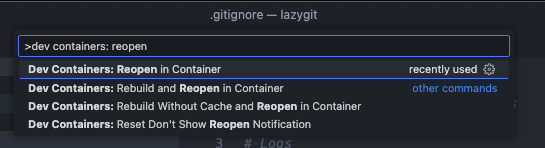
|
||||
|
||||
This requires that:
|
||||
* you have docker installed
|
||||
* you have the dev containers extension installed in VSCode
|
||||
|
||||
See [here](https://code.visualstudio.com/docs/devcontainers/containers) for more info about dev containers.
|
||||
|
||||
## Running in a Github Codespace
|
||||
|
||||
If you want to start contributing to Lazygit with the click of a button, you can open the lazygit codebase in a Codespace. First fork the repo, then click to create a codespace:
|
||||
|
||||

|
||||
|
||||
To run lazygit from within the integrated terminal just go `go run main.go`
|
||||
|
||||
This allows you to contribute to Lazygit without needing to install anything on your local machine. The Codespace has all the necessary tools and extensions pre-installed.
|
||||
|
||||
## Code of conduct
|
||||
|
||||
Please note by participating in this project, you agree to abide by the [code of conduct].
|
||||
|
||||
[code of conduct]: https://github.com/jesseduffield/lazygit/blob/master/CODE-OF-CONDUCT.md
|
||||
|
||||
## Any contributions you make will be under the MIT Software License
|
||||
|
||||
In short, when you submit code changes, your submissions are understood to be
|
||||
under the same [MIT License](http://choosealicense.com/licenses/mit/) that
|
||||
covers the project. Feel free to contact the maintainers if that's a concern.
|
||||
|
||||
## Report bugs using Github's [issues](https://github.com/jesseduffield/lazygit/issues)
|
||||
|
||||
We use GitHub issues to track public bugs. Report a bug by [opening a new
|
||||
issue](https://github.com/jesseduffield/lazygit/issues/new); it's that easy!
|
||||
|
||||
## Go
|
||||
|
||||
This project is written in Go. Go is an opinionated language with strict idioms, but some of those idioms are a little extreme. Some things we do differently:
|
||||
|
||||
1. There is no shame in using `self` as a receiver name in a struct method. In fact we encourage it
|
||||
2. There is no shame in prefixing an interface with 'I' instead of suffixing with 'er' when there are several methods on the interface.
|
||||
3. If a struct implements an interface, we make it explicit with something like:
|
||||
|
||||
```go
|
||||
var _ MyInterface = &MyStruct{}
|
||||
```
|
||||
|
||||
This makes the intent clearer and means that if we fail to satisfy the interface we'll get an error in the file that needs fixing.
|
||||
|
||||
### Code Formatting
|
||||
|
||||
To check code formatting [gofumpt](https://pkg.go.dev/mvdan.cc/gofumpt#section-readme) (which is a bit stricter than [gofmt](https://pkg.go.dev/cmd/gofmt)) is used.
|
||||
VSCode will format the code correctly if you tell the Go extension to use `gofumpt` via your [`settings.json`](https://code.visualstudio.com/docs/getstarted/settings#_settingsjson)
|
||||
by setting [`formatting.gofumpt`](https://github.com/golang/tools/blob/master/gopls/doc/settings.md#gofumpt-bool) to `true`:
|
||||
|
||||
```jsonc
|
||||
// .vscode/settings.json
|
||||
{
|
||||
"gopls": {
|
||||
"formatting.gofumpt": true
|
||||
}
|
||||
}
|
||||
```
|
||||
|
||||
To run gofumpt from your terminal go:
|
||||
|
||||
```
|
||||
go install mvdan.cc/gofumpt@latest && gofumpt -l -w .
|
||||
```
|
||||
|
||||
## Programming Font
|
||||
|
||||
Lazygit supports [Nerd Fonts](https://www.nerdfonts.com) to render certain icons. Sometimes we use some of these icons verbatim in string literals in the code (mainly in tests), so you need to set your development environment to use a nerd font to see these.
|
||||
|
||||
## Internationalisation
|
||||
|
||||
Boy that's a hard word to spell. Anyway, lazygit is translated into several languages within the pkg/i18n package. If you need to render text to the user, you should add a new field to the TranslationSet struct in `pkg/i18n/english.go` and add the actual content within the `EnglishTranslationSet()` method in the same file. Then you can access via `gui.Tr.YourNewText` (or `self.c.Tr.YourNewText`, etc). Although it is appreciated if you translate the text into other languages, it's not expected of you (google translate will likely do a bad job anyway!).
|
||||
|
||||
Note, we use 'Sentence case' for everything (so no 'Title Case' or 'whatever-it's-called-when-there's-no-capital-letters-case')
|
||||
|
||||
## Debugging
|
||||
|
||||
The easiest way to debug lazygit is to have two terminal tabs open at once: one for running lazygit (via `go run main.go -debug` in the project root) and one for viewing lazygit's logs (which can be done via `go run main.go --logs` or just `lazygit --logs`).
|
||||
|
||||
From most places in the codebase you have access to a logger e.g. `gui.Log.Warn("blah")` or `self.c.Log.Warn("blah")`.
|
||||
|
||||
If you find that the existing logs are too noisy, you can set the log level with e.g. `LOG_LEVEL=warn go run main.go -debug` and then only use `Warn` logs yourself.
|
||||
|
||||
If you need to log from code in the vendor directory (e.g. the `gocui` package), you won't have access to the logger, but you can easily add logging support by setting the `LAZYGIT_LOG_PATH` environment variable and using `logs.Global.Warn("blah")`. This is a global logger that's only intended for development purposes.
|
||||
|
||||
If you keep having to do some setup steps to reproduce an issue, read the Testing section below to see how to create an integration test by recording a lazygit session. It's pretty easy!
|
||||
|
||||
### VSCode debugger
|
||||
|
||||
If you want to trigger a debug session from VSCode, you can use the following snippet. Note that the `console` key is, at the time of writing, still an experimental feature.
|
||||
|
||||
```jsonc
|
||||
// .vscode/launch.json
|
||||
{
|
||||
"version": "0.2.0",
|
||||
"configurations": [
|
||||
{
|
||||
"name": "debug lazygit",
|
||||
"type": "go",
|
||||
"request": "launch",
|
||||
"mode": "auto",
|
||||
"program": "main.go",
|
||||
"args": ["--debug"],
|
||||
"console": "externalTerminal" // <-- you need this to actually see the lazygit UI in a window while debugging
|
||||
}
|
||||
]
|
||||
}
|
||||
```
|
||||
|
||||
## Profiling
|
||||
|
||||
If you want to investigate what's contributing to CPU or memory usage, see [this separate document](docs/dev/Profiling.md).
|
||||
|
||||
## Testing
|
||||
|
||||
Lazygit has two kinds of tests: unit tests and integration tests. Unit tests go in files that end in `_test.go`, and are written in Go. For integration tests, see [here](https://github.com/jesseduffield/lazygit/blob/master/pkg/integration/README.md)
|
||||
|
||||
## Updating Gocui
|
||||
|
||||
Sometimes you will need to make a change in the gocui fork (https://github.com/jesseduffield/gocui). Gocui is the package responsible for rendering windows and handling user input. Here's the typical process to follow:
|
||||
|
||||
1. Make the changes in gocui inside lazygit's vendor directory so it's easy to test against lazygit
|
||||
2. Copy the changes over to the actual gocui repo (clone it if you haven't already, and use the `awesome` branch, not `master`)
|
||||
3. Raise a PR on the gocui repo with your changes
|
||||
4. After that PR is merged, make a PR in lazygit bumping the gocui version. You can bump the version by running the following at the lazygit repo root:
|
||||
|
||||
```sh
|
||||
./scripts/bump_gocui.sh
|
||||
```
|
||||
|
||||
5. Raise a PR in lazygit with those changes
|
||||
|
||||
## Updating Lazycore
|
||||
|
||||
[Lazycore](https://github.com/jesseduffield/lazycore) is a repo containing shared functionality between lazygit and lazydocker. Sometimes you will need to make a change to that repo and import the changes into lazygit. Similar to updating Gocui, here's what you do:
|
||||
|
||||
1. Make the changes in lazycore inside lazygit's vendor directory so it's easy to test against lazygit
|
||||
2. Copy the changes over to the actual lazycore repo (clone it if you haven't already, and use the `master` branch)
|
||||
3. Raise a PR on the lazycore repo with your changes
|
||||
4. After that PR is merged, make a PR in lazygit bumping the lazycore version. You can bump the version by running the following at the lazygit repo root:
|
||||
|
||||
```sh
|
||||
./scripts/bump_lazycore.sh
|
||||
```
|
||||
|
||||
Or if you're using VSCode, there is a bump lazycore task you can find by going `cmd+shift+p` and typing 'Run task'
|
||||
|
||||
5. Raise a PR in lazygit with those changes
|
||||
|
||||
## Improvements
|
||||
|
||||
If you can think of any way to improve these docs let us know.
|
||||
@@ -1,19 +0,0 @@
|
||||
# run with:
|
||||
# docker build -t lazygit .
|
||||
# docker run -it lazygit:latest /bin/sh
|
||||
|
||||
FROM golang:1.24 as build
|
||||
WORKDIR /go/src/github.com/jesseduffield/lazygit/
|
||||
COPY go.mod go.sum ./
|
||||
RUN go mod download
|
||||
COPY . .
|
||||
RUN CGO_ENABLED=0 GOOS=linux go build
|
||||
|
||||
FROM alpine:3.19
|
||||
RUN apk add --no-cache -U git xdg-utils
|
||||
WORKDIR /go/src/github.com/jesseduffield/lazygit/
|
||||
COPY --from=build /go/src/github.com/jesseduffield/lazygit ./
|
||||
COPY --from=build /go/src/github.com/jesseduffield/lazygit/lazygit /bin/
|
||||
RUN echo "alias gg=lazygit" >> ~/.profile
|
||||
|
||||
ENTRYPOINT [ "lazygit" ]
|
||||
@@ -1,21 +0,0 @@
|
||||
MIT License
|
||||
|
||||
Copyright (c) 2018 Jesse Duffield
|
||||
|
||||
Permission is hereby granted, free of charge, to any person obtaining a copy
|
||||
of this software and associated documentation files (the "Software"), to deal
|
||||
in the Software without restriction, including without limitation the rights
|
||||
to use, copy, modify, merge, publish, distribute, sublicense, and/or sell
|
||||
copies of the Software, and to permit persons to whom the Software is
|
||||
furnished to do so, subject to the following conditions:
|
||||
|
||||
The above copyright notice and this permission notice shall be included in all
|
||||
copies or substantial portions of the Software.
|
||||
|
||||
THE SOFTWARE IS PROVIDED "AS IS", WITHOUT WARRANTY OF ANY KIND, EXPRESS OR
|
||||
IMPLIED, INCLUDING BUT NOT LIMITED TO THE WARRANTIES OF MERCHANTABILITY,
|
||||
FITNESS FOR A PARTICULAR PURPOSE AND NONINFRINGEMENT. IN NO EVENT SHALL THE
|
||||
AUTHORS OR COPYRIGHT HOLDERS BE LIABLE FOR ANY CLAIM, DAMAGES OR OTHER
|
||||
LIABILITY, WHETHER IN AN ACTION OF CONTRACT, TORT OR OTHERWISE, ARISING FROM,
|
||||
OUT OF OR IN CONNECTION WITH THE SOFTWARE OR THE USE OR OTHER DEALINGS IN THE
|
||||
SOFTWARE.
|
||||
@@ -1,72 +0,0 @@
|
||||
.PHONY: all
|
||||
all: build
|
||||
|
||||
.PHONY: build
|
||||
build:
|
||||
go build -gcflags='all=-N -l'
|
||||
|
||||
.PHONY: install
|
||||
install:
|
||||
go install
|
||||
|
||||
.PHONY: run
|
||||
run: build
|
||||
./lazygit
|
||||
|
||||
# Run `make run-debug` in one terminal tab and `make print-log` in another to view the program and its log output side by side
|
||||
.PHONY: run-debug
|
||||
run-debug:
|
||||
go run main.go -debug
|
||||
|
||||
.PHONY: print-log
|
||||
print-log:
|
||||
go run main.go --logs
|
||||
|
||||
.PHONY: unit-test
|
||||
unit-test:
|
||||
go test ./... -short
|
||||
|
||||
.PHONY: test
|
||||
test: unit-test integration-test-all
|
||||
|
||||
# Generate all our auto-generated files (test list, cheatsheets, maybe other things in the future)
|
||||
.PHONY: generate
|
||||
generate:
|
||||
go generate ./...
|
||||
|
||||
.PHONY: format
|
||||
format:
|
||||
gofumpt -l -w .
|
||||
|
||||
.PHONY: lint
|
||||
lint:
|
||||
./scripts/golangci-lint-shim.sh run
|
||||
|
||||
# For more details about integration test, see https://github.com/jesseduffield/lazygit/blob/master/pkg/integration/README.md.
|
||||
.PHONY: integration-test-tui
|
||||
integration-test-tui:
|
||||
go run cmd/integration_test/main.go tui $(filter-out $@,$(MAKECMDGOALS))
|
||||
|
||||
.PHONY: integration-test-cli
|
||||
integration-test-cli:
|
||||
go run cmd/integration_test/main.go cli $(filter-out $@,$(MAKECMDGOALS))
|
||||
|
||||
.PHONY: integration-test-all
|
||||
integration-test-all:
|
||||
go test pkg/integration/clients/*.go
|
||||
|
||||
.PHONY: bump-gocui
|
||||
bump-gocui:
|
||||
scripts/bump_gocui.sh
|
||||
|
||||
.PHONY: bump-lazycore
|
||||
bump-lazycore:
|
||||
scripts/bump_lazycore.sh
|
||||
|
||||
.PHONY: record-demo
|
||||
record-demo:
|
||||
demo/record_demo.sh $(filter-out $@,$(MAKECMDGOALS))
|
||||
|
||||
.PHONY: vendor
|
||||
vendor:
|
||||
go mod vendor && go mod tidy
|
||||
@@ -1,104 +0,0 @@
|
||||
# Vision and Design Principles
|
||||
|
||||
## Vision
|
||||
|
||||
Lazygit's vision is to be the most enjoyable UI for git.
|
||||
|
||||
## Design Principles
|
||||
|
||||
There are seven (sometimes contradictory) design principles we follow:
|
||||
|
||||
- Dicoverability
|
||||
- Simplicity
|
||||
- Safety
|
||||
- Power
|
||||
- Speed
|
||||
- Conformity with git
|
||||
- Think of the codebase
|
||||
|
||||
### Discoverability
|
||||
|
||||
TUI's are notoriously hard to learn, thanks to limited screen real-estate to provide contextual help and a general lack of effort on the part of developers to make things obvious. We want Lazygit to buck the trend and be easy for a new user to grok.
|
||||
|
||||
Examples:
|
||||
|
||||
- Clearly document all the features/configuration options
|
||||
- e.g. gifs in the README
|
||||
- Document how to solve various git problems with Lazygit
|
||||
- This is something we don't have yet but should: a section in the docs explaining how Lazygit can help you in various scenarios
|
||||
- Use tooltips to explain what actions will do
|
||||
- Make it easy for users to ask questions and get answers from the community
|
||||
- Make it easy to find entities and actions from within Lazygit
|
||||
- Use visual elements to make things obvious
|
||||
- e.g. '<-- YOU ARE HERE' label when rebasing
|
||||
- Don't require the user to memorise keybindings
|
||||
- e.g. when the user is mid-rebase, we prominently show that the keybinding for viewing rebase options is 'm'
|
||||
- When the user performs an action in Lazygit, make the impact obvious
|
||||
- If the affected entity isn't visible, show a toast notification
|
||||
- If a keybinding is disabled, give a reason why
|
||||
|
||||
### Simplicity
|
||||
|
||||
The git CLI is very complex but most git use cases are simple. Lazygit needs to ensure that simple use cases are easy to satisfy.
|
||||
|
||||
- Make the most common use cases dead-simple (staging files, committing, pulling/pushing)
|
||||
- Don't overwhelm the user with options
|
||||
- Use sensible defaults
|
||||
- We already have too many configuration options: think hard before adding any new ones
|
||||
|
||||
### Safety
|
||||
|
||||
It's easy to screw things up in git so Lazygit should try to protect the user from screwing things up.
|
||||
|
||||
- Prompt for a confirmation before doing anything that's hard to reverse
|
||||
- Make it easy to correct mistakes
|
||||
- e.g. undo action
|
||||
- the escape key should get you out of most transient situations (rebasing, diffing, etc)
|
||||
|
||||
## Power
|
||||
|
||||
Users shouldn't have to drop down the CLI _too_ often. Lazygit should be able to handle some complex use cases.
|
||||
|
||||
- Make complex (but common) CLI flows simple
|
||||
- e.g. interactive rebasing
|
||||
- Use the custom commands system to handle the really rare complex edge-cases
|
||||
|
||||
### Speed
|
||||
|
||||
Pro users should be able to move at lightning speed with Lazygit.
|
||||
|
||||
- Always think about the number of keypresses involved in a given UX flow
|
||||
- Make lazygit performant and responsive
|
||||
- Think about the individual commands being run and how fast they are
|
||||
- Startup should be FAST. If you want to run something at startup that is slow, make it non-blocking.
|
||||
- Support muscle-memory
|
||||
- Prefer disabling menu items instead of hiding them so that muscle memory can be used to select the desired menu item
|
||||
- Try to make keybinding intuitions to transfer across contexts (e.g. 'd' for destroy)
|
||||
- When changing keybindings in a new release, always consider what will happen if a user does not read the release notes and relies on muscle memory.
|
||||
|
||||
### Conformity with git
|
||||
|
||||
Satisfying the use-cases of git users is more important than perfectly conforming to git's API, but even obscure parts of git's API were motivated by real use-cases.
|
||||
|
||||
- Users should only have to drop down to the git CLI in rare circumstances
|
||||
- Honour the git config
|
||||
- Don't override anything set in the git config without the user's permission
|
||||
- Work with git, not against it.
|
||||
- Too much magic will get us into trouble
|
||||
- Avoid storing Lazygit-specific session state that could instead be stored in git
|
||||
- Ensure that Lazygit can represent the state of any repo
|
||||
- Sometimes git's default behaviour is just silly and we'll make the call to override but it should be a well-considered decision.
|
||||
|
||||
### Think of the codebase
|
||||
|
||||
Will somebody PLEASE think of the codebase!
|
||||
|
||||
Some features are not worth the added complexity in the codebase. The more this codebase grows, the harder it will be to make the changes that everybody wants.
|
||||
|
||||
## Resolving conflicts
|
||||
|
||||
Many of the above objectives are directly antithetical to one another. If you add an extra confirmation prompt for the sake of _safety_, you're sacrificing _speed_. If you support toggling various git flags in the name of _power_, you're sacrificing _simplicity_. There are a few things to say here.
|
||||
|
||||
When there are conflicts, we need to make a judgement call. In general we should err on the side of safety and simplicity as the default, with the ability for users to make things faster / more powerful either through configuration or separate keybindings.
|
||||
|
||||
This does not mean for example that force pushes should be impossible without being manually enabled: force pushes are table stakes for anybody who rebases. But it does mean that a confirmation popup should appear when force pushing.
|
||||
@@ -1,26 +0,0 @@
|
||||
package main
|
||||
|
||||
import (
|
||||
"encoding/json"
|
||||
"log"
|
||||
"os"
|
||||
|
||||
"github.com/jesseduffield/lazygit/pkg/i18n"
|
||||
)
|
||||
|
||||
func saveLanguageFileToJson(tr *i18n.TranslationSet, filepath string) error {
|
||||
jsonData, err := json.MarshalIndent(tr, "", " ")
|
||||
if err != nil {
|
||||
return err
|
||||
}
|
||||
|
||||
jsonData = append(jsonData, '\n')
|
||||
return os.WriteFile(filepath, jsonData, 0o644)
|
||||
}
|
||||
|
||||
func main() {
|
||||
err := saveLanguageFileToJson(i18n.EnglishTranslationSet(), "en.json")
|
||||
if err != nil {
|
||||
log.Fatal(err)
|
||||
}
|
||||
}
|
||||
@@ -1,84 +0,0 @@
|
||||
package main
|
||||
|
||||
import (
|
||||
"fmt"
|
||||
"log"
|
||||
"os"
|
||||
|
||||
"github.com/jesseduffield/lazygit/pkg/integration/clients"
|
||||
)
|
||||
|
||||
var usage = `
|
||||
Usage:
|
||||
See https://github.com/jesseduffield/lazygit/tree/master/pkg/integration/README.md
|
||||
|
||||
CLI mode:
|
||||
> go run cmd/integration_test/main.go cli [--slow] [--sandbox] <test1> <test2> ...
|
||||
If you pass no test names, it runs all tests
|
||||
Accepted environment variables:
|
||||
INPUT_DELAY (e.g. 200): the number of milliseconds to wait between keypresses or mouse clicks
|
||||
|
||||
TUI mode:
|
||||
> go run cmd/integration_test/main.go tui
|
||||
This will open up a terminal UI where you can run tests
|
||||
|
||||
Help:
|
||||
> go run cmd/integration_test/main.go help
|
||||
`
|
||||
|
||||
type flagInfo struct {
|
||||
name string // name of the flag; can be used with "-" or "--"
|
||||
flag *bool // a pointer to the variable that should be set to true when this flag is passed
|
||||
}
|
||||
|
||||
// Takes the args that you want to parse (excluding the program name and any
|
||||
// subcommands), and returns the remaining args with the flags removed
|
||||
func parseFlags(args []string, flags []flagInfo) []string {
|
||||
outer:
|
||||
for len(args) > 0 {
|
||||
for _, f := range flags {
|
||||
if args[0] == "-"+f.name || args[0] == "--"+f.name {
|
||||
*f.flag = true
|
||||
args = args[1:]
|
||||
continue outer
|
||||
}
|
||||
}
|
||||
break
|
||||
}
|
||||
|
||||
return args
|
||||
}
|
||||
|
||||
func main() {
|
||||
if len(os.Args) < 2 {
|
||||
log.Fatal(usage)
|
||||
}
|
||||
|
||||
switch os.Args[1] {
|
||||
case "help":
|
||||
fmt.Println(usage)
|
||||
case "cli":
|
||||
slow := false
|
||||
sandbox := false
|
||||
waitForDebugger := false
|
||||
raceDetector := false
|
||||
testNames := parseFlags(os.Args[2:], []flagInfo{
|
||||
{"slow", &slow},
|
||||
{"sandbox", &sandbox},
|
||||
{"debug", &waitForDebugger},
|
||||
{"race", &raceDetector},
|
||||
})
|
||||
clients.RunCLI(testNames, slow, sandbox, waitForDebugger, raceDetector)
|
||||
case "tui":
|
||||
raceDetector := false
|
||||
remainingArgs := parseFlags(os.Args[2:], []flagInfo{
|
||||
{"race", &raceDetector},
|
||||
})
|
||||
if len(remainingArgs) > 0 {
|
||||
log.Fatal("tui only supports the -race argument.")
|
||||
}
|
||||
clients.RunTUI(raceDetector)
|
||||
default:
|
||||
log.Fatal(usage)
|
||||
}
|
||||
}
|
||||

|
After Width: | Height: | Size: 88 KiB |

|
After Width: | Height: | Size: 1.3 MiB |
@@ -1,2 +0,0 @@
|
||||
This directory contains stuff for recording lazygit demos.
|
||||
|
||||

|
After Width: | Height: | Size: 473 KiB |

|
After Width: | Height: | Size: 3.1 MiB |

|
After Width: | Height: | Size: 820 KiB |

|
After Width: | Height: | Size: 6.9 MiB |

|
After Width: | Height: | Size: 301 KiB |

|
After Width: | Height: | Size: 1.9 MiB |

|
After Width: | Height: | Size: 462 KiB |

|
After Width: | Height: | Size: 3.8 MiB |

|
After Width: | Height: | Size: 650 KiB |

|
After Width: | Height: | Size: 11 MiB |
@@ -1,112 +0,0 @@
|
||||
# Specify a command to be executed
|
||||
# like `/bin/bash -l`, `ls`, or any other commands
|
||||
# the default is bash for Linux
|
||||
# or powershell.exe for Windows
|
||||
command: echo "YOU NEED TO SPECIFY YOUR OWN COMMAND WITH THE -d ARG"
|
||||
|
||||
# Specify the current working directory path
|
||||
# the default is the current working directory path
|
||||
cwd: null
|
||||
|
||||
# Export additional ENV variables
|
||||
env:
|
||||
recording: true
|
||||
|
||||
# Explicitly set the number of columns
|
||||
# or use `auto` to take the current
|
||||
# number of columns of your shell
|
||||
cols: 120 # 100
|
||||
|
||||
# Explicitly set the number of rows
|
||||
# or use `auto` to take the current
|
||||
# number of rows of your shell
|
||||
rows: 35 # 30
|
||||
|
||||
# Amount of times to repeat GIF
|
||||
# If value is -1, play once
|
||||
# If value is 0, loop indefinitely
|
||||
# If value is a positive number, loop n times
|
||||
repeat: 0
|
||||
|
||||
# Quality
|
||||
# 1 - 100
|
||||
# Higher quality seems to make no difference, but running it through
|
||||
# gifsicle ends up with a much better compressed version.
|
||||
quality: 100
|
||||
|
||||
# Delay between frames in ms
|
||||
# If the value is `auto` use the actual recording delays
|
||||
frameDelay: auto
|
||||
|
||||
# Maximum delay between frames in ms
|
||||
# Ignored if the `frameDelay` isn't set to `auto`
|
||||
# Set to `auto` to prevent limiting the max idle time
|
||||
maxIdleTime: 2000
|
||||
|
||||
# The surrounding frame box
|
||||
# The `type` can be null, window, floating, or solid`
|
||||
# To hide the title use the value null
|
||||
# Don't forget to add a backgroundColor style with a null as type
|
||||
frameBox:
|
||||
type: floating
|
||||
title: Lazygit
|
||||
style:
|
||||
border: 0px black solid
|
||||
backgroundColor: "#1d1d1d"
|
||||
margin: -5px
|
||||
|
||||
# Add a watermark image to the rendered gif
|
||||
# You need to specify an absolute path for
|
||||
# the image on your machine or a URL, and you can also
|
||||
# add your own CSS styles
|
||||
watermark:
|
||||
imagePath: null
|
||||
style:
|
||||
position: absolute
|
||||
right: 15px
|
||||
bottom: 15px
|
||||
width: 100px
|
||||
opacity: 0.9
|
||||
|
||||
# Cursor style can be one of
|
||||
# `block`, `underline`, or `bar`
|
||||
cursorStyle: block
|
||||
|
||||
# Font family
|
||||
# You can use any font that is installed on your machine
|
||||
# in CSS-like syntax
|
||||
# Download from:
|
||||
# https://github.com/ryanoasis/nerd-fonts/releases/download/v3.0.2/DejaVuSansMono.zip
|
||||
# Not using the mono font because it makes icons too small.
|
||||
fontFamily: "DejaVuSansM Nerd Font"
|
||||
|
||||
# The size of the font
|
||||
fontSize: 8
|
||||
|
||||
# The height of lines
|
||||
lineHeight: 1
|
||||
|
||||
# The spacing between letters
|
||||
letterSpacing: 0
|
||||
|
||||
# Theme
|
||||
theme:
|
||||
background: "transparent"
|
||||
foreground: "#dddad6"
|
||||
cursor: "#c7c7c7"
|
||||
black: "#7a7a7a"
|
||||
red: "#fc4384"
|
||||
green: "#b3e33b"
|
||||
yellow: "#ffa727"
|
||||
blue: "#102895"
|
||||
magenta: "#c930c7"
|
||||
cyan: "#00c5c7"
|
||||
white: "#c7c7c7"
|
||||
brightBlack: "#676767"
|
||||
brightRed: "#ff7fac"
|
||||
brightGreen: "#c8ed71"
|
||||
brightYellow: "#ebdf86"
|
||||
brightBlue: "#6871ff"
|
||||
brightMagenta: "#ff76ff"
|
||||
brightCyan: "#5ffdff"
|
||||
brightWhite: "#fffefe"
|
||||

|
After Width: | Height: | Size: 314 KiB |

|
After Width: | Height: | Size: 1.5 MiB |

|
After Width: | Height: | Size: 338 KiB |

|
After Width: | Height: | Size: 1.9 MiB |

|
After Width: | Height: | Size: 431 KiB |

|
After Width: | Height: | Size: 2.1 MiB |

|
After Width: | Height: | Size: 321 KiB |

|
After Width: | Height: | Size: 2.1 MiB |

|
After Width: | Height: | Size: 962 KiB |

|
After Width: | Height: | Size: 7.0 MiB |

|
After Width: | Height: | Size: 626 KiB |

|
After Width: | Height: | Size: 3.0 MiB |

|
After Width: | Height: | Size: 611 KiB |

|
After Width: | Height: | Size: 4.2 MiB |
@@ -1,81 +0,0 @@
|
||||
#!/bin/sh
|
||||
|
||||
set -e
|
||||
|
||||
TYPE=$1
|
||||
TEST=$2
|
||||
|
||||
usage() {
|
||||
echo "Usage: $0 [gif|mp4] <test path>"
|
||||
echo "e.g. using full path: $0 gif pkg/integration/tests/demo/nuke_working_tree.go"
|
||||
exit 1
|
||||
}
|
||||
|
||||
if [ "$#" -ne 2 ]
|
||||
then
|
||||
usage
|
||||
fi
|
||||
|
||||
if [ "$TYPE" != "gif" ] && [ "$TYPE" != "mp4" ]
|
||||
then
|
||||
usage
|
||||
exit 1
|
||||
fi
|
||||
|
||||
if [ -z "$TEST" ]
|
||||
then
|
||||
usage
|
||||
fi
|
||||
|
||||
WORKTREE_PATH=$(git worktree list | grep assets | awk '{print $1}')
|
||||
|
||||
if [ -z "$WORKTREE_PATH" ]
|
||||
then
|
||||
echo "Could not find assets worktree. You'll need to create a worktree for the assets branch using the following command:"
|
||||
echo "git worktree add .worktrees/assets assets"
|
||||
echo "The assets branch has no shared history with the main branch: it exists to store assets which are too large to store in the main branch."
|
||||
exit 1
|
||||
fi
|
||||
|
||||
OUTPUT_DIR="$WORKTREE_PATH/demo"
|
||||
|
||||
if ! command -v terminalizer &> /dev/null
|
||||
then
|
||||
echo "terminalizer could not be found"
|
||||
echo "Install it with: npm install -g terminalizer"
|
||||
exit 1
|
||||
fi
|
||||
|
||||
if ! command -v "gifsicle" &> /dev/null
|
||||
then
|
||||
echo "gifsicle could not be found"
|
||||
echo "Install it with: npm install -g gifsicle"
|
||||
exit 1
|
||||
fi
|
||||
|
||||
# Get last part of the test path and set that as the output name
|
||||
# example test path: pkg/integration/tests/01_basic_test.go
|
||||
# For that we want: NAME=01_basic_test
|
||||
NAME=$(echo "$TEST" | sed -e 's/.*\///' | sed -e 's/\..*//')
|
||||
|
||||
# Add the demo to the tests list (if missing) so that it can be run
|
||||
go generate pkg/integration/tests/tests.go
|
||||
|
||||
mkdir -p "$OUTPUT_DIR"
|
||||
|
||||
# First we record the demo into a yaml representation
|
||||
terminalizer -c demo/config.yml record --skip-sharing -d "go run cmd/integration_test/main.go cli --slow $TEST" "$OUTPUT_DIR/$NAME"
|
||||
# Then we render it into a gif
|
||||
terminalizer render "$OUTPUT_DIR/$NAME" -o "$OUTPUT_DIR/$NAME.gif"
|
||||
|
||||
# Then we convert it to either an mp4 or gif based on the command line argument
|
||||
if [ "$TYPE" = "mp4" ]
|
||||
then
|
||||
COMPRESSED_PATH="$OUTPUT_DIR/$NAME.mp4"
|
||||
ffmpeg -y -i "$OUTPUT_DIR/$NAME.gif" -movflags faststart -pix_fmt yuv420p -vf "scale=trunc(iw/2)*2:trunc(ih/2)*2" "$COMPRESSED_PATH"
|
||||
else
|
||||
COMPRESSED_PATH="$OUTPUT_DIR/$NAME-compressed.gif"
|
||||
gifsicle --colors 256 --use-col=web -O3 < "$OUTPUT_DIR/$NAME.gif" > "$COMPRESSED_PATH"
|
||||
fi
|
||||
|
||||
echo "Demo recorded to $COMPRESSED_PATH"
|
||||

|
After Width: | Height: | Size: 362 KiB |

|
After Width: | Height: | Size: 2.2 MiB |

|
After Width: | Height: | Size: 343 KiB |

|
After Width: | Height: | Size: 2.3 MiB |

|
After Width: | Height: | Size: 443 KiB |

|
After Width: | Height: | Size: 3.0 MiB |

|
After Width: | Height: | Size: 14 KiB |
@@ -1,370 +0,0 @@
|
||||
# Custom Command Keybindings
|
||||
|
||||
You can add custom command keybindings in your config.yml (accessible by pressing 'e' on the status panel from within lazygit) like so:
|
||||
|
||||
```yml
|
||||
customCommands:
|
||||
- key: '<c-r>'
|
||||
context: 'commits'
|
||||
command: 'hub browse -- "commit/{{.SelectedLocalCommit.Hash}}"'
|
||||
- key: 'a'
|
||||
context: 'files'
|
||||
command: "git {{if .SelectedFile.HasUnstagedChanges}} add {{else}} reset {{end}} {{.SelectedFile.Name | quote}}"
|
||||
description: 'Toggle file staged'
|
||||
- key: 'C'
|
||||
context: 'global'
|
||||
command: "git commit"
|
||||
output: terminal
|
||||
- key: 'n'
|
||||
context: 'localBranches'
|
||||
prompts:
|
||||
- type: 'menu'
|
||||
title: 'What kind of branch is it?'
|
||||
key: 'BranchType'
|
||||
options:
|
||||
- name: 'feature'
|
||||
description: 'a feature branch'
|
||||
value: 'feature'
|
||||
- name: 'hotfix'
|
||||
description: 'a hotfix branch'
|
||||
value: 'hotfix'
|
||||
- name: 'release'
|
||||
description: 'a release branch'
|
||||
value: 'release'
|
||||
- type: 'input'
|
||||
title: 'What is the new branch name?'
|
||||
key: 'BranchName'
|
||||
initialValue: ''
|
||||
command: "git flow {{.Form.BranchType}} start {{.Form.BranchName}}"
|
||||
loadingText: 'Creating branch'
|
||||
```
|
||||
|
||||
Looking at the command assigned to the 'n' key, here's what the result looks like:
|
||||
|
||||

|
||||
|
||||
Custom command keybindings will appear alongside inbuilt keybindings when you view the keybindings menu by pressing '?':
|
||||
|
||||

|
||||
|
||||
For a given custom command, here are the allowed fields:
|
||||
| _field_ | _description_ | required |
|
||||
|-----------------|----------------------|-|
|
||||
| key | The key to trigger the command. Use a single letter or one of the values from [here](https://github.com/jesseduffield/lazygit/blob/master/docs/keybindings/Custom_Keybindings.md). Custom commands without a key specified can be triggered by selecting them from the keybindings (`?`) menu | no |
|
||||
| command | The command to run (using Go template syntax for placeholder values) | yes |
|
||||
| context | The context in which to listen for the key (see [below](#contexts)) | yes |
|
||||
| prompts | A list of prompts that will request user input before running the final command | no |
|
||||
| loadingText | Text to display while waiting for command to finish | no |
|
||||
| description | Label for the custom command when displayed in the keybindings menu | no |
|
||||
| output | Where the output of the command should go. 'none' discards it, 'terminal' suspends lazygit and runs the command in the terminal (useful for commands that require user input), 'log' streams it to the command log, 'logWithPty' is like 'log' but runs the command in a pseudo terminal (can be useful for commands that produce colored output when the output is a terminal), and 'popup' shows it in a popup. | no |
|
||||
| outputTitle | The title to display in the popup panel if output is set to 'popup'. If left unset, the command will be used as the title. | no |
|
||||
| after | Actions to take after the command has completed | no |
|
||||
|
||||
Here are the options for the `after` key:
|
||||
| _field_ | _description_ | required |
|
||||
|-----------------|----------------------|-|
|
||||
| checkForConflicts | true/false. If true, check for merge conflicts | no |
|
||||
|
||||
## Contexts
|
||||
|
||||
The permitted contexts are:
|
||||
|
||||
| _context_ | _description_ |
|
||||
| -------------- | -------------------------------------------------------------------------------------------------------- |
|
||||
| status | The 'Status' tab |
|
||||
| files | The 'Files' tab |
|
||||
| worktrees | The 'Worktrees' tab |
|
||||
| localBranches | The 'Local Branches' tab |
|
||||
| remotes | The 'Remotes' tab |
|
||||
| remoteBranches | The context you get when pressing enter on a remote in the remotes tab |
|
||||
| tags | The 'Tags' tab |
|
||||
| commits | The 'Commits' tab |
|
||||
| reflogCommits | The 'Reflog' tab |
|
||||
| subCommits | The context you see when pressing enter on a branch |
|
||||
| commitFiles | The context you see when pressing enter on a commit or stash entry (warning, might be renamed in future) |
|
||||
| stash | The 'Stash' tab |
|
||||
| global | This keybinding will take affect everywhere |
|
||||
|
||||
> **Bonus**
|
||||
>
|
||||
> You can use a comma-separated string, such as `context: 'commits, subCommits'`, to make it effective in multiple contexts.
|
||||
|
||||
|
||||
## Prompts
|
||||
|
||||
### Common fields
|
||||
|
||||
These fields are applicable to all prompts.
|
||||
|
||||
| _field_ | _description_ | _required_ |
|
||||
| ------------ | -----------------------------------------------------------------------------------------------| ---------- |
|
||||
| type | One of 'input', 'confirm', 'menu', 'menuFromCommand' | yes |
|
||||
| title | The title to display in the popup panel | no |
|
||||
| key | Used to reference the entered value from within the custom command. E.g. a prompt with `key: 'Branch'` can be referred to as `{{.Form.Branch}}` in the command | yes |
|
||||
|
||||
### Input
|
||||
|
||||
| _field_ | _description_ | _required_ |
|
||||
| ------------ | -----------------------------------------------------------------------------------------------| ---------- |
|
||||
| initialValue | The initial value to appear in the text box | no |
|
||||
| suggestions | Shows suggestions as the input is entered. See below for details | no |
|
||||
|
||||
The permitted suggestions fields are:
|
||||
| _field_ | _description_ | _required_ |
|
||||
|-----------------|----------------------|-|
|
||||
| preset | Uses built-in logic to obtain the suggestions. One of 'authors', 'branches', 'files', 'refs', 'remotes', 'remoteBranches', 'tags' | no |
|
||||
| command | Command to run such that each line in the output becomes a suggestion. Mutually exclusive with 'preset' field. | no |
|
||||
|
||||
Here's an example of passing a preset:
|
||||
|
||||
```yml
|
||||
customCommands:
|
||||
- key: 'a'
|
||||
command: 'echo {{.Form.Branch | quote}}'
|
||||
context: 'commits'
|
||||
prompts:
|
||||
- type: 'input'
|
||||
title: 'Which branch?'
|
||||
key: 'Branch'
|
||||
suggestions:
|
||||
preset: 'branches' # use built-in logic for obtaining branches
|
||||
```
|
||||
|
||||
Here's an example of passing a command directly:
|
||||
|
||||
```yml
|
||||
customCommands:
|
||||
- key: 'a'
|
||||
command: 'echo {{.Form.Branch | quote}}'
|
||||
context: 'commits'
|
||||
prompts:
|
||||
- type: 'input'
|
||||
title: 'Which branch?'
|
||||
key: 'Branch'
|
||||
suggestions:
|
||||
command: "git branch --format='%(refname:short)'"
|
||||
```
|
||||
|
||||
|
||||
Here's an example of passing an initial value for the input:
|
||||
|
||||
```yml
|
||||
customCommands:
|
||||
- key: 'a'
|
||||
command: 'echo {{.Form.Remote | quote}}'
|
||||
context: 'commits'
|
||||
prompts:
|
||||
- type: 'input'
|
||||
title: 'Remote:'
|
||||
key: 'Remote'
|
||||
initialValue: "{{.SelectedRemote.Name}}"
|
||||
```
|
||||
|
||||
### Confirm
|
||||
|
||||
| _field_ | _description_ | _required_ |
|
||||
| ------------ | -----------------------------------------------------------------------------------------------| ---------- |
|
||||
| body | The immutable body text to appear in the text box | no |
|
||||
|
||||
Example:
|
||||
|
||||
```yml
|
||||
customCommands:
|
||||
- key: 'a'
|
||||
command: 'echo "pushing to remote"'
|
||||
context: 'commits'
|
||||
prompts:
|
||||
- type: 'confirm'
|
||||
title: 'Push to remote'
|
||||
body: 'Are you sure you want to push to the remote?'
|
||||
```
|
||||
|
||||
### Menu
|
||||
|
||||
| _field_ | _description_ | _required_ |
|
||||
| ------------ | -----------------------------------------------------------------------------------------------| ---------- |
|
||||
| options | The options to display in the menu | yes |
|
||||
|
||||
The permitted option fields are:
|
||||
| _field_ | _description_ | _required_ |
|
||||
|-----------------|----------------------|-|
|
||||
| name | The first part of the label | no |
|
||||
| description | The second part of the label | no |
|
||||
| value | the value that will be used in the command | yes |
|
||||
|
||||
If an option has no name the value will be displayed to the user in place of the name, so you're allowed to only include the value like so:
|
||||
|
||||
```yml
|
||||
customCommands:
|
||||
- key: 'a'
|
||||
command: 'echo {{.Form.BranchType | quote}}'
|
||||
context: 'commits'
|
||||
prompts:
|
||||
- type: 'menu'
|
||||
title: 'What kind of branch is it?'
|
||||
key: 'BranchType'
|
||||
options:
|
||||
- value: 'feature'
|
||||
- value: 'hotfix'
|
||||
- value: 'release'
|
||||
```
|
||||
|
||||
Here's an example of supplying more detail for each option:
|
||||
|
||||
```yml
|
||||
customCommands:
|
||||
- key: 'a'
|
||||
command: 'echo {{.Form.BranchType | quote}}'
|
||||
context: 'commits'
|
||||
prompts:
|
||||
- type: 'menu'
|
||||
title: 'What kind of branch is it?'
|
||||
key: 'BranchType'
|
||||
options:
|
||||
- value: 'feature'
|
||||
name: 'feature branch'
|
||||
description: 'branch based off develop'
|
||||
- value: 'hotfix'
|
||||
name: 'hotfix branch'
|
||||
description: 'branch based off main for fast bug fixes'
|
||||
- value: 'release'
|
||||
name: 'release branch'
|
||||
description: 'branch for a release'
|
||||
```
|
||||
|
||||
### Menu-from-command
|
||||
|
||||
| _field_ | _description_ | _required_ |
|
||||
| ------------ | -----------------------------------------------------------------------------------------------| ---------- |
|
||||
| command | The command to run to generate menu options | yes |
|
||||
| filter | The regexp to run specifying groups which are going to be kept from the command's output | no |
|
||||
| valueFormat | How to format matched groups from the filter to construct a menu item's value | no |
|
||||
| labelFormat | Like valueFormat but for the labels. If `labelFormat` is not specified, `valueFormat` is shown instead. | no |
|
||||
|
||||
Here's an example using named groups in the regex. Notice how we can pipe the label to a colour function for coloured output (available colours [here](https://github.com/jesseduffield/lazygit/blob/master/docs/Config.md))
|
||||
|
||||
```yml
|
||||
- key : 'a'
|
||||
description: 'Checkout a remote branch as FETCH_HEAD'
|
||||
command: "git fetch {{.Form.Remote}} {{.Form.Branch}} && git checkout FETCH_HEAD"
|
||||
context: 'remotes'
|
||||
prompts:
|
||||
- type: 'menuFromCommand'
|
||||
title: 'Remote branch:'
|
||||
key: 'Branch'
|
||||
command: 'git branch -r --list {{.SelectedRemote.Name }}/*'
|
||||
filter: '.*{{.SelectedRemote.Name }}/(?P<branch>.*)'
|
||||
valueFormat: '{{ .branch }}'
|
||||
labelFormat: '{{ .branch | green }}'
|
||||
```
|
||||
|
||||
Here's an example using unnamed groups:
|
||||
|
||||
```yml
|
||||
- key : 'a'
|
||||
description: 'Checkout a remote branch as FETCH_HEAD'
|
||||
command: "git fetch {{.Form.Remote}} {{.Form.Branch}} && git checkout FETCH_HEAD"
|
||||
context: 'remotes'
|
||||
prompts:
|
||||
- type: 'menuFromCommand'
|
||||
title: 'Remote branch:'
|
||||
key: 'Branch'
|
||||
command: 'git branch -r --list {{.SelectedRemote.Name }}/*'
|
||||
filter: '.*{{.SelectedRemote.Name }}/(.*)'
|
||||
valueFormat: '{{ .group_1 }}'
|
||||
labelFormat: '{{ .group_1 | green }}'
|
||||
```
|
||||
|
||||
Here's an example using a command but not specifying anything else: so each line from the command becomes the value and label of the menu items
|
||||
|
||||
```yml
|
||||
- key : 'a'
|
||||
description: 'Checkout a remote branch as FETCH_HEAD'
|
||||
command: "open {{.Form.File | quote}}"
|
||||
context: 'global'
|
||||
prompts:
|
||||
- type: 'menuFromCommand'
|
||||
title: 'File:'
|
||||
key: 'File'
|
||||
command: 'ls'
|
||||
```
|
||||
|
||||
## Placeholder values
|
||||
|
||||
Your commands can contain placeholder strings using Go's [template syntax](https://jan.newmarch.name/golang/template/chapter-template.html). The template syntax is pretty powerful, letting you do things like conditionals if you want, but for the most part you'll simply want to be accessing the fields on the following objects:
|
||||
|
||||
```
|
||||
SelectedCommit
|
||||
SelectedCommitRange
|
||||
SelectedFile
|
||||
SelectedPath
|
||||
SelectedLocalBranch
|
||||
SelectedRemoteBranch
|
||||
SelectedRemote
|
||||
SelectedTag
|
||||
SelectedStashEntry
|
||||
SelectedCommitFile
|
||||
SelectedWorktree
|
||||
CheckedOutBranch
|
||||
```
|
||||
|
||||
(For legacy reasons, `SelectedLocalCommit`, `SelectedReflogCommit`, and `SelectedSubCommit` are also available, but they are deprecated.)
|
||||
|
||||
|
||||
To see what fields are available on e.g. the `SelectedFile`, see [here](https://github.com/jesseduffield/lazygit/blob/master/pkg/gui/services/custom_commands/models.go) (all the modelling lives in the same file).
|
||||
|
||||
We don't support accessing all elements of a range selection yet. We might add this in the future, but as a special case you can access the range of selected commits by using `SelectedCommitRange`, which has two properties `.To` and `.From` which are the hashes of the bottom and top selected commits, respectively. This is useful for passing them to a git command that operates on a range of commits. For example, to create patches for all selected commits, you might use
|
||||
```yml
|
||||
command: "git format-patch {{.SelectedCommitRange.From}}^..{{.SelectedCommitRange.To}}"
|
||||
```
|
||||
|
||||
We support the following functions:
|
||||
|
||||
### Quoting
|
||||
|
||||
Quote wraps a string in quotes with necessary escaping for the current platform.
|
||||
|
||||
```
|
||||
git {{.SelectedFile.Name | quote}}
|
||||
```
|
||||
|
||||
### Running a command
|
||||
|
||||
Runs a command and returns the output. If the command outputs more than a single line, it will produce an error.
|
||||
|
||||
```
|
||||
initialValue: "username/{{ runCommand "date +\"%Y/%-m\"" }}/"
|
||||
```
|
||||
|
||||
## Keybinding collisions
|
||||
|
||||
If your custom keybinding collides with an inbuilt keybinding that is defined for the same context, only the custom keybinding will be executed. This also applies to the global context. However, one caveat is that if you have a custom keybinding defined on the global context for some key, and there is an in-built keybinding defined for the same key and for a specific context (say the 'files' context), then the in-built keybinding will take precedence. See how to change in-built keybindings [here](https://github.com/jesseduffield/lazygit/blob/master/docs/Config.md#keybindings)
|
||||
|
||||
## Menus of custom commands
|
||||
|
||||
For custom commands that are not used very frequently it may be preferable to hide them in a menu; you can assign a key to open the menu, and the commands will appear inside. This has the advantage that you don't have to come up with individual unique keybindings for all those commands that you don't use often; the keybindings for the commands in the menu only need to be unique within the menu. Here is an example:
|
||||
|
||||
```yml
|
||||
customCommands:
|
||||
- key: X
|
||||
description: "Copy/paste commits across repos"
|
||||
commandMenu:
|
||||
- key: c
|
||||
command: 'git format-patch --stdout {{.SelectedCommitRange.From}}^..{{.SelectedCommitRange.To}} | pbcopy'
|
||||
context: commits, subCommits
|
||||
description: "Copy selected commits to clipboard"
|
||||
- key: v
|
||||
command: 'pbpaste | git am'
|
||||
context: "commits"
|
||||
description: "Paste selected commits from clipboard"
|
||||
```
|
||||
|
||||
If you use the commandMenu property, none of the other properties except key and description can be used.
|
||||
|
||||
## Debugging
|
||||
|
||||
If you want to verify that your command actually does what you expect, you can wrap it in an 'echo' call and set `output: popup` so that it doesn't actually execute the command but you can see how the placeholders were resolved.
|
||||
|
||||
## More Examples
|
||||
|
||||
See the [wiki](https://github.com/jesseduffield/lazygit/wiki/Custom-Commands-Compendium) page for more examples, and feel free to add your own custom commands to this page so others can benefit!
|
||||
@@ -1,88 +0,0 @@
|
||||
# Custom Pagers
|
||||
|
||||
Lazygit supports custom pagers, [configured](/docs/Config.md) in the config.yml file (which can be opened by pressing `e` in the Status panel).
|
||||
|
||||
Support does not extend to Windows users, because we're making use of a package which doesn't have Windows support.
|
||||
|
||||
## Default:
|
||||
|
||||
```yaml
|
||||
git:
|
||||
paging:
|
||||
colorArg: always
|
||||
useConfig: false
|
||||
```
|
||||
|
||||
the `colorArg` key is for whether you want the `--color=always` arg in your `git diff` command. Some pagers want it set to `always`, others want it set to `never`.
|
||||
|
||||
## Delta:
|
||||
|
||||
```yaml
|
||||
git:
|
||||
paging:
|
||||
colorArg: always
|
||||
pager: delta --dark --paging=never
|
||||
```
|
||||
|
||||

|
||||
|
||||
A cool feature of delta is --hyperlinks, which renders clickable links for the line numbers in the left margin, and lazygit supports these. To use them, set the `pager:` config to `delta --dark --paging=never --line-numbers --hyperlinks --hyperlinks-file-link-format="lazygit-edit://{path}:{line}"`; this allows you to click on an underlined line number in the diff to jump right to that same line in your editor.
|
||||
|
||||
## Diff-so-fancy
|
||||
|
||||
```yaml
|
||||
git:
|
||||
paging:
|
||||
colorArg: always
|
||||
pager: diff-so-fancy
|
||||
```
|
||||
|
||||

|
||||
|
||||
## ydiff
|
||||
|
||||
```yaml
|
||||
gui:
|
||||
sidePanelWidth: 0.2 # gives you more space to show things side-by-side
|
||||
git:
|
||||
paging:
|
||||
colorArg: never
|
||||
pager: ydiff -p cat -s --wrap --width={{columnWidth}}
|
||||
```
|
||||
|
||||

|
||||
|
||||
Be careful with this one, I think the homebrew and pip versions are behind master. I needed to directly download the ydiff script to get the no-pager functionality working.
|
||||
|
||||
## Using git config
|
||||
|
||||
```yaml
|
||||
git:
|
||||
paging:
|
||||
colorArg: always
|
||||
useConfig: true
|
||||
```
|
||||
|
||||
If you set `useConfig: true`, lazygit will use whatever pager is specified in `$GIT_PAGER`, `$PAGER`, or your *git config*. If the pager ends with something like ` | less` we will strip that part out, because less doesn't play nice with our rendering approach. If the custom pager uses less under the hood, that will also break rendering (hence the `--paging=never` flag for the `delta` pager).
|
||||
|
||||
## Using external diff commands
|
||||
|
||||
Some diff tools can't work as a simple pager like the ones above do, because they need access to the entire diff, so just post-processing git's diff is not enough for them. The most notable example is probably [difftastic](https://difftastic.wilfred.me.uk).
|
||||
|
||||
These can be used in lazygit by using the `externalDiffCommand` config; in the case of difftastic, that could be
|
||||
|
||||
```yaml
|
||||
git:
|
||||
paging:
|
||||
externalDiffCommand: difft --color=always
|
||||
```
|
||||
|
||||
The `colorArg`, `pager`, and `useConfig` options are not used in this case.
|
||||
|
||||
You can add whatever extra arguments you prefer for your difftool; for instance
|
||||
|
||||
```yaml
|
||||
git:
|
||||
paging:
|
||||
externalDiffCommand: difft --color=always --display=inline --syntax-highlight=off
|
||||
```
|
||||
@@ -1,65 +0,0 @@
|
||||
# Fixup Commits
|
||||
|
||||
## Background
|
||||
|
||||
There's this common scenario that you have a PR in review, the reviewer is
|
||||
requesting some changes, and you make those changes and would normally simply
|
||||
squash them into the original commit that they came from. If you do that,
|
||||
however, there's no way for the reviewer to see what you changed. You could just
|
||||
make a separate commit with those changes at the end of the branch, but this is
|
||||
not ideal because it results in a git history that is not very clean.
|
||||
|
||||
To help with this, git has a concept of fixup commits: you do make a separate
|
||||
commit, but the subject of this commit is the string "fixup! " followed by the
|
||||
original commit subject. This both tells the reviewer what's going on (you are
|
||||
making a change that you later will squash into the designated commit), and it
|
||||
provides an easy way to actually perform this squash operation when you are
|
||||
ready to do that (before merging).
|
||||
|
||||
## Creating fixup commits
|
||||
|
||||
You could of course create fixup commits manually by typing in the commit
|
||||
message with the prefix yourself. But lazygit has an easier way to do that:
|
||||
in the Commits view, select the commit that you want to create a fixup for, and
|
||||
press shift-F (for "Create fixup commit for this commit"). This automatically
|
||||
creates a commit with the appropriate subject line.
|
||||
|
||||
Don't confuse this with the lowercase "f" command ("Fixup commit"); that one
|
||||
squashes the selected commit into its parent, this is not what we want here.
|
||||
|
||||
## Creating amend commits
|
||||
|
||||
There's a special type of fixup commit that uses "amend!" instead of "fixup!" in
|
||||
the commit message subject; in addition to fixing up the original commit with
|
||||
changes it allows you to also (or only) change the commit message of the
|
||||
original commit. The menu that appears when pressing shift-F has options for
|
||||
both of these; they bring up a commit message panel similar to when you reword a
|
||||
commit, but then create the "amend!" commit containing the new message. Note
|
||||
that in that panel you only type the new message as you want it to be
|
||||
eventually; lazygit then takes care of formatting the "amend!" commit
|
||||
appropriately for you (with the subject of your new message moving into the body
|
||||
of the "amend!" commit).
|
||||
|
||||
## Squashing fixup commits
|
||||
|
||||
When you're ready to merge the branch and want to squash all these fixup commits
|
||||
that you created, that's very easy to do: select the first commit of your branch
|
||||
and hit shift-S (for "Squash all 'fixup!' commits above selected commit
|
||||
(autosquash)"). Boom, done.
|
||||
|
||||
## Finding the commit to create a fixup for
|
||||
|
||||
When you are making changes to code that you changed earlier in a long branch,
|
||||
it can be tedious to find the commit to squash it into. Lazygit has a command to
|
||||
help you with this, too: in the Files view, press ctrl-f to select the right
|
||||
base commit in the Commits view automatically. From there, you can either press
|
||||
shift-F to create a fixup commit for it, or shift-A to amend your changes into
|
||||
the commit if you haven't published your branch yet.
|
||||
|
||||
If you have many modifications in your working copy, it is a good idea to stage
|
||||
related changes that are meant to go into the same fixup commit; if no changes
|
||||
are staged, ctrl-f works on all unstaged modifications, and then it might show
|
||||
an error if it finds multiple different base commits. If you are interested in
|
||||
what the command does to do its magic, and how you can help it work better, you
|
||||
may want to read the [design document](dev/Find_Base_Commit_For_Fixup_Design.md)
|
||||
that describes this.
|
||||
@@ -1,11 +0,0 @@
|
||||
# Documentation Overview
|
||||
|
||||
* [Configuration](./Config.md).
|
||||
* [Custom Commands](./Custom_Command_Keybindings.md)
|
||||
* [Custom Pagers](./Custom_Pagers.md)
|
||||
* [Dev docs](./dev)
|
||||
* [Keybindings](./keybindings)
|
||||
* [Undo/Redo](./Undoing.md)
|
||||
* [Range Select](./Range_Select.md)
|
||||
* [Searching/Filtering](./Searching.md)
|
||||
* [Stacked Branches](./Stacked_Branches.md)
|
||||
@@ -1,14 +0,0 @@
|
||||
# Range Select
|
||||
|
||||
Some actions can be performed on a range of contiguous items. For example:
|
||||
* staging multiple files at once
|
||||
* squashing multiple commits at once
|
||||
* copying (for cherry-pick) multiple commits at once
|
||||
|
||||
There are two ways to select a range of items:
|
||||
1. Sticky range select: Press 'v' to toggle range select, then expand the selection using the up/down arrow key. To reset the selection, press 'v' again.
|
||||
2. Non-sticky range select: Press shift+up or shift+down to expand the selection. To reset the selection, press up/down without shift.
|
||||
|
||||
The sticky option will be more familiar to vim users, and the second option will feel more natural to users who aren't used to doing things in a modal way.
|
||||
|
||||
In order to perform an action on a range of items, simply press the normal key for that action. If the action only works on individual items, it will raise an error. This is a new feature and the plan is to incrementally support range select for more and more actions. If there is an action you would like to support range select which currently does not, please raise an issue in the repo.
|
||||
@@ -1,21 +0,0 @@
|
||||
# Searching/Filtering
|
||||
|
||||
## View searching/filtering
|
||||
|
||||
Depending on the currently focused view, hitting '/' will bring up a filter or search prompt. When filtering, the contents of the view will be filtered down to only those lines which match the query string. When searching, the contents of the view are not filtered, but matching lines are highlighted and you can iterate through matches with `n`/`N`.
|
||||
|
||||
We intend to support filtering for the files view soon, but at the moment it uses searching. We intend to continue using search for the commits view because you typically care about the commits that come before/after a matching commit.
|
||||
|
||||
If you would like both filtering and searching to be enabled on a given view, please raise an issue for this.
|
||||
|
||||
## Filtering files by status
|
||||
|
||||
You can filter the files view to only show staged/unstaged files by pressing `<c-b>` in the files view.
|
||||
|
||||
## Filtering commits by file path
|
||||
|
||||
You can filter the commits view to only show commits which contain changes to a given file path.
|
||||
|
||||
You can do this in a couple of ways:
|
||||
1) Start lazygit with the -f flag e.g. `lazygit -f my/path`
|
||||
2) From within lazygit, press `<c-s>` and then enter the path of the file you want to filter by
|
||||
@@ -1,18 +0,0 @@
|
||||
# Working with stacked branches
|
||||
|
||||
When working on a large branch it can often be useful to break it down into
|
||||
smaller pieces, and it can help to create separate branches for each independent
|
||||
chunk of changes. For example, you could have one branch for preparatory
|
||||
refactorings, one for backend changes, and one for frontend changes. Those
|
||||
branches would then all be stacked onto each other.
|
||||
|
||||
Git has support for rebasing such a stack as a whole; you can enable it by
|
||||
setting the git config `rebase.updateRefs` to true. If you then rebase the
|
||||
topmost branch of the stack, the other ones in the stack will follow. This
|
||||
includes interactive rebases, so for example amending a commit in the first
|
||||
branch of the stack will "just work" in the sense that it keeps the other
|
||||
branches properly stacked onto it.
|
||||
|
||||
Lazygit visualizes the individual branch heads in the stack by marking them with a
|
||||
cyan asterisk (or a cyan branch symbol if you are using [nerd
|
||||
fonts](Config.md#display-nerd-fonts-icons)).
|
||||
@@ -1,24 +0,0 @@
|
||||
# Undo/Redo in lazygit
|
||||
|
||||
You can undo the last action by pressing 'z' and redo with `ctrl+z`. Here we drop a couple of commits and then undo the actions.
|
||||
Undo uses the reflog which is specific to commits and branches so we can't undo changes to the working tree or stash.
|
||||
|
||||

|
||||
|
||||
## How it works
|
||||
|
||||
If you're as clumsy as me you'll probably have felt the pain of botching an interactive rebase or doing a hard reset onto the wrong commit. Luckily, the reflog allows you to trace your steps and make things right again, but I personally can't stand trying to make sense of the reflog.
|
||||
|
||||
Lazygit can read through your reflog for you and walk back action by action so that you don't even need to read the reflog. If lazygit finds a reflog entry where you checked out a branch, we'll checkout the original branch. If the entry is from a commit being applied, we'll go back to the commit before that. If we hit an interactive rebase, we'll go back to the commit you were on just before you started it.
|
||||
|
||||
## You can even undo things you did outside of lazygit!
|
||||
|
||||
Because lazygit just uses the reflog to keep track of things, it doesn't matter whether you're trying to undo something you did in lazygit or directly on the command line. You can open lazygit for the first time and start undoing thing in your repo! Likewise, lazygit marks its undos/redos in the reflog so if you quit the application and come back, lazygit still knows where you're up to.
|
||||
|
||||
## Limitations
|
||||
|
||||
There are limitations: firstly, lazygit can only undo things that are recorded in the reflog. That means changes to your working tree or stash aren't covered. Secondly, anything permanent you do like pushing to a remote can't be undone. Thirdly, actions like creating a branch won't be undone, because they're not stored in the reflog.
|
||||
|
||||
If you are mid-rebase, undo/redo is not supported, because the reflog doesn't contain enough information about what specific things have happened inside that rebase. If you want to undo out of a rebase, it's best to abort the rebase (the default keybinding for bringing up rebase options is 'm').
|
||||
|
||||
Undo/Redo is a new feature so if you find a bug let us know. The worst case scenario is that you'll just need to look at your reflog and manually put yourself back on track.
|
||||
@@ -1,78 +0,0 @@
|
||||
# Knowing when Lazygit is busy/idle
|
||||
|
||||
## The use-case
|
||||
|
||||
This topic deserves its own doc because there are a few touch points for it. We have a use-case for knowing when Lazygit is idle or busy because integration tests follow the following process:
|
||||
1) press a key
|
||||
2) wait until Lazygit is idle
|
||||
3) run assertion / press another key
|
||||
4) repeat
|
||||
|
||||
In the past the process was:
|
||||
1) press a key
|
||||
2) run assertion
|
||||
3) if assertion fails, wait a bit and retry
|
||||
4) repeat
|
||||
|
||||
The old process was problematic because an assertion may give a false positive due to the contents of some view not yet having changed since the last key was pressed.
|
||||
|
||||
## The solution
|
||||
|
||||
First, it's important to distinguish three different types of goroutines:
|
||||
* The UI goroutine, of which there is only one, which infinitely processes a queue of events
|
||||
* Worker goroutines, which do some work and then typically enqueue an event in the UI goroutine to display the results
|
||||
* Background goroutines, which periodically spawn worker goroutines (e.g. doing a git fetch every minute)
|
||||
|
||||
The point of distinguishing worker goroutines from background goroutines is that when any worker goroutine is running, we consider Lazygit to be 'busy', whereas this is not the case with background goroutines. It would be pointless to have background goroutines be considered 'busy' because then Lazygit would be considered busy for the entire duration of the program!
|
||||
|
||||
In gocui, the underlying package we use for managing the UI and events, we keep track of how many busy goroutines there are using the `Task` type. A task represents some work being done by lazygit. The gocui Gui struct holds a map of tasks and allows creating a new task (which adds it to the map), pausing/continuing a task, and marking a task as done (which removes it from the map). Lazygit is considered to be busy so long as there is at least one busy task in the map; otherwise it's considered idle. When Lazygit goes from busy to idle, it notifies the integration test.
|
||||
|
||||
It's important that we play by the rules below to ensure that after the user does anything, all the processing that follows happens in a contiguous block of busy-ness with no gaps.
|
||||
|
||||
### Spawning a worker goroutine
|
||||
|
||||
Here's the basic implementation of `OnWorker` (using the same flow as `WaitGroup`s):
|
||||
|
||||
```go
|
||||
func (g *Gui) OnWorker(f func(*Task)) {
|
||||
task := g.NewTask()
|
||||
go func() {
|
||||
f(task)
|
||||
task.Done()
|
||||
}()
|
||||
}
|
||||
```
|
||||
|
||||
The crucial thing here is that we create the task _before_ spawning the goroutine, because it means that we'll have at least one busy task in the map until the completion of the goroutine. If we created the task within the goroutine, the current function could exit and Lazygit would be considered idle before the goroutine starts, leading to our integration test prematurely progressing.
|
||||
|
||||
You typically invoke this with `self.c.OnWorker(f)`. Note that the callback function receives the task. This allows the callback to pause/continue the task (see below).
|
||||
|
||||
### Spawning a background goroutine
|
||||
|
||||
Spawning a background goroutine is as simple as:
|
||||
|
||||
```go
|
||||
go utils.Safe(f)
|
||||
```
|
||||
|
||||
Where `utils.Safe` is a helper function that ensures we clean up the gui if the goroutine panics.
|
||||
|
||||
### Programmatically enqueueing a UI event
|
||||
|
||||
This is invoked with `self.c.OnUIThread(f)`. Internally, it creates a task before enqueuing the function as an event (including the task in the event struct) and once that event is processed by the event queue (and any other pending events are processed) the task is removed from the map by calling `task.Done()`.
|
||||
|
||||
### Pressing a key
|
||||
|
||||
If the user presses a key, an event will be enqueued automatically and a task will be created before (and `Done`'d after) the event is processed.
|
||||
|
||||
## Special cases
|
||||
|
||||
There are a couple of special cases where we manually pause/continue the task directly in the client code. These are subject to change but for the sake of completeness:
|
||||
|
||||
### Writing to the main view(s)
|
||||
|
||||
If the user focuses a file in the files panel, we run a `git diff` command for that file and write the output to the main view. But we only read enough of the command's output to fill the view's viewport: further loading only happens if the user scrolls. Given that we have a background goroutine for running the command and writing more output upon scrolling, we create our own task and call `Done` on it as soon as the viewport is filled.
|
||||
|
||||
### Requesting credentials from a git command
|
||||
|
||||
Some git commands (e.g. git push) may request credentials. This is the same deal as above; we use a worker goroutine and manually pause continue its task as we go from waiting on the git command to waiting on user input. This requires passing the task through to the `Push` method so that it can be paused/continued.
|
||||
@@ -1,100 +0,0 @@
|
||||
# Lazygit Codebase Guide
|
||||
|
||||
## Packages
|
||||
|
||||
* `pkg/app`: Contains startup code, initialises a bunch of stuff like logging, the user config, etc, before starting the gui. Catches and handles some errors that the gui raises.
|
||||
* `pkg/app/daemon`: Contains code relating to the lazygit daemon. This could be better named: it's is not a daemon in the sense that it's a long-running background process; rather it's a short-lived background process that we pass to git for certain tasks, like GIT_EDITOR for when we want to set the TODO file for an interactive rebase.
|
||||
* `pkg/cheatsheet`: Generates the keybinding cheatsheets in `docs/keybindings`.
|
||||
* `pkg/commands/git_commands`: All communication to the git binary happens here. So for example there's a `Checkout` method which calls `git checkout`.
|
||||
* `pkg/commands/oscommands`: Contains code for talking to the OS, and for invoking commands in general
|
||||
* `pkg/commands/git_config`: Reading of the git config all happens here.
|
||||
* `pkg/commands/hosting_service`: Contains code that is specific to git hosting services (aka forges).
|
||||
* `pkg/commands/models`: Contains model structs that represent commits, branches, files, etc.
|
||||
* `pkg/commands/patch`: Contains code for parsing and working with git patches
|
||||
* `pkg/common`: Contains the `Common` struct which holds common dependencies like the logger, i18n, and the user config. Most structs in the code will have a field named `c` which holds a common struct (or a derivative of the common struct).
|
||||
* `pkg/config`: Contains code relating to the Lazygit user config. Specifically `pkg/config/user_config/go` defines the user config struct and its default values. See [below](#using-userconfig) for some important information about using it.
|
||||
* `pkg/constants`: Contains some constant strings (e.g. links to docs)
|
||||
* `pkg/env`: Contains code relating to setting/getting environment variables
|
||||
* `pkg/i18n`: Contains internationalised strings
|
||||
* `pkg/integration`: Contains end-to-end tests
|
||||
* `pkg/jsonschema`: Contains generator for user config JSON schema.
|
||||
* `pkg/logs`: Contains code for instantiating the logger and for tailing the logs via `lazygit --logs`
|
||||
* `pkg/tasks`: Contains code for running asynchronous tasks: mostly related to efficiently rendering command output to the main window.
|
||||
* `pkg/theme`: Contains code related to colour themes.
|
||||
* `pkg/updates`: Contains code related to Lazygit updates (checking for update, download and installing the update)
|
||||
* `pkg/utils`: Contains lots of low-level helper functions
|
||||
* `pkg/gui`: Contains code related to the gui. We've still got a God Struct in the form of our Gui struct, but over time code has been moved out into contexts, controllers, and helpers, and we intend to continue moving more code out over time.
|
||||
* `pkg/gui/context`: Contains code relating to contexts. There is a context for each view e.g. a branches context, a tags context, etc. Contexts manage state related to the view and receive keypresses.
|
||||
* `pkg/gui/controllers`: Contains code relating to controllers. Controllers define a list of keybindings and their associated handlers. One controller can be assigned to multiple contexts, and one context can contain multiple controllers.
|
||||
* `pkg/gui/controllers/helpers`: Contains code that is shared between multiple controllers.
|
||||
* `pkg/gui/filetree`: Contains code relating to the representation of filetrees.
|
||||
* `pkg/gui/keybindings`: Contains code for mapping between keybindings and their labels
|
||||
* `pkg/gui/mergeconflicts`: Contains code relating to the handling of merge conflicts
|
||||
* `pkg/gui/modes`: Contains code relating to the state of different modes e.g. cherry picking mode, rebase mode.
|
||||
* `pkg/gui/patch_exploring`: Contains code relating to the state of patch-oriented views like the staging view.
|
||||
* `pkg/gui/popup`: Contains code that lets you easily raise popups
|
||||
* `pkg/gui/presentation`: Contains presentation code i.e. code concerned with rendering content inside views
|
||||
* `pkg/gui/services/custom_commands`: Contains code related to user-defined custom commands.
|
||||
* `pkg/gui/status`: Contains code for invoking loaders and toasts
|
||||
* `pkg/gui/style`: Contains code for specifying text styles (colour, bold, etc)
|
||||
* `pkg/gui/types`: Contains various gui-specific types and interfaces. Lots of code lives here to avoid circular dependencies
|
||||
* `vendor/github.com/jesseduffield/gocui`: Gocui is the underlying library used for handling the gui event loop, handling keypresses, and rendering the UI. It defines the View struct which our own context structs build upon.
|
||||
|
||||
## Important files
|
||||
|
||||
* `pkg/config/user_config.go`: defines the user config and default values
|
||||
* `pkg/gui/keybindings.go`: defines keybindings which have not yet been moved into a controller (originally all keybindings were defined here)
|
||||
* `pkg/gui/controllers.go`: links up controllers with contexts
|
||||
* `pkg/gui/controllers/helpers/helpers.go`: defines all the different helper structs
|
||||
* `pkg/commands/git.go`: defines all the different git command structs
|
||||
* `pkg/gui/gui.go`: defines the top-level gui state and gui initialisation/run code
|
||||
* `pkg/gui/layout.go`: defines what happens on each render
|
||||
* `pkg/gui/controllers/helpers/window_arrangement_helper.go`: defines the layout of the UI and the size/position of each window
|
||||
* `pkg/gui/context/context.go`: defines the different contexts
|
||||
* `pkg/gui/context/setup.go`: defines initialisation code for all contexts
|
||||
* `pkg/gui/context.go`: manages the lifecycle of contexts, the context stack, and focus changes.
|
||||
* `pkg/gui/types/views.go`: defines views
|
||||
* `pkg/gui/views.go`: defines the ordering of views (front to back) and their initialisation code
|
||||
* `pkg/gui/gui_common.go`: defines gui-specific methods that all controllers and helpers have access to
|
||||
* `pkg/i18n/english.go`: defines the set of i18n strings and their English values
|
||||
* `pkg/gui/controllers/helpers/refresh_helper.go`: manages refreshing of models. The refresh helper is typically invoked at the end of an action to re-load affected models from git (e.g. re-load branches after doing a git pull)
|
||||
* `pkg/gui/controllers/quit_actions.go`: contains code that runs when you hit 'escape' on a view (assuming the view doesn't define its own escape handler)
|
||||
* `vendor/github.com/jesseduffield/gocui/gui.go`: defines the gocui gui struct
|
||||
* `vendor/github.com/jesseduffield/gocui/view.go`: defines the gocui view struct
|
||||
|
||||
## Concepts
|
||||
|
||||
* **View**: Views are defined in the gocui package, and they maintain an internal buffer of content which is rendered each time the screen is drawn.
|
||||
* **Context**: A context is tied to a view and contains some additional state and logic specific to that view e.g. the branches context has code relating specifically to branches, and writes the list of branches to the branches view. Views and contexts share some responsibilities for historical reasons.
|
||||
* **Controller**: A controller defined keybindings with associated handlers. One controller can be assigned to multiple contexts and one context can have multiple controllers. For example the list controller handles keybindings relating to navigating a list, and is assigned to all list contexts (e.g. the branches context).
|
||||
* **Helper**: A helper defines shared code used by controllers, or used by some other parts of the application. Often a controller will have a method that ends up needing to be used by another controller, so in that case we move the method out into a helper so that both controllers can use it. We need to do this because controllers cannot refer to other controllers' methods.
|
||||
|
||||
In terms of dependencies, controllers sit at the highest level, so they can refer to helpers, contexts, and views (although it's preferable for view-specific code to live in contexts). Helpers can refer to contexts and views, and contexts can only refer to views. Views can't refer to contexts, controllers, or helpers.
|
||||
|
||||
* **Window**: A window is a section of the screen which will render a view. Windows are named after the default view that appears there, so for example there is a 'stash' window that is so named because by default the stash view appears there. But if you press enter on a stash entry, the stash entry's files will be shown in a different view, but in the same window.
|
||||
* **Panel**: The term 'panel' is still used in a few places to refer to either a view or a window, and it's a term that is now deprecated in favour of 'view' and 'window'.
|
||||
* **Tab**: Each tab in a window (e.g. Files, Worktrees, Submodules) actually has a corresponding view which we bring to the front upon changing tabs.
|
||||
* **Model**: Representation of a git object e.g. commits, branches, files.
|
||||
* **ViewModel**: Used by a context to maintain state related to the view.
|
||||
* **Keybinding**: A keybinding associates a _key_ with an _action_. For example if you press the 'down' arrow, the action performed will be your cursor moving down a list by one.
|
||||
* **Action**: An action is the thing that happens when you press a key. Often an action will invoke a git command, but not always: for example, navigation actions don't involve git.
|
||||
* **Common structs**: Most structs have a field named `c` which contains a 'common' struct: a struct containing a bag of dependencies that most structs of the same layer require. For example if you want to access a helper from a controller you can do so with `self.c.Helpers.MyHelper`.
|
||||
|
||||
## Event loop and threads
|
||||
|
||||
The event loop is managed in the `MainLoop` function of `vendor/github.com/jesseduffield/gocui/gui.go`. Any time there is an event like a key press or a window resize, the event will be processed and then the screen will be redrawn. This involves calling the `layout` function defined in `pkg/gui/layout.go`, which lays out the windows and invokes some on-render hooks.
|
||||
|
||||
Often, as part of handling a keypress, we'll want to run some code asynchronously so that it doesn't block the UI thread. For this we'll typically run `self.c.OnWorker(myFunc)`. If the worker wants to then do something on the UI thread again it can call `self.c.OnUIThread(myOtherFunc)`.
|
||||
|
||||
## Using UserConfig
|
||||
|
||||
The UserConfig struct is loaded from lazygit's global config file (and possibly repo-specific config files). It can be re-loaded while lazygit is running, e.g. when the user edits one of the config files. In this case we should make sure that any new or changed config values take effect immediately. The easiest way to achieve this is what we do in most controllers or helpers: these have a pointer to the `common.Common` struct, which contains the UserConfig, and access it from there. Since the UserConfig instance in `common.Common` is updated whenever we reload the config, the code can be sure that it always uses an up-to-date value, and there's nothing else to do.
|
||||
|
||||
If that's not possible for some reason, see if you can add code to `Gui.onUserConfigLoaded` to update things from the new config; there are some examples in that function to use as a guide. If that's too hard to do too, add the config to the list in `Gui.checkForChangedConfigsThatDontAutoReload` so that the user is asked to quit and restart lazygit.
|
||||
|
||||
## Legacy code structure
|
||||
|
||||
Before we had controllers and contexts, all the code lived directly in the gui package under a gui God Struct. This was fairly bloated and so we split things out to have a better separation of concerns. Nonetheless, it's a big effort to migrate all the code so we still have some logic in the gui struct that ought to live somewhere else. Likewise, we have some keybindings defined in `pkg/gui/keybindings.go` that ought to live on a controller (all keybindings used to be defined in that one file).
|
||||
|
||||
The new structure has its own problems: we don't have a clear guide on whether code should live in a controller or helper. The current approach is to put code in a controller until it's needed by another controller, and to then extract it out into a helper. We may be better off just putting code in helpers to start with and leaving controllers super-thin, with the responsibility of just pairing keys with corresponding helper functions. But it's not clear to me if that would be better than the current approach.
|
||||
|
||||
@@ -1,82 +0,0 @@
|
||||
# Demo Recordings
|
||||
|
||||
We want our demo recordings to be consistent and easy to update if we make changes to Lazygit's UI. Luckily for us, we have an existing recording system for the sake of our integration tests, so we can piggyback on that.
|
||||
|
||||
You'll want to familiarise yourself with how integration tests are written: see [here](../../pkg/integration/README.md).
|
||||
|
||||
## Prerequisites
|
||||
|
||||
Ideally we'd run this whole thing through docker but we haven't got that working. So you will need:
|
||||
```
|
||||
# for recording
|
||||
npm i -g terminalizer
|
||||
# for gif compression
|
||||
npm i -g gifsicle
|
||||
# for mp4 conversion
|
||||
brew install ffmpeg
|
||||
|
||||
# font with icons
|
||||
wget https://github.com/ryanoasis/nerd-fonts/releases/download/v3.0.2/DejaVuSansMono.tar.xz && \
|
||||
tar -xf DejaVuSansMono.tar.xz -C /usr/local/share/fonts && \
|
||||
rm DejaVuSansMono.tar.xz
|
||||
```
|
||||
|
||||
## Creating a demo
|
||||
|
||||
Demos are found in `pkg/integration/tests/demo/`. They are like regular integration tests but have `IsDemo: true` which has a few effects:
|
||||
* The bottom row of the UI is quieter so that we can render captions
|
||||
* Fetch/Push/Pull have artificial latency to mimic a network request
|
||||
* The loader at the bottom-right does not appear
|
||||
|
||||
In demos, we don't need to be as strict in our assertions as we are in tests. But it's still good to have some basic assertions so that if we automate the process of updating demos we'll know if one of them has broken.
|
||||
|
||||
You can use the same flow as we use with integration tests when you're writing a demo:
|
||||
* Setup the repo
|
||||
* Run the demo in sandbox mode to get a feel of what needs to happen
|
||||
* Come back and write the code to make it happen
|
||||
|
||||
### Adding captions
|
||||
|
||||
It's good to add captions explaining what task if being performed. Use the existing demos as a guide.
|
||||
|
||||
### Setting up the assets worktree
|
||||
|
||||
We store assets (which includes demo recordings) in the `assets` branch, which is a branch that shares no history with the main branch and exists purely for storing assets. Storing them separately means we don't clog up the code branches with large binaries.
|
||||
|
||||
The scripts and demo definitions live in the code branches but the output lives in the assets branch so to be able to create a video from a demo you'll need to create a linked worktree for the assets branch which you can do with:
|
||||
|
||||
```sh
|
||||
git worktree add .worktrees/assets assets
|
||||
```
|
||||
|
||||
Outputs will be stored in `.worktrees/assets/demos/`. We'll store three separate things:
|
||||
* the yaml of the recording
|
||||
* the original gif
|
||||
* either the compressed gif or the mp4 depending on the output you chose (see below)
|
||||
|
||||
### Recording the demo
|
||||
|
||||
Once you're happy with your demo you can record it using:
|
||||
```sh
|
||||
scripts/record_demo.sh [gif|mp4] <path>
|
||||
# e.g.
|
||||
scripts/record_demo.sh gif pkg/integration/tests/demo/interactive_rebase.go
|
||||
```
|
||||
|
||||
~~The gif format is for use in the first video of the readme (it has a larger size but has auto-play and looping)~~
|
||||
~~The mp4 format is for everything else (no looping, requires clicking, but smaller size).~~
|
||||
|
||||
Turns out that you can't store mp4s in a repo and link them from a README so we're gonna just use gifs across the board for now.
|
||||
|
||||
### Including demos in README/docs
|
||||
|
||||
If you've followed the above steps you'll end up with your output in your assets worktree.
|
||||
|
||||
Within that worktree, stage all three output files and raise a PR against the assets branch.
|
||||
|
||||
Then back in the code branch, in the doc, you can embed the recording like so:
|
||||
```md
|
||||

|
||||
```
|
||||
|
||||
This means we can update assets without needing to update the docs that embed them.
|
||||
@@ -1,229 +0,0 @@
|
||||
# About the mechanics of lazygit's "Find base commit for fixup" command
|
||||
|
||||
## Background
|
||||
|
||||
Lazygit has a command called "Find base commit for fixup" that helps with
|
||||
creating fixup commits. (It is bound to "ctrl-f" by default, and I'll call it
|
||||
simply "the ctrl-f command" throughout the rest of this text for brevity.)
|
||||
|
||||
It's a heuristic that needs to make a few assumptions; it tends to work well in
|
||||
practice if users are aware of its limitations. The user-facing side of the
|
||||
topic is explained [here](../Fixup_Commits.md). In this document we describe how
|
||||
it works internally, and the design decisions behind it.
|
||||
|
||||
It is also interesting to compare it to the standalone tool
|
||||
[git-absorb](https://github.com/tummychow/git-absorb) which does a very similar
|
||||
thing, but made different decisions in some cases. We'll explore these
|
||||
differences in this document.
|
||||
|
||||
## Design goals
|
||||
|
||||
I'll start with git-absorb's design goals (my interpretation, since I can't
|
||||
speak for git-absorb's maintainer of course): its main goal seems to be minimum
|
||||
user interaction required. The idea is that you have a PR in review, the
|
||||
reviewer requested a bunch of changes, you make all these changes, so you have a
|
||||
working copy with lots of modified files, and then you fire up git-absorb and it
|
||||
creates all the necessary fixup commits automatically with no further user
|
||||
intervention.
|
||||
|
||||
While this sounds attractive, it conflicts with ctrl-f's main design goal, which
|
||||
is to support creating high-quality fixups. My philosophy is that fixup commits
|
||||
should have the same high quality standards as normal commits; in particular:
|
||||
|
||||
- they should be atomic. This means that multiple diff hunks that belong
|
||||
together to form one logical change should be in the same fixup commit. (Not
|
||||
always possible if the logical change needs to be fixed up into several
|
||||
different base commits.)
|
||||
- they should be minimal. Every fixup commit should ideally contain only one
|
||||
logical change, not several unrelated ones.
|
||||
|
||||
Why is this important? Because fixup commits are mainly a tool for reviewing (if
|
||||
they weren't, you might as well squash the changes into their base commits right
|
||||
away). And reviewing fixup commits is easier if they are well-structured, just
|
||||
like normal commits.
|
||||
|
||||
The only way to achieve this with git-absorb is to set the `oneFixupPerCommit`
|
||||
config option (for the first goal), and then manually stage the changes that
|
||||
belong together (for the second). This is close to what you have to do with
|
||||
ctrl-f, with one exception that we'll get to below.
|
||||
|
||||
But ctrl-f enforces this by refusing to do the job if the staged hunks belong to
|
||||
more than one base commit. Git-absorb will happily create multiple fixup commits
|
||||
in this case; ctrl-f doesn't, to enforce that you pay attention to how you group
|
||||
the changes. There's another reason for this behavior: ctrl-f doesn't create
|
||||
fixup commits itself (unlike git-absorb), instead it just selects the found base
|
||||
commit so that the user can decide whether to amend the changes right in, or
|
||||
create a fixup commit from there (both are single-key commands in lazygit). And
|
||||
lazygit doesn't support non-contiguous multiselections of commits, but even if
|
||||
it did, it wouldn't help much in this case.
|
||||
|
||||
## The mechanics
|
||||
|
||||
### General approach
|
||||
|
||||
Git-absorb uses a relatively simple approach, and the benefit is of course that
|
||||
it is easy to understand: it looks at every diff hunk separately, and for every
|
||||
hunk it looks at all commits (starting from the newest one backwards) to find
|
||||
the earliest commit that the change can be amended to without conflicts.
|
||||
|
||||
It is important to realize that "diff hunk" doesn't necessarily mean what you
|
||||
see in the diff view. Git-absorb and ctrl-f both use a context of 0 when diffing
|
||||
your code, so they often see more and smaller hunks than users do. For example,
|
||||
moving a line of code down by one line is a single hunk for users, but it's two
|
||||
separate hunks for git-absorb and ctrl-f; one for deleting the line at the old
|
||||
place, and another one for adding the line at the new place, even if it's only
|
||||
one line further down.
|
||||
|
||||
From this, it follows that there's one big problem with git-absorb's approach:
|
||||
when moving code, it doesn't realize that the two related hunks of deleting the
|
||||
code from the old place and inserting it at the new place belong together, and
|
||||
often it will manage to create a fixup commit for the first hunk, but leave the
|
||||
other hunk in your working copy as "don't know what to do with this". As an
|
||||
example, suppose your PR is adding a line of code to an existing function, maybe
|
||||
one that declares a new variable, and a reviewer suggests to move this line down
|
||||
a bit, closer to where some other related variables are declared. Moving the
|
||||
line down results in two diff hunks (from the perspective of git-absorb and
|
||||
ctrl-f, as they both use a context of 0 when diffing), and when looking at the
|
||||
second diff hunk in isolation there's no way to find a base commit in your PR
|
||||
for it, because the surrounding code is already on main.
|
||||
|
||||
To solve this, the ctrl-f command makes a distinction between hunks that have
|
||||
deleted lines and hunks that have only added lines. If the whole diff contains
|
||||
any hunks that have deleted lines, it uses only those hunks to determine the
|
||||
base commit, and then assumes that all the hunks that have only added lines
|
||||
belong into the same commit. This nicely solves the above example of moving
|
||||
code, but also other examples such as the following:
|
||||
|
||||
<details>
|
||||
<summary>Click to show example</summary>
|
||||
|
||||
Suppose you have a PR in which you added the following function:
|
||||
|
||||
```go
|
||||
func findCommit(hash string) (*models.Commit, int, bool) {
|
||||
for i, commit := range self.c.Model().Commits {
|
||||
if commit.Hash == hash {
|
||||
return commit, i, true
|
||||
}
|
||||
}
|
||||
|
||||
return nil, -1, false
|
||||
}
|
||||
```
|
||||
|
||||
A reviewer suggests to replace the manual `for` loop with a call to
|
||||
`lo.FindIndexOf` since that's less code and more idiomatic. So your modification
|
||||
is this:
|
||||
|
||||
```diff
|
||||
--- a/my_file.go
|
||||
+++ b/my_file.go
|
||||
@@ -12,2 +12,3 @@ import (
|
||||
"github.com/jesseduffield/lazygit/pkg/utils"
|
||||
+ "github.com/samber/lo"
|
||||
"golang.org/x/sync/errgroup"
|
||||
@@ -308,9 +309,5 @@ func (self *FixupHelper) blameAddedLines(addedLineHunks []*hunk) ([]string, error
|
||||
func findCommit(hash string) (*models.Commit, int, bool) {
|
||||
- for i, commit := range self.c.Model().Commits {
|
||||
- if commit.Hash == hash {
|
||||
- return commit, i, true
|
||||
- }
|
||||
- }
|
||||
-
|
||||
- return nil, -1, false
|
||||
+ return lo.FindIndexOf(self.c.Model().Commits, func(commit *models.Commit) bool {
|
||||
+ return commit.Hash == hash
|
||||
+ })
|
||||
}
|
||||
```
|
||||
|
||||
If we were to look at these two hunks separately, we'd easily find the base
|
||||
commit for the second one, but we wouldn't find the one for the first hunk
|
||||
because the imports around the added import have been on main for a long time.
|
||||
In fact, git-absorb leaves this hunk in the working copy because it doesn't know
|
||||
what to do with it.
|
||||
|
||||
</details>
|
||||
|
||||
Only if there are no hunks with deleted lines does ctrl-f look at the hunks with
|
||||
only added lines and determines the base commit for them. This solves cases like
|
||||
adding a comment above a function that you added in your PR.
|
||||
|
||||
The downside of this more complicated approach is that it relies on the user
|
||||
staging related hunks correctly. However, in my experience this is easy to do
|
||||
and not very error-prone, as long as users are aware of this behavior. Lazygit
|
||||
tries to help making them aware of it by showing a warning whenever there are
|
||||
hunks with only added lines in addition to hunks with deleted lines.
|
||||
|
||||
### Finding the base commit for a given hunk
|
||||
|
||||
As explained above, git-absorb finds the base commit by walking the commits
|
||||
backwards until it finds one that conflicts with the hunk, and then the found
|
||||
base commit is the one just before that one. This works reliably, but it is
|
||||
slow.
|
||||
|
||||
Ctrl-f uses a different approach that is usually much faster, but should always
|
||||
yield the same result. Again, it makes a distinction between hunks with deleted
|
||||
lines and hunks with only added lines. For hunks with deleted lines it performs
|
||||
a line range blame for all the deleted lines (e.g. `git blame -L42,+3 --
|
||||
filename`), and if the result is the same for all deleted lines, then that's the
|
||||
base commit; otherwise it returns an error.
|
||||
|
||||
For hunks with only added lines, it gets a little more complicated. We blame the
|
||||
single lines just before and just after the hunk (I'll ignore the edge cases of
|
||||
either of those not existing because the hunk is at the beginning or end of the
|
||||
file; read the code to see how we handle these cases). If the blame result is
|
||||
the same for both, then that's the base commit. This is the case of adding a
|
||||
line in the middle of a block of code that was added in the PR. Otherwise, the
|
||||
base commit is the more recent of the two (and in this case it doesn't matter if
|
||||
the other one is an earlier commit in the current branch, or a possibly very old
|
||||
commit that's already on main). This covers the common case of adding a comment
|
||||
to a function that was added in the PR, but also adding another line at the end
|
||||
of a block of code that was added in the base commit.
|
||||
|
||||
It's interesting to discuss what "more recent" means here. You could say if
|
||||
commit A is an ancestor of commit B (or in other words, A is reachable from B)
|
||||
then B is the more recent one. And if none of the two commits is reachable from
|
||||
the other, you have an error case because it's unclear which of the two should
|
||||
be considered the base commit. The scenario in which this happens is a commit
|
||||
history like this:
|
||||
|
||||
```
|
||||
C---D
|
||||
/ \
|
||||
A---B---E---F---G
|
||||
```
|
||||
|
||||
where, for instance, D and E are the two blame results.
|
||||
|
||||
Unfortunately, determining the ancestry relationship between two commits using
|
||||
git commands is a bit expensive and not totally straightforward. Fortunately,
|
||||
it's not necessary in lazygit because lazygit has the most recent 300 commits
|
||||
cached in memory, and can simply search its linear list of commits to see which
|
||||
one is closer to the beginning of the list. If only one of the two commits is
|
||||
found within those 300 commits, then that's the more recent one; if neither is
|
||||
found, we assume that both commits are on main and error out. In the merge
|
||||
scenario pictured above, we arbitrarily return one of the two commits (this will
|
||||
depend on the log order), but that's probably fine as this scenario should be
|
||||
extremely rare in practice; in most cases, feature branches are simply linear.
|
||||
|
||||
### Knowing where to stop searching
|
||||
|
||||
Git-absorb needs to know when to stop walking backwards searching for commits,
|
||||
since it doesn't make sense to create fixups for commits that are already on
|
||||
main. However, it doesn't know where the current branch ends and main starts, so
|
||||
it needs to rely on user input for this. By default it searches the most recent
|
||||
10 commits, but this can be overridden with a config setting. In longer branches
|
||||
this is often not enough for finding the base commit; but setting it to a higher
|
||||
value causes the command to take longer to complete when the base commit can't
|
||||
be found.
|
||||
|
||||
Lazygit doesn't have this problem. For a given blame result it needs to
|
||||
determine whether that commit is already on main, and if it can find the commit
|
||||
in its cached list of the first 300 commits it can get that information from
|
||||
there, because lazygit knows what the user's configured main branches are
|
||||
(`master` and `main` by default, but it could also include branches like `devel`
|
||||
or `1.0-hotfixes`), and so it can tell for each commit whether it's contained in
|
||||
one of those main branches. And if it can't find it among the first 300 commits,
|
||||
it assumes the commit already on main, on the assumption that no feature branch
|
||||
has more than 300 commits.
|
||||
@@ -1 +0,0 @@
|
||||
see new docs [here](../../pkg/integration/README.md)
|
||||
@@ -1,69 +0,0 @@
|
||||
# Profiling Lazygit
|
||||
|
||||
If you want to investigate what's contributing to CPU or memory usage, start
|
||||
lazygit with the `-profile` command line flag. This tells it to start an
|
||||
integrated web server that listens for profiling requests.
|
||||
|
||||
## Save profile data
|
||||
|
||||
### CPU
|
||||
|
||||
While lazygit is running with the `-profile` flag, perform a CPU profile and
|
||||
save it to a file by running this command in another terminal window:
|
||||
|
||||
```sh
|
||||
curl -o cpu.out http://127.0.0.1:6060/debug/pprof/profile
|
||||
```
|
||||
|
||||
By default, it profiles for 30 seconds. To change the duration, use
|
||||
|
||||
```sh
|
||||
curl -o cpu.out 'http://127.0.0.1:6060/debug/pprof/profile?seconds=60'
|
||||
```
|
||||
|
||||
### Memory
|
||||
|
||||
To save a heap profile (containing information about all memory allocated so
|
||||
far since startup), use
|
||||
|
||||
```sh
|
||||
curl -o mem.out http://127.0.0.1:6060/debug/pprof/heap
|
||||
```
|
||||
|
||||
Sometimes it can be useful to get a delta log, i.e. to see how memory usage
|
||||
developed from one point in time to another. For that, use
|
||||
|
||||
```sh
|
||||
curl -o mem.out 'http://127.0.0.1:6060/debug/pprof/heap?seconds=20'
|
||||
```
|
||||
|
||||
This will log the memory usage difference between now and 20 seconds later, so
|
||||
it gives you 20 seconds to perform the action in lazygit that you are interested
|
||||
in measuring.
|
||||
|
||||
## View profile data
|
||||
|
||||
To display the profile data, you can either use speedscope.app, or the pprof
|
||||
tool that comes with go. I prefer the former because it has a nicer UI and is a
|
||||
little more powerful; however, I have seen cases where it wasn't able to load a
|
||||
profile for some reason, in which case it's good to have the pprof tool as a
|
||||
fallback.
|
||||
|
||||
### Speedscope.app
|
||||
|
||||
Go to https://www.speedscope.app/ in your browser, and drag the saved profile
|
||||
onto the browser window. Refer to [the
|
||||
documentation](https://github.com/jlfwong/speedscope?tab=readme-ov-file#usage)
|
||||
for how to navigate the data.
|
||||
|
||||
### Pprof tool
|
||||
|
||||
To view a profile that you saved as `cpu.out`, use
|
||||
|
||||
```sh
|
||||
go tool pprof -http=:8080 cpu.out
|
||||
```
|
||||
|
||||
By default this shows the graph view, which I don't find very useful myself.
|
||||
Choose "Flame Graph" from the View menu to show a much more useful
|
||||
representation of the data.
|
||||